
1. Produto rematadoview
The DeltaTrak 13307 Jumbo Display Thermohygrometer is designed for monitoring temperature and relative humidity in various environments such as hospitals, pharmacies, blood banks, greenhouses, laboratories, and clean rooms. This device features a large LCD display for easy readability, switchable °F/°C units, and memory for minimum and maximum readings. It includes an external thermistor probe for outdoor or remote temperature monitoring and a freeze alarm setting.
- °C/°F selectable temperature display.
- Indoor and outdoor temperature sensors, plus an indoor humidity sensor.
- Jumbo display for clear temperature and humidity readings.
- Min/Max memory function to recall highest and lowest recorded values.
- Freeze Alert feature for external temperature monitoring.
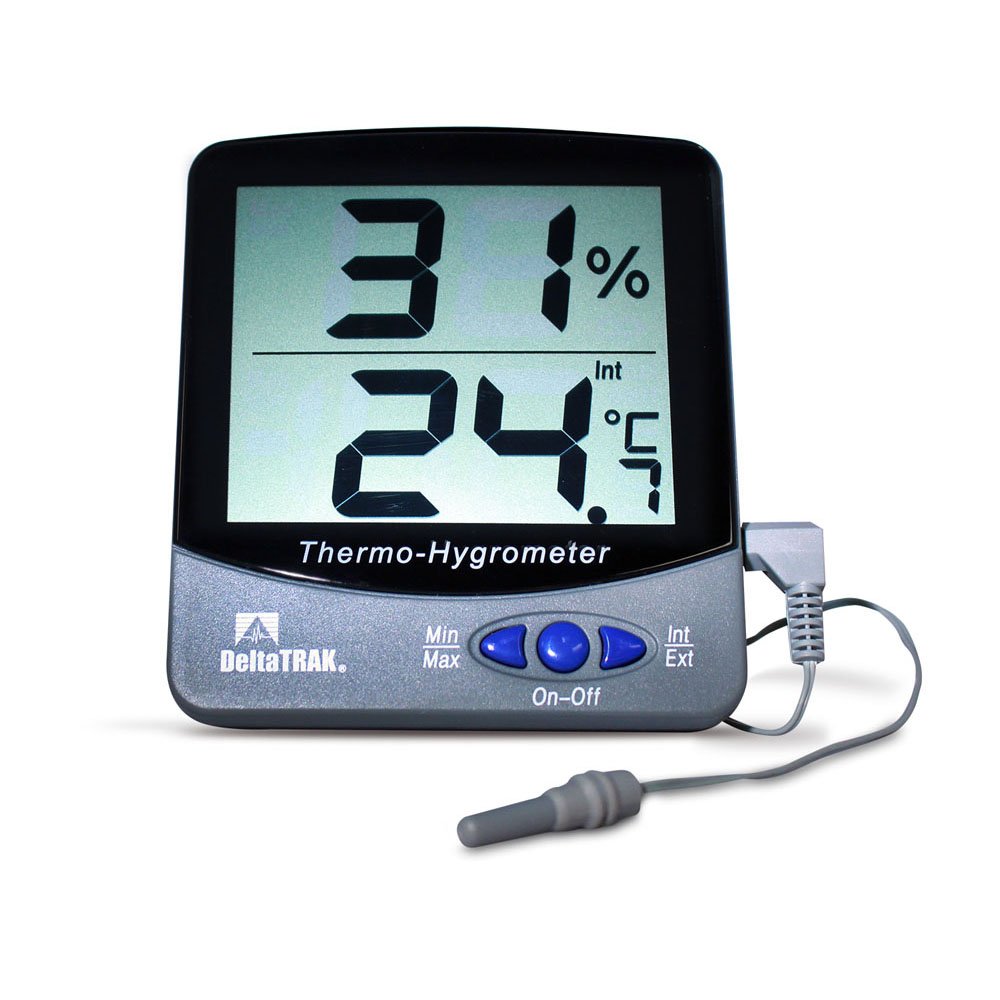
Figura 1: DeltaTrak 13307 Jumbo Display Thermohygrometer with external probe.
2. Configuración e instalación
2.1 Instalación da batería
- Localice o compartimento da batería na parte traseira da unidade.
- Abra a tapa do compartimento da batería.
- Insira dúas (2) pilas AAA, asegurándose de manter a polaridade correcta (+/-).
- Close the battery compartment cover securely. The unit should power on automatically.
2.2 Colocación do sensor
- Unidade principal: Place the main thermohygrometer unit in the desired indoor location. Ensure it is not exposed to direct sunlight, drafts, or extreme temperature fluctuations, which could affect indoor temperature and humidity readings.
- Sonda externa: The external temperature probe has a 3-meter (9.8 feet) cable. Position the probe in the area where outdoor or remote temperature monitoring is required. The probe itself is IP67 water-resistant, making it suitable for outdoor use or in damp environments. Ensure the cable is routed safely and not pinched.
3. Instrucións de funcionamento
3.1 Encendido/apagado
The unit typically powers on automatically upon battery installation. There is no dedicated power button. To turn off, remove the batteries.
3.2 °C/°F Selection
Locate the °C/°F button, usually on the back or side of the unit. Press this button to toggle between Celsius and Fahrenheit temperature display units.
3.3 Min/Max Memory Function
The thermohygrometer automatically records the minimum and maximum temperature and humidity readings since the last reset. To view estes valores:
- Preme o MIN / MAX botón unha vez para mostrar os valores máximos rexistrados.
- Preme o MIN / MAX botón unha segunda vez para mostrar os valores mínimos rexistrados.
- Preme o MIN / MAX botón unha terceira vez para volver ás lecturas actuais.
- To clear the Min/Max memory, press and hold the MIN / MAX button for approximately 3 seconds while the Min/Max values are displayed. The display will flash, indicating the memory has been cleared.
3.4 Freeze Alert Setting
The unit features a freeze alert that sounds when the external temperature reaches 0°C (32°F).
- Refer to the specific button on your unit (often labeled ALERTA or CONXELAR) to activate or deactivate this feature.
- When activated, an alarm icon may appear on the display.
- The alarm will sound when the external probe detects a temperature of 0°C (32°F) or below.
4. Mantemento
4.1 Limpeza
Wipe the unit's casing cun suave, damp pano. Non empregue produtos de limpeza abrasivos nin disolventes, xa que poden danar a pantalla ou aasing. Ensure no liquid enters the unit's openings.
4.2 Substitución da batería
When the display becomes dim or the unit stops functioning, it is time to replace the batteries. Follow the battery installation steps in Section 2.1. Always replace both AAA batteries simultaneously with new ones.
4.3 Coidado do sensor
The external probe is water-resistant (IP67), but the main unit is not. Avoid submerging the main unit in water. Keep the sensors free from dust and debris for accurate readings.
5 Solución de problemas
- Sen visualización ou pantalla atenuada:
- Comprobe a polaridade da batería.
- Substitúe as pilas por pilas AAA novas.
- Lecturas inexactas:
- Ensure the unit and external probe are not exposed to direct sunlight, heat sources, or strong drafts.
- Verify the external probe is securely connected to the main unit.
- Allow the unit to stabilize for at least 30 minutes after placement or battery change.
- If readings consistently deviate significantly from a known accurate reference, the unit may require calibration or service. Note that the external probe only measures temperature, not humidity.
- External Probe Not Working:
- Ensure the probe's connector is fully inserted into the jack on the main unit.
- Inspect the probe cable for any visible damage.
6. Especificacións
| Característica | Especificación |
|---|---|
| Número de modelo | 13307 |
| Rango de temperatura interior | 0 °C a 50 °C (32 °F a 122 °F) |
| External Probe Temperature Range | -50 °C a 70 °C (-58 °F a 158 °F) |
| Rango de humidade interior | 20% a 90% RH |
| Precisión da temperatura | ±1°C (±1.8°F) from -40°C to 70°C |
| Precisión da humidade | ±5% from 35% to 85% RH at 25°C |
| Resolución | 0.1°C / 0.1°F, 1% RH |
| Mostrar a taxa de actualización | 10 segundos |
| External Probe Cable Length | 3 metros (9.8 pés) |
| External Probe Dimensions | 30 mm (L) x 5 mm (Dia.) |
| Display Window Size | 79 mm (W) x 66 mm (H) / 3.11 in. (W) x 2.79 in. (H) |
| Character Height (Display) | 27 mm (1.06 polgadas) |
| Dimensións do produto | 98 mm (W) x 110 mm (H) x 21 mm (D) / 3.85 in. (W) x 4.33 in. (H) x 0.82 in. (D) |
| Peso | 68 g (2.4 onzas) |
| CasinMaterial de grao | Policarbonato e ABS |
| Tipo de sensor de temperatura | Termistor |
| Tipo de sensor de humidade | Electronic Polymer Film Capacitance |
| Tipo de batería | 2 x AAA |
| Resistencia á auga | IP67 (só sonda) |
| Certificacións | CE Marked, NIST Traceable |
7. Garantía e soporte
For warranty information, technical support, or service inquiries, please contact DeltaTrak customer service directly. Refer to the product packaging or the official DeltaTrak websitio web para obter os datos de contacto e as condicións de garantía máis actuais.
Fabricante: DeltaTrak