
1. Introdución
The Argox AS8520 is a high-performance cordless imager designed for efficient barcode scanning. It features advanced wireless communication technology, allowing for a data transmission range of up to 100 meters. Equipped with a long-lasting Li-ion battery and an IP42 sealing level, the AS8520 is built for durability and mobility across various environments, including offices, supermarkets, warehouses, and manufacturing facilities.
2. Produto rematadoview
The AS8520 barcode scanner is designed for comfortable handling and robust performance. Key components include the scanning window, trigger button, and ergonomic grip.
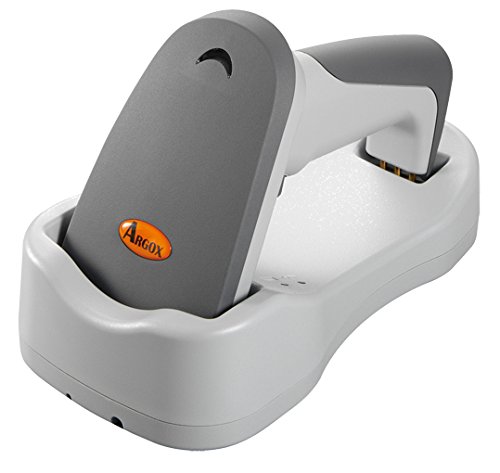
Figura 2.1: Lado view of the Argox AS8520 Barcode Scanner, showing the ergonomic handle and trigger button.
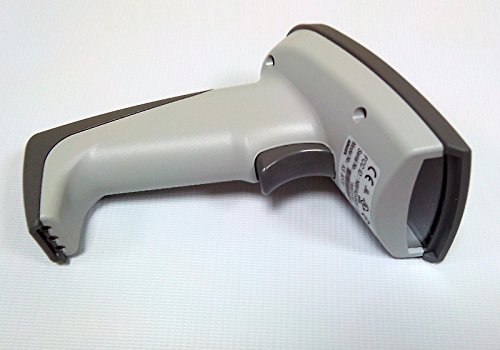
Figura 2.2: Fronte view of the Argox AS8520 Barcode Scanner, highlighting the scanning window and product labels.
3. Guía de configuración
3.1. Instalación e carga da batería
- Ensure the scanner is powered off before installing or removing the battery.
- Localice o compartimento da batería na asa do escáner.
- Insert the Li-ion battery pack, ensuring correct polarity.
- Pecha o compartimento da batería de forma segura.
- Connect the scanner to its charging base or power adapter using the provided cable. Allow the battery to fully charge before first use.
3.2. Conexión a un dispositivo anfitrión
The Argox AS8520 can connect wirelessly to various host devices, including desktops, laptops, and smartphones. Refer to the separate quick start guide for specific pairing instructions for your operating system or device type.
4. Instrucións de funcionamento
4.1. Escaneado básico
- Ensure the scanner is powered on and successfully paired with your host device.
- Point the scanning window towards the barcode you wish to scan.
- Press and hold the trigger button. A red LED light source (630nm Visible Red LED) will illuminate the barcode.
- Position the scanner at an appropriate distance (the AS8520 offers superior depth of field up to 40 inches on 40-mil codes) until the barcode is successfully read. A successful scan is typically indicated by an audible beep and/or a visual indicator.
- Release the trigger button.
4.2. Advanced Scanning Features
- Rapid Scan Rate: The AS8520 provides a rapid scan rate of 450 scans/sec for efficient data capture.
- Barcode Symbology Support: Supports GS1 Databar (RSS) and CS (Composite Symbology) barcodes.
- Sunlight Readability: Designed to be readable under direct sunlight conditions.
5. Mantemento
5.1. Limpeza do escáner
- Ensure the scanner is powered off before cleaning.
- Use un pano suave e sen pelusa dampened with water or a mild cleaning solution to wipe the exterior of the scanner.
- Para a xanela de dixitalización, use un pano de limpeza de lentes para evitar rabuñaduras.
- Do not use abrasive cleaners, solvents, or immerse the scanner in liquid. The IP42 sealing level protects against dust and light water splashes, but not full immersion.
5.2. Coidado da batería
- To maximize battery life, avoid fully discharging the Li-ion battery frequently.
- Garde o escáner nun lugar fresco e seco cando non o use durante períodos prolongados.
- If the battery performance degrades significantly, consider replacing it with an authorized Argox replacement battery.
6 Solución de problemas
| Problema | Causa posible | Solución |
|---|---|---|
| O escáner non se acende. | A batería está descargada ou non está instalada correctamente. | Charge the battery. Ensure the battery is correctly seated in its compartment. |
| O escáner non le códigos de barras. | Barcode is damaged, scanner is too far/close, or incorrect symbology settings. | Ensure the barcode is clear. Adjust scanning distance. Check scanner programming for supported barcode types. |
| Non se transmitiron datos ao dispositivo anfitrión. | Scanner not paired or out of range. | Re-pair the scanner with the host device. Ensure the scanner is within the 100-meter transmission range. |
| Scanner is unresponsive. | Fallo temporal do software. | Perform a soft reset by powering off and then on the scanner. If issues persist, consult the manufacturer's support. |
7. Especificacións técnicas
| Característica | Especificación |
|---|---|
| Modelo | AS8520 |
| Taxa de escaneo | 450 escaneos/s |
| Fonte de luz | 630nm Visible Red LED |
| Rendemento da dixitalización | Starting at 0.1mm (4 mil) |
| Profundidade de campo | Up to 40 inches on 40-mil codes |
| Rango de transmisión de datos | 100 meters (wireless) |
| Dispositivos compatibles | Escritorio, portátil, teléfono intelixente |
| Fonte de enerxía | Battery Powered (Li-ion battery pack) |
| Temperatura de funcionamento | 0 °C a 50 °C (32 °F a 122 °F) |
| Temperatura de almacenamento | -20 °C a 70 °C (-4 °F a 158 °F) |
| Humidade | 10% a 90% de humidade relativa, sen condensación |
| Nivel de luz | Ata 70,000 lux |
| Current - Operating | 225 mA @ 4.2 VDC |
| Current - Standby | 32 mA @ 4.2 VDC |
| Power - Operating | 900 mW |
| Power - Standby | 150 mW |
| Reliability (Trigger) | 1,000,000 veces |
| Reliability (Cable) | 320,000 times (90° bend) |
| Especificación de caída | 1.5 metro |
| Nivel de selado | IP42 |
| Peso do elemento | 1.3 kg |
| GTIN/UPC | 702563636336 |
8. Garantía e soporte
For detailed warranty information, please refer to the warranty card included with your product or visit the official Argox website. For technical support, service, or replacement parts, please contact your authorized Argox reseller or Argox customer service directly.