
1. Configuración
1.1 Desembalaxe e contido
Retire con coidado o televisor e todos os accesorios da embalaxe. Asegúrese de que estean presentes todos os compoñentes:
- Sharp LC-40LE653U 40-Inch Smart LED TV
- Control remoto
- 2 pilas AA
1.2 Instalación do stand
If placing the TV on a table, attach the included stand. Refer to the diagram below for proper assembly. Ensure all screws are securely fastened.
1.3 Conexión de dispositivos externos
Connect your external devices such as cable boxes, Blu-ray players, or gaming consoles to the TV's input ports. The TV features multiple connectivity options.


Available ports include:
- HDMI: 2 ports for high-definition audio and video. One HDMI port supports MHL (Mobile High-Definition Link).
- USB: 1 port for media playback or connecting a USB device.
- Ethernet: Para conexión de rede por cable.
- Component/Video: For older video devices.
- TV/TV (antena): Para conectar unha antena ou unha fonte de alimentación de televisión por cable.
- Saída de audio: Optical for digital audio, and RCA for analog audio.
1.4 Conexión de alimentación
After connecting all necessary devices, plug the TV's power cord into a wall outlet.
1.5 Configuración inicial
Upon first power-on, the TV will guide you through an initial setup process. This includes language selection, time zone, and network configuration. For Wi-Fi setup, select your network and enter the password.
2. Instrucións de funcionamento
2.1 Funcións de control remoto
The remote control allows you to access all TV functions. Insert the two AA batteries into the remote control, ensuring correct polarity.

- Acendido (botón vermello): Acende ou apaga o televisor.
- Entrada: Selecciona a fonte de entrada (HDMI, TV, USB, etc.).
- VOL +/-: Axusta o nivel de volume.
- CH +/-: Cambia as canles de televisión.
- Botóns de navegación (Arriba/Abaixo/Esquerda/Dereita/Intro): Úsase para navegar polos menús e seleccionar opcións.
- INTELLIGENTE: Accesses the Smart Central Apps menu.
- MENÚ: Opens the main TV menu for settings adjustments.
- NETFLIX: Botón de acceso directo para a aplicación de Netflix.
2.2 Smart TV Features (Smart Central Apps)
The Sharp LC-40LE653U features Smart Central Apps, providing access to various online services and a web browser. Ensure your TV is connected to the internet via Wi-Fi or Ethernet.

- Acceso ás aplicacións: Press the 'SMART' button on your remote to open the Smart Central Apps menu.
- Servizos compatibles: Includes Hulu Plus, Netflix, Pandora, Vudu, and YouTube.
- Web Navegador: Use o incorporado web browser for general internet browsing. Navigation is done via the remote control.
2.3 Wallpaper Mode
When the TV is turned off, Wallpaper Mode can display virtually any image. To use this feature, connect a USB drive containing your desired images to the TV's USB port. Navigate to the Wallpaper Mode settings in the TV menu to select and configure your images.
3. Mantemento
3.1 Limpeza do televisor
Para limpar a pantalla, limpe suavemente cun pano suave, seco e sen pelusa. Para marcas difíciles, d lixeiramenteampen the cloth with water or a specialized screen cleaner. Avoid using harsh chemicals, abrasive cleaners, or direct spraying of liquids onto the screen or cabinet.
Clean the TV cabinet with a soft, dry cloth. Ensure the TV is unplugged before cleaning.
3.2 Actualizacións de software
Periodically check for software updates through the TV's settings menu to ensure optimal performance and access to the latest features. Updates can be performed via the internet connection.
4 Solución de problemas
If you encounter issues with your Sharp LC-40LE653U TV, refer to the following common solutions:
- Sen enerxía: Ensure the power cord is securely plugged into both the TV and a working wall outlet. Check if the power indicator light on the TV is on.
- Sen imaxe/son: Verify the correct input source is selected using the 'Input' button on the remote. Check all cable connections (HDMI, component, etc.) are secure.
- Mala calidade de imaxe: Axusta a configuración da imaxe (brillo, contraste, nitidez) no menú da TV. Asegúrate de que a fonte de entrada proporcione un sinal de alta calidade.
- Sen conexión a Internet: Check your Wi-Fi router or Ethernet cable connection. Re-enter your Wi-Fi password in the TV's network settings. Restarting your router may resolve connectivity issues.
- O control remoto non funciona: Substitúa as pilas do mando a distancia. Asegúrese de que non haxa obstrucións entre o mando a distancia e o sensor de infravermellos do televisor.
For more detailed troubleshooting steps, consult the full online manual or contact customer support.
5. Especificacións
Key technical specifications for the Sharp LC-40LE653U 40-Inch Smart LED TV:
| Característica | Especificación |
|---|---|
| Número de modelo | LC-40LE653U |
| Tamaño da pantalla | 39.5 polgadas (clase de 40 polgadas) |
| Tecnoloxía de visualización | LCD |
| Resolución | 1080p (Full HD) |
| Taxa de actualización | 60 Hz |
| Relación de aspecto | 16:9 |
| Tecnoloxía de conectividade | Wi-Fi |
| Interface de hardware | Ethernet, HDMI, USB |
| Total Number of HDMI Ports | 2 (one with MHL support) |
| Total de portos USB | 1 |
| Entrada de audio | HDMI, Optical, USB |
| Potencia de saída máxima do altofalante | 20 vatios |
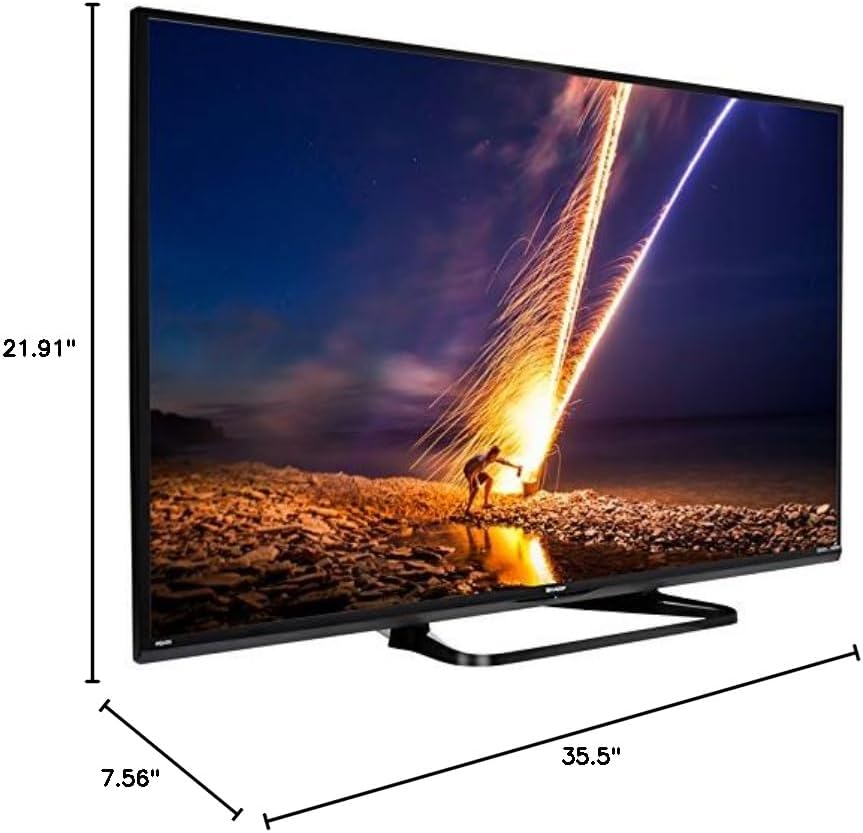
| Dimensións do produto (P x A x A) | 7.56" x 35.5" x 21.91" |
| Peso do elemento | 16.3 libras |
| Tipo de montaxe | Soporte de mesa |
| Servizos de Internet compatibles | Hulu Plus, Netflix, Pandora, Vudu, YouTube |
| Certificado Energy Star | Si |
6. Garantía e soporte
6.1 Garantía do produto
This Sharp LC-40LE653U TV comes with a 1 ano de garantía limitada. Please retain your proof of purchase for warranty claims. The warranty covers manufacturing defects under normal use conditions.
6.2 Atención ao cliente
For technical assistance, troubleshooting beyond this manual, or warranty service, please contact Sharp customer support. Refer to the official Sharp websitio web ou a tarxeta de rexistro do produto para obter a información de contacto máis actualizada.