
1. Introdución
This manual provides detailed instructions for the Edifier X5 True Wireless Stereo Earbuds. The Edifier X5 earbuds offer a high-fidelity audio experience with advanced features designed for convenience and durability.
As características principais inclúen:
- High-Fidelity AptX Audio: Delivers CD-quality sound with deep bass and balanced tri-frequency.
- Conectividade Bluetooth V5.0: Ensures faster, more stable signal transmission and lower power consumption.
- CVC 8.0 Noise Canceling Microphone: Reduces background noise for clear calls.
- IP55 Dustproof & Waterproof: Provides protection against dust, rain, and sweat, suitable for outdoor activities.
- Emparejamento nun paso: Automatic connection with the last paired device after initial setup.
- Deseño compacto e lixeiro: Cómodo para un uso prolongado.

Image 1.1: Edifier X5 True Wireless Stereo Earbuds and Charging Case.
Vídeo 1.1: Rematadoview of Edifier X5 True Wireless Stereo Earbuds features.
2. Configuración
2.1. Contido do paquete
Comprobe se o paquete contén os seguintes elementos:
- Edifier X5 True Wireless Stereo Earbuds (Left and Right)
- Estuche de carga
- Cable de carga USB
- Varios tamaños de puntas para os oídos
- Manual de usuario
2.2. Carga dos auriculares e da funda
Antes do primeiro uso, carga completamente os auriculares e a caixa de carga.
- Coloca os auriculares na caixa de carga. Asegúrate de que estean correctamente asentados.
- Connect the USB charging cable to the charging port on the case and to a USB power adapter (not included).
- O indicador luminoso da caixa de carga mostrará o estado da carga. Unha vez que estea completamente cargada, o indicador cambiará ou apagarase.
A full charge provides approximately 6 hours of playback time for the earbuds, with an additional 18 hours available from the charging case.
2.3. Emparejamento cun dispositivo
The Edifier X5 earbuds feature one-step pairing for convenience.

Image 2.1: Edifier X5 Earbuds demonstrating seamless connection.
- Primeira parella: Abre a caixa de carga. Os auriculares acenderanse automaticamente e entrarán no modo de emparellamento. A luz indicadora dos auriculares parpadeará.
- No teu dispositivo (teléfono intelixente, tableta, etc.), activa o Bluetooth e busca os dispositivos dispoñibles.
- Select "EDIFIER X5" from the list of devices. Once connected, the earbud indicator lights will turn off or show a steady light.
- Emparejamento posterior: After the initial pairing, the earbuds will automatically connect to the last paired device when taken out of the charging case.

Image 2.2: Edifier X5 Earbuds powered by Qualcomm Bluetooth 5.0 for stable connection.
3. Funcionamento dos auriculares
3.1. Como usar os auriculares
Select the appropriate ear tips for a comfortable and secure fit. Insert the earbuds into your ears and gently twist them to ensure a snug seal for optimal sound quality and noise isolation.
3.2. Toca Controis
The Edifier X5 earbuds feature intuitive touch controls on each earbud.
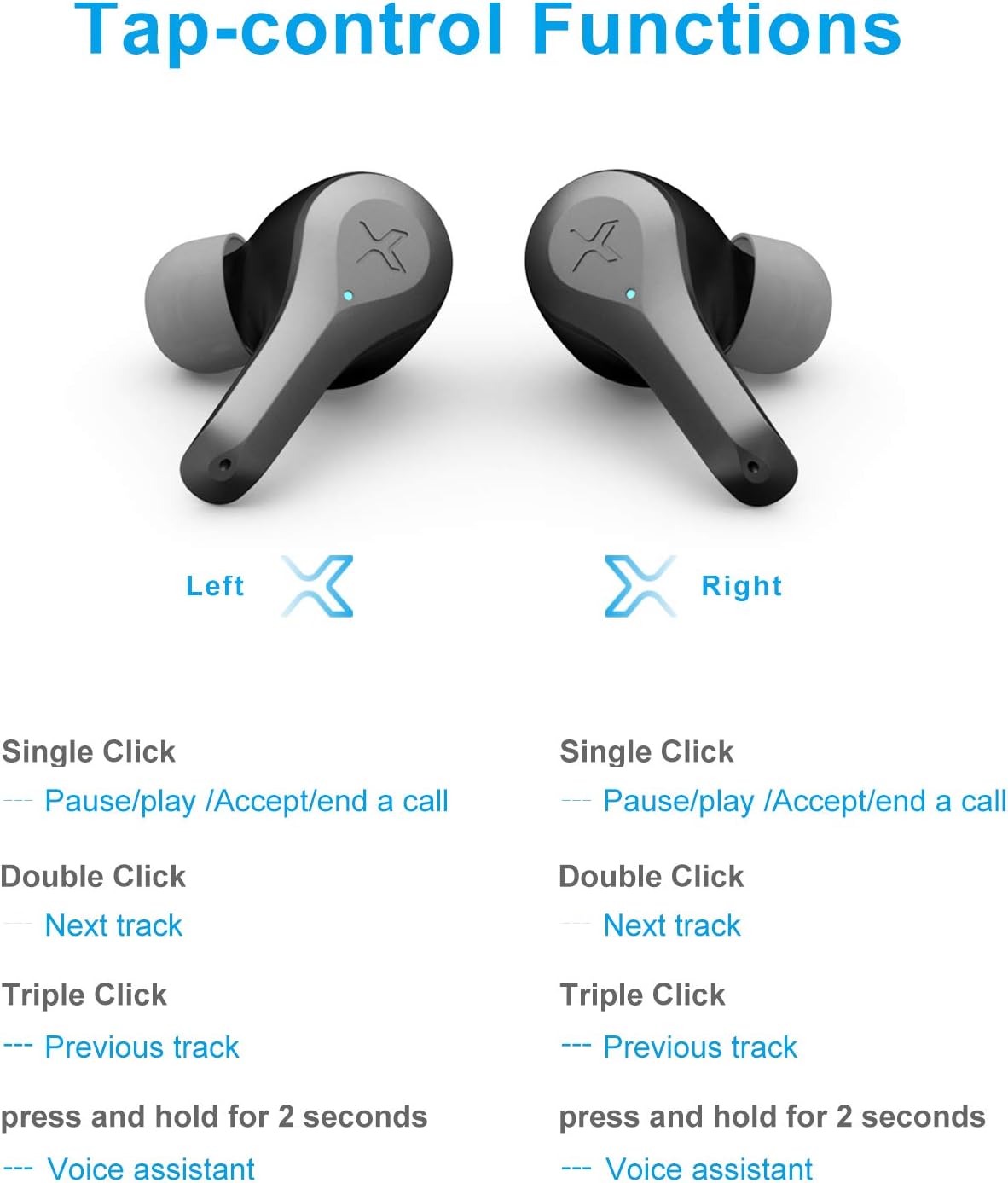
Image 3.1: Detailed diagram of Edifier X5 Earbuds touch control functions.
| Acción | Auricular esquerdo | Earbud dereito |
|---|---|---|
| Prema único | Pause/Play, Accept/End a Call | Pause/Play, Accept/End a Call |
| Dobre clic | Próxima pista | Próxima pista |
| Triple clic | Pista anterior | Pista anterior |
| Mantén premido (2 segundos) | Asistente de voz | Asistente de voz |
3.3. Realización e recepción de chamadas
The CVC 8.0 noise canceling microphone ensures clear communication during calls.
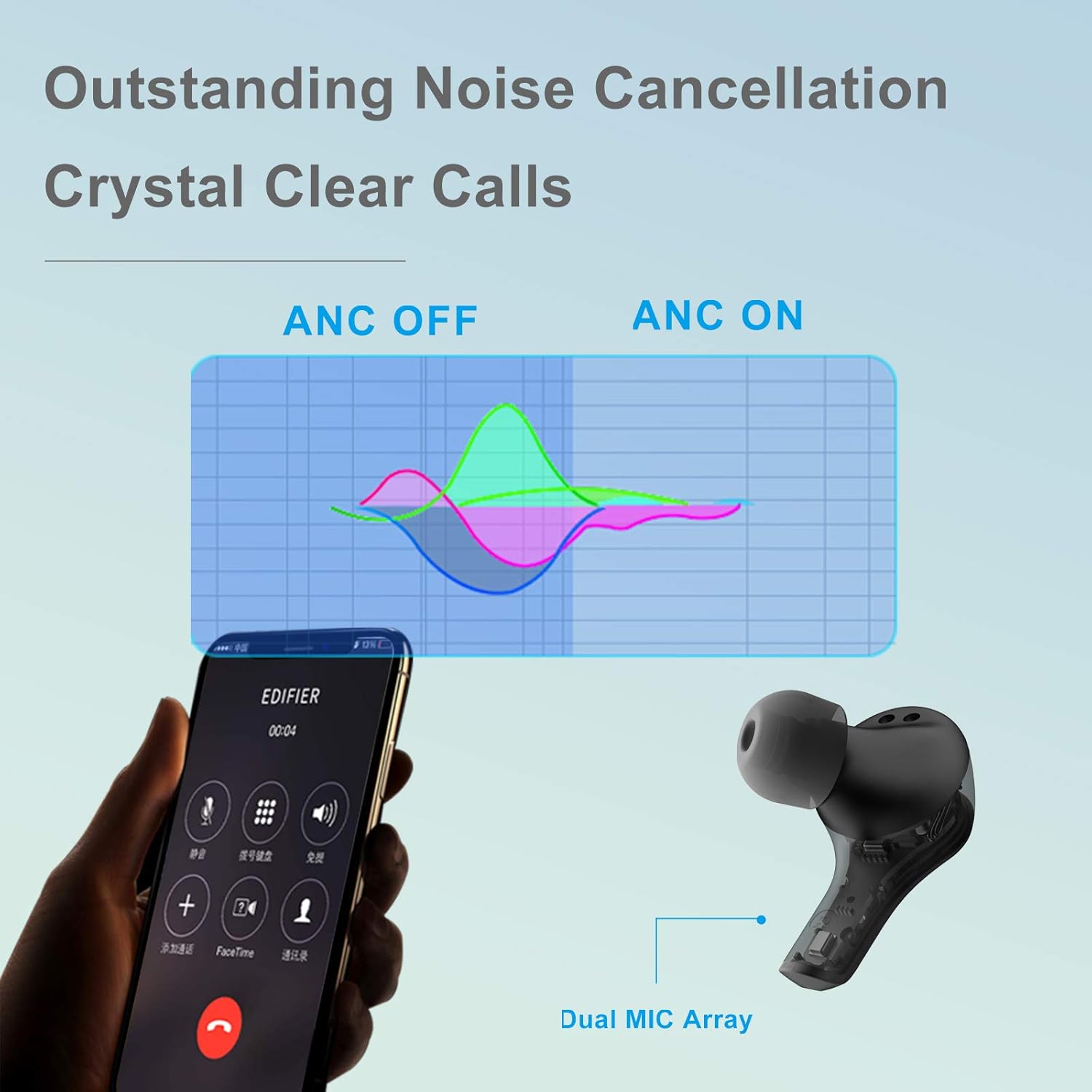
Image 3.2: Edifier X5 Earbuds featuring outstanding noise cancellation for clear calls.
- Responder/Finalizar chamada: Single click either earbud.
- Rexeitar a chamada: Mantén premido calquera dos auriculares durante 2 segundos.
3.4. Reprodución de música
Enjoy high-quality audio with AptX decoding.

Image 3.3: Edifier X5 Earbuds featuring AptX decoding for enhanced audio quality.
- Reproducir/Pausa: Single click either earbud.
- Próxima pista: Double click either earbud.
- Pista anterior: Triple click either earbud.
4. Mantemento
4.1. Limpeza
Unha limpeza regular axuda a manter un rendemento e unha hixiene óptimos.
- Usa un pano suave, seco e sen fiapos para limpar os auriculares e a funda de carga.
- Retire as almofadas dos oídos e límpeas con auga e xabón suave, logo séqueas ben antes de volvelas colocar.
- Limpa con coidado os contactos de carga tanto dos auriculares como da funda cun hisopo de algodón seco.
4.2. Resistencia á auga e ao po (IP55)
The Edifier X5 earbuds are rated IP55, meaning they are protected against limited dust ingress and low-pressure water jets from any direction. This makes them suitable for workouts and light rain.

Image 4.1: Edifier X5 Earbuds demonstrating water and dust resistance.
Importante:
- Non mergulles os auriculares na auga.
- Asegúrate de que os auriculares estean secos antes de volvelo colocar na caixa de carga para evitar danalos.
- O estuche de carga non é resistente á auga.
4.3. Almacenamento
Cando non estean en uso, garde os auriculares no seu estoxo de carga para protexelos e mantelos cargados.

Image 4.2: Edifier X5 Earbuds designed for comfort and durability during outdoor activities.
5 Solución de problemas
If you encounter issues with your Edifier X5 earbuds, refer to the following common problems and solutions:
- Earbuds do not power on:
Ensure the earbuds are charged. Place them in the charging case and check the charging indicator. - Non se pode emparellar co dispositivo:
Make sure Bluetooth is enabled on your device. Ensure the earbuds are in pairing mode (indicator flashing). Try forgetting "EDIFIER X5" from your device's Bluetooth list and re-pairing. - Sen son ou mala calidade de son:
Check the volume level on both your device and the earbuds. Ensure the earbuds are properly seated in your ears. Try cleaning the ear tips and speaker mesh. - Un auricular non funciona:
Place both earbuds back into the charging case, close the lid, wait a few seconds, then take them out again. This can reset the connection between the two earbuds. - Call quality is poor:
Ensure the microphone is not obstructed. Move closer to your device to improve signal strength.
6. Especificacións
| Característica | Detalle |
|---|---|
| Nome do modelo | X5 |
| Marca | Edificador |
| Tecnoloxía de conectividade | Sen fíos |
| Tecnoloxía de comunicación sen fíos | Bluetooth V5.0 |
| Colocación do oído | En Orella |
| Factor de forma | En Orella |
| Control de ruído | Sound Isolation, CVC 8.0 Noise Cancellation |
| Método de control | Toca |
| Nivel de resistencia á auga | IP55 (a proba de po e impermeable) |
| Peso do elemento | 1.5 onzas |
| Dimensións do paquete | 4.92 x 2.95 x 1.34 polgadas |
| Baterías | 3 baterías de iones de litio (incluídas) |
| Material | Plástico |
| Cor | Negro |
7. Garantía e soporte
7.1. Información da garantía
The Edifier X5 True Wireless Stereo Earbuds come with a manufacturer's warranty. Please refer to the warranty card included in your package or visit the official Edifier websitio web para obter termos e condicións de garantía detallados específicos da súa rexión.
7.2. Atención ao cliente
For further assistance, technical support, or inquiries regarding your Edifier X5 earbuds, please contact Edifier customer service through their official websitio web ou a información de contacto proporcionada na documentación do produto.