
1. Introdución
The PowerDrive PD3000 is a 3000 Watt power inverter designed to convert 12V DC power from your vehicle's battery into 115V AC household power. This unit provides 3000 Watts of continuous AC power and has a high surge capacity of up to 6000 Watts to accommodate devices with high starting power requirements. It features integrated Bluetooth wireless technology for remote monitoring and control via a mobile application, along with a removable control panel for flexible placement. This manual provides essential information for the safe and efficient operation of your PowerDrive PD3000 inverter.
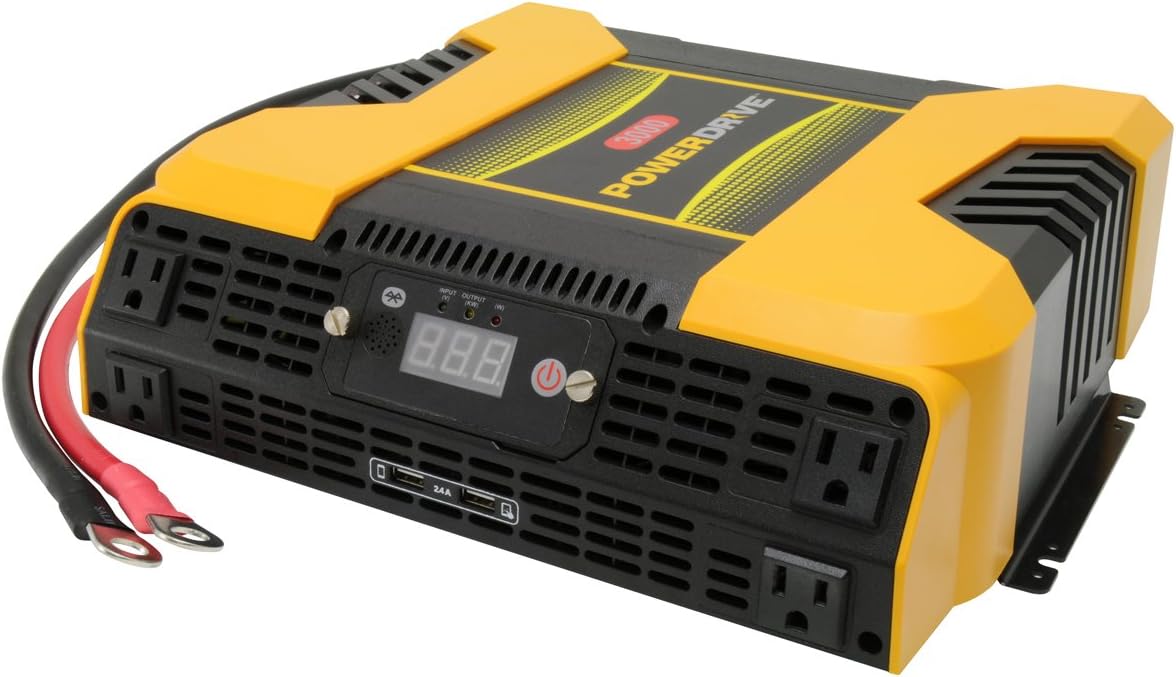
Figure 1.1: PowerDrive PD3000 3000 Watt Power Inverter, front view with outlets and display.
2. Información de seguridade
Please read and understand all safety instructions before installing or operating the inverter. Failure to follow these instructions may result in electrical shock, fire, serious injury, or property damage.
- Risco de descarga eléctrica: Non abra o inversor casing. Non hai pezas que o usuario poida reparar no interior. Encomende calquera mantemento a persoal de servizo cualificado.
- Risco de incendio: Do not operate the inverter near flammable materials, gases, or vapors. Ensure adequate ventilation around the inverter.
- Seguridade da batería: Connect the inverter only to a 12V DC battery system. Ensure battery terminals are clean and connections are secure. Wear eye protection and gloves when working with batteries.
- Ventilación: Asegúrate de que o inversor estea instalado nunha zona ben ventilada. Non bloquees as aberturas de ventilación.
- Protección contra sobrecarga: Do not exceed the inverter's continuous power rating of 3000 Watts. Overloading can damage the inverter and connected devices.
- Humidade: Do not expose the inverter to rain, moisture, or spray.
3. Contido do paquete
Comprobe que todos os elementos estean presentes ao desembalar:
- PowerDrive PD3000 Power Inverter Unit
- Manual de instrucións
- Cables de batería (vermello e negro)
- Removable Control Panel with Cable
4. Características do produto
The PowerDrive PD3000 inverter offers a range of features for versatile power conversion:
- Saída de alta potencia: Delivers 3000 Watts of continuous AC power with a 6000 Watt surge capacity.
- Multiple AC Outlets: Equipped with four (4) 3-prong AC outlets to support various devices.
- Portos de carga USB: Includes two (2) USB power ports (shared 2400mA total output) for charging mobile devices.
- Conectividade Bluetooth: Allows remote access to features and settings via a free downloadable mobile application.
- Panel de control extraíble: Detachable control panel enables remote monitoring and testing, offering installation flexibility.
- Construción duradeira: Features a robust ABS PVC composite housing designed to protect internal electronic components.
- Proteccións de seguridade: Incorporates audible alarms and automatic shut-off triggers for low battery, high battery, and overload conditions.

Figure 4.1: Front panel of the PowerDrive PD3000 showing AC outlets, USB ports, and digital display.
5. Configuración e instalación
Proper installation is crucial for the safe and efficient operation of your inverter.
5.1 Montaxe do inversor
- Choose a dry, well-ventilated location away from direct sunlight, heat sources, and flammable materials.
- Asegúrese de que haxa espazo suficiente arredor do inversor para a circulación do aire, especialmente arredor dos ventiladores de refrixeración.
- Mount the inverter securely using appropriate hardware (not included) to prevent movement during operation.
5.2 Conexión a unha fonte de alimentación de 12 V CC
Importante: Ensure the inverter is turned OFF before making any connections.
- Conecta o VERMELLO (positive) battery cable to the VERMELLO (positive) terminal on the inverter. Tighten securely.
- Conecte o outro extremo do VERMELLO (positive) battery cable to the positivo (+) terminal of your 12V DC battery. Tighten securely.
- Conecta o NEGRO (negative) battery cable to the NEGRO (negative) terminal on the inverter. Tighten securely.
- Conecte o outro extremo do NEGRO (negative) battery cable to the negativa (-) terminal of your 12V DC battery. Tighten securely.
- Verify all connections are tight and free from corrosion. Loose connections can cause overheating and damage.

Figure 5.1: PowerDrive PD3000 Inverter showing battery cable connections.

Figura 5.2: Traseira view of the PowerDrive PD3000 showing cooling fans and battery terminals.
5.3 Removable Control Panel Installation
The control panel can be used directly on the inverter or detached for remote operation.
- To use remotely, gently pull the control panel from the inverter.
- Connect the provided cable to the port on the back of the detached control panel and to the corresponding port on the inverter.
- Mount the control panel in a convenient location for monitoring and control.

Figure 5.3: PowerDrive PD3000 Inverter with its control panel detached for remote use.
6. Instrucións de funcionamento
6.1 Acendido/Apagado
- After ensuring all battery connections are secure, press and hold the power button on the inverter or the remote control panel for approximately 1-2 seconds.
- The digital display will illuminate, and the inverter will begin providing AC power.
- Para apagar, manteña premido o botón de acendido de novo ata que a pantalla se apague.
6.2 Connecting AC Devices
- Plug your 115V AC devices into the 3-prong AC outlets on the front of the inverter.
- Asegurar o wat totaltagA potencia de todos os dispositivos conectados non supera os 3000 vatios.
- For devices with high starting loads (e.g., motors, compressors), ensure their surge wattage is within the inverter's 6000 Watt surge capacity.
6.3 Uso dos portos de carga USB
- Connect your USB-powered devices (e.g., smartphones, tablets) to the USB ports.
- The two USB ports share a total output of 2400mA (2.4A).
6.4 Understanding the Digital Display and Indicators
The digital display shows real-time information such as input voltage or output wattage. Indicator lights provide status feedback:
- LED de entrada: Indicates the status of the DC input power.
- LED de saída: Indicates the status of the AC output power.
- LED de falla: Illuminates to indicate an error condition (e.g., overload, low/high voltage).
7. Conectividade Bluetooth
The PowerDrive PD3000 features Bluetooth wireless technology, allowing you to monitor and control the inverter using a compatible smartphone application.
7.1 Downloading the Mobile App
- Busca the official PowerDrive inverter app on your smartphone's app store (e.g., Apple App Store, Google Play Store).
- Descarga e instala a aplicación.
7.2 Pairing with Your Inverter
- Asegúrate de que o Bluetooth estea activado no teu smartphone.
- Turn on the PowerDrive PD3000 inverter.
- Open the PowerDrive mobile app. The app should automatically detect nearby PowerDrive inverters.
- Follow the on-screen prompts within the app to pair with your PD3000 inverter.
7.3 Funcións da aplicación
Once paired, the app allows you to:
- Entrada de monitor voltage e saída wattage.
- View inverter status and fault codes.
- Remotely turn the inverter on or off.
- Adjust certain settings (refer to the app's help section for details).

Figure 7.1: Smartphone displaying the PowerDrive mobile application interface.
8. Mantemento
Un mantemento regular garante un rendemento óptimo e unha maior duración do inversor.
- Limpeza: Limpa periodicamente o exterior do inversor cun pano suave e seco. Non empregues produtos de limpeza líquidos nin disolventes.
- Ventilación: Ensure the cooling fans and ventilation openings are free from dust and debris. Use compressed air to clear blockages if necessary.
- Conexións: Regularly check battery cable connections for tightness and corrosion. Clean terminals with a wire brush if corrosion is present.
- Almacenamento: Se vai gardar o inversor durante un período prolongado, desconécteo da batería e gárdeo nun lugar fresco e seco.
9 Solución de problemas
This section addresses common issues you might encounter with your PowerDrive PD3000 inverter.
9.1 Problemas comúns e solucións
- O inversor non se acende:
- Check battery connections for tightness and proper polarity.
- Asegúrese de que a batería voltage is above 10.5V DC (Low Battery Shut Down Point).
- Verify the power button is pressed and held for the required duration.
- Sen saída de CA:
- Check if the inverter is powered on and the Output LED is illuminated.
- Ensure the connected AC device is functioning correctly.
- Check for an overload condition (Fault LED illuminated). Reduce the load.
- Audible Alarm / Fault LED On:
- Alarma de batería baixa: Activates at 11 ± 0.3V DC. Recharge or replace the battery. The inverter will shut down at 10.5 ± 0.3V DC.
- High Battery Shut Down: Occurs at 15.5 ± 0.5V DC. Check the charging system of your vehicle.
- Sobrecarga: O wat totaltage of connected devices exceeds 3000 Watts. Disconnect some devices.
- Sobre temperatura: Inverter is overheating. Ensure proper ventilation and reduce load.
- Problemas de conexión Bluetooth:
- Ensure Bluetooth is enabled on your smartphone and the inverter is powered on.
- Restart the mobile app and try pairing again.
- Ensure your smartphone is within range of the inverter.
10. Especificacións
| Especificación | Valor |
|---|---|
| Modelo | PD3000 |
| Continuous AC Power Output | 3000 vatios |
| Potencia de sobrecarga máxima | 6000 vatios |
| Vol. De entrada CCtage | 12.8 V |
| Saída CA Voltage | 115 V |
| Frecuencia de saída de CA | 58Hz-62Hz |
| Saída USB | 5V / 2 (Shared 2400mA) |
| Eficiencia (máxima) | >88% |
| Eficiencia (carga completa) | >84% |
| Battery Drain (No AC Load) | <0.6A |
| Low Battery Alarm Trigger | 11 ± 0.3 V CC |
| Low Battery Shut Down Point | 10.5 ± 0.3 V CC |
| High Battery Shut Down Point | 15.5 ± 0.5 V CC |
| Recovering Voltage after Under Voltage Turn-off | 12 ± 0.3 V CC |
| Peso do elemento | 12.14 libras |
| Dimensións do produto | 16.2 x 16.3 x 7.6 polgadas |
11. Garantía e soporte
For warranty information or technical support, please refer to the documentation included with your purchase or visit the official PowerDrive websitio. Garda o comprobante de compra para calquera reclamación de garantía.