
1. Introdución
This manual provides detailed instructions for the installation, setup, operation, and maintenance of your Samsung SHS-3321 Digital Door Lock. Please read this manual thoroughly before installation and use to ensure proper function and safety.
2. Características do produto
- Seguridade mellorada: Features like Random Security Code, Double Authentication (password and RFID), Double Locking, Anti-Theft, Mischief Prevention, Intrusion Alarm, and Fire Warning.
- Entrada sen chave: Digital touchscreen numeric keypad for password entry or RFID tag acceso.
- Bloqueo automático: Magnetic sensor automatically locks the door after 3 seconds of being closed.
- Potencia de emerxencia: External 9V battery terminal for emergency power in case of battery depletion.
- Aviso de batería baixa: Audible alert (Fur Elise melody) when batteries are low.
- Memoria de usuario: Supports up to 71 user PINs or RFID tags.

Figura 2.1: Máisview of key security and convenience features.
3. Compoñentes do produto
The Samsung SHS-3321 Digital Door Lock package includes the following components:

Figura 3.1: Explotado view of the Samsung SHS-3321 Digital Door Lock components.
- Unidade Exterior
- Unidade Interior
- Interior Rubber Pad
- Placa de montaxe interior
- Pistón axustable
- Strike Parts (Strike, Dust Box)
- Sensor magnético
- Screws (H1: for Strike and Deadbolt, H2: for mounting plate, H3: for Interior unit)
- Tailpiece (one extra)
- RF Tag (4 incluídos)
- Batteries (4 AA alkaline batteries)
- Manual de usuario
4. Guía de instalación
4.1. Comprobación previa á instalación
Before beginning installation, ensure your door meets the required specifications for the Samsung SHS-3321 lock. The lock fits doors with a thickness from 35mm to 55mm. It is designed for standard 161 prep doors (cylindrical lock prep with a 2-1/8" hole at 2-3/4" backset, where the door edge prep is 1-1/8" x 2-1/4").
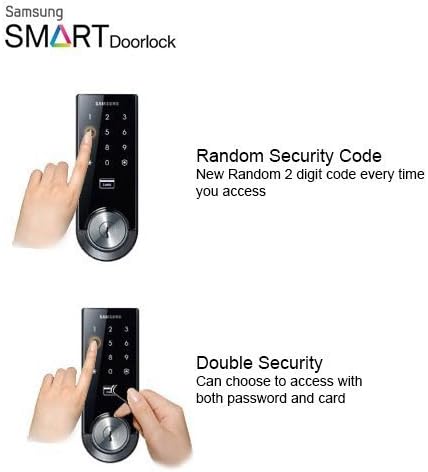
Figure 4.1: Ensure at least 4.5 inches distance from the center of the deadbolt hole to the door handle.
4.2. Mounting the Deadbolt
- Retira o pestillo existente.
- Insert the adjustable deadbolt into the door edge. Ensure it is correctly oriented for your door's handing (left or right). The universal deadbolt fits 60mm and 70mm backsets.
- Secure the deadbolt with the appropriate screws (H1).
4.3. Installing Exterior and Interior Units
- Pass the tailpiece of the exterior unit through the deadbolt mechanism.
- Position the exterior unit on the outside of the door, ensuring the tailpiece aligns with the interior mechanism.
- Attach the interior mounting plate to the door, securing it with screws (H2) through the exterior unit. Ensure the wires from the exterior unit pass through the plate.
- Connect the wiring from the exterior unit to the interior unit.
- Attach the interior unit to the mounting plate, securing it with screws (H3).
4.4. Instalación da batería
- Abra a tapa da batería da unidade interior.
- Insert 4 AA alkaline batteries, ensuring correct polarity.
- Pecha a tapa da batería.
5. Configuración
5.1. Setting Master PIN Code
Upon first use or after a factory reset, you will need to set a master PIN code. Refer to the detailed user manual for specific steps on how to program your initial master code.
5.2. Programming User PIN Codes and RFID Tags
The lock supports up to 71 user PIN codes and RFID tags. Follow the instructions in the full user manual to add, modify, or delete individual user codes and register RFID tags.
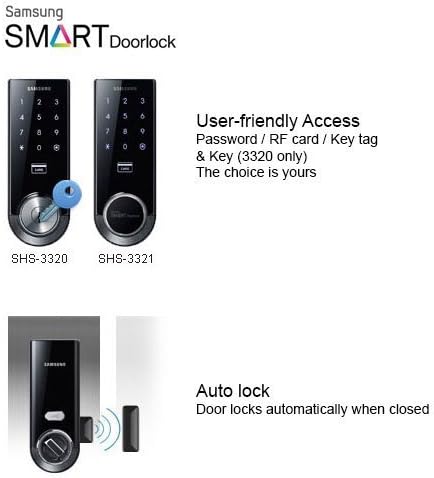
Figure 5.1: Random Security Code and Double Security features.
6. Instrucións de funcionamento
6.1. Abrir a porta
- Usando o código PIN: Touch the keypad to activate. Two random numbers will appear; press them first. Then enter your registered PIN code followed by the '*' button.
- Usando RFID Tag: Place a registered RFID tag on the card reader area of the exterior unit.

Figure 6.1: Digital touchscreen keypad for PIN entry and RFID access.
6.2. Pechar a porta con chave
- Bloqueo automático: The door will automatically lock 3 seconds after being closed, thanks to the magnetic sensor.
- Peche manual (exterior): Touch the keypad to activate, then press the '*' button.
- Peche manual (interior): Turn the thumb turn on the interior unit.
7. Características de seguridade
- Random Security Code: Before entering your PIN, two random numbers appear, which helps prevent fingerprint traces from revealing your code.
- Dobre autenticación: Requires both a password and an RFID tag for unlocking, enhancing security.
- Bloqueo dobre: Prevents unlocking from the outside, even with a key.
- Anti-Theft Mode: Activates an alarm if the lock is operated from the inside while in this mode.
- Mischief Prevention: After 5 failed entry attempts, a warning sounds, and the lock stops operating for 3 minutes.
- Alarma de intrusión: An alarm sounds if the door is opened while still locked.
- Aviso de incendio: A thermal sensor activates an alarm and auto-unlocks the door if the temperature reaches a critical level.

Figure 7.1: Truly Keyless design for enhanced security.
8. Mantemento
8.1. Substitución da batería
The lock uses 4 AA alkaline batteries. When the batteries are low, the lock will play the 'Fur Elise' melody after every unlocking. Replace all four batteries simultaneously with new alkaline batteries. Do not mix old and new batteries or different types of batteries.
8.2. Enerxía de emerxencia
If the batteries are completely depleted, you can still power the lock from the outside using a standard 9V battery. Simply touch the 9V battery to the emergency power contacts on the exterior unit, then enter your PIN or use an RFID tag como de costume.
8.3. Atención xeral
Clean the touchscreen with a soft, dry cloth. Avoid using abrasive cleaners or solvents that could damage the surface. Ensure the magnetic sensor on the door frame is clean and unobstructed for proper automatic locking.
9 Solución de problemas
- O peche non responde: Check battery levels. Use emergency 9V power if needed.
- Incorrect PIN/RFID: Ensure correct PIN is entered or RFID tag is properly scanned.
- Door not locking automatically: Check if the magnetic sensor is properly aligned and clean. Ensure the door is fully closed.
- Alarm sounding unexpectedly: Review security settings (Anti-Theft, Intrusion Alarm) and ensure they are not accidentally triggered.
10. Especificacións
| Característica | Especificación |
|---|---|
| Marca | SAMSUNG |
| Número de modelo | SHS-3321 |
| Tipo de bloqueo | Keypad, Truly Keyless |
| Material | Zn, Al, Polycarbonate |
| Cor | Negro |
| Dimensións do artigo (L x A x P) | Exterior: 2.7 x 7.1 x 1.4 inches, Interior: 2.7 x 7.1 x 1.5 inches |
| Espesor da porta | 35 mm a 55 mm |
| Retroceso | Universal Deadbolt (60mm and 70mm) |
| Max User Memory | 71 user PIN/RFID |
| Tipo de batería | 4 pilas alcalinas AA |
| Duración media da batería | 12 months (at 10 uses per day) |
| Temperatura de funcionamento | -25 °C a +60 °C |
| Especificacións RFID | 13.56MHz RFID ISO14443 A Type |
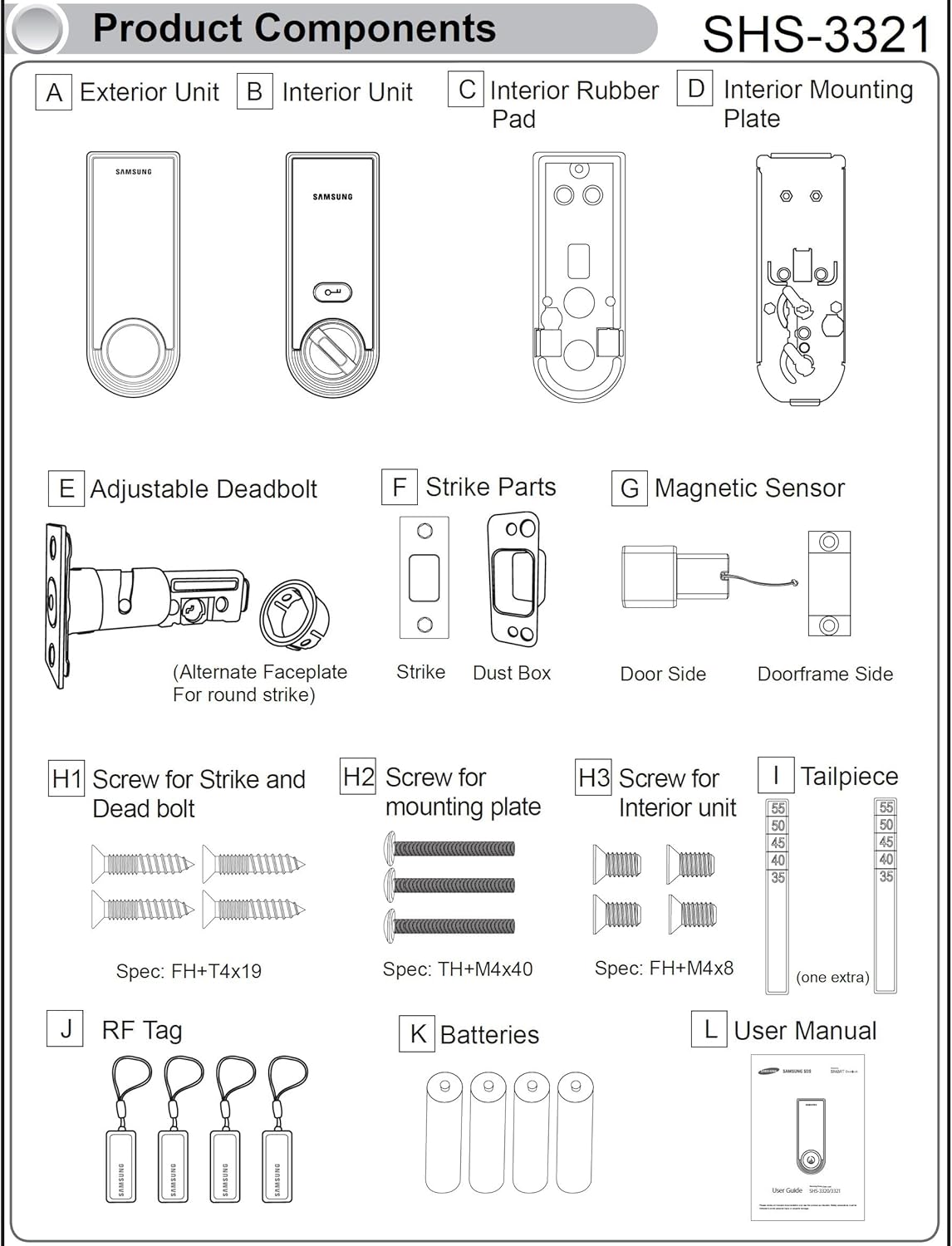
Figura 10.1: Dimensións do produto.
11. Garantía e soporte
Para obter información sobre a garantía e asistencia técnica, consulte a páxina oficial de SAMSUNG websitio web ou póñase en contacto co servizo de atención ao cliente. Garde o recibo de compra para reclamacións de garantía.