
1. Introdución
Grazas pola compraasing the Marvo G904 6D Optical Wired Gaming Mouse. This manual provides essential information for the proper setup, operation, and maintenance of your new gaming mouse. Please read this manual thoroughly before use to ensure optimal performance and longevity of the product.
2. Produto rematadoview
The Marvo G904 is a high-performance 6D optical wired gaming mouse designed for precision and comfort. It features an AVago3050 sensor, adjustable DPI settings, and programmable buttons to enhance your gaming experience.

Figure 1: Marvo G904 Gaming Mouse with blue LED lighting, showcasing its ergonomic design and illuminated accents.

Figure 2: Marvo G904 Gaming Mouse displaying green LED lighting, indicating different lighting modes or DPI settings.
3. Configuración
Follow these steps to set up your Marvo G904 gaming mouse:
- Desembalar o rato: Carefully remove the mouse and any accessories from its packaging.
- Conectar ao ordenador: Plug the USB connector of the mouse into an available USB port on your computer. The mouse is plug-and-play for basic functionality.
- Install Driver (Optional for Advanced Features): For full functionality, including macro programming and advanced DPI settings, insert the provided CD driver into your computer's optical drive and follow the on-screen instructions to install the software. If your computer does not have an optical drive, please visit the official Marvo websitio para descargar controladores.

Figure 3: Marvo G904 Gaming Mouse packaging, which includes the driver CD.
4. Instrucións de funcionamento
The Marvo G904 mouse features 6 buttons and adjustable DPI settings for versatile control.
4.1 Funcións dos botóns
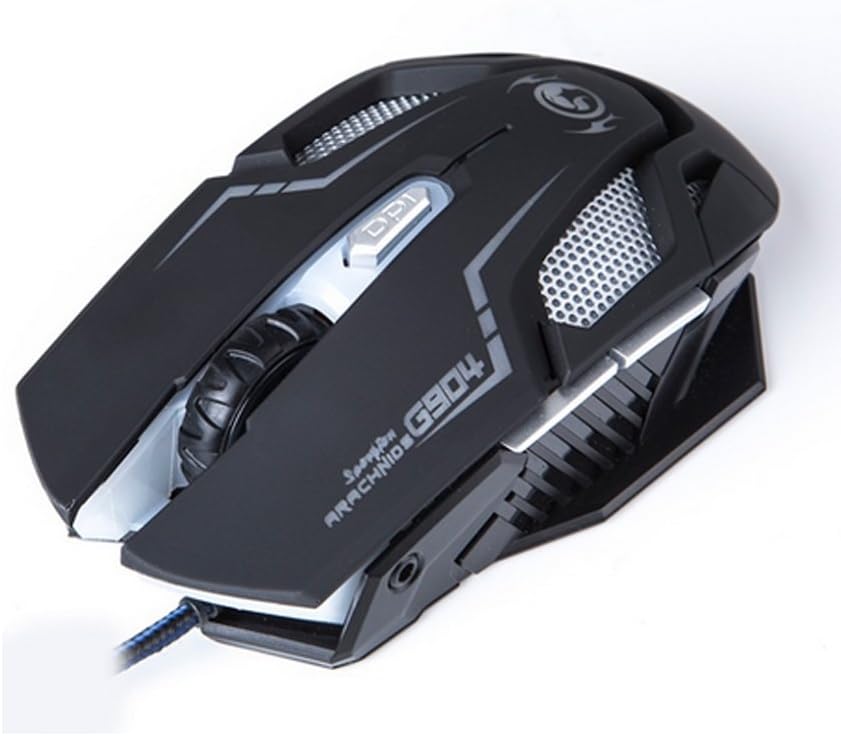
Figura 4: Arriba view of the Marvo G904 Gaming Mouse, highlighting the placement of its 6 buttons.
- Botón esquerdo para premer: Función de clic principal estándar.
- Botón dereito do rato: Función de clic secundario estándar.
- Roda de desprazamento: Scrolls up/down. Can also be pressed for a middle click function.
- DPI Shift Button: Cycles through DPI settings (1000, 2000, 3000, 4000).
- Side Buttons (2): Typically function as 'Forward' and 'Back' in web navegadores e file explorers. These can be programmed using the driver software.
4.2 Axuste de DPI
Preme o DPI Shift Button (located behind the scroll wheel) to cycle through the available DPI settings: 1000, 2000, 3000, and 4000 DPI. Each DPI level may be indicated by a change in the mouse's LED lighting color or pattern, depending on the current light mode.
4.3 Macro Programming (with Light Mode)
Utilize the included CD driver software to customize button functions and create macros. The software also allows you to configure the mouse's LED lighting modes. Refer to the software's help section for detailed instructions on macro creation and light mode customization.
5. Mantemento
Un mantemento axeitado garante a lonxevidade e o rendemento óptimo do teu rato para xogos.
- Limpeza: Usa un pano suave e seco para limpar a superficie do rato. Para a sucidade persistente, limpa lixeiramenteampEnxágüe o pano con auga ou unha solución de limpeza suave. Evite o uso de produtos químicos agresivos ou materiais abrasivos.
- Coidados do sensor: Manteña o sensor óptico da parte inferior do rato limpo e libre de po ou residuos. Use un hisopo de algodón ou aire comprimido se é necesario.
- Xestión de cables Evite dobrar bruscamente ou tirar demasiado do cable USB para evitar danos.
- Almacenamento: Cando non o use, garde o rato nun ambiente limpo e seco, lonxe de temperaturas extremas.
6 Solución de problemas
If you encounter issues with your Marvo G904 mouse, refer to the following common problems and solutions:
| Problema | Solución |
|---|---|
| O rato non responde. |
|
| A configuración de DPI non cambia. |
|
| Os botóns non funcionan correctamente. |
|
| Mouse cursor movement is erratic or jumpy. |
|
7. Especificacións
Detailed technical specifications for the Marvo G904 Gaming Mouse:

Figura 5: Abaixo view of the Marvo G904 Gaming Mouse, displaying model number, DPI range, and certification marks.
| Característica | Detalle |
|---|---|
| Modelo | G904 |
| Tipo de sensor | Optical (AVago3050) |
| Configuración de DPI | 1000/2000/3000/4000 DPI |
| Botóns | 6D (6 Buttons) |
| Taxa de informe | 1000 Hz |
| Durabilidade clave | 10 millóns de clics |
| Lonxitude do cable | 1.5 metros |
| Dimensións (L*W*H) | 143 * 76 * 42 mm |
| Voltage | 5V |
| Corrente nominal | 10 mA |
| Compatibilidade | PC |
| Cor | Negro |
8. Garantía e soporte
For warranty information and technical support, please refer to the documentation provided with your purchase or contact your retailer. You may also visit the official MARVO website for further assistance and updated driver software.