
1. Introdución
The Edifier P180 is a stereo earbud headset designed for clear audio and convenient communication. Featuring an inline microphone and control, it offers a comfortable listening experience for various devices.

Figure 1: Edifier P180 Wired Earbud Headset
2. Que hai na caixa
- Edifier P180 Earbud Headset
- Cable
3. Características clave
- Classic Comfort: Ergonomic design for comfortable wear without irritating the ear canal.
- Excelente calidade de son: Equipped with 16mm neodymium magnetic monomers for high-fidelity audio playback.
- Integrated Microphone and Control: 3.5mm stereo earphones with a built-in microphone and remote button for mobile phone communication.
- Funcionalidade: Single button control for picking up/hanging up calls and skipping songs (device dependent for iOS/Android).
- Deseño duradeiro: Constructed with quality materials for longevity.

Figure 2: Ergonomic design for comfortable fit.
4. Configuración
- Desempaquetar: Carefully remove the Edifier P180 headset from its packaging.
- Inspeccionar: Check the earbuds and cable for any visible damage.
- Conectar: Insert the 3.5mm audio jack into the headphone port of your compatible device (smartphone, tablet, computer, etc.). Ensure the jack is fully inserted for proper audio and microphone function.
- Posición: Place the earbuds comfortably in your ears. The ergonomic design is intended to rest well without causing irritation.
5. Instrucións de funcionamento
The Edifier P180 features an inline control button for easy management of calls and music playback.
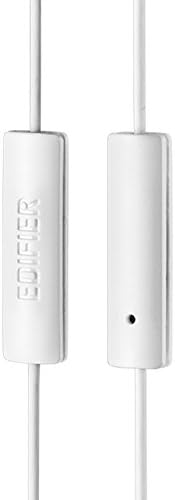
Figure 3: Inline microphone and control button.
- Atender / finalizar chamadas: Prema o botón de control unha vez para responder a unha chamada entrante. Prémao de novo para finalizar unha chamada activa.
- Reproducir/Pausar música: Press the control button once to play or pause audio playback.
- Saltando pistas: Double-press the control button to skip to the next track. Triple-press to go to the previous track (functionality may vary by device and operating system).
- Asistente de voz: Long-press the control button to activate your device's voice assistant (e.g., Siri, Google Assistant).
Vídeo 1: Produto oficial rematadoview of the Edifier P180 Classic Earbud Headsets, demonstrating features and usage.
6. Mantemento
- Limpeza: Limpe con coidado os auriculares e o cable cun pano suave e seco. Evite o uso de produtos químicos agresivos ou materiais abrasivos.
- Almacenamento: When not in use, store the headset in a clean, dry place, away from extreme temperatures and direct sunlight. Avoid tangling the cable.
- Evitar a humidade: Do not expose the headset to water or excessive moisture, as this can damage the internal components.
7 Solución de problemas
- Sen son:
- Asegúrate de que o conector de 3.5 mm estea completamente inserido no porto de son do dispositivo.
- Comproba a configuración de volume do teu dispositivo.
- Proba os auriculares con outro dispositivo para descartar un problema específico do dispositivo.
- O micrófono non funciona:
- Asegúrate de que o conector de 3.5 mm estea completamente inserido.
- Comproba a configuración da entrada de micrófono do teu dispositivo.
- Proba o micrófono con outro dispositivo ou aplicación.
- Audio intermitente:
- Check the cable for any kinks or damage.
- Asegúrate de que a toma de son estea limpa e libre de residuos.
8. Especificacións
| Característica | Especificación |
|---|---|
| Número de modelo | P180 |
| Resposta en frecuencia | 20 Hz - 20,000 Hz |
| Jack para auriculares | Jack de 3.5 mm |
| Tecnoloxía de conectividade | Con cable |
| Peso do elemento | 1.76 onzas (50 gramos) |
| Dimensións do produto | 2.01 x 5.59 x 0.91 polgadas |
| Material | Neodimio |
| Tipo de control | Inline Control Button |
| Impedancia | 32 ohmios |
| Control de ruído | Illamento acústico |
9. Garantía e soporte
The Edifier P180 headset is backed by a 1 ano de garantía. For any support inquiries or warranty claims, please refer to the contact information provided with your purchase or visit the official Edifier websitio.