
1. Introdución
This manual provides essential information for the safe and efficient operation of your Philips 40PFL4609/F8 40-inch Full HD LED Smart TV. Please read these instructions carefully before using your television and retain them for future reference.
2. Información de seguridade
Siga sempre as precaucións de seguridade básicas ao usar este televisor para reducir o risco de incendio, descarga eléctrica e lesións.
- Non expoñas o televisor á choiva nin á humidade.
- Non abra o armario; encárguese de calquera mantemento a persoal cualificado.
- Asegúrate de que haxa unha ventilación axeitada arredor do televisor.
- Protexa o cable de alimentación para evitar que se pise ou se pinche.
- Desconecta o televisor durante as tormentas eléctricas ou cando non o uses durante longos períodos.
3. Contido do paquete
Verifica que todos os elementos estean presentes na caixa:
- Philips 40PFL4609/F8 40-inch Full HD LED Smart TV
- Mando a distancia (require 2 pilas AAA, incluídas)
- Cable de alimentación
- Tabletop Stand and Screws
- Guía de inicio rápido (non incluída neste manual dixital)
- Manual de usuario (este documento)
4. Configuración
4.1 Desembalaxe e colocación
Carefully remove the television from its packaging. Inspect the TV for any physical damage. Place the television on a stable, flat surface or mount it on a wall using a compatible VESA 200x200mm wall mount (sold separately).
4.2 Montaxe do soporte
If using the tabletop stand:
- Coloque o televisor boca abaixo sobre unha superficie suave e limpa para evitar danar a pantalla.
- Aliñe o soporte cos orificios de montaxe na parte inferior do televisor.
- Fixe o soporte cos parafusos proporcionados.
4.3 Conexión de enerxía
Connect the power cord to the TV's power input, then plug the other end into a 110 VAC, 60 Hz electrical outlet.
4.4 Conexión de dispositivos externos
Your Philips TV offers various connection options for external devices.
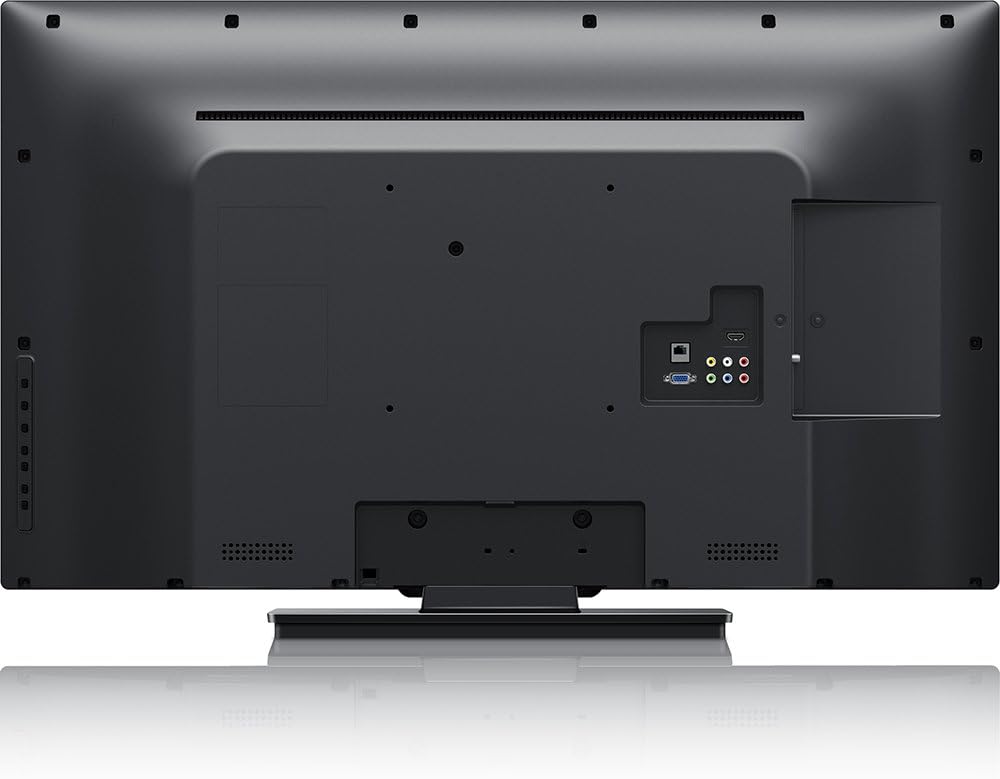
Imaxe: Traseira view of the Philips 40PFL4609/F8 television, highlighting the input ports including HDMI, DVI, and other audio/video connections.
- HDMI: Connect Blu-Ray players, game consoles, or other HDMI-enabled devices. This model has 1 HDMI port.
- DVI: Connect computers or other DVI-enabled devices.
- USB: Connect USB storage devices for media playback. This model has 1 USB 2.0 port.
- Antena/Cable: Conecta unha antena ou un sinal de televisión por cable para as canles de emisión.
4.5 Asistente de configuración inicial
Ao acendelo por primeira vez, o televisor guiarache a través dun proceso de configuración inicial:
- Selección do idioma: Escolle o teu idioma preferido.
- Conexión de rede: Connect to your home Wi-Fi network. The TV supports Wi-Fi connectivity.
- Escaneo de canles: Busca canles de emisión dispoñibles (se hai unha antena ou un cable conectado).
5. Funcionamento do televisor
5.1 Control remotoview
The included remote control allows you to navigate menus, adjust settings, and control playback. Insert two AAA batteries into the remote control, ensuring correct polarity.
5.2 Funcións básicas
- Potencia: Prema o botón de acendido para acender ou apagar o televisor.
- Volume: Use os botóns de volume para axustar o nivel de son.
- Canle: Use os botóns de canle para cambiar de canle de televisión.
- Entrada: Press the input button to select connected devices (HDMI, DVI, etc.).
5.3 Smart TV Features (Net TV)
Your Philips TV features Net TV, providing access to online content and applications.
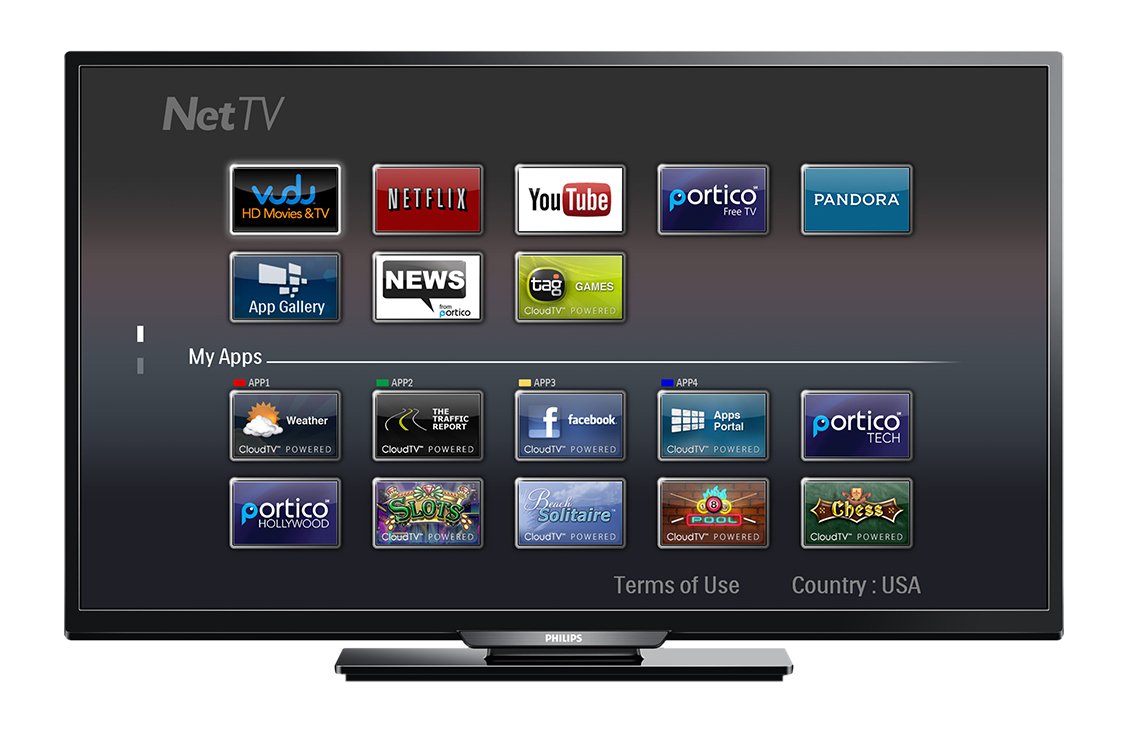
Imaxe: Fronte view of the Philips 40PFL4609/F8 television, showing the Net TV interface with various application icons such as Netflix, YouTube, and other streaming services.
- Acceso ás aplicacións: Use the remote control to navigate to the Net TV menu and select applications like Netflix and YouTube.
- Conectividade Wi-Fi: Ensure your TV is connected to a stable Wi-Fi network for optimal Smart TV performance.
5.4 Configuración da imaxe
Adjust picture settings to enhance your viewexperiencia:
- Pixel Plus HD: This video engine enhances detail, depth, and clarity.
- 120Hz PMR (Perfect Motion Rate): Provides sharp images in fast-moving scenes.
- Access the picture menu to adjust brightness, contrast, color, and sharpness.
5.5 Configuración de son
Optimize audio output:
- SRS TruSurround: Enjoy immersive sound with this integrated surround sound format.
- Access the audio menu to adjust bass, treble, and sound modes.
5.6 Reprodución multimedia a través de USB
Connect a USB storage device to the TV's USB 2.0 port to view fotos, reproducir música ou ver vídeos.
6. Mantemento
6.1 Limpeza da pantalla
Limpe a pantalla con suavidade cun pano suave e sen pelusa. Para marcas difíciles,ampEnxágüe o pano cunha pequena cantidade de auga ou cun limpador de pantallas especializado. Non pulverice líquido directamente sobre a pantalla.
6.2 Limpeza do Casing
Limpar a televisión casinLimpe cun pano suave e seco. Evite o uso de produtos de limpeza abrasivos ou solventes.
6.3 Actualizacións de software
This model may not support automatic software updates via the internet. Check the Philips support website for information on manual firmware updates, if available, to ensure optimal performance and access to the latest features.
7 Solución de problemas
Se tes problemas co teu televisor, consulta as seguintes solucións habituais:
- Sen enerxía: Ensure the power cord is securely plugged into both the TV and the electrical outlet. Check the power outlet with another device.
- Sen imaxe/son: Verify the correct input source is selected. Check all cable connections (HDMI, DVI, antenna).
- Sen conexión de rede: Ensure your Wi-Fi router is working correctly. Re-enter your Wi-Fi password if necessary.
- Net TV Limitations: Some users have reported that the Net TV functionality on this model can be basic or limited in terms of additional app installation or software updates. If you find the built-in Smart TV features insufficient, consider connecting an external streaming device.
- Danos físicos: Upon unboxing, carefully inspect the screen and casing for any damage, especially along the edges, which could affect display quality. Contact your retailer immediately if damage is found.
- O control remoto non funciona: Substitúa as pilas AAA. Asegúrese de que non haxa obstrucións entre o mando a distancia e o sensor de infravermellos do televisor.
8. Especificacións

Imaxe: Lado view of the Philips 40PFL4609/F8 television, illustrating its slim profile and side-mounted connectivity options.
| Característica | Descrición |
|---|---|
| Nome do modelo | PHILIPS 40PFL4609/F8 |
| Tamaño da pantalla | 40 Inches (100.3 Centimeters) |
| Tecnoloxía de visualización | LED, LCD |
| Resolución | Full HD 1080p |
| Taxa de actualización | 120 Hz (120Hz PMR) |
| Relación de aspecto | 16:9 |
| Tecnoloxía de conectividade | Wi-Fi |
| Servizos de Internet compatibles | Netflix, YouTube |
| Características especiais | Blu-Ray compatible, DVI Input, HDMI Input, Full HD, HD Compatible, Internet, Surround Sound |
| Portos HDMI | 1 |
| Portos USB 2.0 | 1 |
| Modo de saída de audio | Estéreo, son envolvente |
| Integrated Surround Sound Format | SRS TruSurround |
| Descrición do orador | SRS TruSurround |
| Consumo de enerxía | 89 vatios |
| Voltage | 110 VCA 60 Hz |
| Peso do elemento | 8200 gramos |
| Estándar de montaxe VESA | 200 x 200 mm |
| Cor | Negro |
| Dispositivos compatibles | Laptop, Tablet, Game Console, Headphones |
| Ano modelo | 2016 |
9. Información da garantía
This Philips television comes with a Garantía limitada de 12 meses provided by the manufacturer. Please retain your proof of purchase for warranty claims. The warranty covers manufacturing defects under normal use conditions.
10. Atención ao cliente
For further assistance, technical support, or warranty inquiries, please contact Philips customer service. Refer to the official Philips websitio web ou na embalaxe do produto para obter os datos de contacto específicos da súa rexión.