
Introdución
This manual provides detailed instructions for the Inateck Bluetooth 4.1 Sport Headset, Model P20 (BH1001). Please read this guide thoroughly before using the product to ensure proper operation and to maximize your listening experience. This headset is designed for active lifestyles, offering wireless audio with a secure fit and integrated microphone.
1. Configuración
1.1 Contido do paquete
Verifica que todos os elementos estean presentes no paquete:
- Inateck Bluetooth Sport Headset (P20 / BH1001)
- Cable de carga USB
- Multiple pairs of silicone ear tips (various sizes)
- Bolsa de transporte
- Manual de usuario (este documento)
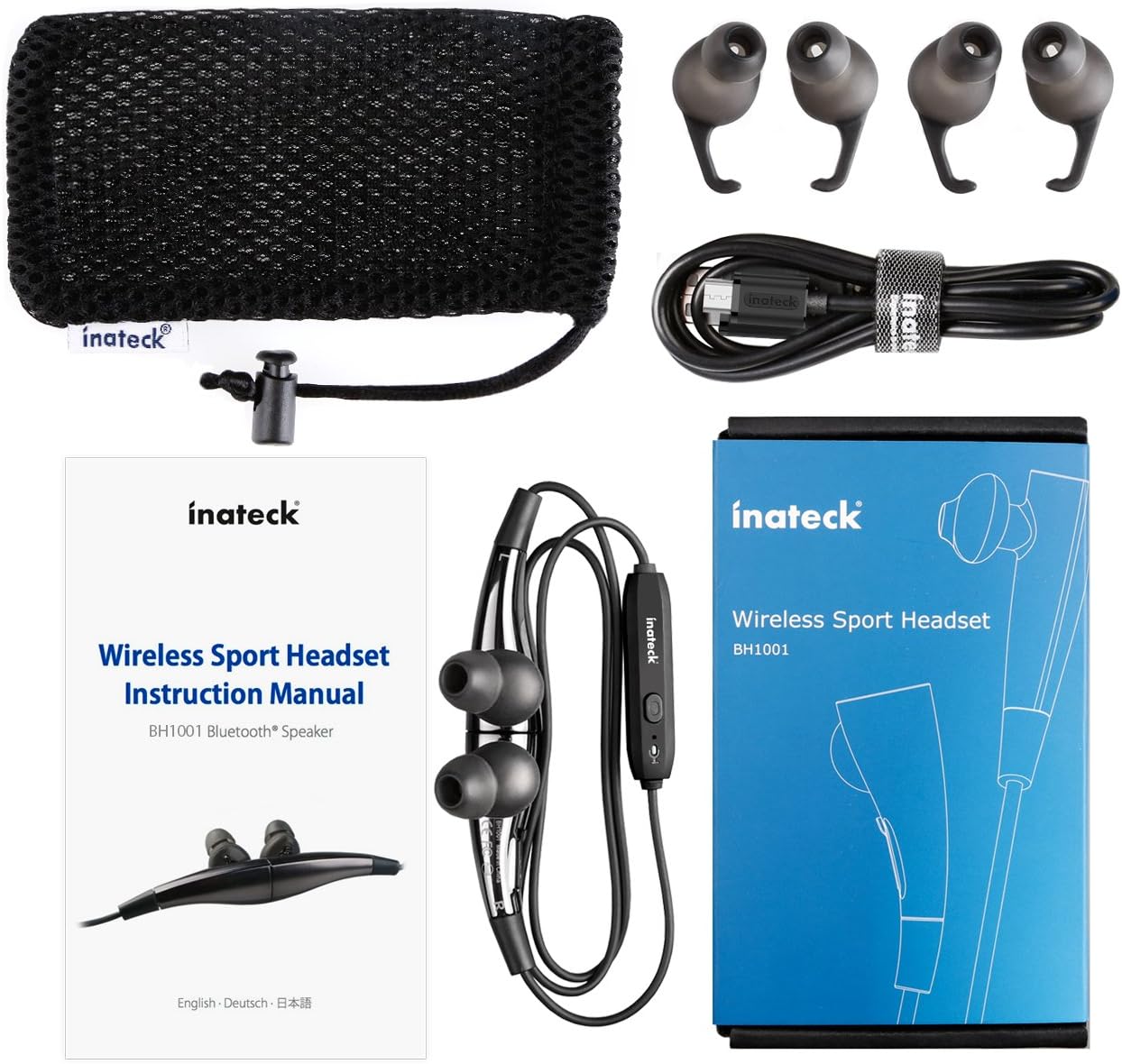
Figura 1.1: Contents of the Inateck Bluetooth Sport Headset package.
1.2 Carga dos auriculares
Before first use, fully charge the headset. A full charge takes approximately 3 hours and provides at least 8 hours of music playback.
- Locate the Micro USB charging port on the headset.
- Connect the small end of the provided USB charging cable to the headset's Micro USB port.
- Conecta o extremo máis grande do cable USB a unha fonte de alimentación USB (por exemplo, un porto USB do ordenador ou un adaptador de parede USB).
- The status indicator light will illuminate during charging. It will change color or turn off once charging is complete.

Figura 1.2: Charging the Inateck Bluetooth Sport Headset via Micro USB.
1.3 Emparellamento cun dispositivo Bluetooth
To connect your headset to a smartphone or other Bluetooth-enabled device:
- Asegúrese de que os auriculares están apagados.
- Press and hold the Multifunction Key (MFB) on the inline control unit for approximately 5-7 seconds until the status indicator light flashes red and blue alternately. This indicates pairing mode.
- On your Bluetooth device, enable Bluetooth and search for new devices.
- Select "Inateck BH1001" or "Inateck P20" from the list of available devices.
- Once paired, the status indicator light on the headset will flash blue slowly, and you may hear an audible confirmation.
- The headset will automatically attempt to reconnect to the last paired device when turned on.

Figura 1.3: Inateck Headset paired with a mobile device for music playback.
2. Instrucións de funcionamento
2.1 Controis dos auriculares
The inline control unit provides easy access to various functions:

Figura 2.1: Acabadoview of the Inateck Headset control unit.
- Multifunction Key (MFB):
- Press and hold (5-7s): Power On/Off, Enter Pairing Mode
- Short press: Play/Pause music, Answer/End call
- Long press (during incoming call): Reject call
- Subir volume (+) / Seguinte pista:
- Presión curta: aumenta o volume
- Pulsación longa: pasa á seguinte pista
- Baixar volume (-) / Pista anterior:
- Presión curta: diminuír o volume
- Long press: Go to previous track
- Porto micro USB: Para cargar os auriculares.
- Indicador de estado: Mostra o estado de enerxía, emparellamento e carga.
- Micrófono: Para chamadas mans libres.
2.2 Como usar os auriculares
Select the ear tips that provide the most comfortable and secure fit for your ears. The headset is designed to be worn with the cable behind your neck, ensuring stability during physical activity.

Figura 2.2: Proper wearing of the Inateck Sport Headset for active use.
2.3 Magnetic Earbuds Feature
The earbuds feature integrated magnets. When not in use, you can connect the two earbuds together, forming a necklace around your neck. This action automatically pauses music playback and prevents the headset from falling off.

Figura 2.3: Magnetic earbuds feature for secure wearing around the neck.

Figura 2.4: Headset worn as a necklace using the magnetic feature.
3. Mantemento
- Limpeza: Wipe the headset with a soft, dry cloth. Do not use abrasive cleaners or solvents.
- Consellos para oídos: Retire e limpe regularmente as almofadas de silicona para os oídos con auga e xabón suave. Asegúrese de que estean completamente secas antes de volvelas colocar.
- Almacenamento: When not in use, store the headset in the provided carrying pouch to protect it from dust and damage. Avoid extreme temperatures.
- Resistencia á auga: The headset is designed to be water-resistant for sports and exercise (e.g., sweat, light rain). Do not submerge it in water or expose it to heavy rain.
4 Solución de problemas
4.1 Non se pode acender
Ensure the headset is fully charged. Connect it to a power source using the USB cable and allow it to charge for at least 30 minutes before attempting to power on again.
4.2 Non se pode emparellar co dispositivo
- Ensure the headset is in pairing mode (status indicator flashing red and blue alternately).
- Asegúrate de que o Bluetooth estea activado no teu dispositivo e que estea dentro do seu alcance (normalmente 10 metros ou 33 pés).
- Turn off and on the Bluetooth function on your device.
- If previously paired, try "forgetting" or "unpairing" the headset from your device's Bluetooth settings and then re-pair.
- Asegúrate de que ningún outro dispositivo Bluetooth estea a interferir coa conexión.
4.3 Sen son ou mala calidade de son
- Comprobe o nivel de volume tanto nos auriculares como no dispositivo conectado.
- Asegúrate de que os auriculares estean correctamente emparellados e conectados ao teu dispositivo.
- Move closer to your device to reduce potential interference or range issues.
- Ensure the ear tips are correctly seated in your ears for optimal sound delivery.
- Reboot both the headset and your connected device.
4.4 Conexión intermitente
- Ensure there are no physical obstructions between the headset and your device.
- Avoid placing your device in areas where the signal might be blocked (e.g., deep pockets, behind thick walls).
- Minimiza as interferencias doutros dispositivos sen fíos (routers Wi-Fi, outros dispositivos Bluetooth).
- Keep the headset and your device within the recommended Bluetooth range.
5. Especificacións
| Marca | Inateck |
| Nome do modelo | P20 |
| Número de modelo | BH1001 |
| Tecnoloxía de conectividade | Bluetooth 4.1 |
| Factor de forma | In-Ear |
| Colocación do oído | Intra-aural |
| Conector para auriculares | USB (para cargar) |
| Nivel de resistencia á auga | Waterproof (suitable for sweat/light rain) |
| Características especiais | Sports and exercise, integrated microphone, magnetic earbuds |
| Peso do elemento | 78 gramos |
| Tipo de control | Volume Control, Multifunction Button |
| Material | Plástico |
6. Información da garantía
Inateck products typically come with a limited warranty. For specific warranty terms and conditions applicable to your Inateck Bluetooth Sport Headset, please refer to the warranty card included in your product packaging or visit the official Inateck websitio. Garda o comprobante de compra para reclamacións de garantía.
7. Atención ao cliente
If you encounter any issues not covered in this manual or require further assistance, please contact Inateck customer support. You can usually find contact information, FAQs, and additional resources on the official Inateck websitio:
Websitio: www.inateck.com
Please have your product model (P20 / BH1001) and purchase details ready when contacting support.