
HP 15-ac123TX
HP 15-ac123TX Laptop User Manual
Model: 15-ac123TX
Introdución
This manual provides essential information for setting up, operating, maintaining, and troubleshooting your HP 15-ac123TX laptop. Please read this manual thoroughly before using your device to ensure optimal performance and longevity.
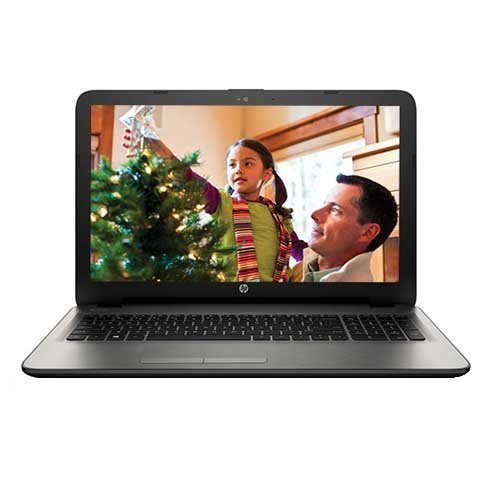
Figura 1: HP 15-ac123TX Laptop. This image displays the laptop in an open position, showcasing its 15.6-inch screen, keyboard, and touchpad. The screen shows a family scene, indicating its display capabilities.
Guía de configuración
- Desembalaxe: Carefully remove the laptop and all accessories from the packaging. Verify that all components are present: laptop, power adapter, and documentation.
- Conectar enerxía: Conecta o adaptador de corrente ao porto de alimentación do portátil e despois a unha toma de corrente. Recoméndase cargar completamente a batería antes do primeiro uso.
- Arranque inicial: Open the laptop lid and press the power button. The laptop will guide you through the initial Windows 10 setup process, including language selection, network connection, and user account creation.
- Instalación de software: Follow on-screen prompts to complete the operating system setup. Install any necessary updates or additional software as required.
Instrucións de funcionamento
Operación básica
- Encendido/apagado: Preme o botón de acendido para acender. Para apagar, fai clic no botón Inicio, despois en Acendido e selecciona "Apagar".
- Modo de suspensión: Close the lid or select "Sleep" from the Power menu to enter sleep mode.
- Teclado e Touchpad: Utilize the full-size textured island style keyboard and the touchpad with Windows 10 Multi-touch gesture support for navigation and input.
Conectividade
- Wi-Fi: Connect to wireless networks via the built-in 802.11bgn Wi-Fi. Access network settings through the Windows 10 taskbar.
- Bluetooth: Pair Bluetooth devices such as headphones or mice through Windows 10 Bluetooth settings.
- Portos USB: The laptop features 2 USB 2.0 ports and 1 USB 3.0 port for connecting peripherals.
- HDMI: Connect to external displays using the HDMI port.
- Ethernet: Use the Ethernet port for wired network connections.
- Unidade óptica: The integrated DVD-RW drive supports reading and writing CDs and DVDs.
- Lector de tarxetas: Insert Secure Digital (SD) cards into the card reader slot for data transfer.
Mantemento
- Limpeza: Usa un pano suave e sen fiapos para limpar a pantalla e o exterior. Evita produtos químicos agresivos.
- Actualizacións de software: Comprobe e instale regularmente actualizacións de Windows e actualizacións de controladores para garantir a estabilidade e a seguridade do sistema.
- Coidado da batería: To prolong battery life, avoid extreme temperatures and allow the battery to discharge periodically before recharging.
- Almacenamento: Keep the laptop in a cool, dry place when not in use.
Resolución de problemas
| Problema | Posible Solución |
|---|---|
| O portátil non se acende. | Ensure the power adapter is securely connected and the outlet is functional. Check battery charge level. |
| Non hai conexión Wi-Fi. | Verify Wi-Fi is enabled in Windows settings. Restart the router and the laptop. |
| Rendemento lento. | Close unnecessary applications. Check for background processes. Ensure sufficient free disk space. Consider upgrading RAM if frequently running demanding applications. |
| Screen issues (e.g., no display). | Connect to an external monitor to check if the issue is with the laptop screen. Restart the laptop. |
For further assistance, refer to the HP support websitio ou póñase en contacto co servizo de atención ao cliente.
Especificacións
- Modelo: HP 15-ac123TX
- Procesador: Intel Core i5-5200U (2.2 GHz)
- RAM: 4 GB DDR3L (Expandable to 8 GB)
- Almacenamento: 1 TB 5400 RPM Serial ATA HDD
- Gráficos: AMD Radeon R5 Series M330 (2GB Dedicated)
- Visualización: 15.6-inch, 1366 x 768 resolution (HD)
- Sistema operativo: Windows 10 (64 bits)
- Webleva: HP TrueVision HD Webcam (1280 x 720 @ 30 fps)
- Audio: DTS Studio Sound, Dual Speakers
- Conectividade: Wi-Fi (802.11bgn), Bluetooth, 2x USB 2.0, 1x USB 3.0, 1x HDMI, 1x Ethernet, 1x Audio-out
- Unidade óptica: DVD-RW
- Lector de tarxetas: Tarxeta dixital segura
- Duración da batería: Approximately 5 hours (average)
- Dimensións: 10 x 15.1 x 1 cm (Product), 2.19 kg (Item Weight)
Garantía e Soporte
Este produto vén cun 1 anos de garantía do fabricante from the date of purchase. For warranty claims or technical support, please contact HP customer service or visit the official HP support websitio. Garde o recibo da compra como xustificante da mesma.
Importante: Any unauthorized modifications or repairs may void your warranty.
Para máis información, visite: Soporte HP
Ask a question about this manual
Ask about setup, troubleshooting, compatibility, parts, safety, or missing instructions. Manuals+ will review the question and use this page’s manual context to help answer it.