
Introdución
The myTouchSmart Plug-In Indoor/Outdoor Digital Timer is designed to simplify the automation of your lighting and appliances. This weather-resistant timer features two grounded outlets, offering versatile control for landscape, patio, and seasonal lighting. It provides both customizable "My On/Off Time" settings and convenient daily preset options, along with a 24-hour countdown feature. The large LCD screen and blue LED indicators ensure easy programming and monitoring of active programs. Compatible with various light sources including CFL, LED, incandescent, and halogen, this UL listed product is built for convenience and energy efficiency.
Características do produto
- Easy-to-set digital timer with two grounded outlets for landscape, patio, and seasonal lights and appliances.
- Features simple daily preset options, fully customizable "My On/Off Time" settings, and a custom, up to 24-hour countdown feature.
- Weather resistant for both outdoor and indoor use. Includes an attached bracket for easy mounting and installation.
- Compatible with CFL, LED, incandescent, and halogen light sources.
- Large LCD screen and blue LED indicators to show active programs.
- Electrical Rating: 125V/60Hz, 15A/1875W General purpose/resistive.
- CSA listed for safety.

Figure 1: Control outdoor or indoor lights with the myTouchSmart timer.

Figure 2: The timer is weather resistant and suitable for outdoor use.
Instrucións de configuración
- Encendido inicial: Plug the timer into a standard 125V AC outlet. The LCD screen will illuminate. If the screen is blank or not reading, plug it in for at least one hour to charge the internal battery.
- Establecer a hora actual:
- Preme o RELOXO botón.
- Usa o ARRIBA (▲) e ABAIXO (▼) frechas para axustar a hora.
- Preme RELOXO again to move to minutes, then use the arrows to adjust.
- Preme RELOXO a third time to confirm and exit time setting.
- Montaxe: Use the integrated mounting bracket to securely attach the timer near your desired outlet. Ensure the timer is positioned to prevent water accumulation.

Figure 3: Simple setup involves setting the current time and custom ON/OFF times.
Video 1: An instructional video demonstrating how to set the current time and program ON/OFF times on the myTouchSmart timer.
Instrucións de funcionamento
Setting Custom ON/OFF Times ("My On/Off Time")
- Axustar a hora de activación:
- Preme o MY ON TIME button. The display will show the current ON time setting.
- Usa o ARRIBA (▲) e ABAIXO (▼) arrows to adjust the desired ON hour.
- Preme MY ON TIME again to move to minutes, then use the arrows to adjust.
- Preme MY ON TIME a third time to confirm and save the ON time. The blue LED indicator next to "my on time" will illuminate when active.
- Axustar a hora de apagado:
- Preme o MY OFF TIME button. The display will show the current OFF time setting.
- Usa o ARRIBA (▲) e ABAIXO (▼) arrows to adjust the desired OFF hour.
- Preme MY OFF TIME again to move to minutes, then use the arrows to adjust.
- Preme MY OFF TIME a third time to confirm and save the OFF time. The blue LED indicator next to "my off time" will illuminate when active.
Using Preset Schedules
The timer offers three convenient preset schedules:
- Evening (5pm-12am): Preme o NOITE botón.
- Morning (5am-8am): Preme o MAÑÁ botón.
- All Night (6pm-6am): Preme o ALL NIGHT botón.
To activate a preset, simply press the corresponding button. The blue LED indicator next to the selected preset will light up.
24-Hour Countdown
To use the countdown feature:
- Preme o MY COUNTDOWN botón.
- Usa o ARRIBA (▲) e ABAIXO (▼) arrows to set the desired countdown duration (up to 24 hours).
- Preme MY COUNTDOWN again to start the countdown. The timer will turn ON for the set duration and then turn OFF.

Figure 4: Program custom ON/OFF times or select from convenient preset schedules.
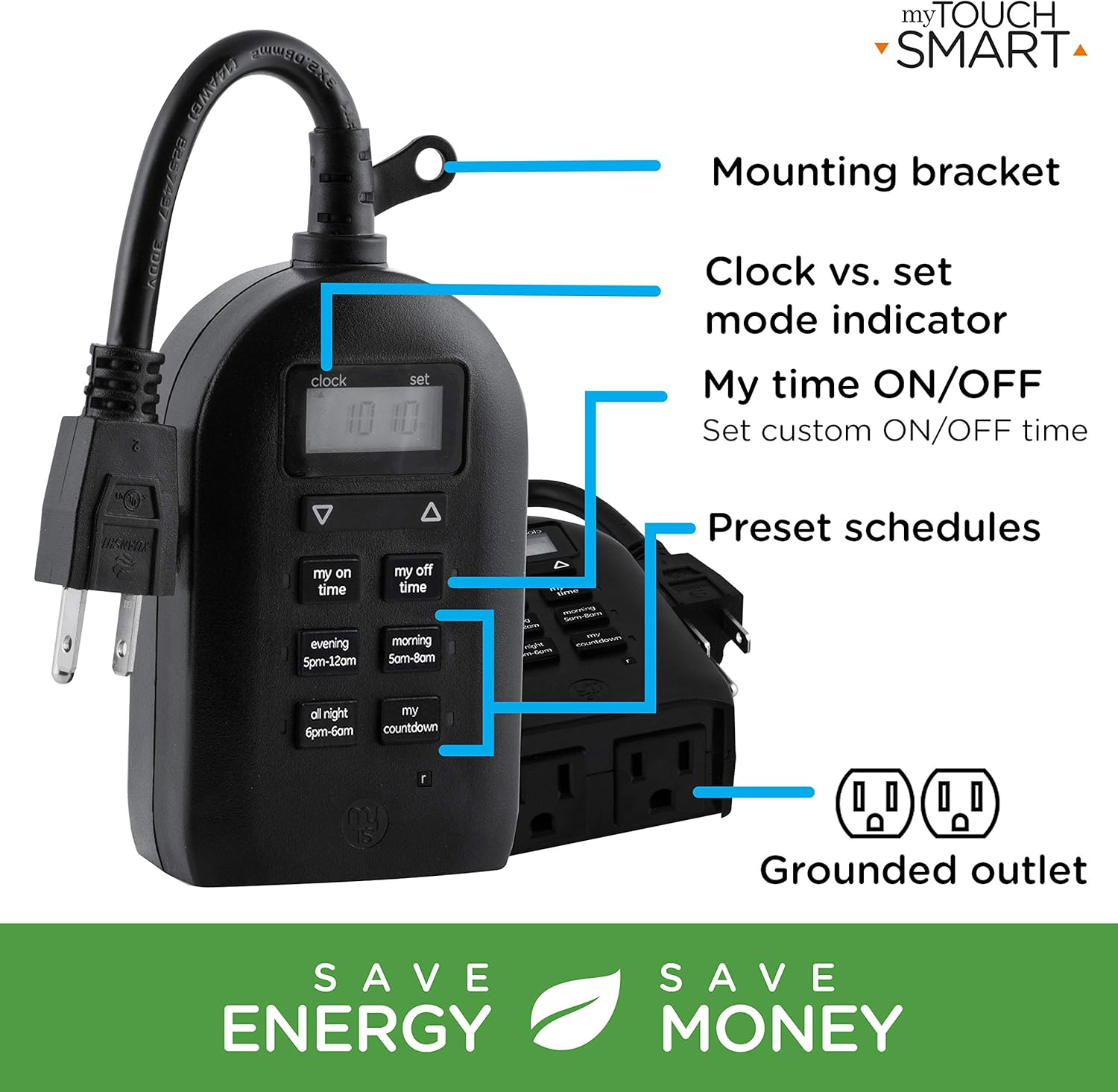
Figure 5: Key features and controls of the myTouchSmart timer.
Mantemento
- Limpeza: Desconecte o temporizador da toma de corrente antes de limpalo. Limpe o exterior cun pano suave e seco.amp pano. Non use produtos químicos agresivos ou produtos de limpeza abrasivos.
- Almacenamento: Cando non o use durante períodos prolongados, garde o temporizador nun lugar fresco e seco, lonxe da luz solar directa e de temperaturas extremas.
- Batería interna: O temporizador contén unha batería interna para manter a configuración durante o apagado.tages. If the display is dim or blank, plug the timer into an outlet for at least one hour to recharge the battery.
Resolución de problemas
| Problema | Causa posible | Solución |
|---|---|---|
| A pantalla do temporizador está en branco ou escura. | A batería interna está baixa ou esgotada. | Plug the timer into a live outlet for at least one hour to charge the internal battery. |
| Connected device does not turn ON/OFF. |
|
|
| Timer is not responding to button presses. | Fallo temporal de software ou batería baixa. | Unplug the timer from the outlet for a few minutes, then plug it back in. Allow the internal battery to charge if the display was dim. |
Especificacións
| Característica | Detalle |
|---|---|
| Número de modelo | 26898-P1 |
| Valoración eléctrica | 125V AC, 60Hz, 15A, 1875W (General Purpose/Resistive) |
| Puntos de venda | 2 tomas de terra |
| Dimensións | 3.2 cm de profundidade x 7 cm de ancho x 7.5 cm de alto (aproximadamente) |
| Peso do elemento | 9.92 onzas |
| Tipo de visualización | LCD |
| Tipo de montaxe | Montaxe enchufable |
| Certificacións | UL Listed, CSA Listed |
| Batería interna | Yes (for settings retention) |

Figure 6: Product dimensions for the myTouchSmart timer.
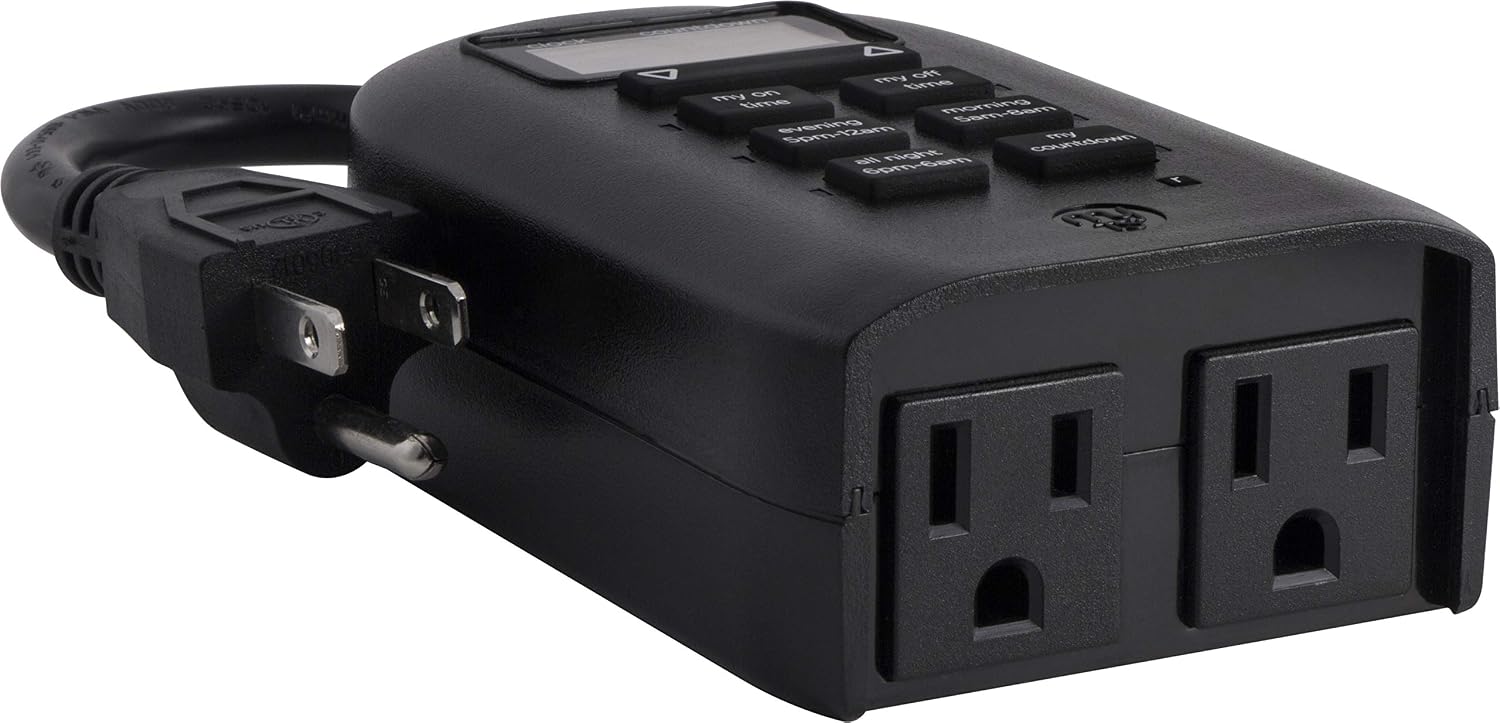
Figure 7: Dual grounded outlets for connecting devices.
Garantía e Soporte
This myTouchSmart timer is backed by a garantía limitada dun ano from the date of purchase. For warranty claims or technical support, please refer to the contact information provided with your product packaging or visit the official myTouchSmart websitio.
Para obter recursos adicionais, tamén podes consultar a páxina oficial Manual do usuario (PDF) or Manual de instalación (PDF) dispoñible en liña.