
Introdución
Grazas pola compraasing the SENTRY HPXBT150 Bluetooth Flat Cord Earbuds. This manual provides detailed instructions on how to set up, operate, and maintain your new wireless earbuds. Please read this manual thoroughly before use to ensure optimal performance and longevity of your device.
Contido do paquete
- SENTRY HPXBT150 Bluetooth Flat Cord Earbuds
- Funda protectora
- Cable de carga USB (micro-USB)
- Removable Ear Hooks
- Manual de usuario
Produto rematadoview
The SENTRY HPXBT150 earbuds feature Bluetooth wireless technology, allowing for a cord-free listening experience. They include an in-line microphone for hands-free calls and media control buttons for easy operation. Removable ear hooks provide a secure fit, especially during physical activity.
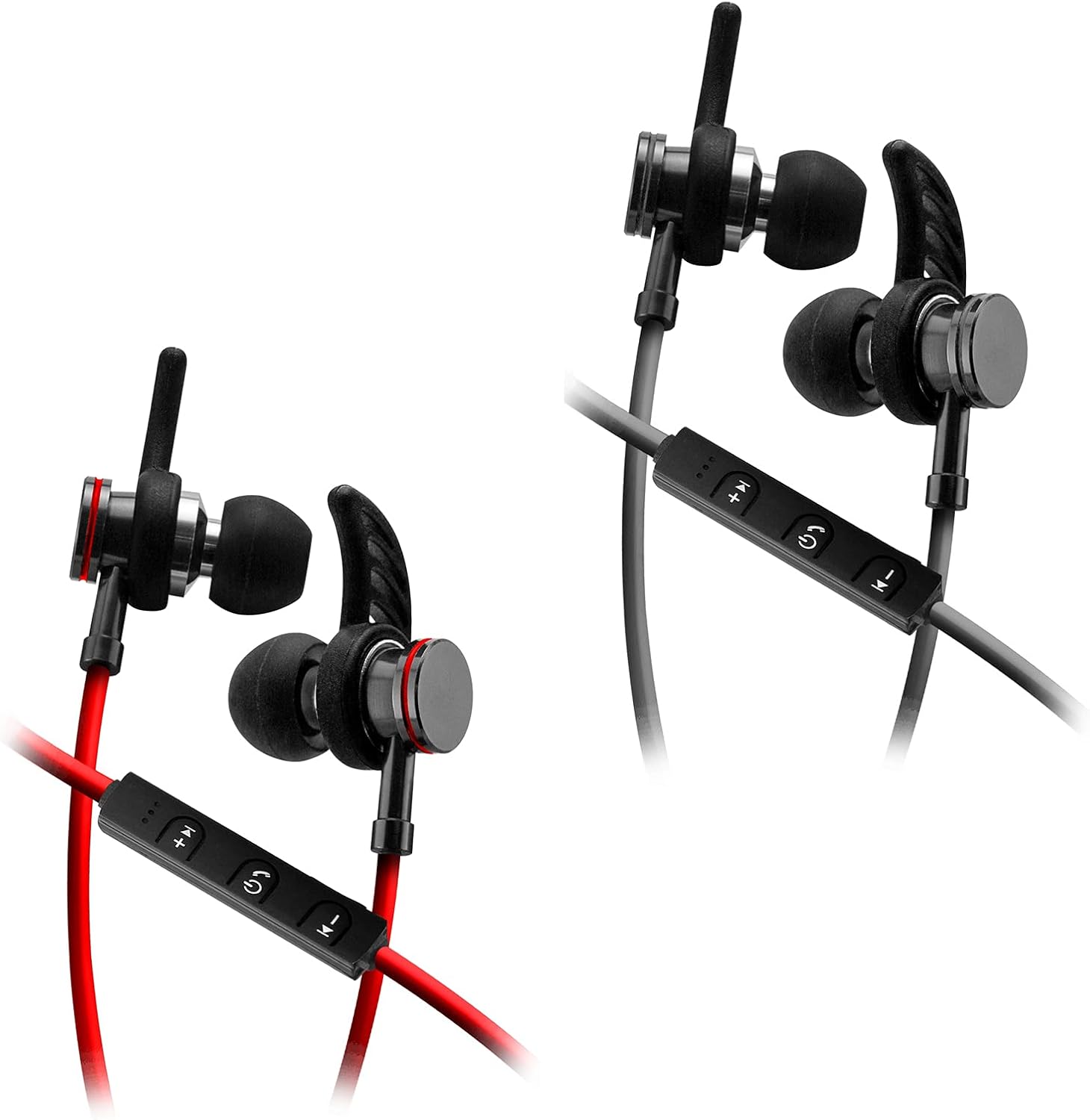
Image: SENTRY HPXBT150 Bluetooth Earbuds showing the in-line control panel and ear hooks. The control panel features volume up/next track, power/multifunction, and volume down/previous track buttons.
Configuración
1. Cargando os auriculares
- Locate the Micro-USB charging port on the in-line control unit.
- Connect the provided USB charging cable to the earbuds' charging port.
- Conecta o outro extremo do cable USB a unha fonte de alimentación USB compatible (por exemplo, un porto USB do ordenador ou un adaptador de parede USB).
- The LED indicator light will illuminate during charging. It will change color or turn off once charging is complete. A full charge typically takes approximately 1-2 hours.
2. Emparellamento Bluetooth
- Ensure the earbuds are fully charged before initial pairing.
- Press and hold the multi-function button (usually the center button on the in-line control) for approximately 5-7 seconds until the LED indicator light flashes red and blue alternately. This indicates the earbuds are in pairing mode.
- On your Bluetooth-enabled device (smartphone, tablet, computer), go to the Bluetooth settings menu.
- Activa o Bluetooth e busca os dispositivos dispoñibles.
- Select "HPXBT150" or a similar name from the list of found devices.
- Once successfully paired, the LED indicator on the earbuds will typically flash blue slowly or turn off, and you will hear an audible confirmation.
- Se se lle solicita un contrasinal, introduza "0000".
Instrucións de funcionamento
Encendido/apagado
- Encendido: Press and hold the multi-function button for approximately 3 seconds until the LED indicator flashes blue and you hear a power-on tone.
- Apagado: Press and hold the multi-function button for approximately 3-5 seconds until the LED indicator flashes red and you hear a power-off tone.
Reprodución de música
- Reproducir/Pausa: Preme o botón multifunción unha vez.
- Subir volume: Prema o botón "+".
- Baixar volume: Prema o botón '-'.
- Próxima pista: Manteña premido o botón "+".
- Pista anterior: Manteña premido o botón '-'.
Xestión de chamadas
- Responder/Finalizar chamada: Preme o botón multifunción unha vez.
- Rexeitar a chamada: Prema e manteña premido o botón multifunción durante aproximadamente 2 segundos.
- Volver a marcar o último número: Prema dúas veces o botón multifunción.
Mantemento
- Limpeza: Use a soft, dry cloth to clean the earbuds. Do not use harsh chemicals or abrasive materials.
- Almacenamento: When not in use, store the earbuds in the provided protective case to prevent damage.
- Coidado da batería: Para prolongar a duración da batería, evita descargar completamente os auriculares con frecuencia. Cárgaos regularmente, mesmo se non os usas durante períodos prolongados.
- Evitar a humidade: Keep the earbuds away from water and excessive moisture.
Resolución de problemas
| Problema | Posible Solución |
|---|---|
| Os auriculares non se acenderon. | Ensure the earbuds are fully charged. Connect to a power source and allow time to charge. |
| Non se pode emparellar co dispositivo. | Ensure earbuds are in pairing mode (flashing red/blue). Turn off and on Bluetooth on your device. Move earbuds closer to your device. Forget previous pairings on your device and try again. |
| Sen son ou volume baixo. | Check volume levels on both the earbuds and your connected device. Ensure earbuds are properly paired. Try re-pairing the earbuds. |
| Conexión intermitente. | Ensure there are no obstructions between the earbuds and your device. Move closer to your device. Avoid environments with strong Wi-Fi or other wireless interference. |
Especificacións
- Modelo: HPXBT150
- Tecnoloxía de conectividade: Sen fíos (Bluetooth)
- Unidade de condutor: 10 mm
- Impedancia: 32+/-3 Ohms
- Sensibilidade: 103 dB +/-3 dB
- Resposta en frecuencia: 20 Hz - 20 kHz
- Dispositivos compatibles: Phones, Tablets, MP3 Players, Computers, Gaming Consoles
- Tipo de control: Control de medios
- Características especiais: Microphone Included, USB Connectivity, Removable Ear Hooks
- Peso do artigo: 2.08 onzas
Información de seguridade
- Do not expose the earbuds to extreme temperatures, direct sunlight, or fire.
- Do not disassemble or modify the earbuds. This may void the warranty and cause damage.
- Evite escoitar a volume alto durante períodos prolongados para evitar danos auditivos.
- Manter fóra do alcance dos nenos e animais.
- Eliminar o produto de forma responsable segundo a normativa local.
Garantía e Soporte
For warranty information and technical support, please refer to the documentation included with your purchase or contact SENTRY customer service directly. Keep your proof of purchase for warranty claims.