
Introdución
This manual provides essential instructions for setting up, operating, and maintaining your Coolpad Note 3 smartphone. Please read this guide thoroughly to ensure proper use and to maximize the features of your device.
Información de seguridade
Warning: Keep away from children.
Always handle your device with care. Avoid exposure to extreme temperatures, direct sunlight, and liquids. Do not attempt to disassemble or repair the device yourself, as this will void the warranty and may cause damage or injury.
Contido do paquete
Verifique que o seu paquete conteña os seguintes elementos:
- Coolpad Note 3 Handset
- Auriculares
- Cargador
- Cable USB
- Película protectora
- Manual de usuario (este documento)
- Tarxeta de garantía
Configuración
1. Inserción de tarxetas SIM e tarxetas MicroSD
The Coolpad Note 3 supports dual SIM cards (4G+2G) and a MicroSD card for expandable storage up to 64GB. Ensure the device is powered off before inserting or removing cards.
- Localiza a bandexa da tarxeta SIM/MicroSD no lateral do dispositivo.
- Usa a ferramenta de expulsión da tarxeta SIM fornecida para abrir a bandexa.
- Place your SIM cards into the designated slots. Ensure the gold contacts face downwards.
- Insert your MicroSD card into its slot. For 64GB cards, ensure it is formatted to FAT32 for compatibility.
- Empuxa coidadosamente a bandexa de novo no dispositivo ata que faga clic.
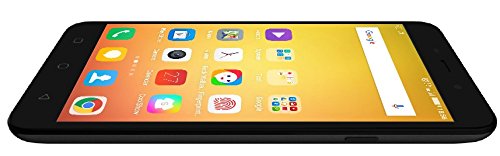
Imaxe: Lateral view of the Coolpad Note 3, illustrating the location of the SIM/MicroSD card tray and physical buttons.
2. Asistente de acendido inicial e configuración
- Press and hold the Power button until the Coolpad logo appears.
- Segue as instrucións en pantalla para seleccionar o teu idioma, conectarte á wifi e configurar a túa conta de Google.
3. Configuración do sensor de impresión dixital
The Coolpad Note 3 features a fingerprint sensor for enhanced security and quick access.
- Navega ata Configuración > Seguridade > Pegada dixital.
- Follow the prompts to register your fingerprints. You can register multiple fingers.
- Optionally, customize fingerprints to launch specific applications directly.
Instrucións de funcionamento
1. Navegación básica
Your Coolpad Note 3 runs on Android v5.1 Lollipop with the COOLUI 6.0 interface. Use the touchscreen for navigation, tapping icons to open apps, swiping to scroll, and pinching to zoom.

Imaxe: Fronte view of the Coolpad Note 3, showing the vibrant home screen with various application icons.
2. Uso da cámara
O dispositivo conta cunha cámara traseira de 13 MP e unha cámara frontal de 5 MP.
- Abre o Cámara aplicación.
- Toca a pantalla para enfocar.
- Prema o botón do obturador para sacar unha foto ou iniciar/deter a gravación de vídeo.
- Cambia entre as cámaras dianteira e traseira usando a icona de alternancia da cámara.
- Explore various shooting modes available in the camera app.
3. Fingerprint Sensor for Unlocking
To unlock your phone, simply place your registered finger on the fingerprint sensor. The device unlocks in approximately 0.5 seconds. The sensor is designed to detect both dry and wet fingers accurately.
4. Conectividade
- Wi-Fi: Ir a Configuración > Wi-Fi para conectarse ás redes dispoñibles.
- Datos móbiles: Asegúrate de que a túa tarxeta SIM estea activa e que os datos móbiles estean activados en Configuración > Uso de datos.
- Bluetooth: Pair with other devices via Configuración > Bluetooth.
- USB OTG: The Micro USB port supports On-The-Go (OTG) functionality for connecting external USB devices (e.g., flash drives) with an adapter.
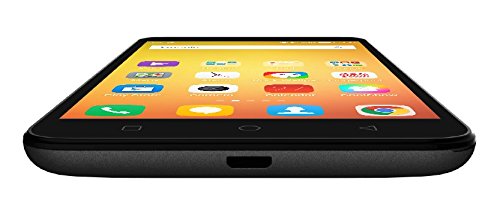
Imaxe: Parte inferior view of the Coolpad Note 3, highlighting the Micro USB port for charging and data transfer.
Mantemento
1. Cargando a batería
Use the provided charger and USB cable to charge your Coolpad Note 3. Connect the USB cable to the phone's Micro USB port and the charger to a power outlet. A full charge typically takes approximately 2 hours.
2. Actualizacións de software
Regularly check for software updates to ensure optimal performance and access to the latest features and security patches. Go to Configuración > Sobre o teléfono > Actualizacións do sistema.
3. Limpeza do dispositivo
Usa un pano suave e sen pelusa para limpar a pantalla e a carcasa do teléfono. Evita o uso de produtos químicos agresivos ou materiais abrasivos.
4. Protección da pantalla
While the device features a durable display, it is recommended to use a tempered glass screen protector and a protective case to prevent scratches and damage from accidental drops.
Resolución de problemas
- Device is heating: It is normal for smartphones to generate some heat during intensive use (e.g., gaming, prolonged video playback). If excessive heating occurs, close background applications and allow the device to cool. Software updates often address heating optimizations.
- Mala calidade da cámara: Ensure good lighting conditions. For potentially improved results, consider using third-party camera applications available on the Google Play Store.
- Network connectivity issues (international travel): The Coolpad Note 3's 3G/4G bands may not be compatible with all international carriers. Verify network compatibility with your service provider before traveling.
- Slow performance/lag: Close unused applications, clear cache, and restart the device. Ensure sufficient free storage space.
Especificacións
| Marca | Coolpad |
| Modelo | Nota 3 |
| Sistema Operativo | Android v5.1 Lollipop |
| Procesador | 1.3GHz Cortex-A53 MT6753 Mediatek Octacore |
| RAM | 3 GB |
| Almacenamento interno | 16 GB (ampliable ata 64 GB mediante MicroSD) |
| Tamaño de visualización | 5.5 polgadas (13.97 cm) |
| Resolución de visualización | 1280 x 720 píxeles (HD) |
| Cámara traseira | 13 MP |
| Cámara frontal | 5 MP |
| Capacidade da batería | 3000 mAh de iones de litio |
| Tempo de conversa | Ata 15 horas |
| Tempo de espera | Ata 400 horas |
| Soporte SIM | Dual SIM (4G+2G) |
| Seguridade biométrica | Recoñecemento de pegadas dixitais |
| Sensores | G sensor, Proximity sensor, Light sensor, Gyro sensor, eCompass, Fingerprint sensor |
| Dimensións (L x W x H) | 15.2 x 7.7 x 0.9 cm |
| Peso | 150 gramos |
Información da garantía
Your Coolpad Note 3 comes with a manufacturer's warranty:
- Dispositivo: 1 ano de garantía do fabricante desde a data de compra.
- In-box Accessories: 6 months manufacturer warranty for accessories including batteries, from the date of purchase.
Please retain your purchase receipt and warranty card for future reference.
Apoio
For further assistance, technical support, or service inquiries, please refer to the official Coolpad support channels. Coolpad has partnered with HCL for service in some regions.
Visit the official Coolpad websitio web para obter a información de soporte e os datos de contacto máis recentes.