
1. Introdución
Grazas pola compraasing the Edifier R1700BT Bluetooth Bookshelf Speakers. This manual provides essential information for the proper setup, operation, and maintenance of your new audio system. Please read it thoroughly before use to ensure optimal performance and longevity of your speakers.
2. Instrucións de seguridade importantes
- Lea atentamente estas instrucións.
- Conserve estas instrucións para referencia futura.
- Presta atención a todas as advertencias.
- Siga todas as instrucións.
- Non use este aparello preto da auga.
- Limpar só cun pano seco.
- Non bloquee ningunha abertura de ventilación. Instáleo segundo as instrucións do fabricante.
- Non instale preto de fontes de calor como radiadores, rexistros de calor, cociñas ou outros aparellos (incluíndo amplificadores) que producen calor.
- Non derogue o propósito de seguridade do enchufe polarizado ou con conexión a terra. Un enchufe polarizado ten dúas láminas, unha máis ancha que a outra. Un enchufe con conexión a terra ten dúas láminas e unha terceira punta de conexión a terra. A folla ancha ou a terceira punta son proporcionadas para a súa seguridade. Se o enchufe proporcionado non encaixa na súa toma de corrente, consulte a un electricista para a substitución da toma obsoleta.
- Protexa o cable de alimentación para evitar que se pise ou se pinche, especialmente nos enchufes, tomas de corrente e no punto de saída do aparello.
- Use só anexos/accesorios especificados polo fabricante.
- Desenchufe este aparello durante tormentas eléctricas ou cando non se use durante longos períodos de tempo.
- Encargue toda a reparación a persoal de servizo cualificado. O mantemento é necesario cando o aparello resultou danado dalgún xeito, como o cable de alimentación ou o enchufe está danado, se derrama líquido ou caen obxectos no aparello, o aparello estivo exposto á choiva ou á humidade, non funciona normalmente. , ou foi abandonado.
3. Contido do paquete
Ao desembalar, asegúrese de que todos os elementos enumerados a continuación estean presentes e en bo estado:
- Edifier R1700BT Active Speaker (with controls)
- Edifier R1700BT Passive Speaker
- Control remoto
- Cable de audio RCA-RCA
- Cable de audio RCA de 3.5 mm
- Cable de conexión de altofalantes
- Manual de usuario

Image: Contents of the Edifier R1700BT package, including the active and passive speakers, remote control, and all necessary audio cables.
4. Produto rematadoview
The Edifier R1700BT speakers are active near-field studio monitors designed for high-quality audio reproduction. They feature a classic wood finish and offer versatile connectivity options.
4.1 Compoñentes do altofalante

Imaxe: Unha detallada view of the speaker's front, highlighting the 19mm silk dome tweeter and the 4-inch bass driver.
- Tweeter: 19mm silk dome tweeter for clear high frequencies.
- Woofer: 4-inch bass driver for rich, deep lows.
- Front-facing Bass Reflex Port: Mellora a resposta dos graves.
4.2 Side Panel Controls (Active Speaker)
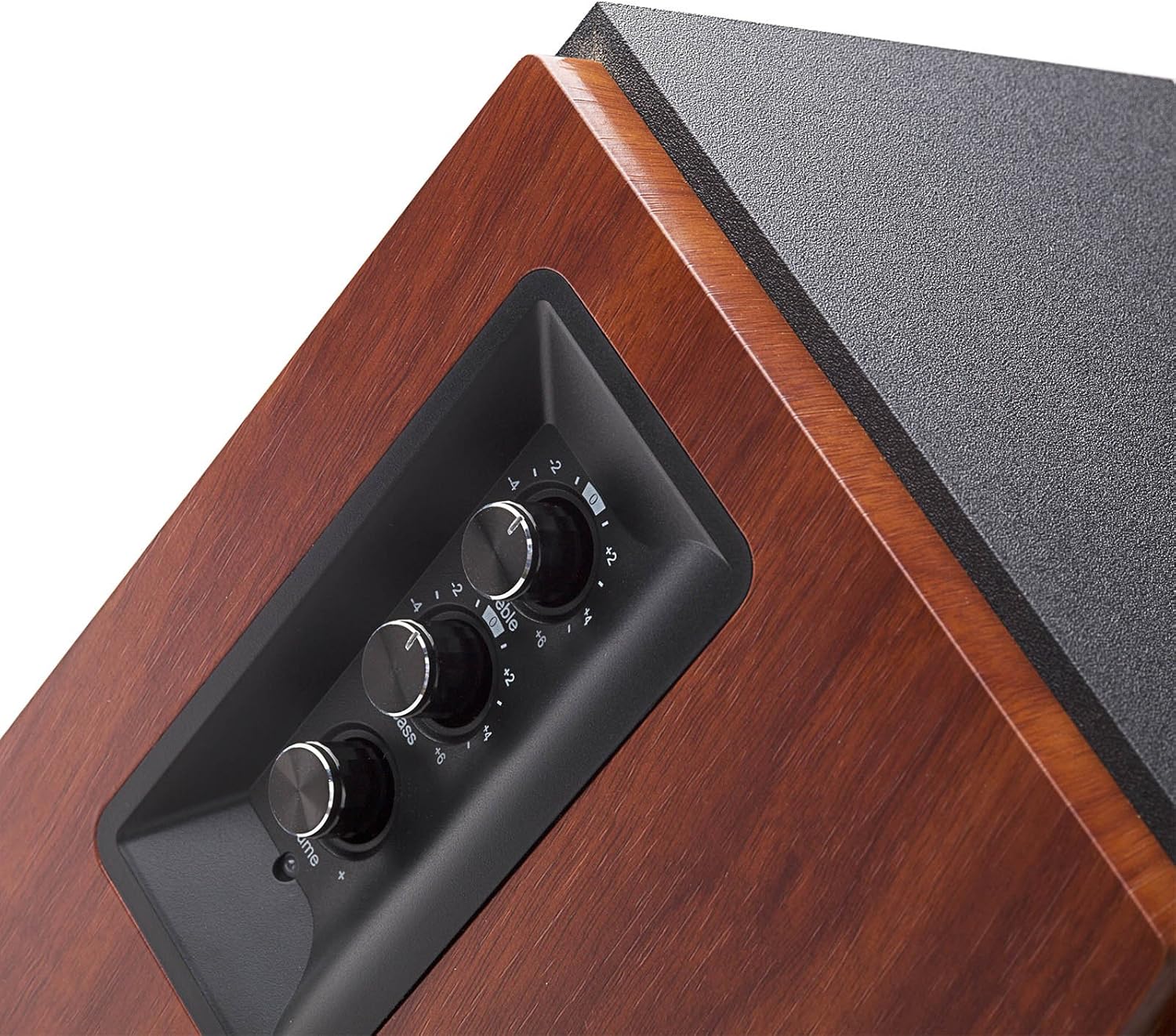
Image: The side panel of the active speaker, showing the treble, bass, and master volume controls.
- Control de agudos: Adjusts high-frequency output.
- Control de graves: Adjusts low-frequency output.
- Control de volume principal: Adjusts overall volume and acts as an input selector (press to cycle through inputs).
4.3 Rear Panel Connections (Active Speaker)

Image: The back panel of the active speaker, displaying the PC In, AUX In, L Speaker Out, and power input.
- PC In: RCA input for connecting to a computer.
- Entrada AUX: RCA input for connecting to other audio devices.
- L Speaker Out: Connects to the passive (left) speaker.
- Entrada de enerxía: Para conectar o cable de alimentación.
- Interruptor de alimentación: To turn the speakers on or off.
5. Configuración
5.1 Colocación de altofalantes
For optimal sound, place the speakers on a stable, flat surface. Position them at ear level, forming an equilateral triangle with your listening position. The R1700BT speakers are designed with a slight upward angle to direct sound towards the listener.

Imaxe: Example of speaker placement on a desktop for a personal computer setup.
5.2 Conexión dos altofalantes
- Connect the active speaker (right speaker) to the passive speaker (left speaker) using the provided speaker connecting cable. Ensure the connectors are firmly inserted.
- Connect the power cord to the active speaker's power input and then to a power outlet.
5.3 Conexión de fontes de son
The R1700BT offers multiple ways to connect your audio devices:
- Entrada de PC: Use the RCA-RCA audio cable to connect your computer's audio output to the 'PC In' ports on the active speaker.
- Entrada AUX: Use the 3.5mm-RCA audio cable to connect devices like smartphones, tablets, or MP3 players to the 'AUX In' ports on the active speaker.
- Conexión Bluetooth: For wireless audio streaming, refer to the 'Operating' section for Bluetooth pairing instructions.
6. Instrucións de funcionamento
6.1 Encendido/apagado
Flip the power switch on the rear panel of the active speaker to the 'ON' position to power on the speakers. Flip it to 'OFF' to power them down.
6.2 Adjusting Volume, Bass, and Treble
Use the knobs on the side panel of the active speaker to adjust the audio output:
- Xire o Volume mestre botón para aumentar ou diminuír o nivel xeral do son.
- Xire o Baixo knob to adjust the low-frequency response.
- Xire o Treble knob to adjust the high-frequency response.
6.3 Selección de entrada
Preme o Volume mestre knob to cycle through the available audio inputs: PC In, AUX In, and Bluetooth. The LED indicator on the active speaker will change color to indicate the selected input.
6.4 Emparejamento Bluetooth
- Turn on the speakers and select the Bluetooth input by pressing the Master Volume knob until the LED indicator flashes blue.
- No teu dispositivo con Bluetooth (por exemplo, teléfono intelixente ou tableta), busca os dispositivos Bluetooth dispoñibles.
- Select 'EDIFIER R1700BT' from the list to pair. Once paired, the LED indicator will glow solid blue.
- You can now stream audio wirelessly to your speakers.
6.5 Uso do control remoto

Image: The compact remote control for the Edifier R1700BT speakers.
The included remote control allows you to conveniently manage your speakers from a distance:
- Botón de silencio: Silencia ou activa o audio.
- Subir/Baixar o volume: Axusta o volume principal.
- Botón Bluetooth: Selecciona a entrada Bluetooth.
- Line In Button: Selects the AUX/PC input (cycles between them).
7. Mantemento
To ensure the longevity and optimal performance of your Edifier R1700BT speakers, follow these maintenance guidelines:
- Limpeza: Use a soft, dry cloth to wipe the speaker cabinets. Do not use abrasive cleaners, waxes, or solvents as they may damage the finish.
- Protección contra po: Keep the speakers free from dust. You may use a soft brush or a vacuum cleaner with a soft brush attachment to gently clean the speaker grilles.
- Evitar a humidade: Do not expose the speakers to water or excessive moisture. If liquid spills on the speakers, immediately disconnect power and allow them to dry completely before re-use.
- Ventilación: Ensure adequate ventilation around the speakers to prevent overheating. Do not block the rear or side vents.
- Temperatura: Avoid placing speakers in direct sunlight or near heat sources. Operate them within recommended temperature ranges.
8 Solución de problemas
If you encounter any issues with your Edifier R1700BT speakers, please refer to the following troubleshooting guide:
| Problema | Causa posible | Solución |
|---|---|---|
| Sen son | No power; Incorrect input selected; Volume too low; Loose connections | Ensure power is on; Select correct input (PC, AUX, Bluetooth); Increase volume; Check all cables are securely connected. |
| A conexión Bluetooth falla | Speakers not in pairing mode; Device too far; Interference; Device already paired to another speaker | Ensure LED flashes blue; Move device closer; Reduce interference; Disconnect from other devices and try again. |
| Distorsión do son | Volume too high; Source audio quality is poor; Incorrect bass/treble settings | Lower volume; Try a different audio source; Adjust bass/treble controls. |
| O control remoto non funciona | Battery depleted; Obstruction between remote and speaker; Remote not pointed at IR receiver | Replace battery; Remove obstructions; Point remote directly at the active speaker's IR receiver. |
Se o problema persiste despois de probar estas solucións, póñase en contacto co servizo de atención ao cliente de Edifier.
9. Especificacións
Detailed technical specifications for the Edifier R1700BT speakers:
| Característica | Especificación |
|---|---|
| Nome do modelo | R1700BT |
| Tipo de altofalante | Bookshelf, Tweeter |
| Material | Wood (MDF with walnut wood effect vinyl) |
| Potencia de saída | 66W RMS (15W x 2 + 18W x 2) |
| Resposta en frecuencia | 60Hz - 20KHz |
| Relación sinal-ruído | ≥85 dBA |
| Sensibilidade de entrada | PC: 700±50mV; AUX: 550±50mV |
| Tipo de entrada | PC, AUX, Bluetooth |
| Versión Bluetooth | 4.0 with aptX |
| Alcance Bluetooth | 10 metros |
| Diámetro do woofer | 4 polgadas |
| Diámetro do tweeter | 19 milímetros |
| Dimensións do produto | 6.1" D x 8.4" W x 10" H |
| Peso do elemento | 14.6 libras |
| Método de control | Remote, On-speaker knobs |
| UPC | 875674001352 |
10. Garantía e soporte
The Edifier R1700BT speakers come with a Limited or Full Warranty. For specific warranty terms, service, and support, please refer to the official Edifier websitio web ou póñase en contacto co seu distribuidor local.
You can visit the Edifier Store for more information: Tenda oficial de Edifier