
Introdución
The Vonyx STM2270 is a versatile 2-channel DJ mixer designed for both aspiring and experienced DJs. It integrates modern features such as Bluetooth connectivity and a USB/SD card MP3 player, alongside essential DJ tools like a crossfader and microphone input. This manual provides detailed instructions for the safe and efficient setup, operation, and maintenance of your Vonyx STM2270 mixer.
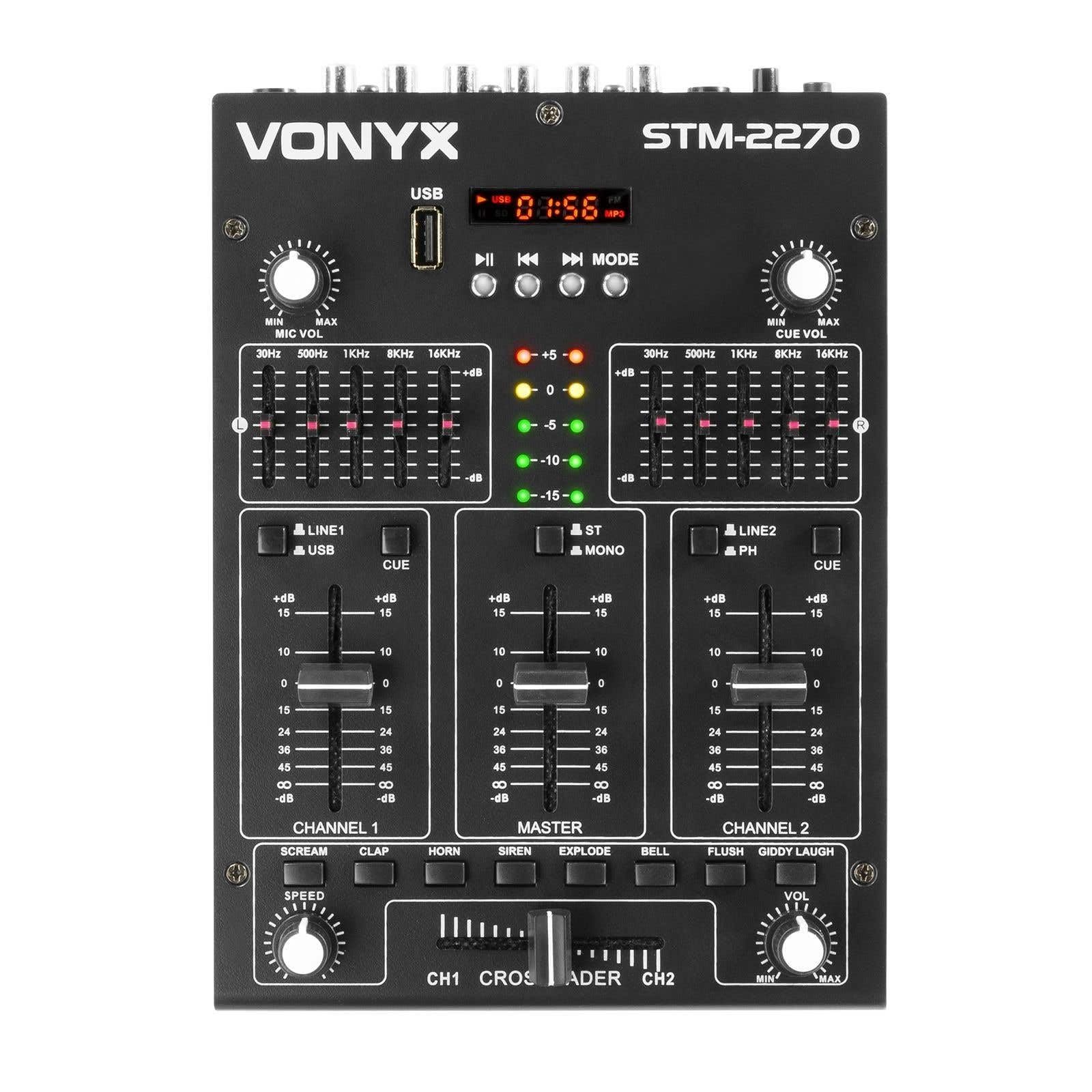
Fronte view of the Vonyx STM2270 DJ Mixer, showing all controls and inputs.
Configuración
Desembalaxe
- Retire coidadosamente todos os compoñentes da embalaxe.
- Verifique que todas as pezas estean presentes e sen danos.
- Conserve a embalaxe orixinal para futuros transportes ou almacenamentos.
Conexión de alimentación
- Ensure the mixer is switched off before connecting the power supply.
- Connect the provided 14V/600mA power adapter to the DC input on the rear panel of the mixer.
- Plug the power adapter into a standard 220V AC electrical outlet.
Conexións de audio
The STM2270 offers various input and output options for connecting your audio sources and sound system.
Rear panel of the Vonyx STM2270 DJ Mixer, showing power input, master output, line/phono inputs, and microphone input.
- Saída principal: Connect your main sound system (amplifiers, powered speakers) to the MASTER OUTPUT RCA jacks.
- Line/Phono Inputs: Connect CD players, media players, or other line-level devices to the LINE inputs. For turntables, use the PHONO inputs. Ensure the correct input type is selected on the mixer.
- Entrada de micrófono: Connect a microphone to the 6.3mm jack input on the rear panel.
- Saída de auriculares: Connect your headphones to the 6.3mm jack on the front panel for monitoring.
En funcionamento
Encendido/apagado
- To power on, ensure all volume controls are at their minimum setting, then press the POWER button.
- To power off, lower all volume controls, then press the POWER button.
Control de canles
The mixer features two main channels, each with dedicated controls:
- Selector de entrada: Switch between LINE/USB (for Channel 1) or LINE/PHONO (for Channel 2) inputs.
- Control de Ganancia: Adjust the input level for each channel to prevent clipping.
- Ecualizador (EQ): Each channel has 2-band EQ controls (High and Low) to adjust the tone of the audio. (Highs: ±10dB, Lows: ±10dB).
- Fader de canle: Controls the volume of the respective channel.
- CUE Button: Activates pre-fader listening (PFL) for the channel through headphones.

Close-up of the EQ section and LED level meters.
Master and Crossfader
- Fader mestre: Controls the overall output volume of the mixer.
- Crossfader: Allows for smooth transitions between Channel 1 and Channel 2. Slide the crossfader to the left for Channel 1, to the right for Channel 2, and to the center for a blend of both.

Close-up of the crossfader and integrated sound effects buttons.
Conectividade Bluetooth
- Activate the Bluetooth function on the mixer (usually via the MP3 player section).
- Activa o Bluetooth no teu dispositivo externo (teléfono intelixente, tableta, etc.).
- Busca and select "Vonyx STM2270" (or similar) in your device's Bluetooth settings to pair.
- Once paired, audio from your device will be routed through the mixer.
USB/SD MP3 Player
- Insira unha unidade flash USB ou unha tarxeta SD que conteña son MP3 files na ranura designada.
- Use the player controls (Play/Pause, Next, Previous, Mode) to navigate and play tracks.
- The display will show track information and playback time.

Close-up of the USB port and SD card slot for the integrated MP3 player.
Uso do micrófono
- Connect your microphone to the MIC input.
- Adjust the MIC VOL knob to control the microphone's volume.
- The mixer may include a 'talkover' function, which automatically lowers the music volume when the microphone is in use, allowing vocals to be heard clearly.
Efectos sonoros
The mixer includes integrated sound effects. Use the dedicated buttons to trigger effects and the SPEED knob to adjust their characteristics.
Mantemento
Limpeza
- Disconnect the mixer from power before cleaning.
- Use un pano suave e seco para limpar o exterior.
- Para a sucidade persistente, un lixeiro damp Pódese usar un pano con xabón suave e, a continuación, un pano seco.
- Avoid using abrasive cleaners, solvents, or excessive moisture, as these can damage the unit.
Almacenamento
- Garda a batedora nun lugar fresco e seco, lonxe da luz solar directa e de temperaturas extremas.
- If storing for an extended period, use the original packaging to protect against dust and physical damage.
Resolución de problemas
If you encounter issues with your Vonyx STM2270 mixer, refer to the following common problems and solutions:
- Sen enerxía:
- Check if the power adapter is securely connected to both the mixer and the electrical outlet.
- Verifique que a toma de corrente funcione.
- Sen saída de son:
- Ensure the Master Fader is raised.
- Check that individual Channel Faders are raised and not muted.
- Verify all audio cables are correctly connected to the mixer's inputs and outputs, and to your sound system.
- Confirm the correct input source is selected for each channel.
- Audio distorsionado:
- Reduce the Gain control for the input channel to prevent clipping (indicated by red LEDs on the level meter).
- Check the volume levels on your connected audio sources.
- Inspeccione os cables de audio para ver se están danos ou conexións soltas.
- Problemas de conexión Bluetooth:
- Ensure the mixer's Bluetooth function is active and in pairing mode.
- Make sure your external device's Bluetooth is enabled and searching for devices.
- Move your device closer to the mixer to ensure it's within range.
- Tenta desvincular e volver vincular o dispositivo.
- Humming/Noise in Headphones:
- Asegúrese de que todas as conexións estean seguras.
- Test with different headphones to rule out headphone issues.
- Check for potential ground loops or interference from other electronic devices nearby.
Especificacións
| Característica | Especificación |
|---|---|
| Marca | Vonyx |
| Modelo | STM2270 |
| Número de canles | 2 (with multiple inputs per channel) |
| Resposta en frecuencia | 20 Hz - 20 kHz |
| THD (distorsión harmónica total) | < 0.05 % |
| Ecualizador (EQ) | Highs: ±10dB, Lows: ±10dB |
| Entrada de micrófono | 10 mV / 10 K Ohm (6.3mm Jack) |
| Entrada de liña | 300 mV / 30 K Ohm |
| Entrada de fono | 15 mV / 22 K Ohm |
| Saída principal | 2 V / 400 Ohm (RCA) |
| Impedancia dos auriculares | 16 - 32 Ohm |
| Relación sinal-ruído | > 70 dB |
| Fonte de alimentación | 14 V / 600 mA (AC Adapter) |
| Vol. Operativotage | 220 voltios |
| Tecnoloxía de conectividade | Bluetooth, USB |
| Dimensións (D x W x H) | 24 cm x 20 cm x 6 cm |
Garantía e Soporte
This Vonyx STM2270 DJ Mixer is covered by a manufacturer's warranty, subject to the terms and conditions provided at the time of purchase. Please retain your proof of purchase for warranty claims.
For technical support, service, or warranty inquiries, please contact your retailer or the official Vonyx support channels. Refer to the product packaging or the Vonyx websitio para información de contacto.
Do not attempt to repair the unit yourself, as this may void your warranty and could result in electrical shock or damage to the device.


