
1. Introdución
This manual provides essential information for the safe and efficient operation, installation, and maintenance of your Daitsu ADDH10 Digital Dehumidifier. Please read these instructions thoroughly before using the appliance and retain them for future reference.
The Daitsu ADDH10 is designed to reduce humidity levels in indoor environments, helping to prevent mold, mildew, and other moisture-related issues. It features a digital display and automatic functions for user convenience.
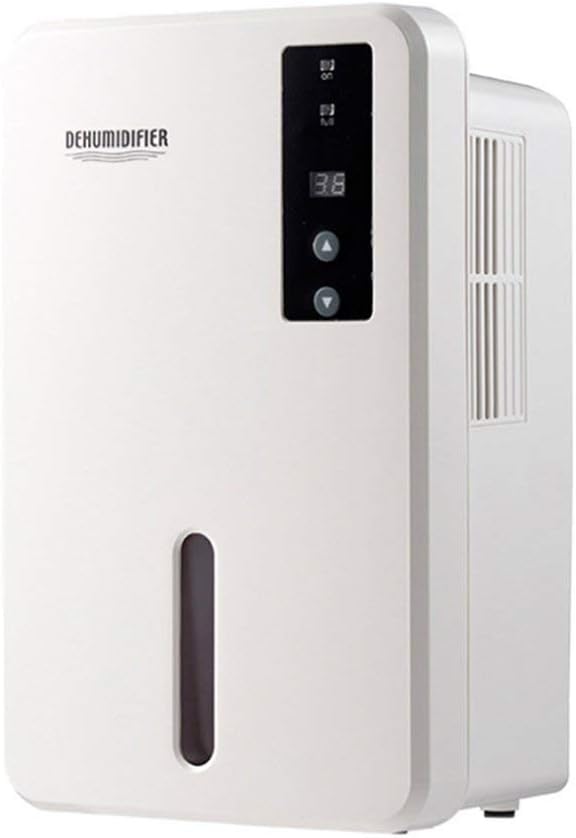
Imaxe 1.1: Fronte view of the Daitsu ADDH10 Digital Dehumidifier, showing the control panel and water tank window.
2. Información de seguridade
Siga sempre as precaucións de seguridade básicas ao usar electrodomésticos para reducir o risco de incendio, descarga eléctrica e lesións.
- Lea todas as instrucións antes de usar o deshumidificador.
- Asegúrese de que a fonte de alimentación coincida co voltage especificado na etiqueta de clasificación.
- Non faga funcionar o deshumidificador cun cable ou unha ficha danados.
- Manteña o aparello lonxe de fontes de calor, luz solar directa e materiais inflamables.
- Do not block the air inlet or outlet. Ensure adequate air circulation around the unit.
- Coloque sempre o deshumidificador sobre unha superficie estable e nivelada.
- Desconecte a unidade antes de limpala, realizando mantemento ou cando non a use durante períodos prolongados.
- Este aparello non está pensado para o seu uso por persoas (incluídos nenos) con capacidades físicas, sensoriais ou mentais reducidas, ou con falta de experiencia e coñecementos, a menos que teñan supervisión ou instrucións sobre o uso do aparello por unha persoa responsable da súa seguridade.

Image 2.1: Illustration of the dehumidifier's double security protection, including automatic shut-off when the water tank is full and over-temperature protection (auto-stop if heat sink exceeds 80°C).
3. Compoñentes e características do produto
Familiarízate coas partes principais do teu deshumidificador:
- Panel de control: Pantalla dixital e botóns para o funcionamento.
- Entrada de aire: Onde entra aire húmido na unidade.
- Saída de aire: Onde se expulsa o aire seco.
- Depósito de auga: Collects condensed water. Features a transparent window to monitor water level.
- Water Tank Handle/Lid: For easy removal and emptying.

Image 3.1: Diagram showing the key components: Air outlet, Control panel, Air inlet, and the 1.5L water tank capacity.
The dehumidifier has a 1.5-liter water tank capacity and features automatic shut-off when the tank is full, indicated by a float sensor. It also includes over-temperature protection.
4. Configuración e instalación
4.1 Desembalaxe
- Retire con coidado o deshumidificador da súa embalaxe.
- Retire todos os materiais de embalaxe, cintas adhesivas e películas protectoras.
- Inspect the unit for any signs of damage. If damaged, do not operate and contact your retailer.
4.2 Colocación
- Coloque o deshumidificador sobre unha superficie firme e nivelada que poida soportar o seu peso cando o depósito de auga estea cheo.
- Ensure there is at least 20 cm (8 inches) of space around the air inlet and outlet for proper air circulation.
- Avoid placing the unit near walls, furniture, or curtains that could obstruct airflow.
- Do not place the unit in direct sunlight or near heat-generating appliances.
- For optimal performance, operate the dehumidifier in an enclosed area. Close all doors and windows in the room.
4.3 Conexión de alimentación
- Ensure your hands are dry before plugging in the unit.
- Enchufe o cable de alimentación a unha toma eléctrica con conexión a terra adecuada.
5. Instrucións de funcionamento
5.1 Panel de control rematadoview
The control panel features a digital display and control buttons:
- Pantalla dixital: Shows current humidity level or settings.
- Botón de encendido: Acende ou apaga a unidade.
- Botóns arriba / abaixo: Adjust desired humidity level or other settings.

Image 5.1: Various angles of the dehumidifier, highlighting the digital control panel with up/down buttons and the transparent water tank.
5.2 Funcionamento básico
- Activar: Press the Power button to turn on the dehumidifier. The digital display will light up, showing the current room humidity.
- Axustar a humidade desexada: Use the Up and Down buttons to set your desired humidity level. The unit will operate until the room humidity reaches the set level, then cycle on and off to maintain it.
- Desactivar: Press the Power button again to turn off the dehumidifier.
5.3 Baleirado do depósito de auga
When the water tank is full, the dehumidifier will automatically stop operating, and an indicator light (if available) may illuminate. The unit will not resume operation until the tank is emptied and reinserted correctly.
- Tire con coidado do depósito de auga pola parte dianteira da unidade.
- Leva o tanque con coidado a un sumidoiro ou a un sumidoiro.
- Remove the tank lid (if applicable) and pour out the collected water.
- Replace the lid securely and slide the empty water tank back into the dehumidifier until it clicks into place.
- The unit will resume operation automatically if the power is on and the desired humidity level has not been reached.

Image 5.2: The transparent water tank, designed for easy removal and emptying.
6. Mantemento
Un mantemento regular garante un rendemento óptimo e prolonga a vida útil do deshumidificador. Desconecte sempre a unidade antes de realizar calquera mantemento.
6.1 Limpeza do depósito de auga
- Clean the water tank regularly (e.g., every few weeks) to prevent mold and bacteria growth.
- Retire o depósito de auga como se describe na Sección 5.3.
- Wash the tank with mild detergent and warm water. Rinse thoroughly.
- Seque o tanque completamente antes de volvelo inserir na unidade.
6.2 Limpeza do exterior
- Limpe o exterior do deshumidificador cun suave, damp pano.
- Non empregues produtos de limpeza abrasivos, solventes ou produtos químicos agresivos, xa que poden danar a superficie.
- Asegúrate de que non entre auga nos compoñentes internos.
6.3 Almacenamento
- If storing the dehumidifier for an extended period, ensure the water tank is empty and clean.
- Limpar o exterior da unidade.
- Garde a unidade en posición vertical nun lugar fresco e seco, lonxe da luz solar directa e de temperaturas extremas.
7 Solución de problemas
Before contacting customer support, please refer to the following troubleshooting guide for common issues:
| Problema | Causa posible | Solución |
|---|---|---|
| O deshumidificador non se acende. | Sen fonte de alimentación. O cable de alimentación non está conectado correctamente. |
Comproba se a toma de corrente funciona. Asegúrese de que o cable de alimentación estea firmemente conectado á unidade e á toma de corrente. |
| A unidade funciona pero non recolle auga. | A humidade da habitación xa é baixa. A temperatura é demasiado baixa. O fluxo de aire está bloqueado. |
Check the current humidity level on the display. If it's below your set point, the unit will not collect water. Os deshumidificadores son menos eficaces en ambientes moi fríos. Asegúrese de que a entrada e saída de aire non estean obstruídas. |
| Unit stops operating and indicator light is on. | O depósito de auga está cheo. O depósito de auga non está inserido correctamente. |
Baleirar o depósito de auga. Volva colocar o depósito de auga correctamente ata que encaixe no seu lugar. |
| Ruído inusual durante o funcionamento. | A unidade non está sobre unha superficie nivelada. Problema de compoñentes internos. |
Asegúrese de colocar a unidade nunha superficie estable e nivelada. Se o ruído persiste, interrompa o uso e contacte co servizo de atención ao cliente. |
8. Especificacións
| Característica | Especificación |
|---|---|
| Marca | Daitsu |
| Número de modelo | ADDH10 (Technical Model: bb_S0403263) |
| Cor | Branco |
| Peso do elemento | 10 quilogramos |
| Dimensións do produto (aprox.) | 286 mm (alto) x 180 mm (ancho) x 134 mm (profundidade) |
| Capacidade do depósito de auga | 1.5 litros |
| Modo de funcionamento | Automático |
| Compoñentes incluídos | Deshumidificador |
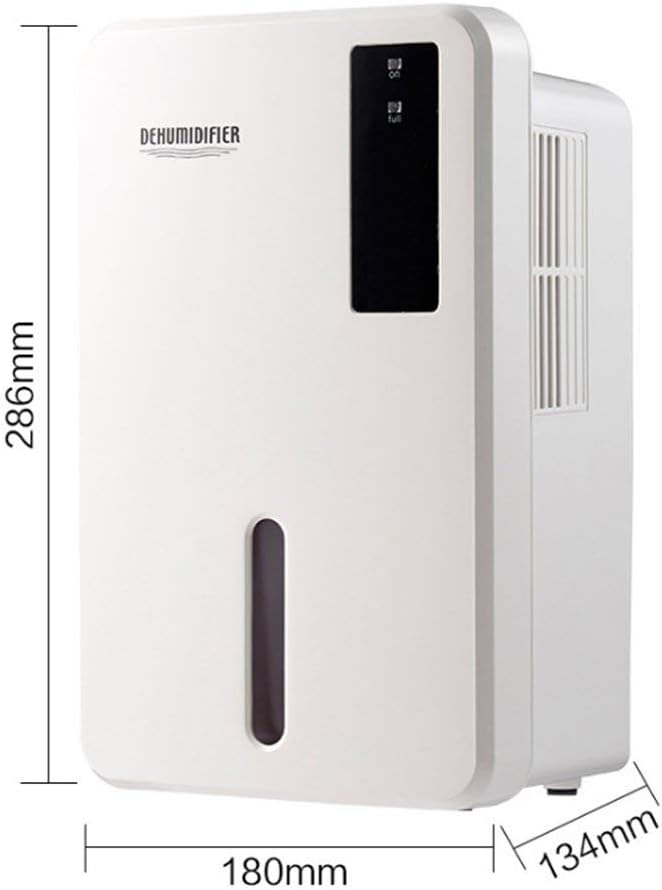
Image 8.1: Diagram illustrating the dimensions of the dehumidifier: 286mm height, 180mm width, and 134mm depth.
9. Garantía e soporte
For warranty information, please refer to the documentation included with your product packaging or visit the official Daitsu websitio. Os termos e condicións da garantía poden variar segundo a rexión e o vendedor.
If you encounter issues not covered in the troubleshooting section or require further assistance, please contact your retailer or the manufacturer's customer support. Have your model number (ADDH10) and purchase details ready when contacting support.