
1. Introdución
The GAMDIAS Hermes GKB3000 is a mechanical gaming keyboard designed for enhanced durability and performance. It features GAMDIAS Certified Blue Switches with a 50 million actuation lifecycle, a 7-color spectrum backlight with 14 lighting effects, and various functional keys for an optimized gaming and typing experience. This manual provides instructions for setting up, operating, and maintaining your keyboard.
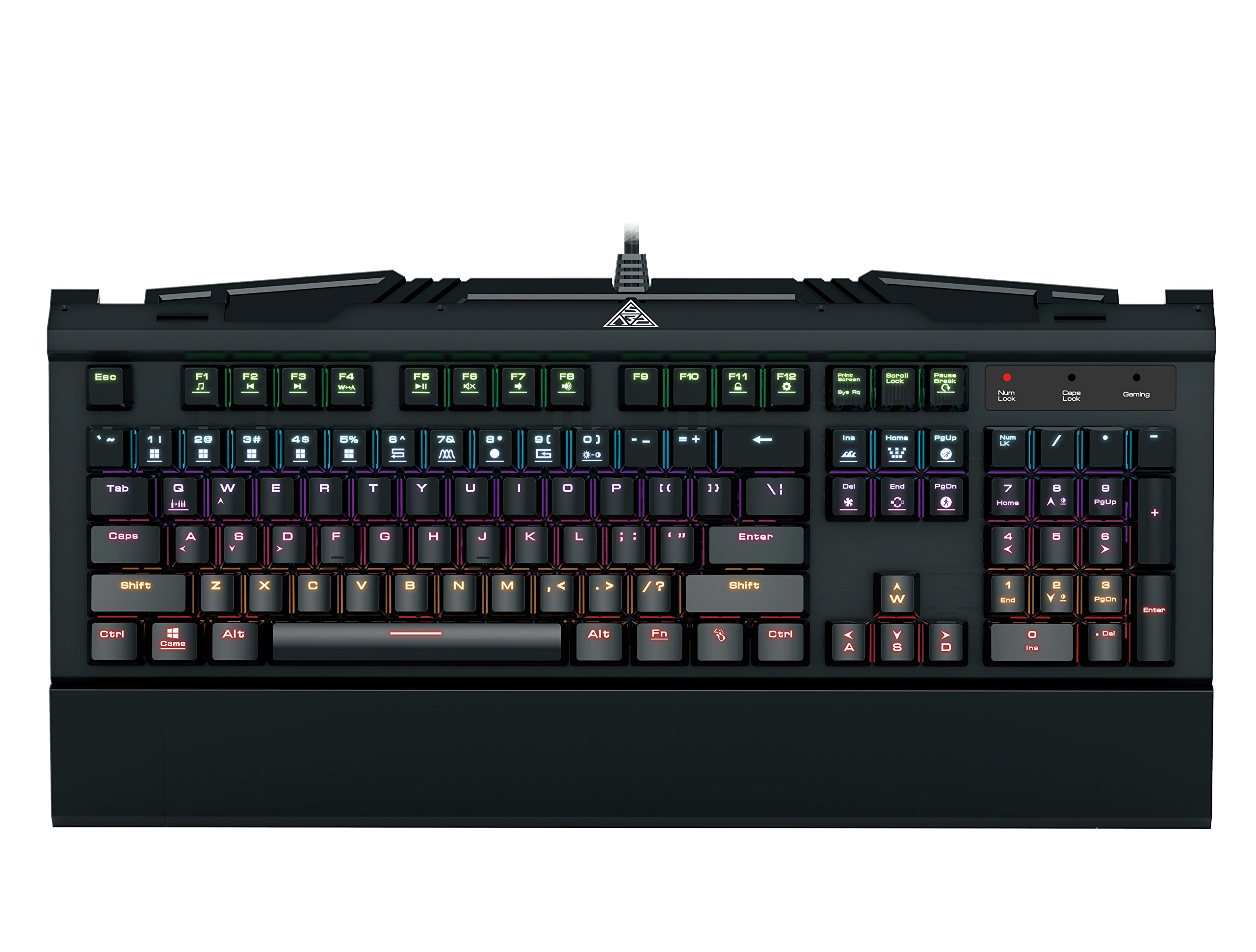
Image 1.1: The GAMDIAS Hermes GKB3000 Mechanical Gaming Keyboard. This image displays the full keyboard with its key layout and design, highlighting its compact yet robust build.
2. Contido do paquete
Ao desembalar, comproba o contido do paquete para asegurarte de que todos os artigos estean presentes e non estean danados.
- GAMDIAS Hermes GKB3000 Mechanical Gaming Keyboard
- Manual de usuario (este documento)
3. Configuración
Follow these steps to set up your GAMDIAS Hermes GKB3000 keyboard:
- Descomprimir o teclado: Retire con coidado o teclado da súa embalaxe.
- Conectar ao ordenador: Plug the USB-A connector of the keyboard cable into an available USB port on your computer.
- Instalación de controladores: The keyboard is plug-and-play. Your operating system (e.g., Windows) will automatically detect and install the necessary drivers. No additional software installation is typically required for basic functionality.
- Colocación: Place the keyboard on a stable, flat surface for comfortable use.
4. Instrucións de funcionamento
4.1. Efectos de iluminación
The Hermes GKB3000 features a 7-color spectrum backlight with 14 sets of lighting effects. These include 9 preset effects and 5 customizable patterns.
- Efectos de conmutación: Use the dedicated function keys (often combined with the Fn key) to cycle through the preset lighting effects. Refer to the keyboard's keycap legends for specific combinations.
- Customizing Effects: The keyboard supports 5 customizable lighting patterns. Instructions for programming these patterns are typically found in the full software suite available for download from the GAMDIAS website, if applicable.
- Axuste de brillo: Adjust backlight brightness using designated function key combinations.
4.2. Multimedia Control Keys
Access multimedia functions quickly using the dedicated multimedia control keys, often activated by holding the Fn key in combination with the F-keys (F1-F12).
- Control de volume: Aumentar, diminuír ou silenciar o audio.
- Reprodución multimedia: Reproducir/pausar, parar, pista anterior, pista seguinte.
- Outras funcións: May include opening default browser, email client, or calculator.
4.3. Special Gaming Functions
- WASD-Arrow Key Swap: This feature allows you to swap the functionality of the WASD keys with the arrow keys. This is useful for certain games or user preferences. Activate this function using a specific Fn key combination (e.g., Fn + W).
- Consecutive Attack Mode: This mode enhances rapid key input for gaming. Refer to the keyboard's specific documentation or GAMDIAS software for activation and configuration details.
- Bloqueo do teclado: Temporarily disable the keyboard input to prevent accidental presses. Activate using a Fn combinación de teclas.
- Windows Key Disable: Prevent accidental presses of the Windows key during gaming, which can minimize your game. Activate using a Fn key combination (e.g., Fn + Win key).
- Rollover de tecla N: The GKB3000 supports N-key rollover, meaning multiple keys can be pressed simultaneously without ghosting or missed inputs. This ensures accurate and responsive commands during intense gaming sessions.
5. Mantemento
Un mantemento axeitado garante a lonxevidade e o rendemento óptimo do teu teclado.
- Limpeza:
- Desconecte o teclado do ordenador antes de limpalo.
- Use un pano suave e sen pelusa lixeiramente dampenxugado con auga ou unha solución de limpeza suave para limpar a superficie.
- Para o po e os residuos entre as teclas, use aire comprimido.
- Evite o uso de produtos químicos agresivos, produtos de limpeza abrasivos ou solventes.
- Almacenamento: Garde o teclado nun lugar fresco e seco, lonxe da luz solar directa e de temperaturas extremas, cando non o use durante períodos prolongados.
- Manexo: Avoid dropping the keyboard or exposing it to excessive force, as this can damage the mechanical switches or internal components.
6 Solución de problemas
If you encounter issues with your GAMDIAS Hermes GKB3000 keyboard, refer to the following common solutions:
| Problema | Posible Solución |
|---|---|
| O teclado non responde. |
|
| Backlight is not working or is dim. |
|
| Certas teclas non funcionan. |
|
| WASD keys are acting as arrow keys. |
|
If the problem persists after trying these solutions, please contact GAMDIAS customer support for further assistance.
7. Especificacións
The following are the technical specifications for the GAMDIAS Hermes GKB3000 Mechanical Gaming Keyboard:
| Característica | Detalle |
|---|---|
| Marca | GAMDIAS |
| Número de modelo | GKB3000 |
| Tipo de cambio | GAMDIAS Certified Mechanical Blue Switches |
| Actuation Lifecycle | 50 millóns de pulsacións |
| Retroiluminación | 7-Color Spectrum, 14 Lighting Effects (9 preset, 5 customizable) |
| Anti-Ghosting | Rollover de tecla N |
| Conectividade | USB-A |
| Sistema Operativo | Windows |
| Peso do elemento | 2.42 libras (aprox. 1.1 kg) |
| Dimensións do produto (LxWxH) | 18.8 x 10.5 x 2 polgadas (aprox. 47.75 x 26.67 x 5.08 cm) |
| Material | Plastic with Elegant Metal Plate Design |
8. Garantía e soporte
GAMDIAS products are manufactured to the highest quality standards. For information regarding warranty coverage, terms, and conditions, please refer to the warranty card included with your product or visit the official GAMDIAS websitio.
For technical support, troubleshooting assistance, or any product-related inquiries, please contact GAMDIAS customer support through their official websitio web ou a información de contacto que se inclúe na embalaxe do produto.
Oficial de GAMDIAS Websitio: www.gamdias.com