
1. Introdución
This manual provides detailed instructions for the installation, operation, and maintenance of your Thomson 512331 720p WiFi IP Camera. This wireless security camera features 720p HD resolution, advanced night vision, motion detection, and remote viewing capabilities via a smartphone or tablet application. Designed for outdoor use, it boasts an IP66 weather-resistant rating and a durable metal construction.
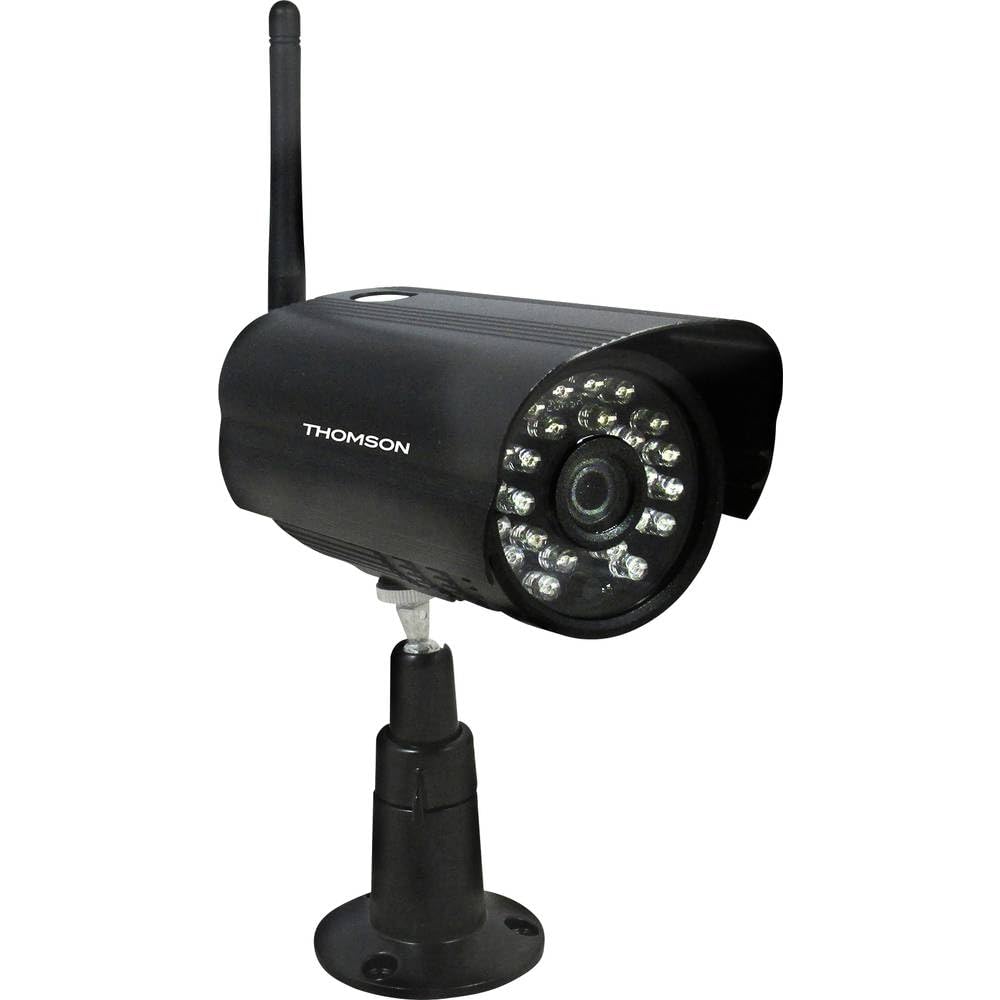
Figura 1: Fronte view of the Thomson 512331 720p WiFi IP Camera. This image shows the camera's main body, lens, and antenna connection point, highlighting its compact and robust design suitable for outdoor surveillance.
2. Contido do paquete
Please verify that all items listed below are included in your package. If any items are missing or damaged, contact customer support.
- Thomson 512331 IP Camera
- Power Adapter (230VAC/12VDC 500mA)
- Antena WiFi
- Kit de montaxe (parafusos e tacos)
- Manual de usuario (este documento)
3. Produto rematadoview
The Thomson 512331 camera is designed for reliable surveillance with the following key features:
- Lente: 3.6mm fixed lens for a wide field of view.
- Resolución: 1280x720 (720p) HD video capture.
- Visión nocturna: Infrared night vision with 24 LEDs, providing a range of up to 20 meters. Features color night vision capability.
- Audio: Integrated microphone for audio acquisition.
- Conectividade: Wireless Wi-Fi connectivity for flexible placement.
- Resistencia á intemperie: IP66 rated for outdoor use, protecting against dust and powerful water jets.
- Material: Durable metal housing.
- Potencia: 12VDC 500mA power input, maximum consumption 5W.
- Compresión de vídeo: H.264 for efficient storage and streaming.
- Almacenamento: Supports SD card for local storage (SD card not included).
4. Configuración
4.1 Instalación física
- Escolle unha localización: Select a suitable outdoor location for the camera, ensuring it has a clear view da área que desexas vixiar e que estea dentro do alcance da túa rede Wi-Fi.
- Montar a cámara: Use the provided mounting kit to securely attach the camera to a wall or other stable surface. Drill pilot holes if necessary, insert wall plugs, and fasten the camera bracket with screws.
- Attach WiFi Antenna: Screw the WiFi antenna firmly onto the designated port on the camera.
- Conectar enerxía: Connect the power adapter to the camera's 12VDC input port and plug the adapter into a suitable power outlet. Ensure the power outlet is protected from weather if installed outdoors.
4.2 Network Configuration and App Setup
- Descarga a aplicación: Busca the official Thomson IP Camera application on your smartphone's or tablet's app store (iOS or Android). Download and install the application.
- Crear unha conta: Abre a aplicación e segue as instrucións que aparecen na pantalla para crear unha nova conta de usuario ou iniciar sesión se xa tes unha.
- Engadir cámara: In the app, select the option to "Add Device" or "Add Camera." Follow the in-app wizard to connect your camera to your Wi-Fi network. This typically involves scanning a QR code on the camera or entering your Wi-Fi credentials.
- Configurar axustes: Once connected, you can configure various settings such as motion detection sensitivity, recording schedules, and alert notifications within the app.
5. Instrucións de funcionamento
5.1 En directo View
Open the Thomson IP Camera app on your smartphone or tablet. Select your camera from the device list to view the live video feed. You can typically switch between standard and HD resolution, and access controls for audio and recording.
5.2 Detección de movemento e alertas
The camera is equipped with motion detection. When motion is detected, the camera can trigger recordings and send push notifications to your connected device. Adjust motion detection sensitivity and alert preferences in the app's settings.
5.3 Visión nocturna
The camera automatically switches to infrared night vision in low-light conditions, providing clear black and white video. It also supports color night vision in certain conditions. The 24 built-in IR LEDs illuminate up to 20 meters.
5.4 Gravación e reprodución
If an SD card is installed (not included), the camera can record video locally. Recordings can be triggered by motion or set on a schedule. Access recorded footage a través da función de reprodución da aplicación.
6. Mantemento
- Limpeza: Limpe periodicamente a lente e a carcasa da cámara cun pano suave eamp un pano para eliminar o po e a sucidade. Non empregue produtos químicos agresivos nin produtos de limpeza abrasivos.
- Actualizacións de firmware: Check the app regularly for firmware updates. Keeping your camera's firmware up-to-date ensures optimal performance and security.
- Fonte de alimentación: Asegúrate de que o adaptador de corrente e o cable estean en bo estado e sen danos.
- Conexión Wi-Fi: Verify your Wi-Fi signal strength periodically to ensure a stable connection for continuous surveillance.
7 Solución de problemas
- A cámara non se conecta á wifi:
- Asegúrate de que a cámara estea dentro do alcance do teu enrutador Wi-Fi.
- Verifica que o contrasinal da wifi estea introducido correctamente na aplicación.
- Reinicia o teu enrutador e a cámara.
- Ensure your Wi-Fi network is 2.4GHz, as 5GHz networks may not be supported.
- Sen fonte de vídeo:
- Comprobe se a cámara está acendida.
- Confirm a stable internet connection on both the camera and your viewdispositivo de ing.
- Reinicia a cámara e a aplicación.
- A detección de movemento non funciona:
- Check motion detection settings in the app; ensure it is enabled and sensitivity is adjusted correctly.
- Asegúrate de que non haxa obstáculos que bloqueen a cámara view.
- Mala calidade de visión nocturna:
- Limpa a lente da cámara para eliminar calquera sucidade ou manchas.
- Ensure there are no reflective surfaces close to the camera that might interfere with IR illumination.
8. Especificacións
| Nome do modelo | 512331 |
| Marca | Thomson |
| Dimensións (L x W x H) | 50 x 50 x 28 cm |
| Peso | 500 gramos |
| Tecnoloxía de conectividade | Sen fíos, Wi-Fi |
| Característica especial | Visión Nocturna |
| Dispositivos compatibles | Tablet, Smartphone |
| Fonte de enerxía | AC Power (12VDC 500mA adapter) |
| Tipo de controlador | iOS (via application) |
| Tipo de montaxe | Soporte de parede |
| Características do produto | Night Vision, Motion Detection |
| Material | Metal |
| Nivel de resistencia á auga | IP66 (Impermeable) |
| Tipo de alerta | Motion only |
| Tipo de fonte de luz | LED |
| Método de control | Aplicación |
| Consumo de enerxía | 5 vatios |
| Pilas necesarias | Non |
| Número de canles | 1 |
| Tipo de foco | Enfoque automático |
| Tecnoloxía de sensores ópticos | CMOS BSI |
| Resolución de vídeo | 720p (1280 x 720 píxeles) |
| Range de visión nocturna | 20 metros |
| Tipo de visión nocturna | Infrared with Color Night Vision capability |
| Tipo de memoria flash | SD (for local storage) |
9. Garantía e soporte
For warranty information and technical support, please refer to the documentation provided with your purchase or visit the official Thomson websitio. Garda o comprobante de compra para reclamacións de garantía.
Recursos en liña: www.thomson.eu