
Introdución
Grazas pola compraasing the QUMOX L165U 2.4GHz Wireless Gamepad. This high-quality game controller is designed for use with PC and Android devices, offering a reliable 2.4GHz wireless connection for an enhanced gaming experience. Please read this manual carefully to ensure proper setup and operation of your new gamepad.

Figure 1: QUMOX L165U Gamepad with included USB adapter and OTG connection kit.
Contido do paquete
Asegúrate de que todos os elementos estean presentes no teu paquete:
- 1x QUMOX L165U Gamepad
- 1x 2.4GHz USB Wireless Adapter
- 1x OTG Connection Kit (Micro USB to USB-A adapter)
Configuración
1. Instalación da batería
The QUMOX L165U Gamepad is powered by 2 AAA batteries (not included). To install the batteries:
- Localiza o compartimento da batería na parte traseira do gamepad.
- Deslice para abrir a tapa da batería.
- Introduza 2 pilas AAA, asegurándose de manter a polaridade correcta (+/-).
- Pecha a tapa da batería de forma segura.

Figure 2: Open battery compartment for AAA battery installation.
2. Conectando a un PC
- Plug the 2.4GHz USB Wireless Adapter into an available USB port on your PC.
- Turn on the gamepad by pressing the 'START' button. The gamepad will automatically attempt to connect.
- The PC should recognize the gamepad and install necessary drivers automatically.
- If the gamepad does not connect, press the 'MODE' button on the gamepad to cycle through connection modes until it is recognized by your PC.
3. Connecting to an Android Device (with OTG support)
- Connect the OTG Connection Kit to your Android device's Micro USB port.
- Plug the 2.4GHz USB Wireless Adapter into the USB-A end of the OTG Connection Kit.
- Turn on the gamepad by pressing the 'START' button. The gamepad will automatically attempt to connect.
- Your Android device should recognize the gamepad.
- If the gamepad does not connect, press the 'MODE' button on the gamepad to cycle through connection modes until it is recognized by your Android device.
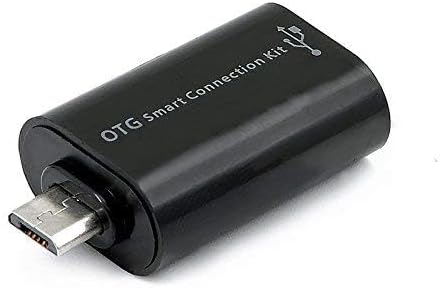
Figure 3: OTG Connection Kit for Android device connectivity.
Instrucións de funcionamento
Once connected, your QUMOX L165U Gamepad is ready for use. The layout is standard for most game controllers.
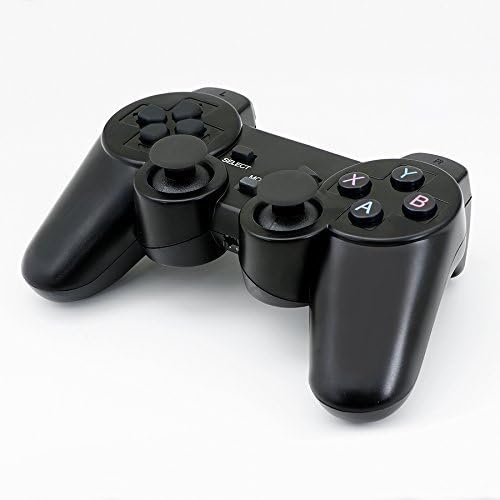
Figura 4: Arriba view of the QUMOX L165U Gamepad, highlighting button layout.
- Pad direccional (D-Pad): Para unha entrada direccional precisa.
- Joysticks analóxicos: Two analog sticks for 360-degree movement and camera control.
- Botóns de acción (A, B, X, Y): Botóns de acción estándar para comandos dentro do xogo.
- Botóns de ombreiro (L1, R1) e gatillos (L2, R2): Located on the top of the gamepad for additional actions.
- SELECT/BACK Button: Normalmente úsase para a navegación por menús ou para funcións específicas do xogo.
- Botón INICIO: Used to pause games or confirm selections.
- Botón MODE: Cycles through different operating modes (e.g., Android, PC) if automatic detection fails.
Vídeo Demostración
Video 1: A seller-provided overview of a 2-pack wireless controller, demonstrating its features and compatibility. While showing a similar product, it illustrates general wireless controller usage and setup.
Mantemento
- Limpeza: Usa un pano suave e seco para limpar o gamepad. Evita o uso de produtos químicos agresivos ou materiais abrasivos.
- Almacenamento: Garda o gamepad nun lugar fresco e seco, lonxe da luz solar directa e de temperaturas extremas.
- Coidado da batería: Retire as pilas se non vai usar o gamepad durante un período prolongado para evitar fugas.
Resolución de problemas
| Problema | Causa posible | Solución |
|---|---|---|
| O gamepad non se conecta. | Low batteries, incorrect mode, adapter not properly inserted. | Replace batteries. Press the 'MODE' button to cycle through modes. Ensure USB adapter is fully inserted into PC or OTG adapter. |
| Os botóns ou os joysticks non responden. | Connection issue, game incompatibility, physical damage. | Reconnect the gamepad. Check game settings for controller support. If issue persists, contact support. |
| Android device does not recognize gamepad. | Android device lacks OTG support, OTG adapter issue. | Verify your Android device supports OTG. Ensure OTG adapter is functioning correctly. |
Especificacións
| Característica | Detalle |
|---|---|
| Número de modelo | L165U |
| Tecnoloxía de conectividade | 2.4GHz Wireless (via USB Adapter) |
| Dispositivos compatibles | PC, Android (with OTG support) |
| Fonte de enerxía | 2 pilas AAA |
| Peso do elemento | 5.3 onzas |
| Dimensións do paquete | 8.07 x 5.63 x 2.95 polgadas |
| Cor | Negro |
Garantía e Soporte
For warranty information or technical support, please refer to the contact details provided with your purchase or visit the official QUMOX websitio. Garda o comprobante de compra para calquera reclamación de garantía.