
1. Introdución
The Amkette Trubeats S50 is a versatile smart wireless Bluetooth speaker designed to enhance your audio experience. It features multiple connectivity options including Bluetooth, USB, Micro SD card, and AUX input, along with an integrated FM radio. The speaker also includes a digital clock with alarm functions and can be controlled via a dedicated smartphone application. Additionally, it can function as a power bank to charge your mobile devices.
2. Contido do paquete
Marque a caixa para os seguintes elementos:
- Amkette Trubeats S50 Smart Wireless Bluetooth Speaker
- Cable de carga USB
- Cable AUX
- Manual de usuario (este documento)
3. Produto rematadoview
Familiarize yourself with the various parts and controls of your Amkette Trubeats S50 speaker.
3.1 Fronte View

Figura 1: Fronte view of the Amkette Trubeats S50 speaker, showing the speaker grille and LED display.
3.2 Panel de control superior

Figure 2: Labeled diagram of the Amkette Trubeats S50 speaker's top control buttons: Mode, Volume Down/Previous, Play/Pause/Answer Call, Volume Up/Next, Clock, and Microphone.
- Botón MODE: Press to switch between Bluetooth, FM, AUX, USB, and Micro SD modes.
- K-/ Button: Press to decrease volume; long press for previous track/station.
- Play/Pause/Answer Call Button: Press to play/pause audio; press to answer/end calls.
- +/N Button: Press to increase volume; long press for next track/station.
- Botón RELOXO: Press to set time and alarms.
- Micrófono: Para chamadas mans libres.
3.3 Rear Ports and Switch

Figure 3: Labeled diagram of the Amkette Trubeats S50 speaker's rear ports: AUX, Micro SD, USB Host, USB DC, and On/Off switch.
- Entrada AUX: Connect external audio devices using the 3.5mm AUX cable.
- Ranura para tarxeta Micro SD: Insira unha tarxeta Micro SD para reproducir audio.
- Porto de host USB: Insert a USB drive for audio playback or use as a power bank.
- USB DC Input: Connect the USB charging cable to power the speaker.
- Interruptor ON / OFF: Acende ou apaga o altofalante.
4. Configuración
4.1 Carga do altofalante
- Connect the small end of the USB charging cable to the USB DC Input port on the rear of the speaker.
- Conecta o extremo grande do cable de carga USB a un adaptador de corrente USB (non incluído) ou ao porto USB dun ordenador.
- O indicador LED mostrará o estado de carga. Unha carga completa adoita tardar aproximadamente 4 horas.
Nota: The speaker does not have a visible battery level indicator. It is recommended to charge fully before first use and when the battery is low.
4.2 Acendido/Apagado
- Para acender, deslice o botón Interruptor ON/OFF on the rear of the speaker to the 'ON' position.
- Para apagar, deslice o botón Interruptor ON/OFF á posición "APAGADO".
5. Instrucións de funcionamento
5.1 Emparejamento Bluetooth

Figure 4: Speaker in Bluetooth pairing mode, indicated by 'BT' on the display.
- Power on the speaker. It will automatically enter Bluetooth pairing mode, indicated by 'BT' flashing on the LED display.
- Activa o Bluetooth no teu smartphone ou outro dispositivo.
- Busca available devices and select "Amkette S50" from the list.
- Once paired, the speaker will emit a confirmation tone, and 'BT' will stop flashing.
- Agora podes reproducir audio desde o teu dispositivo a través do altofalante.
5.2 Uso da entrada AUX

Figure 5: Speaker connected to a smartphone via AUX cable for wired audio playback.
- Conecte un extremo do cable AUX de 3.5 mm ao Entrada AUX port on the rear of the speaker.
- Connect the other end of the AUX cable to the audio output jack of your external device (e.g., smartphone, MP3 player, laptop).
- Preme o Botón MODE repeatedly until the speaker enters AUX mode.
- Reproduce audio desde o teu dispositivo conectado.
5.3 Using USB/Micro SD Card
- Insira unha unidade USB no Porto de host USB or a Micro SD card into the Ranura para tarxetas Micro SD na parte traseira do altofalante.
- Asegura o teu audio files (MP3 format recommended) are stored on the drive/card.
- Preme o Botón MODE repeatedly until the speaker enters USB or Micro SD mode. Playback will begin automatically.
- Usa o K-/ e +/N botóns para a navegación polas pistas e o control do volume.
5.4 Funcionamento da radio FM

Figure 6: Speaker displaying FM frequency, with app control for station selection.
- Preme o Botón MODE repeatedly until the speaker enters FM radio mode.
- Escaneo automático: No modo FM, prema e manteña pulsado o botón Reproducir/Pausa para iniciar unha busca automática de emisoras de FM dispoñibles. O altofalante gardará as emisoras detectadas.
- Sintonización manual: Usa o K-/ e +/N botóns para navegar polas estacións gardadas.
- For precise tuning and station management, use the Amkette Trubeats Smart Speaker App (see section 5.7).
5.5 Digital Clock and Alarm Setup

Figure 7: Speaker displaying the current time on its LED screen.
- Tempo de configuración: Manteña premido o Botón CLOCK. The hour display will flash. Use the K-/ e +/N botóns para axustar a hora. Prema o botón Botón CLOCK again to set minutes, and adjust with K-/ e +/N. Preme Botón CLOCK unha vez máis para confirmar.
- Configuración de alarmas: Prema brevemente o Botón CLOCK to cycle through Alarm 1 and Alarm 2 settings. When an alarm time is displayed, long press the Botón CLOCK to enter alarm setting mode. Adjust hour and minute using K-/ e +/N, confirming each with a short press of the Botón CLOCK. You can also set the alarm source (FM/SD Card/USB) via the app.
5.6 Uso como batería externa
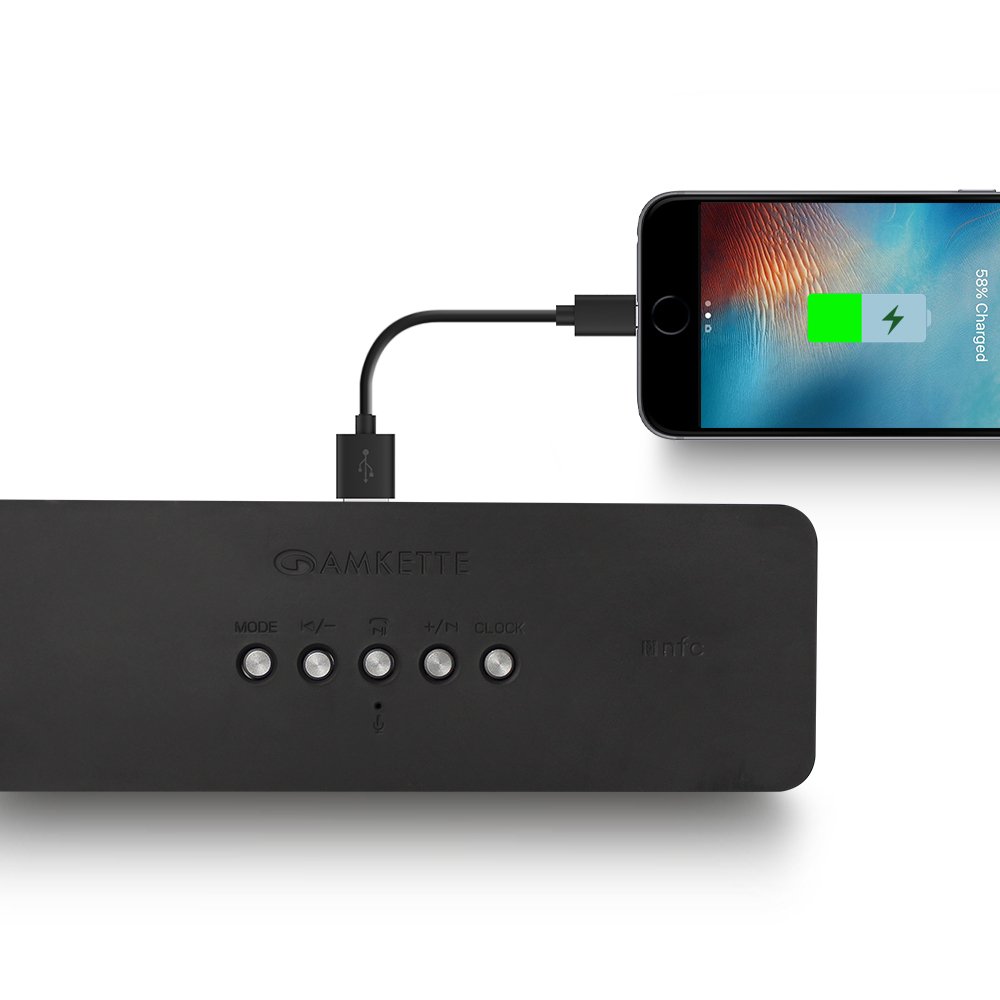
Figure 8: Speaker providing power to a smartphone through its USB Host port.
The Amkette Trubeats S50 can charge your smartphone or other USB-powered devices. Connect your device's charging cable to the Porto de host USB on the rear of the speaker. The speaker's internal battery will then supply power to your device.
5.7 App Control (Android Only)

Figure 9: Smartphone displaying the Amkette Trubeats Smart Speaker App interface.
For enhanced control, download the Amkette Trubeats Smart Speaker App from the Google Play Store (for Android phones). The app allows you to:
- Cambiar entre diferentes modos de son.
- Control volume and track playback.
- Manage FM radio stations and perform precise tuning.
- Set and customize alarms, including alarm source.
Ensure your speaker is connected via Bluetooth to your smartphone for app functionality.
5.8 Xestión de chamadas
When connected via Bluetooth to a smartphone, the speaker can be used for hands-free calling:
- Responder chamada: Preme o Play/Pause/Answer Call Button unha vez.
- Finalizar a chamada: Preme o Play/Pause/Answer Call Button unha vez durante unha chamada.
- Rexeitar a chamada: Mantén presionado Play/Pause/Answer Call Button.
6. Mantemento
- Keep the speaker away from extreme temperatures, direct sunlight, and moisture.
- Limpa o altofalante cun pano suave e seco. Non empregues produtos de limpeza abrasivos nin disolventes.
- Evite deixar caer o altofalante ou sometelo a impactos fortes.
- Cando non o use durante períodos prolongados, gárdeo nun lugar fresco e seco e cárgueo periodicamente para manter a batería en bo estado.
7 Solución de problemas
| Problema | Causa posible | Solución |
|---|---|---|
| O altofalante non se acende. | A batería está esgotada. | Cargue o altofalante completamente. |
| Non se escoita son do altofalante. | O volume é demasiado baixo; seleccionouse o modo incorrecto; o dispositivo non está conectado correctamente. | Increase speaker and source device volume. Ensure correct mode (Bluetooth, AUX, etc.) is selected. Reconnect the device. |
| Falla o emparellamento Bluetooth. | O altofalante non está en modo de emparellamento; o dispositivo está demasiado lonxe; interferencias. | Ensure speaker is in pairing mode ('BT' flashing). Move device closer to speaker. Turn off other Bluetooth devices. |
| Mala recepción de radio FM. | Sinal débil; interferencias ambientais. | Recoloque o altofalante nunha zona con mellor recepción. Realice unha busca automática de novo. |
| App not connecting to speaker. | Bluetooth not connected; app issue. | Ensure speaker is paired via Bluetooth to your phone. Restart the app and try again. |
8. Especificacións
- Modelo: S50
- Marca: Amkette
- Tipo de altofalante: Portable Bluetooth Speaker (Outdoor)
- Conectividade: Bluetooth, USB, Micro SD, AUX, FM Radio
- Tecnoloxía de comunicación sen fíos: Bluetooth
- Método de control: Buttons, App (Android)
- Modo de saída de audio: Estéreo
- Audio Wattage: 10 vatios
- Fonte de enerxía: Alimentado por batería
- Duración da batería: Ata 12 horas (media)
- Tempo de carga: Aproximadamente 4 horas
- Dispositivos compatibles: Laptop, Mobile, Tablet
- Dimensións (LxWxH): 26.7 x 10.9 x 7.9 cm
- Peso do artigo: 703 gramos
- Impermeable: Si
- Tipo de montaxe: Soporte de mesa
9. Garantía e soporte
The Amkette Trubeats S50 Smart Wireless Bluetooth Speaker comes with a 1 ano de garantía desde a data de compra. Esta garantía cobre defectos de fabricación en condicións de uso normal.
For warranty claims, technical assistance, or any other support inquiries, please contact Amkette customer support through their official websitio web ou a información de contacto proporcionada coa documentación da compra.
Conserve o recibo de compra como comprobante de compra para efectos de garantía.