
Motorola MBP483
Manual do usuario do monitor de bebé con vídeo Motorola MBP483 de 2.8 polgadas
Modelo: MBP483
1. Introdución
The Motorola MBP483 2.8-inch Video Baby Monitor is designed to provide parents with a clear view and audio monitoring of their child. This manual provides essential information for setting up, operating, and maintaining your baby monitor.
Características do produto
- 2.8-inch Diagonal Color Screen
- Funcionalidade de zoom dixital
- Comunicación bidireccional
- Visualización da temperatura ambiente
- Visión nocturna por infravermellos
- Micrófono de alta sensibilidade
- Wireless Technology: 2.4 GHz FHSS
- Up to 1000ft Range with Out-of-Range Alert
- Includes 5 Lullabies
- LED Sound Level Indicator
- Rechargeable Battery with Low Battery Alert on the Parent Unit
O que hai na caixa
- Unidade de pais (monitor)
- Unidade para bebés (cámara)
- Adaptador de corrente para a unidade parental
- Adaptador de corrente para a unidade do bebé
- Guía de inicio rápido (este documento serve como guía completa)

The Motorola MBP483 system includes a baby unit (camera) and a parent unit (monitor) for comprehensive baby monitoring.
2. Instrucións de seguridade importantes
AVISO: Risco de estrangulamento
- Keep all cords out of reach of children (at least 3 feet / 1 meter away). Never place the camera or cords within a crib or playpen.
- Do not place the baby unit or parent unit where a child could reach them.
AVISO: Risco de asfixia
- Este produto contén pezas pequenas. Manter fóra do alcance dos nenos.
Seguridade Xeral
- Do not expose the product to water or moisture. Do not use near bathtubs, sinks, laundry tubs, swimming pools, or wet basements.
- Non coloque o produto preto de fontes de calor como radiadores, rexistros de calor, cociñas ou outros aparellos que produzan calor.
- Asegúrese de que haxa unha ventilación axeitada. Non bloquee ningunha das aberturas de ventilación.
- Use only the AC adapters provided. Using other adapters may damage the device and void your warranty.
- The parent unit contains a rechargeable battery. Do not attempt to replace it yourself. Dispose of batteries properly. Do not expose batteries to excessive heat.
- Limpar só cun pano seco.
3. Configuración
3.1 Desembalaxe e carga inicial
- Desembale con coidado todos os compoñentes da caixa.
- Connect the power adapter to the Parent Unit and plug it into an electrical outlet. Charge the Parent Unit for at least 16 hours before first use to ensure optimal battery performance.
- Connect the power adapter to the Baby Unit and plug it into an electrical outlet.
3.2 Colocación da unidade do bebé (cámara)
Place the Baby Unit on a flat surface in your baby's room, such as a dresser or shelf. Ensure the camera provides a clear view of your baby's crib or sleeping area. Keep the Baby Unit and its cord at least 3 feet (1 meter) away from the crib.

Proper placement of the baby unit ensures a clear view of your child in their crib.
3.3 Acendido das unidades
- To power on the Baby Unit, slide the ON/OFF switch located on the side of the unit to the 'ON' position.
- To power on the Parent Unit, press and hold the Power button until the screen illuminates.

The baby unit features an ON/OFF switch for easy power control.
3.4 Pairing (Automatic)
The Baby Unit and Parent Unit are pre-paired at the factory. If you experience connection issues or need to add additional cameras (up to 4 total), refer to the 'Troubleshooting' section for manual pairing instructions.
4. Funcionamento do monitor
4.1 Parent Unit Display and Controls
The Parent Unit features a 2.8-inch color screen and intuitive controls for managing the monitor's functions.
4.2 Zoom dixital
To zoom in on the video feed, press the 'Zoom' button (often represented by a magnifying glass icon) on the Parent Unit. Press again to zoom out or return to the normal view.
4.3 Comunicación bidireccional
To speak to your baby through the Baby Unit, press and hold the 'Talk' button (microphone icon) on the Parent Unit. Release the button to hear your baby again.
4.4 Visión nocturna por infravermellos
The Baby Unit automatically activates infrared night vision in low-light conditions, providing a clear black and white image on the Parent Unit display.
4.5 Room Temperature Display
The Parent Unit displays the room temperature detected by the Baby Unit, allowing you to ensure your baby's room is comfortable.
4.6 Cantos de berce
The monitor includes 5 pre-programmed lullabies. Refer to the Parent Unit's menu options to select and play lullabies. You can usually control playback (play/pause/skip) from the Parent Unit.
4.7 Alertas
- Alerta de fóra de alcance: The Parent Unit will notify you if it loses connection with the Baby Unit, indicating you are too far away or there is interference.
- Alerta de batería baixa: The Parent Unit will display an icon or message when its battery level is low, prompting you to recharge it.
4.8 LED Sound Level Indicator
The LED lights on the Parent Unit indicate the sound level detected by the Baby Unit, providing a visual cue even when the volume is low or muted.
Rematadas as características do produtoview
Este vídeo ofrece unha visión xeralview of the Motorola MBP483 Video Baby Monitor's key features, including the 2.8-inch color screen, room temperature display, lullabies, high sensitivity microphone, out-of-range alerts, digital zoom, two-way communication, and infrared night vision.
5. Mantemento
5.1 Limpeza das unidades
- Ensure both units are powered off and unplugged before cleaning.
- Use a soft, dry, lint-free cloth to clean the surfaces of the Baby Unit and Parent Unit.
- Non use sprays de limpeza nin produtos de limpeza líquidos.
5.2 Coidado coa batería
- The Parent Unit uses a rechargeable battery. For optimal battery life, fully charge the unit before initial use.
- Evite expor a batería a temperaturas extremas.
- If the monitor will not be used for an extended period, store it with a partially charged battery in a cool, dry place.
6 Solución de problemas
| Problema | Solución |
|---|---|
| Sen imaxe/son na unidade parental | Ensure both units are powered on and connected to power. Check if the Parent Unit battery is charged. Move the Parent Unit closer to the Baby Unit. |
| Mala calidade de imaxe | Ensure there are no obstructions between the Baby Unit and Parent Unit. Adjust the Baby Unit's position for better lighting. |
| Out-of-Range alert | Move the Parent Unit closer to the Baby Unit. Ensure there are no large metal objects or other electronic devices causing interference. The maximum range is up to 1000ft in an open field, but indoor range will be less due to walls and obstacles. |
| A batería da unidade parental descárgase rapidamente | Ensure the Parent Unit was fully charged for 16 hours before first use. Reduce screen brightness. Turn off the screen when not actively viewing. Battery life is approximately 8 hours. |
| Interference (static, buzzing) | Move the monitor away from other electronic devices (e.g., Wi-Fi routers, cordless phones, microwaves). |
| Non se poden emparellar cámaras adicionais | Refer to the Parent Unit's menu for 'Add Camera' or 'Pairing' options. Follow the on-screen instructions to initiate pairing. Ensure the new camera is powered on and within range during the pairing process. |
7. Especificacións
- Modelo: MBP483
- Tecnoloxía sen fíos: 2.4 GHz FHSS
- Tamaño da pantalla: 2.8 polgadas de diagonal
- Resolución de captura de vídeo: 720 p
- Rango: Ata 1000 pés (línea de visión)
- Fonte de enerxía: Alimentado por batería (unidade parental), adaptador de CA (unidade para bebés)
- Parent Unit Battery Life: Aproximadamente 8 horas
- Dimensións (unidade principal): 2.62 x 4.85 x 1.15 polgadas
- Peso do artigo: 4 onzas
- Características especiais: Digital Zoom, Two-Way Audio, Room Temperature Display, Infrared Night Vision, Lullabies, LED Sound Level Indicator
- Protocolo de conectividade: Wi-Fi (for internal communication, not external internet)
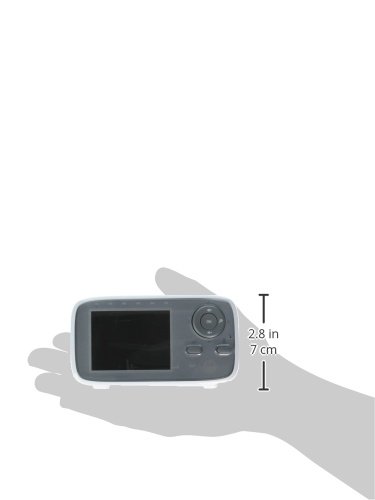
The parent unit is designed for portability, fitting comfortably in hand.
8. Garantía e soporte
Motorola products are designed for reliability and performance. For warranty information or technical support, please refer to the warranty card included with your product or visit the official Motorola support websitio. Garde o recibo da compra como xustificante da mesma.
For further assistance, you may visit the Motorola support page: www.motorola.com/us/support