
Introdución
This manual provides comprehensive instructions for the safe installation, operation, and maintenance of your Insignia Full Motion TV Wall Mount, model NS-HTVMM1702-C. This mount is designed to securely hold televisions with screen sizes ranging from 33 to 46 inches. Please read this manual thoroughly before installation and retain it for future reference.
Información importante de seguridade
Improper installation or use of this product can result in serious injury or damage. Always follow these safety guidelines:
- Read all instructions before assembly and installation. If you do not understand the instructions or have any doubts, contact a qualified installer.
- Asegúrate de que a superficie de montaxe poida soportar con seguridade o peso combinado do soporte e do televisor.
- Do not exceed the maximum weight capacity of the mount. Refer to the specifications section for details.
- Empregue só o hardware subministrado ou especificado polo fabricante.
- Never install the mount into drywall alone. It must be secured to a solid wall stud or appropriate concrete/brick anchors.
- Manteña os nenos e as mascotas afastados durante a instalación.
- Comprobe periodicamente todas as conexións para asegurarse de que permanecen seguras.
Contido do paquete
Before beginning installation, ensure all parts are present and undamaged. While specific component names may vary, a typical package includes:
- Montaxe da placa de parede
- Soportes para TV (2 unidades)
- Kit de ferraxes (varios parafusos, arandelas, espazadores, ancoraxes)
- Manual de instrucións
If any parts are missing or damaged, do not proceed with installation. Contact customer support for assistance.
Configuración e instalación
Follow these steps carefully for a secure installation. Professional installation is recommended if you are unsure about any part of the process.
Step 1: Prepare the Wall Mount
Unpack all components. If the wall plate and articulating arm are separate, assemble them according to the diagrams provided in the included quick setup guide. Ensure all pivot points move freely.
This video demonstrates the general assembly and installation process for a full-motion TV wall mount, including attaching components and preparing for wall mounting.
Paso 2: Coloque os soportes ao televisor
Carefully place your television face down on a soft, clean surface. Attach the two vertical TV brackets to the back of your television using the appropriate screws and spacers from the hardware kit. Ensure the brackets are centered horizontally and vertically on the TV's VESA mounting holes. Do not overtighten screws.
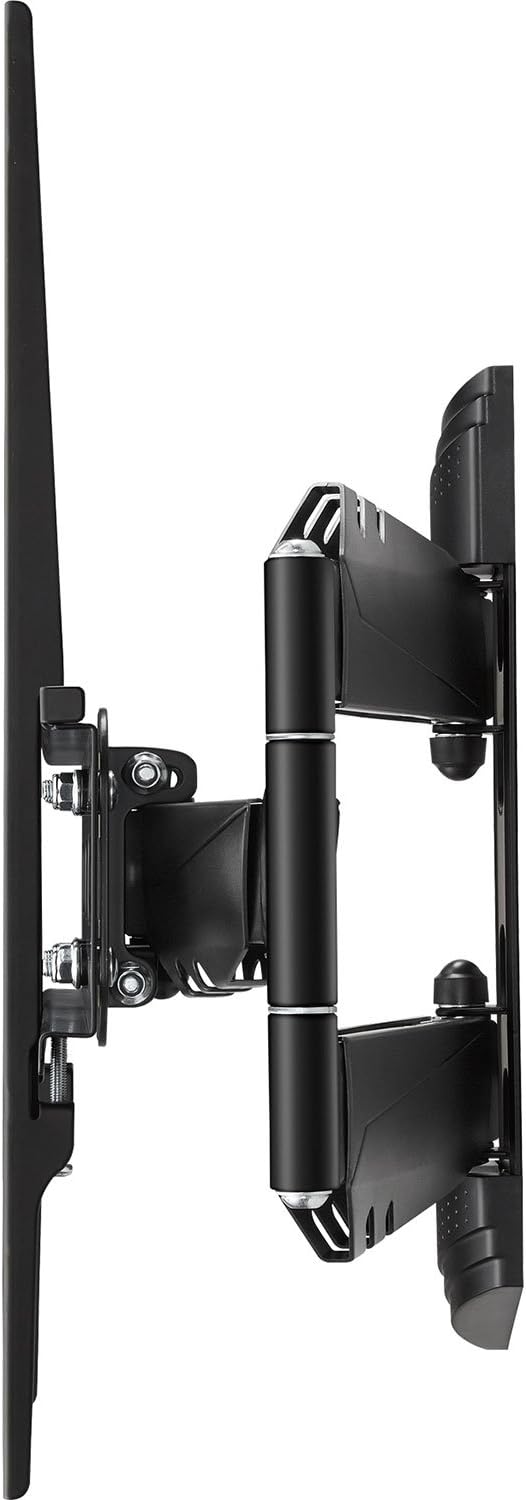
Esta imaxe mostra o lado profile of the Insignia full motion TV wall mount with the TV mounting brackets attached, illustrating the depth and articulation capability.
Paso 3: Montar a placa de parede na parede
Determine the desired height and location for your TV. Use a stud finder to locate the center of a wooden wall stud. Mark the drilling locations for the wall plate. Drill pilot holes and securely fasten the wall plate to the wall using the provided lag bolts. For concrete or brick walls, use appropriate concrete anchors and drill bits (not always included). Use a level to ensure the wall plate is perfectly horizontal before tightening all fasteners.

Esta imaxe mostra a parte dianteira view of the Insignia full motion TV wall mount, showing the wall plate and the articulating arm mechanism in a compact position.
Paso 4: Colgar a TV na placa de parede
With assistance, carefully lift the television (with the attached brackets) and hook the brackets onto the wall plate. Ensure the TV is securely seated. Engage any safety locking mechanisms on the brackets to prevent accidental dislodgement. Double-check all connections for security.

This image illustrates the Insignia full motion TV wall mount in an extended and angled position, demonstrating its articulating capabilities for flexible viewing.
Operating the TV Wall Mount
Your full-motion wall mount allows for flexible positioning of your television to achieve optimal viewing angles from various locations in a room.
- Axuste de inclinación: To adjust the vertical tilt of your TV, locate the tilt adjustment knobs or bolts on the TV brackets. Loosen them slightly, adjust the screen to your desired upward or downward angle, and then re-tighten securely.
- Axuste de xiro: To swivel the TV horizontally, gently push or pull the side of the television to rotate it left or right. The articulating arm will move smoothly.
- Extensión e retracción: To extend or retract the TV from the wall, gently pull the television forward or push it back towards the wall. The articulating arm will extend or fold as needed.
Always handle the TV carefully and with two hands when making adjustments. Avoid sudden movements.
Mantemento
Un mantemento regular garante a lonxevidade e o funcionamento seguro do soporte de parede para TV.
- Limpeza: Wipe the mount with a soft, dry cloth to remove dust. Avoid using abrasive cleaners, solvents, or harsh chemicals, as these can damage the finish.
- Inspección periódica: Every few months, visually inspect all mounting points, screws, and connections. Ensure all fasteners are tight and secure. Do not overtighten. Check for any signs of wear or damage to the mount components.
- Lubricación: The articulating joints are designed for smooth movement. If movement becomes stiff, a small amount of silicone-based lubricant can be applied to the pivot points, but this is rarely necessary.
Resolución de problemas
Se tes problemas co soporte de parede do teu televisor, consulta os seguintes problemas e solucións comúns:
- A televisión non está nivelada: Check the level of the wall plate and the TV brackets. Loosen the necessary fasteners, adjust, and re-tighten. Ensure the TV's VESA mounting holes are used correctly.
- A montura parece solta ou inestable: Immediately remove the TV from the mount. Re-check all wall mounting screws and TV bracket screws to ensure they are securely tightened. Verify that the wall structure is adequate and that the mount's weight capacity has not been exceeded.
- Difficulty adjusting TV position (tilt, swivel, extension): Check for any obstructions. Ensure that tilt adjustment knobs are not overtightened if applicable. If the articulating arm is stiff, inspect for any debris in the joints.
- Hardware que falta: Refer to the package contents list. If parts are missing, contact Insignia customer support. Do not substitute with unapproved hardware.
Especificacións do produto
| Característica | Detalle |
|---|---|
| Marca | Insignia |
| Número de modelo | NS-HTVMM1702-C |
| Tipo de montaxe | Soporte de parede |
| Tipo de movemento | Articulación (movemento completo) |
| Material | Metal |
| Cor | Negro |
| Minimum Supported Screen Size | 33 polgadas |
| Maximum Supported Screen Size | 46 polgadas |
| Dispositivos compatibles | Televisión |
| Dimensións do paquete | 49.61 x 31.39 x 7.19 cm |
| Peso do elemento | 4.3 kg |
| UPC | 600603202117 |
Información sobre a garantía e atención ao cliente
For specific warranty details, terms, and conditions, please refer to the warranty card included with your product or visit the official Insignia website. For technical assistance, troubleshooting not covered in this manual, or to inquire about replacement parts, please contact Insignia customer support.
Manufacturer Contact Information: Peachtree City, GA 30269, US.