
MIDAS DM16
Manual do usuario de MIDAS DM16
Mesturador analóxico de 16 entradas en directo e estudio
1. Introdución
This manual provides comprehensive instructions for the operation and maintenance of your MIDAS DM16 16 Input Analogue Live and Studio Mixer. The DM16 is designed for both live performance and studio recording environments, featuring award-winning MIDAS microphone preamplifiers and robust construction.
Please read this manual thoroughly before operating the device to ensure proper usage and to maximize its lifespan.
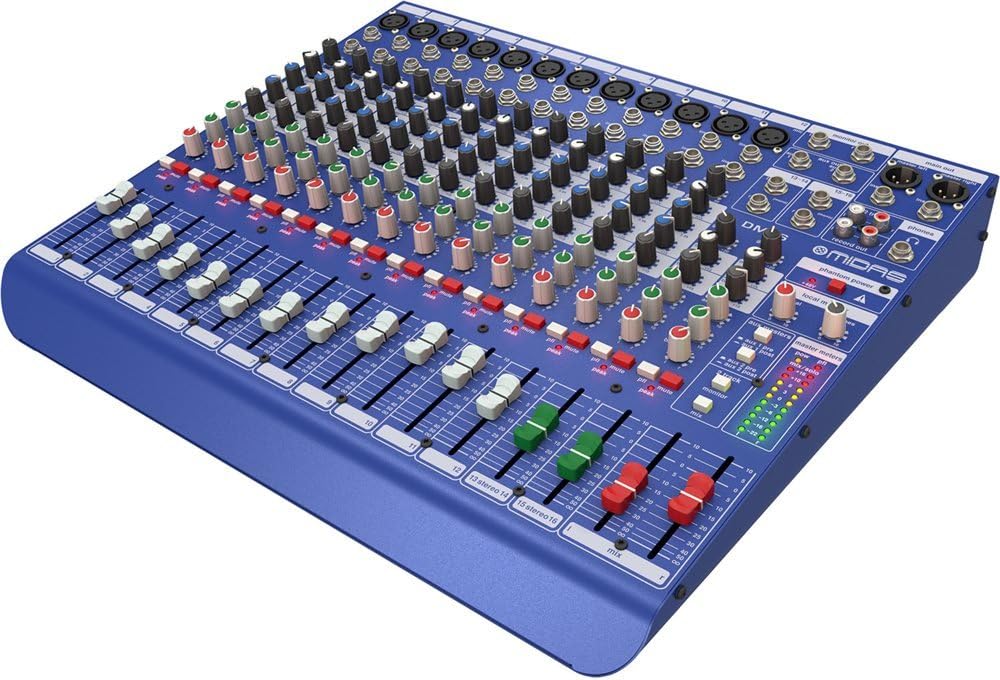
Figura 1.1: Ángulo frontal view do mesturador MIDAS DM16.
2. Configuración
2.1 Desembalaxe e inspección
Upon receiving your MIDAS DM16, carefully unpack the unit and inspect it for any signs of damage that may have occurred during transit. Retain the original packaging materials for future transport or storage.
Incluído na caixa:
- MIDAS DM16 Mesturador analóxico en directo e de estudio de 16 entradas
- Cable de alimentación
- Manual de usuario (este documento)
2.2 Conexión de alimentación
The DM16 operates on a standard AC power supply. Connect the provided power cord to the AC inlet on the rear panel of the mixer and then to a suitable power outlet. Ensure the power switch is in the 'Off' position before connecting to power.
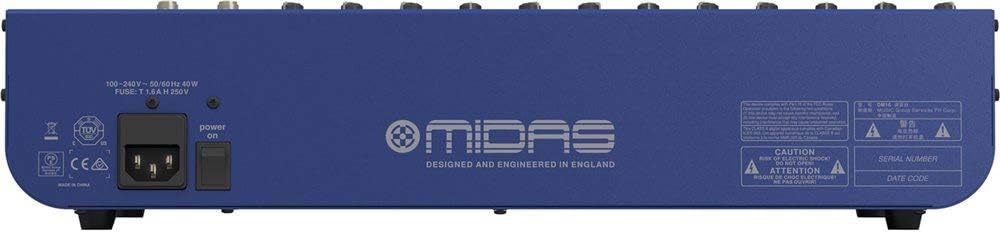
Figure 2.1: Rear panel of the MIDAS DM16 showing power input and warnings.
2.3 Conexións de entrada e saída
The DM16 features a variety of input and output options for connecting microphones, instruments, and other audio devices.
- Entradas de micrófono: 12 mono input channels with XLR connectors for microphones. These channels feature MIDAS microphone preamplevantadores.
- Entradas de liña: 2 electronically-balanced stereo line input channels on 1/4" TRS connectors for instruments or line-level devices.
- Saídas principais: Connect to your main PA system or recording interface.
- Envíos auxiliares: For monitor mixes or effects sends.
- Saída de auriculares: Para monitorización de audio.
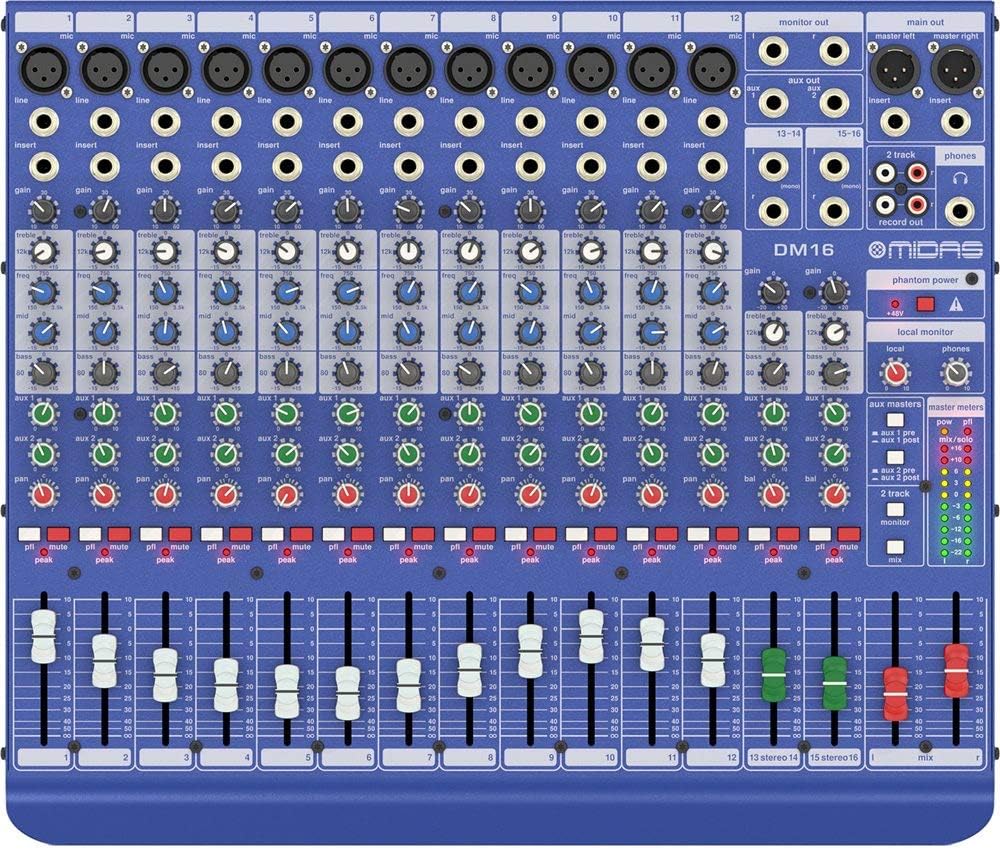
Figura 2.2: Arriba view of the MIDAS DM16 showing all input/output connections and controls.
3. Instrucións de funcionamento
3.1 Controis de canles
Each mono input channel on the DM16 features the following controls:
- GAÑA: Adjusts the input sensitivity for the microphone preampmáis vivo.
- EQ: A 3-band equalizer with a swept mid-band for precise tone shaping.

Figura 3.1: detallada view of the 3-band EQ section on a mono channel.
- AUX 1/2: Controls the level sent to the auxiliary outputs. These can be switched pre/post fader.

Figure 3.2: Aux masters section with pre/post fader switching.
- PAN: Axusta a posición estéreo do canal.
- MUTO: Silencia a canle.
- LED PICO: Indicates when the input signal is clipping.
- FADER: Controls the output level of the channel to the main mix.

Figure 3.3: Channel faders for precise level control.
3.2 Poder fantasma
The DM16 provides +48V phantom power for condenser microphones. This is a global switch, meaning it applies to all microphone inputs simultaneously. Ensure all connections are made before activating phantom power to prevent damage to non-phantom powered devices.

Figure 3.4: Phantom power switch.
3.3 Seguimento
Use the headphone output and monitor controls to listen to the main mix or specific auxiliary sends. The monitor section includes controls for local monitor and phones output levels.

Figure 3.5: Monitor and headphone controls.
4. Mantemento
Proper maintenance ensures the longevity and optimal performance of your MIDAS DM16 mixer.
- Limpeza: Use a soft, dry cloth to clean the exterior of the mixer. Avoid abrasive cleaners or solvents that could damage the finish or controls.
- Protección contra po: Keep the mixer covered when not in use to prevent dust accumulation, especially around faders and knobs.
- Ventilación: Asegúrese de que haxa un fluxo de aire axeitado arredor da unidade para evitar o sobrequecemento. Non bloquee as aberturas de ventilación.
- Almacenamento: Store the mixer in a cool, dry environment away from direct sunlight and extreme temperatures.
5 Solución de problemas
This section addresses common issues you might encounter with your DM16 mixer.
- Sen enerxía:
- Check if the power cord is securely connected to both the mixer and the power outlet.
- Verifique que a toma de corrente funcione.
- Ensure the power switch on the rear panel is in the 'On' position.
- Sen saída de son:
- Comprobe todas as conexións dos cables de entrada e saída.
- Ensure channel faders and the main mix fader are raised.
- Verify that the MUTE buttons on active channels are not engaged.
- Check the gain settings for each channel.
- Confirm that your connected speakers or monitoring system are powered on and functioning correctly.
- Son distorsionado:
- Reduce the GAIN setting on the input channel if the PEAK LED is frequently illuminating.
- Lower the output level of the connected source device.
- Check for faulty cables.
- Zumbido ou ruído:
- Asegúrate de que todos os cables estean debidamente blindados e en bo estado.
- Check for ground loops; try connecting all audio equipment to the same power strip.
- Manteña os cables de son lonxe dos cables de alimentación.
Se tes problemas que non se tratan aquí, consulta a sección de soporte.
6. Especificacións
| Característica | Detalle |
|---|---|
| Tipo de produto | Mixer analóxico en directo e de estudio |
| Canles de entrada | 16 (12 mono, 2 estéreo) |
| Micrófono Preamplevantadores | Award-winning MIDAS preamplevantadores |
| EQ on Mono Channels | 3-band with swept mid band |
| Envíos auxiliares | 2 (with pre/post fader switching) |
| Fonte de enerxía | Eléctrico con cable |
| Peso do elemento | 11.02 libras (5.0 kg) |
| Dimensións do produto (L x W x H) | 17.24 x 14.57 x 3.74 polgadas (438 x 370 x 95 mm) |
| País de Orixe | China |
| Número de modelo | DM16 |
| Tecnoloxía de conectividade | Auxiliar |
7. Garantía e soporte
7.1 Información da garantía
Your MIDAS DM16 mixer is covered by a limited warranty against defects in materials and workmanship. Please refer to the warranty card included with your product or visit the official MIDAS websitio web para obter información detallada sobre os termos e condicións da garantía.
Nota: The warranty may not cover damage caused by improper use, unauthorized modifications, or natural disasters.
7.2 Atención ao cliente
For technical assistance, troubleshooting, or service inquiries, please contact MIDAS customer support through their official websitio web ou a información de contacto proporcionada na documentación do produto.
Recursos en liña:
- Official MIDAS Websitio: www.midasconsoles.com
- Product Support Page: (Specific link if available, otherwise general websitio)
When contacting support, please have your product model number (DM16) and serial number ready.