
1. Introdución
The Surecom SW-102 is a compact and versatile digital VHF/UHF antenna power and SWR meter designed for radio enthusiasts and professionals. It provides direct digital readout of VSWR, forward power, and reflected power without the need for calibration. Its low insertion loss allows for permanent connection within your setup. The device also features a built-in frequency counter and displays comprehensive information including frequency, power, SWR, forward power (FW), reflected power (RW), and battery voltage.
2. Información de seguridade
- Non expoña o dispositivo a temperaturas extremas, humidade ou luz solar directa.
- Evite deixar caer o dispositivo nin someterlo a impactos fortes.
- Non intente desmontar nin modificar o dispositivo. Isto anulará a garantía e pode causar danos.
- Use only the specified charger (5V micro USB) to prevent damage to the battery and device.
- Ensure proper connection of all cables and adapters before operation to prevent damage to the meter or connected equipment.
- This device is designed for analog radio systems only and is not compatible with DMR radios.
3. Contido do paquete
Ao abrir o paquete, comprobe que todos os elementos enumerados a continuación estean presentes e en bo estado:
- 1x SURECOM SW-102 Meter
- 1x Charger Cable (Micro USB)
- 1x Users Manual
- SL16 to SMA-F Connector (included)
- SL16 to SMA-M Connector (included)
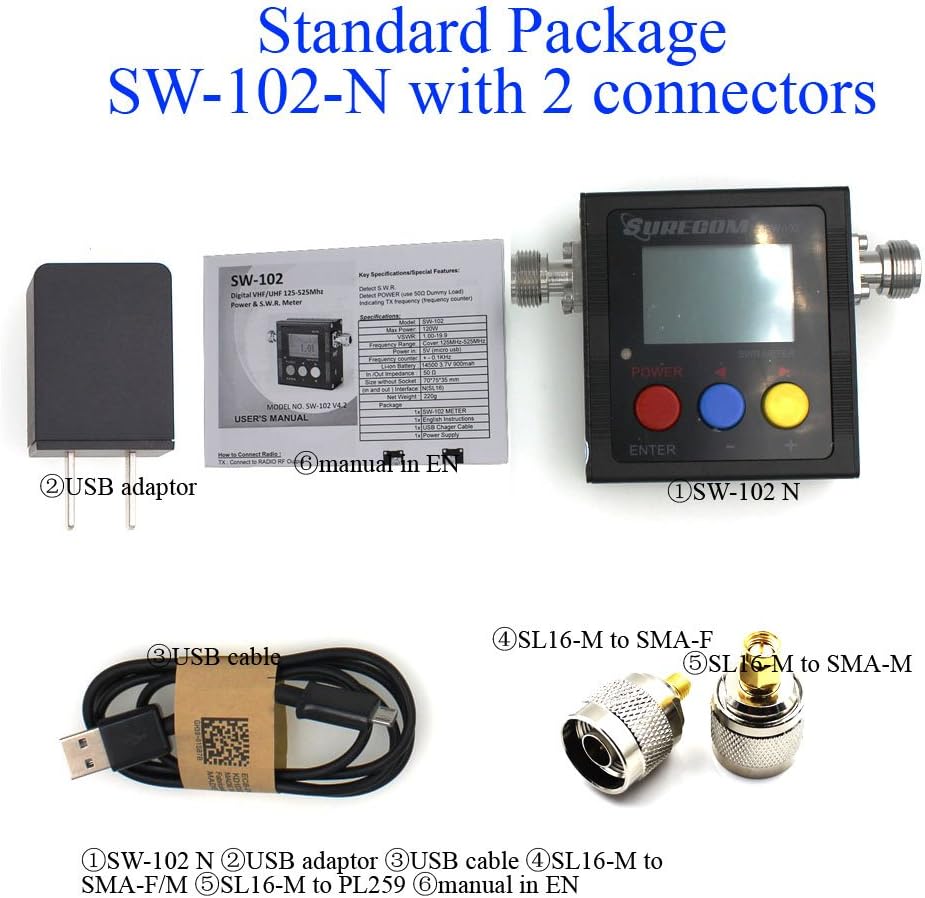
4. Produto rematadoview
4.1. Características clave
- Direct digital readout of VSWR, Forward Power, and Reflected Power.
- Non se precisa calibración.
- Maximum measurable power range up to 120W.
- Low insertion loss (<0.15dB VHF, <0.25dB UHF) allows permanent connection.
- Built-in Frequency Counter.
- All-function display: Frequency, Power, SWR, FW, RW, Battery voltage.
- Compact and handheld size with large LCD display.
4.2. Compoñentes e controis


The SW-102 features an N-J Interface for connections. Optional accessories such as SL16 to SMA and SL16 to BNC adapters are available to ensure compatibility with various radio and antenna connectors.

5. Configuración
5.1. Conexión do contador
To connect the Surecom SW-102, connect the output of your transceiver to the "TX" port on the meter. Then, connect your antenna or dummy load to the "ANT" port. Ensure proper adapters or cables are used if your device has different connector types. The device ships with SL16 to SMA-F and SL16 to SMA-M connectors for common applications.
Watch the video below for a visual guide on connecting the SW-102 to your radio and antenna:
Video 5.1: Demonstration of unboxing, physical overview, and connecting the Surecom SW-102 to a radio and antenna for SWR measurement.
5.2. Acendido
To power on the SW-102, press and hold the Botón vermello for 2 seconds. To power off, press and hold the Botón vermello de novo durante 2 segundos.
6. Instrucións de funcionamento
6.1. Toma de medicións
Once connected and powered on, the SW-102 will display real-time measurements. To measure SWR and power, ensure the meter is in a vertical position and avoid touching the antenna during measurement. Press the PTT (Push-To-Talk) button on your radio to transmit, and the meter will display the VSWR, transmit power, and other relevant data.
O Voltage Standing Wave Ratio (VSWR) is an indication of the amount of mismatch between an antenna and the feed line connecting to it. The range of values for VSWR is from 1 to ∞. A VSWR value under 2 is considered suitable for most antenna applications. The antenna can be described as having a good match. So when someone says that the antenna is poorly matched, very often it means that the VSWR value exceeds 2 for a frequency of interest.
Video 6.1: Demonstration of taking SWR measurements with the Surecom SW-102, including proper positioning and interpreting the display.
6.2. Mostra Introdución
The LCD display provides comprehensive information at a glance. Key indicators include:
- Estado da batería
- Tempo de traballo
- Potencia de transmisión (W)
- Frecuencia de transmisión (MHz)
- VSWR (Voltage Relación de onda estacionaria)
- Forward Power (FW)
- Reflected Power (RW)
Video 6.2: Detailed introduction to the Surecom SW-102's display, explaining each parameter and its significance.
6.3. Function Memory Save
To save function memory settings:
- Preme o MENU (Blue button).
- Preme F1 (Red button) to select a function (1-6).
- Axusta os valores usando as Blue button (-) e Yellow button (+).
- Preme o Botón vermello durante 2 segundos para confirmar.
- Preme o Botón azul to SAVE and EXIT.
7. Mantemento
7.1. Cargando a batería
The SW-102 is equipped with a 3.7V Li-ion rechargeable battery (14500 type). To charge the device, connect the provided USB charger cable to the micro USB port on the side of the meter and plug the other end into a 5V (0.5-1A) USB power source.

Video 7.1: Instructions on how to charge the Surecom SW-102 using the provided USB cable.
7.2. Funcións de aforro de enerxía
- The device features an Apagado automático function, configurable from 1 to 9 minutes.
- O Retroiluminación also has an AUTO OFF feature, configurable from 1 to 9 minutes, to conserve battery life.
8 Solución de problemas
- If the device does not power on, ensure the battery is charged.
- If readings are inconsistent, check all cable connections for tightness and proper adapter usage.
- Ensure the SW-102 is used with analog radios only. É not compatible with DMR radios.
- For significant discrepancies in SWR readings, verify the antenna's condition and proper installation.
9. Especificacións
| Característica | Especificación |
|---|---|
| Rango de frecuencias | 100 - 520 MHz |
| Measurable Power Range | 0 - 120 W |
| Potencia máxima de entrada | 120 W |
| Precisión | +/- 5 % |
| Rango VSWR | 1.00 ~ 19.9 |
| Impedancia | 50Ω |
| Insertion Loss (VHF) | <0.15 dB |
| Insertion Loss (UHF) | <0.25 dB |
| Temperatura de funcionamento | 0 ℃ ~ 60 ℃ |
| Input Frequency Counter | Si |
| Batería Voltage Mostrar | Si |
| Tipo de batería | 3.7V Li-ion Rechargeable Battery (14500) |
| Apagado automático | 1-9 minutes (configurable) |
| Entrada do cargador | 5 V (micro USB) |
| Apagado automático de retroiluminación | 1-9 minutes (configurable) |
| Interface (In and Out) | N (SL16) |
| Tamaño | 66*68*37 (mm) |
| Peso | 220 g |
| Peso do elemento | 13.4 onzas |
| Dimensións do paquete | 7.76 x 5.43 x 1.81 polgadas |
10. Garantía e soporte
Specific warranty information and detailed support contacts are not provided in this manual. Please refer to the product packaging or the manufacturer's official website for warranty details and customer support options.