
1. Introdución
This manual provides essential information for the safe and efficient operation, maintenance, and troubleshooting of your Xiaomi Robot Vacuum S12 EU. Please read this manual thoroughly before using the product and retain it for future reference.
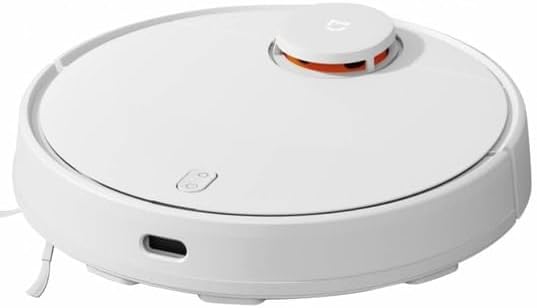
The Xiaomi Robot Vacuum S12 EU is designed to provide automated cleaning for your home, featuring both vacuuming and mopping capabilities. It utilizes advanced navigation technology for precise mapping and efficient cleaning paths.

2. Configuración
2.1 Desembalaxe e comprobación de compoñentes
Carefully remove all components from the packaging. Ensure all items listed in the packing list are present. The package typically includes the robot vacuum, charging dock, power adapter, side brush, main brush, dustbin, water tank, and cleaning tool.
2.2 Cargando o robot
Place the charging dock against a wall in an open area with good Wi-Fi signal. Connect the power adapter to the dock and plug it into a power outlet. Place the robot onto the charging dock, ensuring the charging contacts align. The robot will begin charging automatically. Fully charge the robot before first use.
2.3 Instalación e conexión da aplicación
- Descarga o Xiaomi Home aplicación desde a tenda de aplicacións do teu dispositivo.
- Abre a aplicación e crea unha conta ou inicia sesión.
- Tap the '+' icon to add a new device. Select the Xiaomi Robot Vacuum S12 EU from the list.
- Follow the on-screen instructions to connect the robot to your home Wi-Fi network.

2.4 Mapeo inicial
After successful connection, initiate the first cleaning cycle. The robot will perform a comprehensive scan of your home using its LDS laser navigation system to create an accurate map. This map will be displayed in the Xiaomi Home app and is crucial for efficient cleaning and smart features.
3. En funcionamento
3.1 Modos de limpeza
The robot vacuum offers multiple cleaning modes to suit different needs, adjustable via the Xiaomi Home app:
- Modo silencioso: For quiet operation and light cleaning.
- Modo estándar: Balanced cleaning for daily use.
- Modo multimedia: Increased suction for moderate dirt.
- Modo Turbo: Maximum suction power for deep cleaning of stubborn dirt.

3.2 Scheduling and Zone Cleaning
Use the Xiaomi Home app to set cleaning schedules for specific times and days. You can also define specific zones or rooms on the map for targeted cleaning, allowing the robot to clean only selected areas.
3.3 Función de fregado
To use the mopping function, fill the intelligent water tank with clean water and attach the mopping pad. The intelligent water tank releases water uniformly to ensure consistent humidity without over-wetting the floor. Three different water settings are available for various floor materials.

3.4 Navigation and Cleaning Paths
The robot uses LDS laser navigation for precise positioning and accurate distance measurements, enabling it to create a detailed map of your home. It employs zig-zag and Y-shaped cleaning paths to ensure comprehensive coverage and simulate manual cleaning for effective stain removal.


4. Mantemento
Un mantemento regular garante un rendemento óptimo e prolonga a vida útil do teu robot aspirador.
4.1 Baleirado e limpeza do colector de lixo
Empty the dustbin after each cleaning cycle. Open the top cover of the robot, remove the dustbin, and discard the collected debris. Rinse the dustbin with water if necessary, ensuring it is completely dry before reinserting.
4.2 Limpeza con cepillos
Regularly check and clean the main brush and side brush. Remove any tangled hair or debris using the provided cleaning tool. The main brush can be detached for easier cleaning.
4.3 Filter Cleaning/Replacement
The HEPA filter inside the dustbin should be cleaned regularly by tapping it gently to remove dust. Replace the filter every 3-6 months, or as indicated by the app, to maintain suction efficiency.
4.4 Mantemento do depósito de auga e da almofada de fregar
After mopping, empty any remaining water from the tank. Remove and clean the mopping pad. Wash the pad thoroughly and allow it to air dry completely before reattaching or storing.
4.5 Limpeza do sensor
Wipe the cliff sensors, wall sensors, and charging contacts with a soft, dry cloth to ensure they are free of dust and debris. Clean the LDS laser sensor window periodically.

5 Solución de problemas
Se tes problemas co teu robot aspirador, consulta os seguintes problemas e solucións comúns:
| Problema | Causa posible | Solución |
|---|---|---|
| O robot non carga. | Os contactos de carga están sucios ou desalinhados. | Clean charging contacts on both robot and dock. Ensure proper alignment. |
| O robot quédase atascado con frecuencia. | Obstacles in cleaning path; sensors are dirty. | Clear cables, toys, and other obstacles. Clean all sensors. |
| Mal rendemento de succión. | Depósito do po cheo; filtro atascado; cepillo principal enredado. | Empty dustbin. Clean or replace filter. Clean main brush. |
| A función de fregar non funciona. | Water tank empty; mopping pad not attached correctly. | Fill water tank. Ensure mopping pad is securely attached. |
| O robot non pode conectarse á wifi. | Contrasinal wifi incorrecto; sinal débil; problemas co router. | Verify password. Move robot closer to router. Restart router. |
For more detailed troubleshooting, refer to the Xiaomi Home app or the official Xiaomi support websitio.
6. Especificacións
| Característica | Especificación |
|---|---|
| Marca | Xiaomi |
| Nome do modelo | Robot aspirador S12 |
| Número de modelo | BHR5988EU |
| Cor | Negro |
| Capacidade | 300 mililitro |
| Voltage | 230 voltios |
| Tempo de execución | 130 Minutes (2 hours and 10 minutes) |
| Características especiais | Anti-collision, Wireless, Anti-fall, Smart-mapping |
| Dimensións do produto | 12L x 3B x 8H centimeters |
| Tipo de controlador | Control de voz |
| Tipo de filtro | HEPA |
| Recomendación de superficie | Uso en interiores |
7. Garantía e soporte
For information regarding warranty coverage and terms, please refer to the documentation provided with your purchase or visit the official Xiaomi support website. A 30-day refund/replacement policy is typically available from the date of purchase.
For technical support, troubleshooting assistance, or spare parts, please contact Xiaomi customer service through their official channels. Ensure you have your product model number (BHR5988EU) and purchase details ready when contacting support.