
1. Introdución
This manual provides comprehensive instructions for the proper use and care of your XIAOMI Mi In-Ear Headphones Basic (Silver), model 362891. To ensure optimal performance and longevity of your product, please read this manual thoroughly before initial use and retain it for future reference.
2. Contido do paquete
Upon opening your product packaging, please verify that all items listed below are present and in good condition:
- One pair of XIAOMI Mi In-Ear Headphones Basic (Silver)
- Integrated cable with 3.5mm audio jack and in-line remote with microphone
3. Produto rematadoview
Familiarize yourself with the components of your Mi In-Ear Headphones Basic.

Figura 3.1: Completo view of the XIAOMI Mi In-Ear Headphones Basic, highlighting the silver earbud design, white cable, in-line remote, and 3.5mm jack.
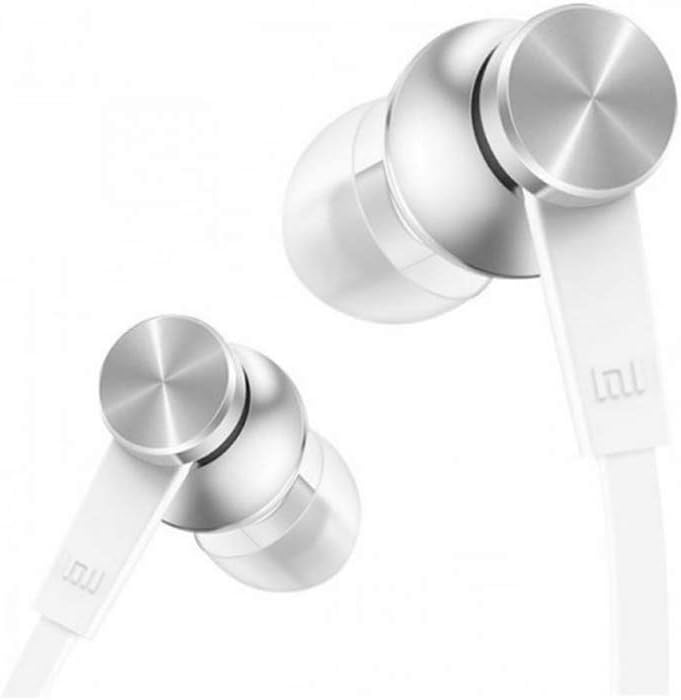
Figura 3.2: detallada view of the earbud housing, showcasing the sophisticated metal technology and aluminum alloy cavity.

Figura 3.3: Pro lateralfile of the earbuds, illustrating the connection point to the flat cable designed to resist tangling.

Figure 3.4: Close-up of the in-line remote, which includes a built-in microphone, and the universal 3.5mm audio jack for device connection.
4. Configuración
Follow these steps to set up your headphones for first use:
- Identify Left and Right Earbuds: The earbuds are typically marked with 'L' for left and 'R' for right. Ensure correct placement for optimal sound experience.
- Inserir auriculares: Gently insert each earbud into the corresponding ear canal. Adjust them until they fit snugly and comfortably. A proper seal is crucial for sound quality and bass response.
- Conectar ao dispositivo de son: Plug the 3.5mm audio jack firmly into the headphone port of your smartphone, tablet, computer, or other compatible audio device.
5. Instrucións de funcionamento
Your Mi In-Ear Headphones Basic feature an in-line remote for convenient control:
- Reprodución de audio:
- Press the button once to Play/Pause music.
- Preme o botón dúas veces para ir á seguinte pista.
- Press the button three times to go to the previous track.
- Control de chamadas:
- Press the button once to Answer/End a call.
- Press and hold the button to Reject an incoming call.
- Micrófono: The built-in microphone allows for hands-free communication during calls. Ensure the microphone is positioned appropriately for clear voice capture.
6. Mantemento
Proper maintenance ensures the longevity and hygiene of your headphones:
- Consellos para limpar os oídos: Regularly remove the ear tips and clean them with a soft, damp pano. Asegúrate de que estean completamente secos antes de volvelos colocar.
- Cleaning Earbud Grilles: Gently wipe the earbud grilles with a dry cotton swab to remove any earwax or debris. Avoid using liquids directly on the grilles.
- Coidado do cable: The flat cable is designed to be tangle-free. Avoid sharp bends or excessive pulling on the cable to prevent internal damage.
- Almacenamento: When not in use, store your headphones in a clean, dry place, away from extreme temperatures and direct sunlight. Avoid wrapping the cable too tightly.
7 Solución de problemas
Se tes problemas cos teus auriculares, consulta as seguintes solucións habituais:
| Problema | Causa posible | Solución |
|---|---|---|
| Sen son nin baixo volume |
|
|
| Poor sound quality (e.g., distorted, lacking bass) |
|
|
| O micrófono non funciona |
|
|
If the issue persists after attempting these solutions, please contact XIAOMI customer support for further assistance.
8. Especificacións
Detailed technical specifications for the XIAOMI Mi In-Ear Headphones Basic (Silver):
- Número de modelo: 362891
- Marca: XIAOMI
- Cor: Prata
- Colocación do oído: En Orella
- Factor de forma: En Orella
- Tecnoloxía de conectividade: Con cable
- Conector para auriculares: Jack de 3.5 mm
- Rango de resposta en frecuencia: 20 Hz - 20 kHz
- Material: Metal (Aluminum Alloy Cavity)
- Lonxitude do cable: 1.25 metros
- Característica do cable: Libre de enredos
- Característica especial: Micrófono incluído
- Tipo de control: Call Control (In-line remote)
- Peso do artigo: Aproximadamente 0.01 quilogramos (0.493 onzas)
- Nivel de resistencia á auga: Non resistente á auga
- Usos recomendados: Música, xogos
- Dispositivos compatibles: Xiaomi phones, Android devices, iOS devices (with 3.5mm jack)
9. Información de seguridade
Please observe the following safety guidelines to prevent damage to your headphones or personal injury:
- Niveis de volume: Evite escoitar a volume alto durante períodos prolongados para evitar danos auditivos.
- Sensibilización ambiental: Do not use headphones in situations where inability to hear ambient sounds could pose a danger (e.g., while driving, cycling, or walking in traffic).
- Auga e humidade: Estes auriculares non son resistentes á auga. Evite a exposición á auga, á choiva ou á humidade excesiva.
- Limpeza: Use only a dry, soft cloth for cleaning. Do not use harsh chemicals or abrasive materials.
- Nenos: Keep out of reach of small children, as small parts may pose a choking hazard.
10. Garantía e soporte
XIAOMI products are designed and manufactured to the highest quality standards. For information regarding warranty coverage, terms, and conditions, please refer to the warranty card included with your purchase or visit the official XIAOMI website. For technical support, troubleshooting assistance, or service inquiries, please contact XIAOMI customer support through their official channels.
XIAOMI Official Websitio: www.mi.com