
Introdución
The ASUS ROG Maximus IX Hero is an ATX motherboard designed for 7th generation Intel Core processors. It features an LGA1151 socket, DDR4 memory support, and various connectivity options including DisplayPort, HDMI, M.2 slots, and USB 3.1. This motherboard provides a robust foundation for building a high-performance personal computer.

Imaxe: De arriba abaixo view of the ASUS ROG Maximus IX Hero motherboard, showcasing its layout, CPU socket, RAM slots, and various expansion slots.
O que hai na caixa
Verifique que todos os compoñentes que se indican a continuación estean incluídos no paquete:
- Guía de usuario
- DVD de soporte
- Escudo de E / S
- 2-in-1 SATA 6Gb/s cables (2)
- SLI™ HB Bridge (2-way-M)
- Conector Q
- ROG Coaster
- 3D printing mount
- 10-in-1 ROG cable label
- CPU Installation Tool
- 2-in-1 M.2 Screw set
- Adhesivo ROG
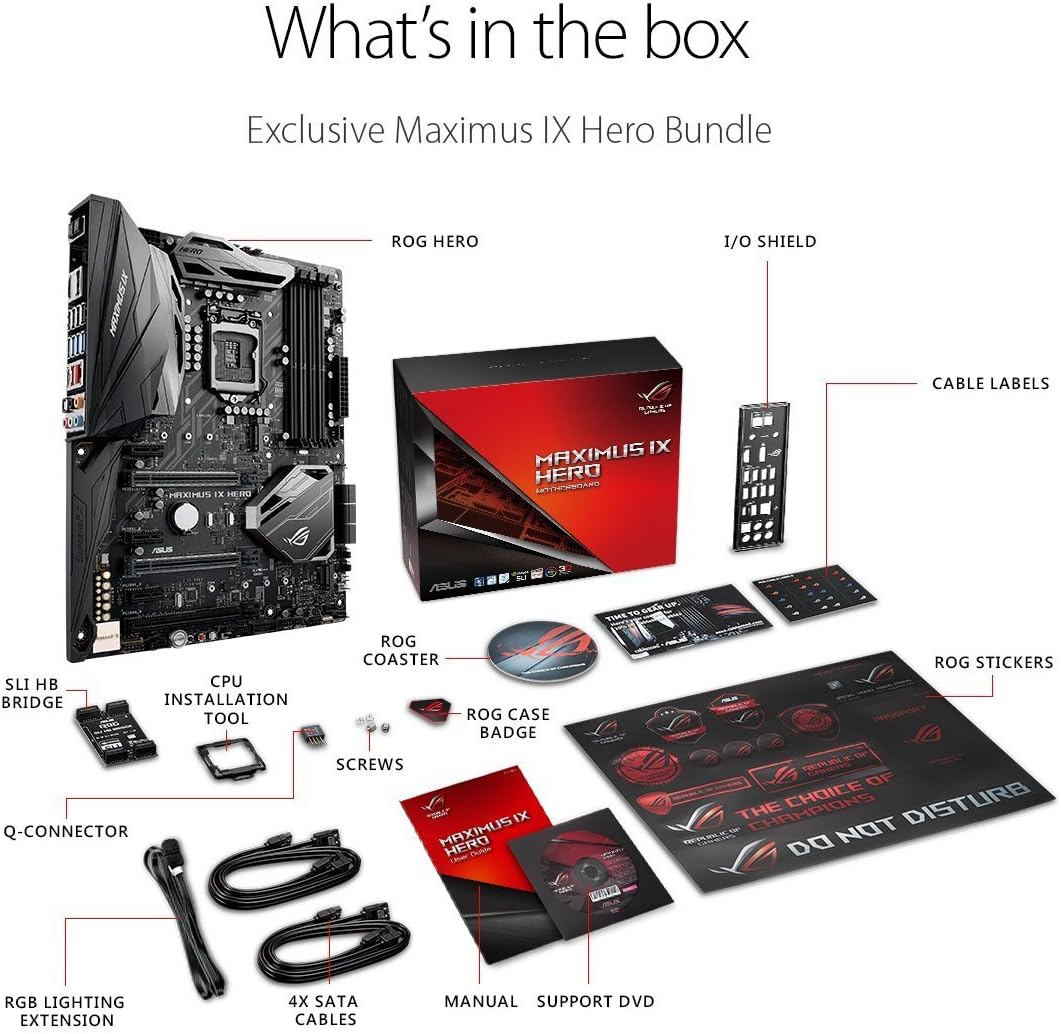
Image: A visual representation of the ASUS ROG Maximus IX Hero motherboard and its included accessories, such as cables, manuals, and installation tools.
Características clave
- Supports 7th generation Intel Core processors, enhancing connectivity and speed with Dual M.2 slots, front panel USB 3.1, and Intel Optane Memory compatibility.
- Includes 5-Way Optimization with Auto-Tuning and FanXpert 4 for automated overclocking profile adjustments and dynamic system cooling.
- Features ASUS AURA Sync RGB lighting and a 3D-printing friendly mount for customization.
- Equipped with two Patent-pending Safe Slots, which integrate metal framing for enhanced support and rigidity of large graphics processing units (GPUs).
- Provides industry-leading 8-channel HD audio through the ROG exclusive SupremeFX S1220, powered by Japanese capacitors.
Configuración e instalación
This section provides general guidelines for installing your ASUS ROG Maximus IX Hero motherboard. Refer to the detailed user guide for specific instructions and safety precautions.
1. Inspección Inicial
Before installation, carefully inspect the motherboard for any physical damage. Ensure the CPU socket pins are not bent.
2. Instalación da CPU (LGA1151)
- Abra a panca do socket da CPU.
- Align the notches on your 7th generation Intel Core processor with the socket.
- Coloque a CPU no socket con coidado sen forzala.
- Peche a panca do zócalo para fixar a CPU.
3. Instalación da RAM (DDR4)
- Abra os clips das ranuras DIMM DDR4.
- Aliñe a muesca do módulo de memoria DDR4 coa chave da ranura DIMM.
- Prema firmemente os dous extremos do módulo de memoria ata que os clips encaixen no seu lugar.
- The motherboard supports up to 64GB of DDR4 memory across four slots.
4. Instalación dun SSD M.2
The motherboard features dual M.2 slots for high-speed storage. Refer to the user guide for specific M.2 slot locations and screw set usage.
- Localiza unha ranura M.2 dispoñible.
- Insira o SSD M.2 na ranura en ángulo.
- Prema con coidado a unidade SSD cara abaixo e asegúreaa co parafuso M.2 incluído.
5. PCIe Card Installation (Safe Slots)
The motherboard includes reinforced Safe Slots for graphics cards and other PCIe devices.
- Align your PCIe card with an available PCIe slot.
- Prema firmemente ata que a tarxeta estea completamente asentada e o clip de retención encaixe.
6. Connecting Power and Front Panel Headers
Connect the 24-pin ATX power connector and the 8-pin CPU power connector from your power supply to the motherboard. Connect the front panel headers (power button, reset button, HDD LED, power LED, USB ports, audio) according to the motherboard manual's pinout diagram.
7. Conexións de E/S traseiras
Connect your peripherals to the rear I/O ports. This includes USB devices, display cables (HDMI, DisplayPort), Ethernet, and audio devices.

Imaxe: Primeiro plano view of the rear input/output panel of the ASUS ROG Maximus IX Hero motherboard, showing various ports including USB, HDMI, DisplayPort, Ethernet, and audio jacks.
8. RGB Lighting Setup
The motherboard features integrated AURA Sync RGB lighting. Additional RGB LED strips can be connected to the dedicated RGB LED headers for expanded lighting control.
9. Liquid Cooling Integration
For custom liquid cooling setups, the motherboard includes H2O sensor headers to monitor temperature and flow within your cooling loop.
Produto rematadoview Vídeo
Vídeo: Un overview of the ASUS ROG Maximus IX Hero motherboard, highlighting its key features, connectivity options, and design elements. This video provides a visual guide to the board's components and capabilities.
Instrucións de funcionamento
1. Arranque inicial
After completing hardware installation, connect your display, keyboard, and mouse. Power on your system. The system should display the BIOS/UEFI interface or begin the operating system installation process.
2. Configuración da BIOS/UEFI
Press the designated key (usually DEL or F2) during boot-up to enter the BIOS/UEFI setup. Here you can configure boot order, system time, enable/disable features, and apply overclocking settings. The 5-Way Optimization feature can assist with automated tuning.
3. Instalación de controladores
Install all necessary drivers for the motherboard chipset, audio, LAN, and other integrated components. These can typically be found on the included Support DVD or downloaded from the ASUS official websitio.
4. Utilidades de software
Utilize ASUS software utilities such as AURA Sync for RGB lighting control and FanXpert 4 for fan speed management to optimize your system's performance and aesthetics.
Mantemento
1. Keep Clean
Regularly clean dust from the motherboard and connected components using compressed air. Ensure the system is powered off and unplugged before cleaning.
2. Actualizacións da BIOS/UEFI
Consulta periodicamente o soporte técnico de ASUS website for BIOS/UEFI updates. Updates can improve system stability, compatibility, and performance. Follow the update instructions carefully to avoid system damage.
3. Actualizacións de controladores
Keep your system drivers updated to ensure optimal performance and compatibility with new hardware and software.
Resolución de problemas
1. Sen alimentación/Sen arranque
- Verifique que todos os cables de alimentación (ATX de 24 pines, CPU de 8 pines) estean conectados correctamente.
- Asegúrese de que a fonte de alimentación estea conectada.
- Check front panel power button connection.
- Tenta arrincar con compoñentes mínimos (CPU, unha memoria RAM, GPU se non tes gráficos integrados).
2. Sen saída de visualización
- Ensure the monitor is connected to the correct graphics output (either motherboard or dedicated GPU).
- Volva colocar a tarxeta gráfica e os módulos de memoria.
- Proba cun cable de pantalla ou monitor diferente.
3. Inestabilidade/fallos do sistema
- Comproba as temperaturas da CPU e da GPU.
- Asegúrate de que todos os controladores estean actualizados.
- If overclocked, revert to default settings to test stability.
- Executa ferramentas de diagnóstico de memoria para comprobar a integridade da RAM.
Especificacións
| Característica | Detalle |
|---|---|
| Marca | ASUS |
| Nome do modelo | ROG MAXIMUS IX HERO |
| Socket CPU | LGA 1151 |
| Procesadores compatibles | Intel Core de 7ª generación |
| Tipo de chipset | Intel Z270 |
| Tecnoloxía de memoria RAM | DDR4 |
| Slots de memoria dispoñibles | 4 |
| Maximum RAM Size | 64 GB |
| Interfaz da tarxeta gráfica | PCI Express |
| Total de portos HDMI | 1 |
| Total de portos USB | 2 (USB 3.1 Type-A, USB 3.1 Type-C on rear I/O) |
| Estándar de bus de sistema compatible | SATA 3 |
| Peso do elemento | 2.9 libras |
Garantía e Soporte
Este produto vén cun 3 ano de garantía from ASUS. For technical support, driver downloads, and further assistance, please visit the official ASUS support websitio web ou na tenda ASUS.