
Angrox RM-ED047
Manual de usuario do control remoto universal Angrox
Modelo: RM-ED047
1. Introdución
This manual provides essential information for the proper use and maintenance of your Angrox Universal Remote Control. Designed for seamless compatibility with a wide range of Sony Bravia TVs, this remote offers a reliable and straightforward replacement for your original or damaged remote.
The Angrox remote control is engineered for ease of use, requiring no complex programming or setup. Simply insert batteries, and it's ready to operate your Sony TV.
2. Produto rematadoview
The Angrox Universal Remote Control is a high-quality, compact, and non-slip device designed for comfortable handling and stable performance. It features a larger transmission range compared to many standard remotes, ensuring reliable operation from a distance.

Imaxe 2.1: Parte dianteira e traseira view of the Angrox Universal Remote Control, showcasino seu deseño ergonómico e a disposición dos botóns.

Imaxe 2.2: Múltiple views of the remote control, highlighting its slim profile and textured back for a secure grip.
Características principais:
- Compatibilidade universal: 100% compatible with all Sony TV and Sony Bravia remotes.
- Non se require programación: Ready to use right out of the box after battery insertion.
- Deseño ergonómico: Small size and compact, with a non-slip surface for practical handling.
- Rendemento estable: Offers a larger transmission range for reliable control.
- Construción duradeira: Made from ABS material for enhanced safety and durability.

Imaxe 2.3: Primeiro plano view emphasizing the remote's safety features, durable construction, and use of ABS material.
Compatible Sony TV Models:
This remote is compatible with a wide range of Sony TV models, including but not limited to:
- KDL-40BX420, KDL-40BX421, KDL-22BX320, KDL-22BX321, KDL-32R300B, KDL-32BX320, KDL-32BX321, KDL-32BX420, KDL-32BX421, KDL-40BX421, KDL-40BXB, KDL-421, KDL-46BX420, KDL-46BX421, KDL-55BX520
- KDL-65X830B, KDL-70W830B, KDL-70W840B, KDL-70W850B, KDL-70XX70XX, XBR-40B, 9X850B, XBR-55X850B, XBR-55X900B, XBR-65X850B, XBR-65X900B, XBR-65X950B, XBR-70X850B, XBR-79X900B, XBR-800B, 5X950B
- KDL-19MB4000, KDL-19M4000, KDL-22L4000, KDL-32L4000, KDL-37L4000, KDL-40S4100

Image 2.4: The remote control positioned next to a modern Sony TV, visually confirming its compatibility with Sony LED and LCD televisions.
3. Configuración
The Angrox Universal Remote Control is designed for immediate use with compatible Sony TVs. No complex programming or pairing procedures are required.
Inserción de pilas:
- Localice o compartimento da batería na parte traseira do control remoto.
- Deslice a tapa da batería cara abaixo ou na dirección indicada por unha frecha para abrila.
- Insira dúas (2) pilas AAA (non incluídas), asegurándose de que os terminais positivo (+) e negativo (-) estean aliñados correctamente coas marcas do interior do compartimento.
- Pecha a tapa da batería deslizándoa de volta ao seu lugar ata que faga clic de forma segura.
Once batteries are inserted, the remote control is ready to operate your Sony TV. It is recommended to use new, high-quality alkaline batteries for optimal performance and longevity.

Imaxe 3.1: Detallada view of the remote's battery compartment, illustrating the correct orientation for inserting two AAA batteries.
4. Instrucións de funcionamento
The Angrox Universal Remote Control functions identically to the original Sony TV remote. All buttons are pre-programmed to perform their standard functions.
Operación básica:
- Botón de encendido: Press to turn your TV on or off.
- Botóns numéricos (0-9): Use to directly enter channel numbers.
- Canle arriba/abaixo (CH +/-): Navigate through channels sequentially.
- Subir/Baixar o volume (VOL +/-): Adjust the TV's volume level.
- Botón de silencio: Mute or unmute the TV's audio.
- Navigation Pad (Arrow Buttons & Enter): Use to navigate menus and select options.
- Botón de inicio: Access the TV's main menu or smart TV interface.
- Botón de entrada/fonte: Cambia entre diferentes fontes de entrada (HDMI, AV, etc.).
- Controis de reprodución: Buttons for Play, Pause, Stop, Fast Forward, Rewind, etc., for media playback.
Ensure there is a clear line of sight between the remote control and your TV's infrared receiver for optimal signal transmission. The remote offers a stable signal and sensitive buttons for a responsive user experience.

Image 4.1: A hand demonstrating the use of the remote control, highlighting its long-distance capability, fine workmanship, signal stabilization, and sensitive buttons.
5. Mantemento
Proper maintenance will ensure the longevity and optimal performance of your Angrox Universal Remote Control.
Limpeza:
- Wipe the remote control regularly with a soft, dry cloth.
- Para a sucidade persistente, d lixeiramenteampEnxágüe o pano con auga ou cun limpador suave e non abrasivo. Non pulverice o limpador directamente sobre o mando a distancia.
- Evita usar produtos químicos agresivos, solventes ou estropajos de limpeza abrasivos, xa que poden danar a superficie ou os compoñentes internos do mando a distancia.
Substitución da batería:
Replace batteries when the remote's responsiveness decreases or it stops functioning. Always replace both batteries at the same time with new ones of the same type (AAA). Refer to Section 3 for battery insertion instructions.
Almacenamento:
Garda o mando a distancia nun lugar fresco e seco, lonxe da luz solar directa, de temperaturas extremas e de alta humidade. Se o mando a distancia non se vai usar durante un período prolongado, é recomendable retirar as pilas para evitar fugas.
6 Solución de problemas
If you encounter issues with your Angrox Universal Remote Control, please refer to the following common problems and solutions:
| Problema | Causa posible | Solución |
|---|---|---|
| O mando a distancia non responde. | Pilas gastadas ou inseridas incorrectamente. | Comprobe a orientación das pilas. Substitúaas por pilas AAA novas. |
| O mando a distancia ten un alcance limitado ou unha resposta intermitente. | Weak batteries, obstruction, or remote too far from TV. | Replace batteries. Ensure clear line of sight to TV's IR receiver. Move closer to the TV. |
| Certos botóns non funcionan. | Dirt or debris under the button, or internal malfunction. | Clean the remote surface. If problem persists, contact support. |
| O mando a distancia non controla a televisión. | Modelo de televisor incompatible. | Verify your TV model is listed in the compatible models section (Section 2). |
7. Especificacións
| Característica | Detalle |
|---|---|
| Nome do modelo | RM-ED047 |
| Marca | Angrox |
| Dispositivos compatibles | Sony Televisions (various models, see Section 2) |
| Tecnoloxía de conectividade | Infravermello (IR) |
| Rango máximo | 10 metros |
| Número de botóns | 50 |
| Tipo de controlador | Control remoto |
| Pilas necesarias | 2 x AAA (non incluído) |
| Dimensións do produto (L x W x H) | 19.99 x 4.78 x 1.98 cm |
| Peso do elemento | 82 g |
| Características especiais | Universal, Non-slip design |
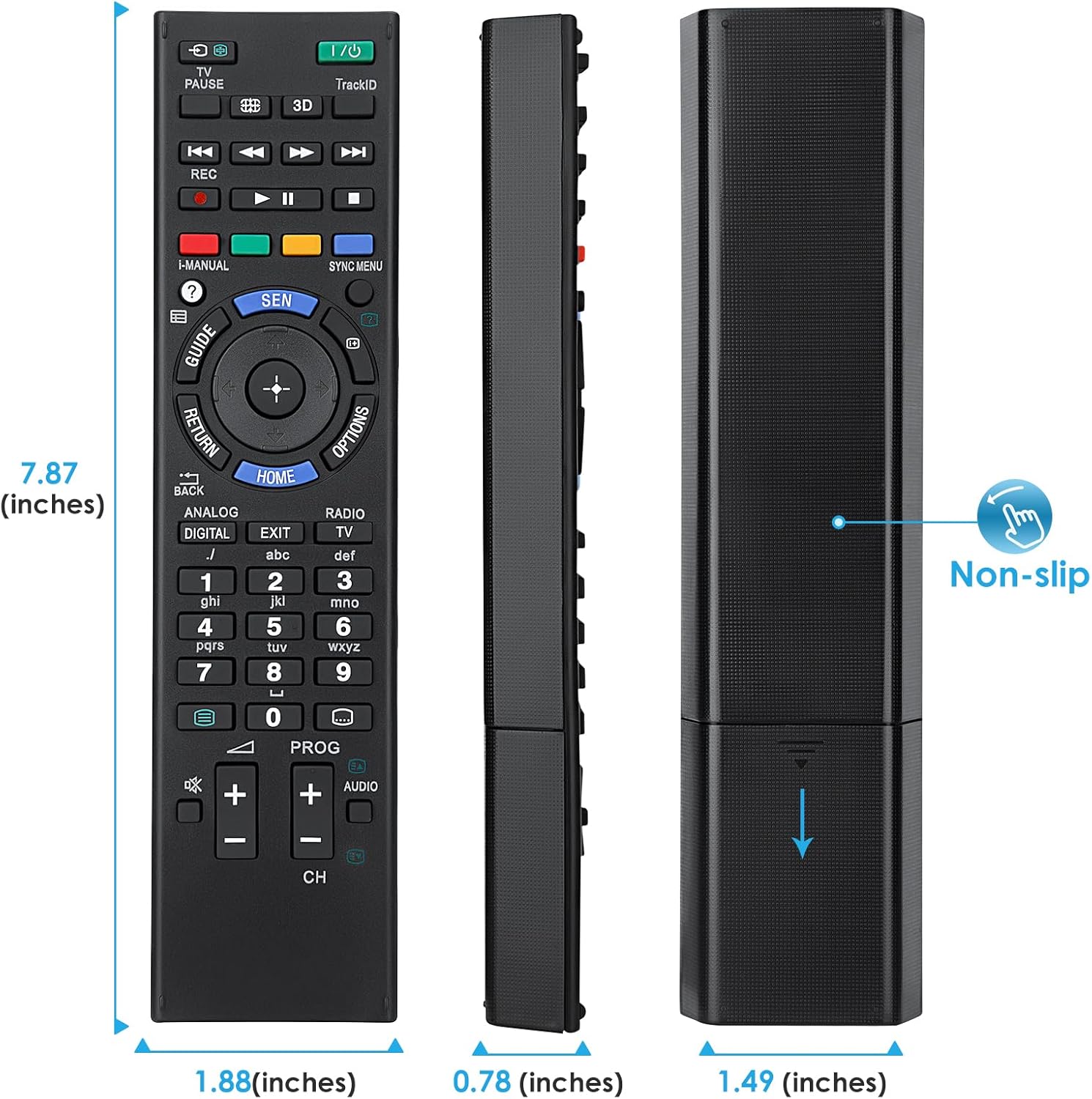
Image 7.1: Visual representation of the remote control's dimensions (length, width, thickness), providing precise measurements for reference.
8. Garantía e soporte
Información da garantía:
This Angrox Universal Remote Control comes with a Garantía de 60 días from the date of purchase. This warranty covers manufacturing defects and ensures the product functions as described under normal use. Please retain your proof of purchase for warranty claims.
Atención ao cliente:
For any questions, concerns, or technical assistance not covered in this manual, please contact the retailer or the manufacturer's customer support. Provide your product model number (RM-ED047) and a detailed description of the issue to facilitate faster service.