
Introdución
Grazas pola compraasing the Ezonetronics 1DIN Car Stereo, Model RM-CW9601. This unit features a 7-inch retractable touchscreen, Bluetooth connectivity, FM radio, and multimedia playback capabilities. This manual provides essential information for installation, operation, and maintenance to ensure optimal performance and user satisfaction. Please read this manual thoroughly before using the product.
Información de seguridade
- Non operes a unidade dun xeito que te distraia da condución. Prioriza sempre a seguridade viaria.
- Asegúrese de que a instalación sexa axeitada por un profesional cualificado para evitar danos na unidade ou no vehículo.
- Avoid exposing the unit to extreme temperatures, direct sunlight for prolonged periods, or moisture.
- Do not attempt to disassemble or modify the unit. This may void the warranty and pose safety risks.
- Manteña o volume a un nivel que lle permita escoitar os sons do tráfico externo.
Contido do paquete
Verifica que todos os elementos estean presentes no paquete:
- Ezonetronics 1DIN Car Stereo Unit (RM-CW9601)
- Arnés de cables de alimentación e altofalantes
- Control remoto
- Manual de usuario (este documento)
- Mounting Accessories (brackets, screws)
- Optional: Rearview Camera (if included in your specific package)
Produto rematadoview
The Ezonetronics RM-CW9601 features a single DIN chassis with a motorized retractable 7-inch touchscreen display. The front panel includes essential controls and ports for easy access.

Figura 1: Fronte view of the Ezonetronics RM-CW9601 car stereo, illustrating the 7-inch screen in both retracted and extended positions, along with front panel controls and ports.
Front Panel Controls and Ports:
- Botón de alimentación / modo: Press to turn on/off, short press to change mode.
- Botón de volume: Rotate to adjust volume. Press to mute/unmute.
- Porto USB: Para a reprodución de contido multimedia desde unidades USB.
- Ranura para tarxetas SD: For media playback from SD cards.
- Entrada AUX: Conector de 3.5 mm para dispositivos de son externos.
- Botón de reinicio: Small button to reset the unit (requires a pointed object).
- Screen Retract/Extend Button: Controls the motorized screen movement.
Configuración
1. Instalación
The RM-CW9601 is designed for a standard 1DIN car stereo opening. Professional installation is highly recommended. Ensure the vehicle's battery is disconnected before starting installation.
- Retire o estéreo do coche existente do taboleiro.
- Connect the wiring harness to the vehicle's wiring.
- Secure the unit into the dashboard using the provided mounting brackets and screws.
- Reconnect the vehicle's battery and test the unit.
2. Diagrama de cableado (xeral)
Refer to the detailed wiring diagram included with your product packaging for specific connections. Below are common connections:
- Fío amarelo: 12 V constantes (batería)
- Fío vermello: 12 V conmutados (accesorio/ignición)
- Fío negro: Terra
- Fío laranxa: Illumination (Optional)
- Fío azul: Antena de alimentación / AmpAcendido remoto do lifier
- Fíos dos altofalantes: Connect to vehicle speakers (e.g., White/White-Black for Front Left, Grey/Grey-Black for Front Right, Green/Green-Black for Rear Left, Purple/Purple-Black for Rear Right).
- Entrada de cámara de marcha atrás: Conectar á parte traseiraview camera video output and reverse trigger wire.
- Entrada de control do volante: Connect to vehicle's steering wheel control wires (if applicable).

Figura 2: Illustration of USB connection points, relevant for media input and smartphone integration.
Instrucións de funcionamento
1. Funcionamento básico
- Encendido/apagado: Prema o botón de acendido no panel frontal ou no mando a distancia.
- Axuste de volume: Rotate the volume knob or use the remote control.
- Selección de modo: Short press the power/mode button to cycle through available modes (Radio, USB, SD, Bluetooth, AUX, CarPlay/Android Auto).
- Control de pantalla: Use the dedicated button to retract or extend the 7-inch display.
2. Función Bluetooth
A unidade admite Bluetooth para chamadas mans libres e transmisión de audio sen fíos.
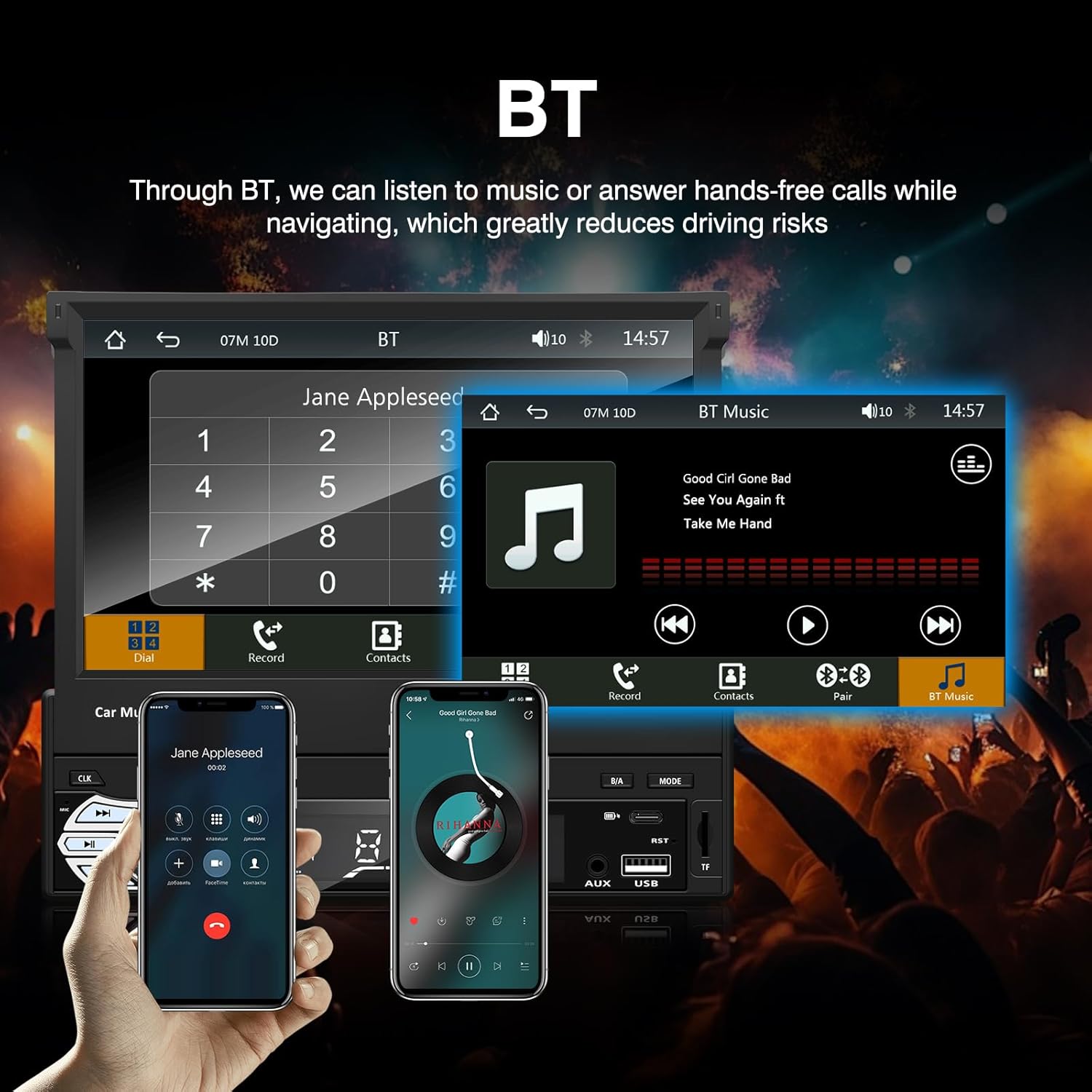
Figura 3: Bluetooth interface for hands-free calls and music streaming, showing a dial pad and music controls.
- Emparejamento: Activa o Bluetooth no teu dispositivo móbil. Busca available devices and select "Ezonetronics" or similar. Enter PIN "0000" if prompted.
- Chamadas mans libres: Once paired, you can make and receive calls directly through the car stereo. Use the touchscreen or remote to dial, answer, or end calls.
- Transmisión de audio (A2DP): Play music from your paired device wirelessly. Control playback (play/pause, skip) from the car stereo or your device.
3. USB/SD Media Playback
Insert a USB drive or SD card into the respective slot. The unit will automatically switch to USB/SD mode and begin playing compatible media files.

Figura 4: Icons indicating support for Bluetooth, Auxiliary input, TF (SD) Card, and USB connections for media playback.
- Supported formats include RM, RMVB, ASF, MKV, DIVX, MPEG4, AVI, VOB for video, and MP3/MP4 for audio.
- Navegar polas carpetas e files usando a interface da pantalla táctil.
4. Radio FM
Access the FM radio mode to listen to local broadcasts.

Figura 5: FM Radio interface with frequency display and equalizer settings for audio customization.
- Escaneo automático: Automatically search and save strong stations.
- Sintonización manual: Fine-tune frequencies using the touchscreen.
- Presets: Save your favorite stations for quick access (up to 18 preset stations).
5. Apple CarPlay / Android Auto
Connect your compatible smartphone via USB to access Apple CarPlay or Android Auto features directly on the stereo's display.

Figura 6: Wired Apple CarPlay interface, displaying phone applications like navigation, music, and messages on the car stereo screen.

Figura 7: Wired Android Auto interface, displaying Android applications like Google Maps, Spotify, and phone calls on the car stereo screen.
- Ensure your phone has CarPlay or Android Auto enabled.
- Use a high-quality USB cable for a stable connection.
- Access navigation, music, messages, and other compatible apps safely while driving.
6. Ligazón de espello
Mirror Link allows you to display your smartphone's screen content directly onto the car stereo's display via a USB data cable.

Figura 8: Mirror Link function demonstrating a smartphone screen being projected onto the car stereo display.
- Connect your smartphone to the USB port using a data cable.
- Follow the on-screen prompts on both the stereo and your phone to establish the connection.
- Note: Functionality may vary depending on your smartphone model and operating system.
7. Traseiraview Entrada da cámara
When a rearview camera is connected and the vehicle is shifted into reverse, the stereo automatically displays the camera feed.

Figura 9: Reversing display showing the view from a rearview camera with parking assistance lines, providing an intuitive aid for parking.
- Asegurar a parte traseiraview camera is properly installed and connected to the dedicated input.
- The display will automatically switch to the camera view when the reverse gear is engaged.
8. Control do volante
The unit supports connection to your vehicle's existing steering wheel controls for convenient operation. Refer to your vehicle's manual and the stereo's wiring diagram for proper connection and configuration.
Mantemento
- Limpeza da pantalla: Usa un pano suave e sen fiapos para limpar con coidado a pantalla táctil. Non empregues produtos de limpeza abrasivos nin disolventes.
- Limpeza xeral: Wipe the unit's exterior with a dry, soft cloth.
- Evitar líquidos: Non pulverice líquidos directamente sobre a unidade.
- Temperatura: Avoid prolonged exposure to extreme heat or cold, which can affect the unit's lifespan.
Resolución de problemas
| Problema | Causa posible | Solución |
|---|---|---|
| A unidade non se acende. | Cableado incorrecto; fusible fundido; problema coa batería do vehículo. | Check power connections (Yellow, Red, Black wires). Inspect vehicle fuses. Ensure battery is charged. |
| Sen son. | Volume demasiado baixo; Silenciamento activado; Cableado incorrecto do altofalante. | Aumenta o volume. Comproba se o silenciador está activado. Verifica as conexións dos altofalantes. |
| O Bluetooth non se conecta. | Bluetooth not enabled on phone; Incorrect pairing process. | Ensure phone's Bluetooth is on and discoverable. Re-attempt pairing. |
| USB/SD media not playing. | Non é compatible file format; Corrupted media; Drive/card not inserted correctly. | Comproba file formats. Try a different USB drive/SD card. Ensure proper insertion. |
| Traseiraview cámara non mostra. | Camera not connected; Reverse trigger wire not connected. | Verify camera video input and reverse trigger wire connection. |
If problems persist, consult a qualified technician or contact customer support.
Especificacións
- Marca: EZoneTronics
- Número de modelo: RM-CW9601
- Cor: Negro
- Pantalla: 7-inch Capacitive Touchscreen, Retractable
- Tecnoloxía de conectividade: Bluetooth, USB, SD, AUX, RCA
- Bluetooth: Integrated Bluetooth 2.0 with A2DP/Hands-free
- Dispositivos compatibles: Teléfono intelixente
- Modo de saída de audio: Estéreo
- Compatibilidade coa codificación de vídeo: RM, RMVB, ASF, MKV, DIVX, MPEG4, AVI, VOB
- Soporte USB/SD: Up to 32GB max.
- Características especiais: Touchscreen, Steering Wheel Control Support, Rear Camera Input, Apple CarPlay, Android Auto, Mirror Link
- Fabricante: Rhythm Electronics Limited
Garantía e Soporte
This product comes with a limited manufacturer's warranty.
- Main Unit Warranty: 12 months for defective items (excluding damaged or misused items after receipt).
- Garantía de accesorios: 3 months for accessories.
For warranty claims or technical support, please contact your retailer or the manufacturer directly. Keep your purchase receipt as proof of purchase.