
BECA BHT-2000GALTP
Manual do usuario do termostato intelixente para calefacción por chan BECA BHT-2000GALTP
Model: BHT-2000GALTP
1. Introdución
Thank you for choosing the BECA BHT-2000GALTP Smart Floor Heating Thermostat. This device is designed to provide intelligent and efficient control over your electric floor heating system, ensuring optimal comfort and energy savings. Featuring a modern black screen display and intuitive touch controls, this thermostat offers 5+2 weekly programming capabilities to suit your lifestyle.

Figura 1: Fronte view of the BECA BHT-2000GALTP Smart Floor Heating Thermostat, displaying temperature, time, and mode indicators.
2. Información de seguridade
Please read this section carefully before installation and operation to prevent personal injury or damage to the product.
- Installation must be carried out by a qualified electrician in accordance with local electrical codes and regulations.
- Always disconnect power at the circuit breaker before installing, cleaning, or servicing the thermostat.
- Non expoñas o termostato á auga nin a humidade excesiva.
- Asegúrese de que todas as conexións de cableado estean seguras e debidamente illadas.
- Este termostato está deseñado só para uso en interiores.
3. Contido do paquete
Verifica que todos os elementos estean presentes no paquete:
- BECA BHT-2000GALTP Thermostat Unit
- Parafusos de montaxe (2)
- Manual de usuario (este documento)
4. Especificacións
| Característica | Especificación |
|---|---|
| Modelo | BHT-2000GALTP |
| Fonte de alimentación | CA 95 ~ 240 V, 50/60 Hz |
| Corrente de carga | 3A |
| Dimensións (L x W x H) | 8.61 x 8.61 x 1.32 cm |
| Cor | Negro |
| Retroiluminación | Si |
| Clasificación IP | IP20 |
| Sensor | NTC |
5. Instalación (Configuración)
The thermostat is designed for installation into a standard 86mm square or European 60mm round wall box. Ensure the power supply is disconnected before beginning installation.
- Turn off the main power supply to the heating system at the circuit breaker.
- Separate the mounting plate from the thermostat unit by gently prying the bottom clips.
- Connect the wiring according to the diagram in Section 6.
- Mount the back plate into the wall box using the provided screws.
- Align the thermostat unit with the mounting plate and snap it into place.
- Restablecer a subministración eléctrica ao sistema de calefacción.

Figura 2: Pro lateralfile of the thermostat, illustrating its compact design for wall mounting.
6. Diagrama de cableado
Proper wiring is essential for the safe and correct operation of your thermostat. Refer to the diagrams below and ensure all connections are secure.

Figura 3: Traseira view of the thermostat with terminal labels for power, load, and NTC sensor.
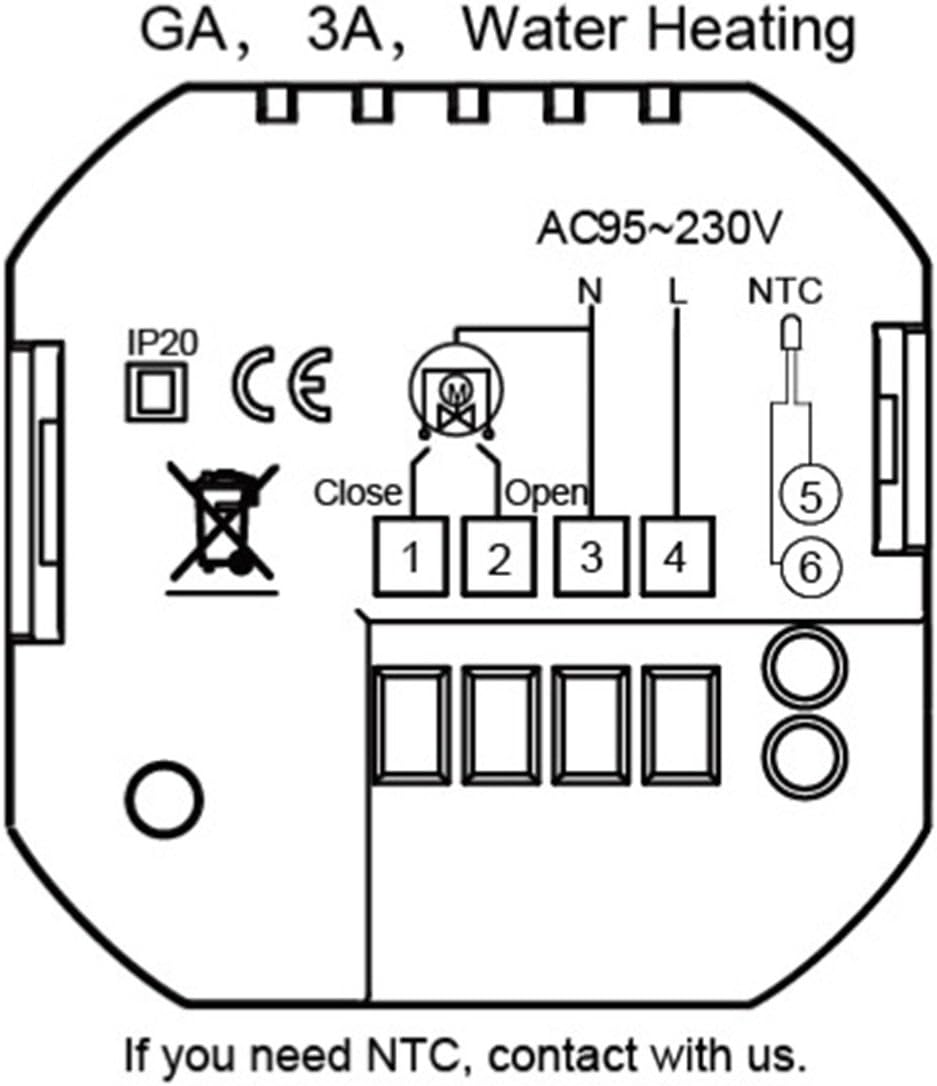
Figure 4: Detailed wiring schematic for GA, 3A, Water Heating models. Connect Live (L) and Neutral (N) to terminals 3 and 4 respectively. Connect the heating load to terminals 1 and 2. The NTC floor sensor connects to terminals 5 and 6.
Descricións de terminais:
- N: Neutral wire for power supply.
- L: Live wire for power supply.
- 1 de 2: Load connections for the heating element.
- 5 de 6: NTC sensor connections (for floor temperature sensing).
7. Funcionamento
The thermostat features a clear display and touch buttons for easy operation.

Figure 5: Thermostat display and button function overview.
Funcións do botón:
- M (modo): Press to switch between Manual mode and Program mode.
- ⏱ (Clock/Time): Press to set time and date. Hold to enter programming settings.
- ⏻ (Potencia): Press to turn the thermostat ON/OFF.
- ▲ (Up Arrow): Increase temperature or adjust settings.
- ▼ (Down Arrow): Decrease temperature or adjust settings.
Axustar a data e a hora:
- With the thermostat ON, press the ⏱ button once. The hour digit will flash.
- Use ▲ e ▼ para axustar a hora.
- Preme ⏱ again to move to minutes, then use ▲ e ▼ para axustar.
- Preme ⏱ again to move to the day of the week (1-7, Monday-Sunday), then use ▲ e ▼ para axustar.
- Preme ⏱ again or wait 10 seconds to save and exit.
8. Programming (5+2 Weekly Schedule)
The thermostat supports 5+2 weekly programming, allowing you to set different temperatures for weekdays (Monday-Friday) and weekends (Saturday-Sunday) across six time periods each day.
- With the thermostat ON, hold the ⏱ button for 3-5 seconds to enter programming mode. The display will show "WEEK" and the first period (Period 1) for weekdays.
- Use ▲ e ▼ to adjust the start time for Period 1.
- Preme ⏱ to move to the temperature setting for Period 1. Use ▲ e ▼ to adjust the desired temperature.
- Repeat steps 2 and 3 for Period 2 through Period 6 for weekdays.
- After setting all 6 periods for weekdays, the display will switch to weekend programming (Saturday-Sunday). Repeat the process for Period 1 through Period 6 for weekends.
- Once all periods are set, press ⏱ again or wait 10 seconds to save the settings and exit programming mode.
Default Program Settings (Example):
| Período | Time (Mon-Fri) | Temp (Mon-Fri) | Time (Sat-Sun) | Temp (Sat-Sun) |
|---|---|---|---|---|
| 1 | 06:00 | 22℃ | 08:00 | 23℃ |
| 2 | 08:00 | 18℃ | 11:00 | 20℃ |
| 3 | 11:30 | 18℃ | 14:00 | 20℃ |
| 4 | 13:30 | 18℃ | 17:00 | 23℃ |
| 5 | 17:00 | 22℃ | 20:00 | 20℃ |
| 6 | 22:00 | 18℃ | 22:00 | 18℃ |
9. Mantemento
The BECA BHT-2000GALTP thermostat requires minimal maintenance.
- Limpeza: Limpar a pantalla e casing cun suave, damp pano. Non use produtos de limpeza ou disolventes abrasivos.
- Non hai pezas reparables polo usuario: Non intente abrir nin reparar o termostato vostede mesmo. Encargue calquera mantemento a persoal cualificado.
10 Solución de problemas
Se tes problemas co teu termostato, consulta os seguintes problemas e solucións comúns:
| Problema | Causa posible | Solución |
|---|---|---|
| O termostato non ten alimentación/a pantalla está apagada. | No power supply; circuit breaker tripped; loose wiring. | Check power supply at the circuit breaker. Ensure wiring connections are secure (refer to Section 6). |
| Heating system not turning on/off as expected. | Incorrect temperature setting; thermostat in wrong mode (Manual/Program); wiring issue. | Verify desired temperature is set correctly. Check thermostat mode (M button). Inspect wiring. |
| A lectura da temperatura semella inexacta. | Sensor issue; thermostat location. | Ensure the NTC sensor is properly connected and not damaged. Avoid placing thermostat near heat sources or drafts. |
| Non se pode entrar no modo de programación. | O botón non se manteña o tempo suficiente. | Manteña o ⏱ botón durante 3-5 segundos. |
11. Garantía e soporte
Para obter información sobre a garantía ou asistencia técnica, póñase en contacto co seu punto de venda ou directamente co fabricante. Garde o recibo de compra como proba de compra.
Manufacturer: BECA
Ask a question about this manual
Ask about setup, troubleshooting, compatibility, parts, safety, or missing instructions. Manuals+ will review the question and use this page’s manual context to help answer it.