
Introdución
This manual provides instructions for the Sentry BT900 On-Neck Bluetooth Headphones. It covers setup, operation, maintenance, and troubleshooting to ensure proper use of your wireless audio device.
Contido do paquete
Verifique que os seguintes elementos estean incluídos no paquete do produto:
- Sentry BT900 On-Neck Bluetooth Headphones
- Cable de carga USB
- Assorted Ear Tips
- Manual de usuario
Produto rematadoview
Familiarize yourself with the components of your Sentry BT900 headphones.
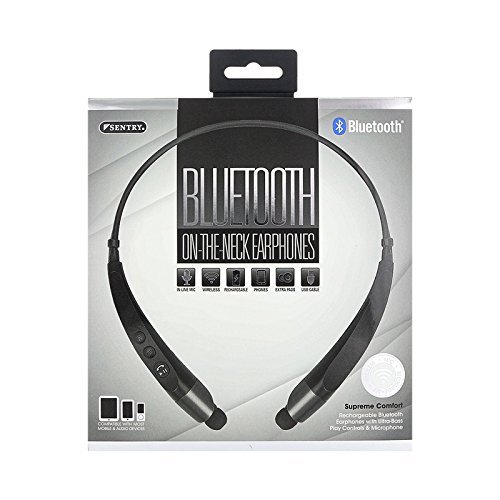
The image displays the Sentry BT900 headphones, featuring a flexible neckband designed for comfortable wear. The earbuds are connected to the neckband, and control buttons are typically located on one side of the neckband for easy access.
Compoñentes clave:
- Botón de acendido/multifunción: Used for powering on/off, play/pause, answering/ending calls.
- Botón para subir o volume/seguinte pista: Increases volume, skips to the next track.
- Botón para baixar o volume/pista anterior: Decreases volume, skips to the previous track.
- Porto de carga micro-USB: Para conectar o cable de carga.
- Indicador LED: Displays power, charging, and pairing status.
- Micrófono: Para chamadas mans libres.
Cargando os auriculares
Before initial use, fully charge the headphones.
- Connect the small end of the USB charging cable to the Micro-USB port on the headphones.
- Conecta o extremo máis grande do cable de carga USB a unha fonte de alimentación USB (por exemplo, un porto USB do ordenador ou un adaptador de parede USB).
- The LED indicator will illuminate during charging and change color or turn off when charging is complete.
- Unha carga completa adoita tardar aproximadamente de 2 a 3 horas.
Emparejamento cun dispositivo Bluetooth
Follow these steps to connect your headphones to a Bluetooth-enabled device:
- Ensure the headphones are turned off and fully charged.
- Manteña premido o Botón de encendido/multifunción for approximately 5-7 seconds until the LED indicator flashes red and blue alternately, indicating pairing mode.
- On your Bluetooth-enabled device (smartphone, tablet, etc.), navigate to the Bluetooth settings.
- Activa o Bluetooth e busca os dispositivos dispoñibles.
- Select 'Sentry BT900' from the list of found devices.
- Once paired, the LED indicator on the headphones will typically flash blue slowly or turn solid blue.
- If a passcode is requested, enter '0000'.
Funcionamento dos auriculares
Encendido/apagado:
- Encendido: Manteña premido o Botón de encendido/multifunción for 3 seconds. The LED indicator will flash blue.
- Apagado: Manteña premido o Botón de encendido/multifunción for 3 seconds. The LED indicator will flash red and then turn off.
Reprodución de música:
- Reproducir/Pausa: Preme o Botón de encendido/multifunción unha vez.
- Próxima pista: Manteña premido o Botón para subir o volume.
- Pista anterior: Manteña premido o Botón para baixar o volume.
Xestión de chamadas:
- Responder/Finalizar chamada: Preme o Botón de encendido/multifunción unha vez.
- Rexeitar a chamada: Manteña premido o Botón de encendido/multifunción durante 2 segundos.
- Volver a marcar o último número: Prema dúas veces o Botón de encendido/multifunción.
Control de volume:
- Aumentar o volume: Preme o Botón para subir o volume repetidamente.
- Diminuír o volume: Preme o Botón para baixar o volume repetidamente.
Mantemento
Limpeza:
Gently wipe the headphones and earbuds with a soft, dry cloth. For ear tips, remove them and clean with a mild soap solution if necessary, then rinse and dry completely before reattaching.
Almacenamento:
Garda os auriculares nun lugar fresco e seco, lonxe da luz solar directa e de temperaturas extremas. Evita colocar obxectos pesados enriba deles.
Coidado da batería:
Para prolongar a duración da batería, evite descargala completamente con frecuencia. Cargue os auriculares regularmente, mesmo se non os usa durante períodos prolongados.
Resolución de problemas
Os auriculares non se acenden:
Ensure the headphones are fully charged. Connect to a power source and attempt to power on after a few minutes.
Non se pode emparellar co dispositivo:
Ensure the headphones are in pairing mode (flashing red and blue LED). Make sure Bluetooth is enabled on your device and it is within range (typically 10 meters). Turn off and on both the headphones and the device, then try pairing again.
Sen son ou volume baixo:
Check the volume levels on both the headphones and your connected device. Ensure the headphones are properly paired and connected. Try re-pairing the headphones.
Mala calidade de son:
Ensure there are no obstructions between the headphones and your device. Move closer to your device. Check for interference from other wireless devices.
Problemas de carga:
Verify the USB cable is securely connected to both the headphones and the power source. Try a different USB cable or power source.
Especificacións
- Modelo: BT900
- Tecnoloxía de comunicación sen fíos: Bluetooth
- Tipo de batería: 1 ión de litio (incluído)
- Peso do artigo: 2.39 onzas
- Dimensións do produto: 8.25 x 1.5 x 6.75 polgadas
- Características especiais: Microphone Included, Wireless
- UPC: 080068549000
Garantía e Soporte
For warranty information, please refer to the documentation included with your purchase or contact Sentry customer support.
Conserve o seu comprobante de compra para reclamacións de garantía.