
1. Introdución
This manual provides essential information for the safe and effective operation and maintenance of your Harmar AL100 Universal Scooter Lift. The AL100 is designed to transport a wide range of mobility scooters, offering a fully automatic lifting solution for vehicle attachment. It features a robust aluminum deck and a 350 lb capacity.
Please read this manual thoroughly before installation or operation to ensure proper use and to prevent injury or damage to the lift or your vehicle.
2. Información de seguridade
- AVISO: Always ensure the scooter is properly secured on the lift platform before driving.
- PRECAUCIÓN: Do not exceed the lift's maximum weight capacity of 350 lbs. Refer to your scooter's manual for its weight.
- IMPORTANTE: Before ordering, it is crucial to verify compatibility with your specific vehicle and scooter. Contact Harmar or your dealer for assistance.
- Manteña as mans e a roupa lonxe das pezas móbiles durante o funcionamento.
- Ensure the lift is properly installed and maintained according to the instructions to prevent accidents.
- Do not allow children to operate or play near the lift.
3. Compoñentes e características
The Harmar AL100 Universal Scooter Lift includes several key components designed for ease of use and durability:
- Aluminum Deck: The main platform for carrying the scooter, measuring 27.5" x 39".
- Adjustable Cradle: Extends up to 46" to accommodate various scooter sizes.
- Cuberta do motor: Protects the lift's motor, includes a key lock for security.
- Interruptor de alternancia: Controls the automatic lifting and lowering functions.
- License Plate Holder and Light: Ensures visibility and compliance with road regulations.
- Anulación manual: Allows for manual operation in case of power failure.
- Hitch Adapter (AL123/HD Class III): Facilitates attachment to your vehicle's hitch receiver.
- Brazo articulado: (If included with your model) Allows the lift to pivot away from the vehicle for trunk access.
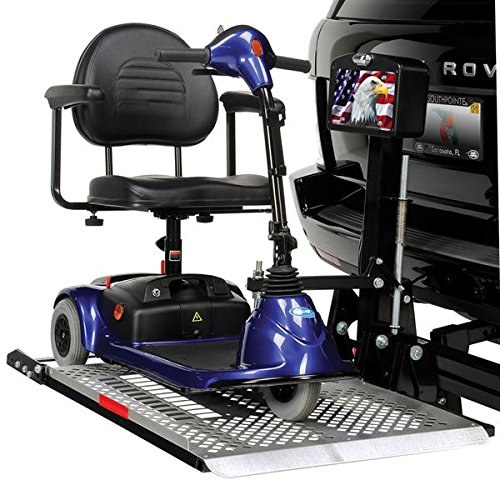
Figure 1: Harmar AL100 Universal Scooter Lift with scooter loaded, attached to a vehicle's hitch. This image illustrates the lift's overall structure and how it connects to the vehicle.
4. Configuración e instalación
Proper installation is critical for the safe and reliable operation of your AL100 lift. It is highly recommended that installation be performed by a qualified technician.
- Verificación de compatibilidade: Before beginning, ensure your vehicle's hitch receiver is compatible with the AL123/HD Class III hitch adapter and that your vehicle's suspension can support the combined weight of the lift and your scooter.
- Attach Hitch Adapter: Securely insert the AL123/HD Class III hitch adapter into your vehicle's hitch receiver. Follow the adapter's specific instructions for proper fastening.
- Mount Lift Assembly: Attach the main lift assembly to the hitch adapter. Ensure all bolts and pins are correctly aligned and tightened according to the provided hardware instructions.
- Conexión eléctrica: Connect the lift's wiring harness to your vehicle's electrical system. This typically involves connecting to the vehicle's battery and tail light wiring for power and license plate light functionality. Consult a professional if you are unsure about electrical connections.
- Adjust Cradle: Adjust the scooter cradle on the platform to match the wheelbase of your scooter. Ensure the scooter will sit securely and balanced on the platform.
- Proba de funcionamento: Before loading a scooter, perform a full cycle of lifting and lowering the platform to ensure smooth operation and proper electrical function.
Imaxe 2: Primeiro plano view of the Harmar AL100's hitch connection point. This illustrates how the lift attaches to the vehicle's hitch receiver.
5. Instrucións de funcionamento
The AL100 lift is designed for fully automatic operation. Follow these steps to load and unload your scooter:
- Prepare the Lift: Ensure the lift platform is in the lowered position. If equipped with a swing-away arm, ensure it is locked in the travel position.
- Position Scooter: Drive or push your scooter onto the lift platform. Align the scooter's wheels with the adjustable cradle.
- Secure Scooter: Use the provided tie-downs or securing straps to firmly attach the scooter to the lift platform. Ensure the scooter cannot move during transit.
- Lift Scooter: Insert the key into the motor cover lock and turn it to the "ON" position. Use the toggle switch to raise the platform until the scooter is fully lifted and secured in the travel position. The lift will automatically stop when fully raised.
- Lock Motor Cover: Turn the key to the "OFF" position and remove it to prevent unauthorized operation.
- Descarga: To unload, reverse the lifting process. Insert the key, turn to "ON", and use the toggle switch to lower the platform. Once the platform is fully lowered, remove the securing straps and carefully drive or push the scooter off the lift.
- Anulación manual: In case of electrical failure, locate the manual override mechanism (refer to the detailed diagram in the full product manual). Follow instructions to manually raise or lower the platform.
Figure 3: Detail of the Harmar AL100's motor cover with key lock and toggle switch. This shows the primary controls for operating the lift.
6. Mantemento
Regular maintenance ensures the longevity and safe operation of your Harmar AL100 lift.
- Mensual: Inspect all moving parts, bolts, and electrical connections for wear, damage, or looseness. Tighten any loose fasteners.
- Trimestral: Clean the lift platform and all components. Lubricate pivot points and moving parts with a suitable lubricant as recommended by Harmar.
- Anualmente: Have the lift inspected by a qualified service technician to ensure all components are functioning correctly and safely.
- Keep the motor cover clean and free of debris.
- Check the condition of the wiring harness for any fraying or damage.
7 Solución de problemas
| Problema | Causa posible | Solución |
|---|---|---|
| O ascensor non funciona | No power; key not in "ON" position; loose electrical connection; blown fuse. | Check vehicle battery; ensure key is "ON"; inspect wiring; check vehicle's fuse box. |
| Lift operates slowly or with difficulty | Batería baixa voltage; excessive load; motor issue. | Check vehicle battery charge; ensure scooter weight is within capacity; contact service. |
| Ruídos pouco habituais durante o funcionamento | Lack of lubrication; loose components; worn parts. | Lubricate moving parts; inspect and tighten fasteners; contact service if noise persists. |
For issues not listed here or if solutions do not resolve the problem, please contact Harmar customer support or a certified service technician.
8. Especificacións
- Modelo: AL-100-WH-HASW
- Marca: Harmar
- Capacidade de carga: 350 libras (158 kg)
- Tamaño da plataforma: 27.5" x 39" (adjustable cradle extends up to 46")
- Material: Aluminio
- Tipo de montaxe: Hitch (AL123/HD Class III adapter included)
- Operación: Totalmente automático
- Cor: Prata
- UPC: 819095020004
9. Información da garantía
Harmar products are backed by a manufacturer's warranty. Specific warranty terms and conditions, including duration and coverage details, are provided with your product documentation at the time of purchase. Please retain your proof of purchase for warranty claims.
For detailed warranty information or to register your product, please visit the official Harmar websitio ou póñase en contacto co seu departamento de atención ao cliente.
10. Soporte e contacto
If you have questions, require technical assistance, or need to order replacement parts, please contact Harmar customer support:
- Websitio: www.harmar.com
- Teléfono: Refer to the contact information provided in your product packaging or on the official Harmar websitio.
- Correo electrónico: Consult the Harmar websitio web para enderezos de correo electrónico de atención ao cliente.
When contacting support, please have your product model number (AL-100-WH-HASW) and serial number ready.