
Technical Precision DMIL-AZ-D89E-7
Technical Precision Replacement for Leica Dmil Light Bulb Instruction Manual
Model: DMIL-AZ-D89E-7 | Brand: Technical Precision
1. Introdución
This manual provides essential information for the safe and effective use of your Technical Precision Replacement for Leica Dmil Halogen Light Bulb. Please read these instructions carefully before installation and retain for future reference.
2. Produto rematadoview
The Technical Precision Replacement for Leica Dmil Light Bulb is a 35W, 6V halogen bulb designed for microscope lighting applications. It features a T3 bulb shape with a 2-pin G4 base, providing clear illumination.
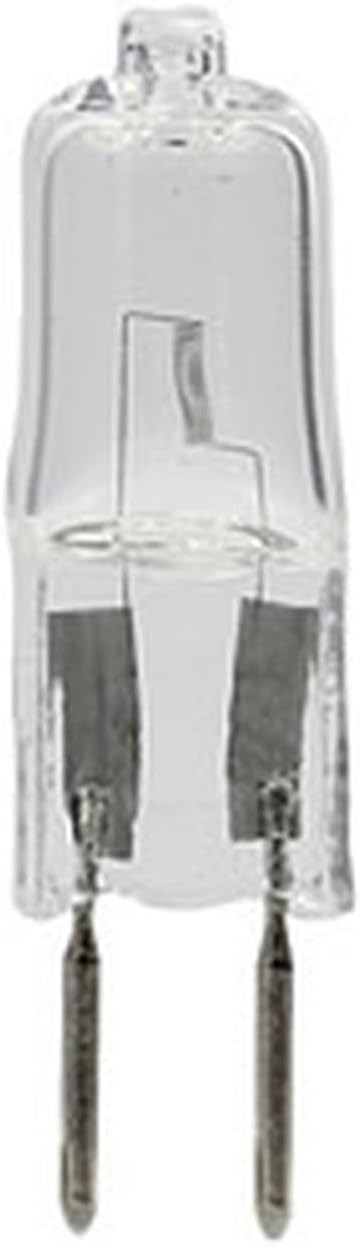
Figura 2.1: Fronte view of the Technical Precision Replacement Halogen Bulb, showing its clear glass and two-pin G4 base.

Figura 2.2: En ángulo view of the Technical Precision Replacement Halogen Bulb, highlighting the internal filament structure.
3. Información de seguridade
Observe sempre as seguintes precaucións de seguridade:
- Risco de queimaduras: Halogen bulbs operate at high temperatures. Allow the bulb to cool completely before handling.
- Risco de descarga eléctrica: Always disconnect power to the fixture before installing, removing, or inspecting the bulb.
- Manipular con coidado: Avoid touching the glass part of the bulb with bare hands. Oils from your skin can create hot spots, leading to premature failure. Use a clean cloth or gloves when handling.
- Eliminación axeitada: Desfágase das lámpadas vellas segundo a normativa local.
- Compatibilidade: Ensure the replacement bulb's specifications (voltage, wattage, base type) match the requirements of your equipment.
4. Instalación
Follow these steps to install the replacement halogen bulb:
- Desconectar a enerxía: Turn off and unplug the microscope or lighting fixture from the power source.
- Permitir arrefriamento: If the previous bulb was in use, wait for it to cool down completely to avoid burns.
- Lámpada de acceso: Abra con coidado o lamp housing or access panel to expose the old bulb. Refer to your microscope's or fixture's manual for specific instructions on accessing the bulb.
- Eliminar a lámpada antiga: Gently pull the old bulb straight out from its G4 base. Avoid twisting or bending the pins.
- Instalar a nova lámpada: Holding the new bulb with a clean cloth or gloves, align the two pins with the holes in the G4 socket. Gently push the bulb straight into the socket until it is firmly seated. Do not force it.
- Vivenda segura: Pechar e asegurar a lamp carcasa ou panel de acceso.
- Restaurar enerxía: Plug the microscope or lighting fixture back into the power source.
5. Funcionamento
Once installed, the halogen bulb operates as part of your microscope or lighting fixture. Simply turn on the device's power switch to illuminate the bulb. Adjust brightness settings as per your equipment's controls.
6. Mantemento
Halogen bulbs generally require minimal maintenance. However, periodic checks can prolong their lifespan and ensure optimal performance:
- Limpeza: If the bulb's glass surface becomes dusty or smudged, ensure the bulb is cool and power is disconnected. Gently wipe the glass with a clean, lint-free cloth moistened with rubbing alcohol. Allow to dry completely before re-energizing.
- Inspección: Periodically inspect the bulb and its socket for any signs of damage, corrosion, or loose connections. Replace the bulb if the glass is cracked or the filament is broken.
7 Solución de problemas
Se a lámpada non se acende despois da instalación, teña en conta o seguinte:
- Sen enerxía: Ensure the microscope or lighting fixture is properly plugged in and the power switch is on. Check the power outlet.
- Instalación incorrecta: Verify that the bulb is fully and correctly seated in its socket. The pins must make proper contact.
- Blown Fuse/Circuit Breaker: Check the fuse or circuit breaker for the lighting fixture or the electrical circuit it is connected to.
- Defective Bulb: Although rare, a new bulb can sometimes be defective. If possible, test with another known-good bulb.
- Fixture Issue: If all else fails, the issue might be with the lighting fixture itself (e.g., faulty socket, wiring, or internal component). Consult a qualified technician.
8. Especificacións
| Atributo | Valor |
|---|---|
| Marca | Precisión técnica |
| Número de modelo | DMIL-AZ-D89E-7 |
| Tipo de luz | Halóxeno |
| Wattage | 35 vatios |
| Voltage | 6 Volts (as per product title) |
| Tamaño da forma do bulbo | T3 |
| Base de bulbo | G4 (2-Pin) |
| Brillo | 1585 lúmenes |
| Tipo de acabado | Limpar |
| Número de unidades | 1 paquete |

Figure 8.1: Lighting Facts for the bulb, detailing brightness, estimated life, and energy usage.
9. Garantía e soporte
For information regarding warranty, returns, or technical support, please refer to the official Technical Precision websitio web ou póñase en contacto directamente co seu servizo de atención ao cliente. Tamén pode visitar o Tenda de precisión técnica en Amazon para máis detalles.
Ask a question about this manual
Ask about setup, troubleshooting, compatibility, parts, safety, or missing instructions. Manuals+ will review the question and use this page’s manual context to help answer it.