
1. Introdución
The COUGAR GX-S 750W is an 80-PLUS Gold certified power supply unit (PSU) designed for reliable and efficient power delivery to your personal computer. Its compact design ensures compatibility with various PC cases, while advanced features like fan curve tuning and DC-DC power conversion technology contribute to stable voltage outputs and reduced noise levels. This manual provides essential information for the safe installation, operation, and maintenance of your GX-S 750W PSU.
2. Información de seguridade
Please read and understand all safety instructions before installing or operating the power supply unit. Failure to comply with these instructions may result in electric shock, fire, or damage to the product and connected components.
- Always disconnect the AC power cord from the wall outlet before installing, removing, or cleaning the PSU.
- Non abra a fonte de alimentación casing. Alto volumetage components inside pose a risk of electric shock, even when the unit is unplugged.
- Ensure the PSU is properly grounded.
- This product is intended for indoor use only. Do not expose the PSU to water, moisture, or high humidity.
- Instala a fonte de alimentación nunha zona ben ventilada, lonxe de fontes de calor e da luz solar directa.
- Empregue só os cables incluídos coa fonte de alimentación.
- Non force os conectores. Asegúrese da orientación correcta antes de conectar os cables.
3. Contido do paquete
Verifica que todos os elementos estean presentes no paquete:
- COUGAR GX-S 750W Power Supply Unit
- Cable de alimentación de CA
- Modular and Fixed Cables (24-pin ATX, 4+4-pin CPU, 6+2-pin PCIe, SATA, Molex)
- Parafusos de montaxe
- Manual de usuario
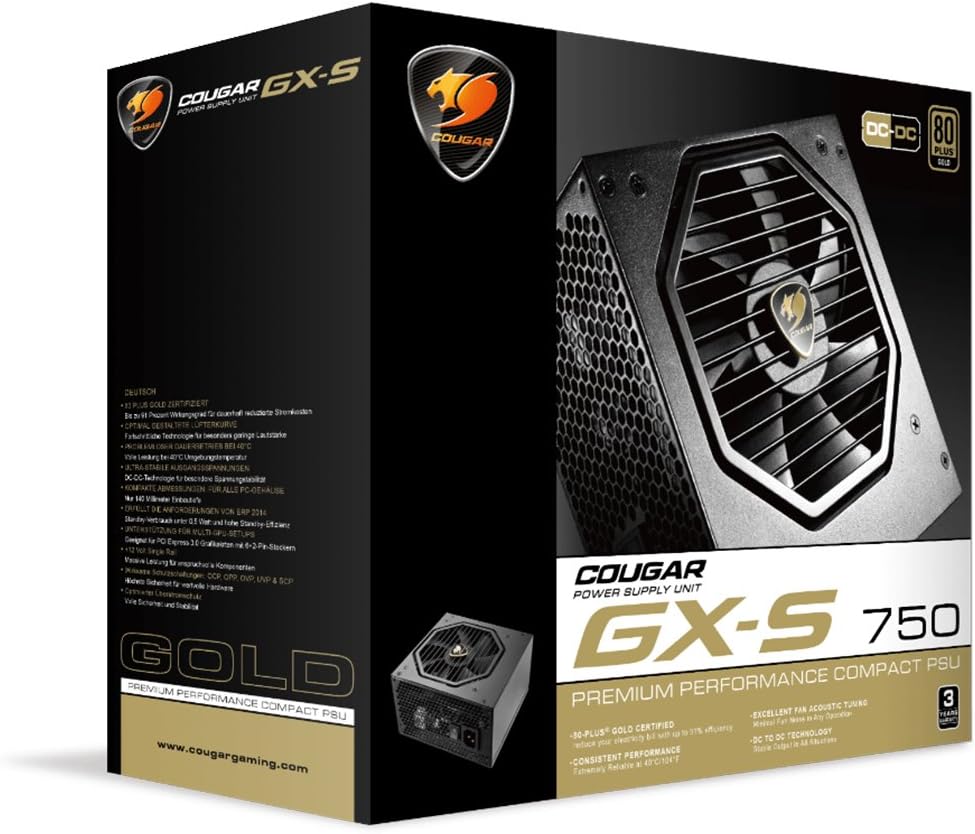
Image 3.1: COUGAR GX-S 750W Power Supply packaging. The image shows the retail box for the COUGAR GX-S 750W PSU, highlighting its 80 PLUS Gold certification and compact design.
4. Configuración e instalación
Follow these steps to install your COUGAR GX-S 750W Power Supply:
- Preparación: Asegúrate de que o teu ordenador estea completamente apagado e desconectado da toma de corrente. Abre a carcasa do teu ordenador para acceder á zona de montaxe da fonte de alimentación.
- Montaxe da fonte de alimentación: Carefully place the GX-S 750W PSU into the designated PSU bay in your PC case. Align the screw holes on the PSU with those on the case. Secure the PSU using the provided mounting screws. Ensure the PSU fan is oriented correctly for optimal airflow (typically facing downwards if there's a vent, or upwards if not).
- Connecting Motherboard Power: Connect the 24-pin ATX power cable from the PSU to the corresponding 24-pin connector on your motherboard. Ensure it clicks securely into place.
- Conexión da alimentación da CPU: Connect the 4+4-pin EPS (CPU) power cable to the CPU power connector on your motherboard. This is usually located near the CPU socket. If your motherboard requires an 8-pin connector, combine the two 4-pin halves.
- Connecting PCIe Power (Graphics Cards): If you have a dedicated graphics card, connect the 6+2-pin PCIe power cables from the PSU to your graphics card(s). Some high-end graphics cards may require multiple PCIe power connectors.
- Connecting SATA/Molex Power: Connect SATA power cables to your storage drives (HDDs, SSDs) and optical drives. Use Molex connectors for any other peripherals that require them (e.g., case fans, fan controllers).
- Xestión de cables Route all cables neatly to improve airflow and aesthetics within your PC case. Use cable ties or straps if necessary.
- Verificación final: Double-check all connections to ensure they are secure and correctly seated. Close your PC case.
- Encendido: Connect the AC power cord to the PSU and then to a wall outlet. Flip the power switch on the back of the PSU to the 'ON' position. You can now power on your computer.

Image 4.1: COUGAR GX-S 750W Power Supply. This image displays the top-down view of the COUGAR GX-S 750W PSU, showing the fan grille, power input, and power switch, along with various cable connections.

Image 4.2: COUGAR GX-S 750W Power Supply side view. This image shows a side view of the COUGAR GX-S 750W PSU, illustrating the compact form factor and the exit point for fixed cables.
5. Instrucións de funcionamento
The COUGAR GX-S 750W PSU is designed for continuous operation within its specified limits. Once installed, its operation is largely automatic, managing power delivery to your system components.
- Eficiencia: The 80-PLUS Gold certification ensures high power efficiency (up to 91%), reducing electricity consumption and heat generation.
- Refrixeración: The PSU features an optimized fan curve tuning designed to minimize noise levels while maintaining effective cooling for internal components. The fan will adjust its speed based on the PSU's temperature and load.
- Potencia estable: DC-DC power conversion technology provides stable and reliable voltage outputs to all connected components, crucial for system stability and longevity.
- Condicións ambientais: The PSU is designed to operate reliably even at ambient temperatures up to 40°C (104°F). Ensure adequate ventilation around your PC to prevent overheating.
6. Mantemento
Proper maintenance helps ensure the longevity and optimal performance of your COUGAR GX-S 750W PSU.
- Eliminación de po: Periodically clean the exterior of the PSU and its fan grille to prevent dust buildup, which can impede airflow and reduce cooling efficiency. Use compressed air or a soft brush. Always disconnect the PSU from power before cleaning.
- Evitar líquidos: Never spray cleaning liquids directly onto the PSU. Use a slightly damp cloth for external cleaning only.
- Conexións por cable: Occasionally check that all power cables are securely connected to the PSU and your components. Loose connections can lead to instability or damage.
7 Solución de problemas
If you encounter issues with your COUGAR GX-S 750W PSU, refer to the following troubleshooting steps:
- O sistema non se acende:
- Asegúrate de que o cable de alimentación de CA estea conectado correctamente tanto á fonte de alimentación como á toma de corrente.
- Comprobe que o interruptor de alimentación da parte traseira da fonte de alimentación estea na posición "ON".
- Verify that the 24-pin ATX and 4+4-pin CPU power cables are correctly connected to the motherboard.
- Proba a toma de corrente con outro dispositivo para confirmar que teña corrente.
- O sistema acende pero apágase inmediatamente:
- This could indicate a short circuit or an overloaded component. Disconnect all non-essential components (e.g., extra drives, graphics card) and try powering on. Reconnect one by one to identify the problematic component.
- Ensure all components are compatible with the PSU's wattage.
- Ruído excesivo do ventilador:
- Check for dust buildup on the fan grille and clean if necessary (after disconnecting power).
- Ensure the PSU is securely mounted and not vibrating against the case.
- High fan speed can be normal under heavy system load. Monitor system temperatures.
- Inestabilidade/fallos do sistema:
- Ensure all power connectors are firmly seated.
- Verify that your system's power requirements do not exceed the PSU's 750W capacity.
- This could also be related to other components (RAM, CPU, GPU). Test components individually if possible.
If these steps do not resolve the issue, please contact COUGAR customer support for further assistance.
8. Especificacións
| Característica | Especificación |
|---|---|
| Marca | PUMA |
| Número de modelo | GXS750 |
| Potencia de saídatage | 750 vatios |
| Certificación 80 PLUS | Ouro |
| Método de arrefriamento | Aire |
| Dimensións do artigo (L x W x H) | 5.9 x 3.4 x 5.5 polgadas (150 x 86 x 140 mm) |
| Peso do elemento | 88.15 Ounces (approx. 2.5 kg) |
| Dispositivos compatibles | Ordenador persoal |
| Tipo de conector | PCI Express |
| UPC | 871520007974 |
9. Garantía e soporte
The COUGAR GX-S 750W Power Supply Unit comes with a 5 ano de garantía desde a data de compra, cubrindo defectos de materiais e fabricación en condicións de uso normal.
For technical support, warranty claims, or further inquiries, please visit the official COUGAR websitio web ou póñase en contacto co seu departamento de atención ao cliente. Garde o comprobante de compra para a validación da garantía.
COUGAR Official Websitio: www.cougargaming.com