
Introdución
Welcome to the world of Imaginext! This manual provides essential information for the safe and proper use of your Fisher-Price Imaginext Mobile Command Center DTM80. Please read these instructions carefully before operating the toy and retain them for future reference.
Información de seguridade
- Supervisión de adultos: Asegúrate sempre de que os nenos estean supervisados mentres xogan.
- Pezas pequenas: This product contains small parts (e.g., projectiles, Batman figure) which may pose a choking hazard for children under 3 years. Not suitable for children under 36 months.
- Seguridade da batería: If the remote control requires batteries (not included), always follow battery safety guidelines: use the correct size and type of batteries, insert them correctly, do not mix old and new batteries or different types, and remove exhausted batteries promptly.
- Seguridade dos proxectís: Do not aim projectiles at eyes or face. Use only projectiles supplied with this toy. Do not modify projectiles or projectile launcher.
- Ambiental: Elimina os materiais de embalaxe de forma responsable.
Contido do paquete
Verifique que todos os elementos que se indican a continuación estean presentes no seu paquete:
- Imaginext Mobile Command Center Vehicle
- Control remoto
- Batman Figure
- Proxectís
- Jail accessory
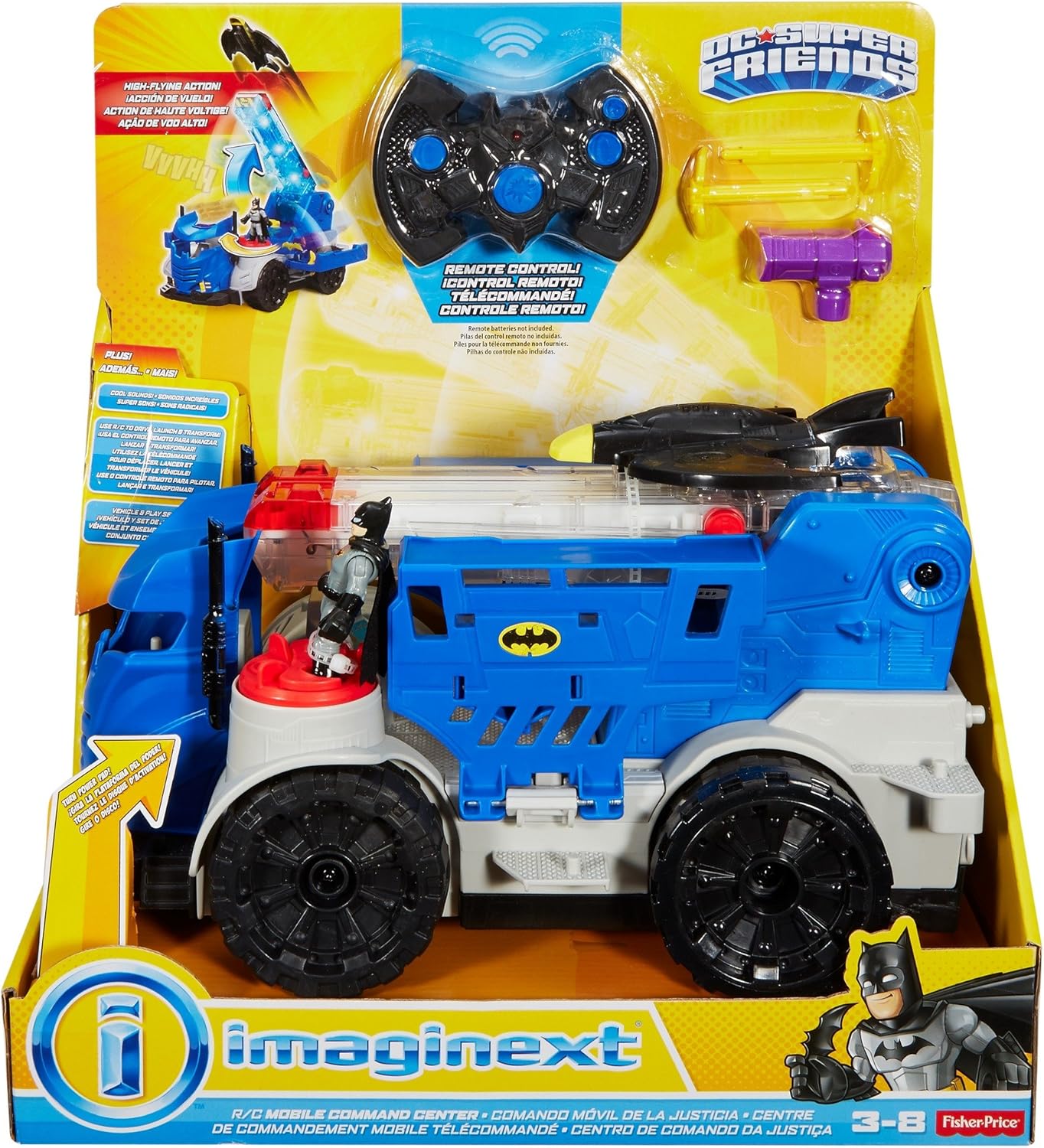
Image: The Imaginext Mobile Command Center and accessories displayed in its retail packaging.
Configuración
1. Desembalaxe
Carefully remove all components from the packaging. Discard all packaging materials responsibly.
2. Montaxe
The Imaginext Mobile Command Center DTM80 requires no assembly. It is ready for play directly out of the box.
3. Instalación da batería (control remoto)
While the main vehicle does not require user-installed batteries, the remote control may require batteries for full functionality. Locate the battery compartment on the remote control, typically on the underside. Use a small Phillips head screwdriver to open the compartment. Insert the required batteries (e.g., AA or AAA, not included) according to the polarity indicators (+/-). Close the compartment and secure with the screw.
Instrucións de funcionamento
1. Movemento básico
Use the remote control to move the Mobile Command Center. Refer to the remote control's buttons for forward, backward, and turning actions.
2. Transforming the Vehicle
The Mobile Command Center can transform to reveal its hidden features. Place the Batman figure on the red Power Pad on the vehicle. To initiate transformation:
- Usando o mando a distancia: Turn the power button or push the transformation button on the remote control. This will raise the Batwing platform.
- Manual Transformation: Alternatively, you can manually activate the transformation by turning the small Power Pad on the vehicle.

Image: The Imaginext Mobile Command Center in its initial, compact vehicle mode with the Batman figure positioned on the Power Pad.
3. Launching the Batwing
Once the Batwing platform is raised, you can launch the Batwing:
- Usando o mando a distancia: Press the dedicated launch button on the remote control to send the Batwing flying.
- Lanzamento manual: You can also manually press the small Power Pad located on the platform to launch the Batwing.

Image: The Imaginext Mobile Command Center in its transformed state, showing the raised Batwing launcher and rear view.
4. Projectile Launcher
Load the projectiles into the designated launcher on the vehicle. Press the launch button on the remote control or manually activate the launcher to fire projectiles.

Image: The Imaginext Mobile Command Center in its transformed state, with the remote control positioned in front, highlighting interactive features.
5. Jail Feature
Utilize the integrated jail accessory to capture villains (other Imaginext figures, sold separately) and secure them within the Mobile Command Center.

Image: A child interacting with the Imaginext Mobile Command Center, demonstrating its play features.
Mantemento
Limpeza
To clean the Mobile Command Center, wipe it with a damp pano. Non mergulles o xoguete na auga. Evita o uso de produtos químicos agresivos ou produtos de limpeza abrasivos.
Almacenamento
Store the toy in a cool, dry place away from direct sunlight when not in use. If the remote control uses batteries, remove them if the toy will not be used for an extended period to prevent leakage.
Resolución de problemas
- Toy Not Responding to Remote:
- Asegúrate de que o mando a distancia teña pilas novas e de que estean inseridas correctamente.
- Check for any obstructions between the remote and the vehicle.
- Ensure the vehicle's power switch (if present) is in the 'ON' position.
- Batwing Not Launching/Platform Not Raising:
- Verify that the Batman figure is correctly placed on the Power Pad.
- Ensure no parts are jammed or obstructed.
- Try manual activation of the Power Pad to rule out remote control issues.
- Projectiles Not Firing:
- Ensure projectiles are fully loaded into the launcher.
- Check for any obstructions in the launcher mechanism.
Especificacións
| Número de modelo | DTM80 |
| Tipo de material | Plástico |
| Dimensións (L x W x H) | 21.59 x 40.64 x 36.83 cm |
| Peso | 1 kg |
| Requírese montaxe | Non |
| Batteries Required (Product) | No (Remote control may require separate batteries) |
| Idade recomendada | 36 meses - 8 anos |
Garantía e Soporte
For information regarding warranty, product support, or replacement parts, please refer to the official Fisher-Price websitio web ou póñase en contacto co seu departamento de atención ao cliente. Os datos de contacto adoitan atoparse na embalaxe do produto ou na presenza oficial en liña da marca.
For additional information or to explore other Imaginext products, visit the Fisher-Price Brand Store.