
DOBE TI-465
Manual de instrucións do mando de xogos sen fíos DOBE TI-465
Modelo: TI-465
1. Introdución
This manual provides comprehensive instructions for the DOBE TI-465 Wireless Gamepad Controller. This device is designed to enhance your gaming experience on various platforms, including Android smartphones, tablets, and PCs. It features wireless Bluetooth connectivity, a built-in rechargeable battery, and a telescopic holder for mobile devices. Please read this manual thoroughly before use to ensure proper operation and maintenance.
2. Información de seguridade
- Non expoñas o dispositivo a temperaturas extremas, luz solar directa nin humidade elevada.
- Evite deixar caer ou someter o dispositivo a fortes impactos.
- Manteña o dispositivo lonxe da auga e doutros líquidos.
- Non intente desmontar nin modificar o dispositivo. Isto anulará a garantía e pode causar danos.
- Use só o volume de carga especificadotage (DC 5V) to prevent damage to the battery and device.
- Manter fóra do alcance dos nenos.
3. Contido do paquete
Comprobe o contido do paquete ao abrilo. Se falta algún artigo ou está danado, póñase en contacto co seu vendedor.
- DOBE TI-465 Wireless Gamepad Controller
- Cable de carga USB
- Manual de usuario (este documento)
4. Produto rematadoview
The DOBE TI-465 is a versatile wireless gamepad designed for comfortable and precise control across various gaming platforms. It features a standard controller layout with dual analog sticks, a D-pad, action buttons, and shoulder buttons. A built-in telescopic holder allows for direct attachment of smartphones.

Imaxe 4.1: Fronte view of the DOBE TI-465 Wireless Gamepad Controller with all buttons labeled. This image illustrates the layout of the Cross function button (D-pad), Left Analog Stick, Right Analog Stick, HOME button, SELECT button, START button, L1/L2 Shoulder Buttons, R1/R2 Shoulder Buttons, X emission button, Y emission button, B emission button, and A emission button.
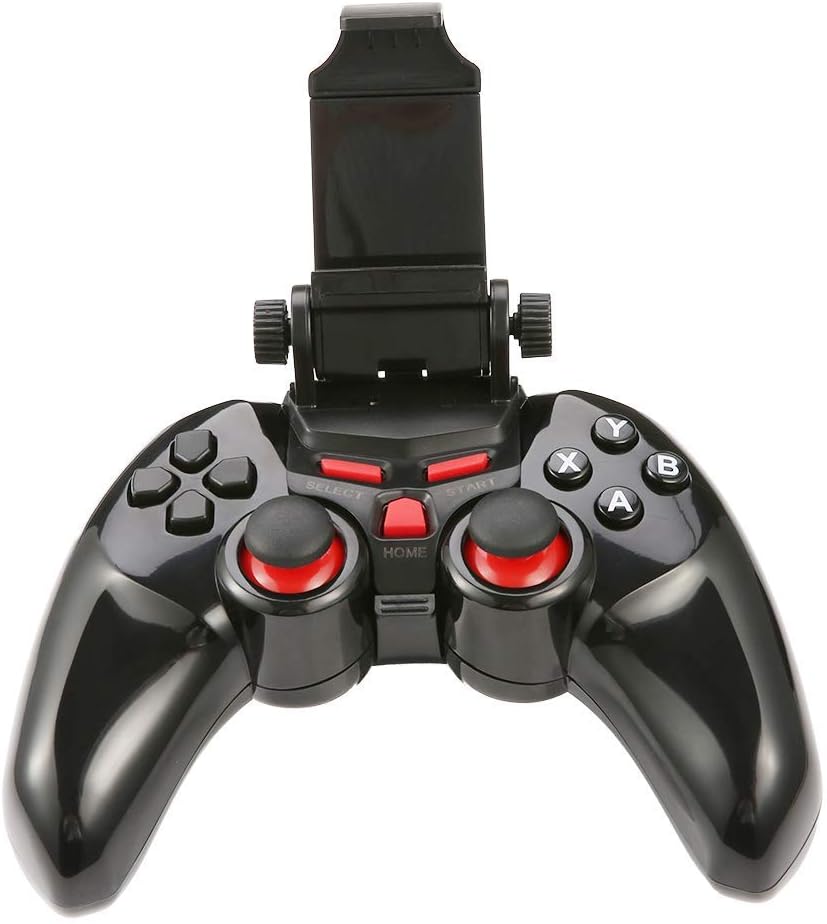
Imaxe 4.2: The DOBE TI-465 Gamepad Controller with its integrated telescopic smartphone holder extended upwards, ready to securely hold a mobile device.
Disposición de 4.1 botóns
- Cross Function Button (D-pad): Entrada direccional.
- Manetas analóxicas esquerda/dereita: 360-degree movement control.
- Botóns A/B/X/Y: Botóns de acción.
- Botóns de ombreiro L1/L2/R1/R2: Additional action inputs.
- Botón SELECCIONAR: Game-specific function.
- Botón INICIO: Game-specific function, often for pausing or menu access.
- Botón HOME: Returns to the main menu or exits the game.
5. Configuración
5.1 Carga do controlador
Before initial use, fully charge the controller.
- Connect the small end of the USB charging cable to the charging port on the controller.
- Connect the large end of the USB charging cable to a USB power source (e.g., computer USB port, USB wall adapter).
- The charging indicator light will illuminate. Once fully charged (approximately 2 hours), the light will change or turn off.
- Unha carga completa proporciona aproximadamente 20 horas de uso continuo.
5.2 Emparejamento Bluetooth
The DOBE TI-465 uses Bluetooth 3.0 for wireless connection. Ensure your device's Bluetooth is enabled.
5.2.1 Pairing with Android Devices (Smartphones/Tablets/Android TV)
- Asegúrate de que o controlador estea apagado.
- Manteña premido o FOGAR button until the indicator light starts flashing rapidly, indicating pairing mode.
- No teu dispositivo Android, vai a Configuración > Bluetooth.
- Scan for available devices. The controller should appear as "TI-465" or similar.
- Select "TI-465" to pair. The indicator light on the controller will become solid once connected.
5.2.2 Pairing with PC (Windows XP/7/8)
- Asegúrate de que o controlador estea apagado.
- Manteña premido o FOGAR button until the indicator light starts flashing rapidly.
- No teu PC, vai a Bluetooth & other devices settings.
- Fai clic Engade Bluetooth ou outro dispositivo > Bluetooth.
- Select "TI-465" from the list of available devices.
- Follow any on-screen prompts to complete the pairing. The indicator light on the controller will become solid once connected.
5.3 Installing a Smartphone
The integrated telescopic holder supports smartphones up to 6 inches in size.
- Tire suavemente da parte superior do soporte cara arriba para estendelo.
- Carefully place your smartphone into the holder, ensuring it is securely gripped by both the top and bottom clamps.
- Axuste o ángulo óptimo viewing.

Imaxe 5.1: The DOBE TI-465 Gamepad Controller with a smartphone securely mounted in its telescopic holder, demonstrating its use for mobile gaming.
5.4 Game Hall Application
For optimal compatibility and access to a wide range of games, it is recommended to download a compatible game hall application.
- Scan the QR code provided in the original product manual (not included here) to download the recommended game hall APP (e.g., Chicken Simulator, Grape Game Hall).
- Install the application on your Android device.
- Launch the game hall APP and download games compatible with external controllers.
- Ensure your controller is connected via Bluetooth before launching games from the application.
6. Funcionamento do controlador
6.1 Encendido/apagado
- Encendido: Preme o FOGAR button. The indicator light will flash and then become solid if connected to a previously paired device.
- Apagado: Manteña premido o FOGAR button for approximately 5 seconds until the indicator light turns off. The controller will also automatically enter power-saving mode if idle for an extended period without a connection.
6.2 Compatibilidade do xogo
The DOBE TI-465 is compatible with Android 3.2 and above systems, including various Android smartphones (e.g., Samsung Galaxy S9/S9+, S10/S10+, HUAWEI Mate 20/P30, OPPO R17, VIVO NEX X23 X27pro), Android TV BOX, Android TV, and PC (Win XP/7/8). It supports simulator games and iTunes compatible controller games.

Imaxe 6.1: A user operating the DOBE TI-465 Gamepad Controller while connected to a television, demonstrating its use for TV gaming.
6.3 Modo de aforro de enerxía
The controller is designed with user-friendly software to enter a power-saving mode automatically when not connected or idle for a period. To reactivate, press the FOGAR botón.
7. Mantemento
7.1 Limpeza
- Limpe o controlador cun pano suave e seco.
- Non empregues produtos de limpeza abrasivos, solventes ou produtos químicos fortes, xa que poden danar a superficie.
- Evite a entrada de humidade en calquera abertura.
7.2 Coidado coa batería
- Para prolongar a duración da batería, evite descargala completamente con frecuencia.
- Charge the controller regularly, even if not in use for extended periods (e.g., once every 3 months).
- Store the controller in a cool, dry place.
8 Solución de problemas
| Problema | Causa posible | Solución |
|---|---|---|
| O controlador non se acende. | A batería está esgotada. | Carga o controlador completamente. |
| Non se pode conectar por Bluetooth. | Controller not in pairing mode. O Bluetooth do dispositivo está desactivado. Interferencia. | Ensure controller is in pairing mode (flashing light). Activa o Bluetooth no teu dispositivo. Move closer to the device; avoid other wireless devices. |
| Controller connects but does not respond in game. | Game not compatible. Game hall app not used. | Verify game compatibility. Use the recommended game hall app for supported titles. |
| Batería de curta duración. | A batería non está completamente cargada. Batería envellecida. | Ensure controller is fully charged before use. If battery life significantly degrades, consider contacting support. |
9. Especificacións
| Característica | Detalle |
|---|---|
| Modelo | TI-465 |
| Conectividade | Bluetooth 3.0 |
| distancia wireless | 6-8 meters (19.68-26.24 ft) |
| Traballo Voltage | DC 3.7 V |
| Corrente de traballo | 38 mA |
| Corrente Quiescente | <2uA |
| Vol. de entrada de cargatage | DC 5 V |
| Corrente de carga | <500 mA |
| Capacidade da batería | 400 mAh |
| Tempo de traballo | Aprox. 20 horas |
| Tempo de carga | Aprox. 2 horas |
| Telescopic Holder Support | Up to 6-inch mobile phone |
| OS compatible | Android 3.2+, Windows XP/7/8 |
| Dimensións (aprox.) | 155mm (6.1 inch) x 105mm (4.1 inch) x 70mm (2.7 inch) (folded) |
| Número de modelo do artigo | 611864732190 |

Imaxe 9.1: The DOBE TI-465 Gamepad Controller with its telescopic holder extended, showing approximate dimensions: 155mm (6.1 inches) width, 105mm (4.1 inches) height (controller body), and 70mm (2.7 inches) height (extended holder).
10. Garantía e soporte
Para obter información sobre a garantía e asistencia técnica, consulte a documentación proporcionada no momento da compra ou póñase en contacto co seu vendedor. Garde o comprobante de compra para reclamacións de garantía.