
Mount-It! MI-2042
Mount-It! Full Motion TV Wall Mount (MI-2042) Instruction Manual
Model: MI-2042 | Brand: Mount-It!
Introdución
This manual provides detailed instructions for the safe and proper installation, operation, and maintenance of your Mount-It! MI-2042 Full Motion TV Wall Mount. This universal wall mount is designed for 19 to 40-inch TVs and computer monitors, supporting VESA 75x75mm and 100x100mm patterns. It offers full motion capabilities including tilt, swivel, and extension up to 15 inches, allowing for optimal viewángulos de inflexión.

Figure 1: Mount-It! MI-2042 Full Motion TV Wall Mount with a television attached.
Información de seguridade
- Read all instructions before installation. If you have any questions, contact customer support.
- Asegúrate de que a superficie de montaxe poida soportar con seguridade o peso combinado do soporte e da pantalla.
- Non exceda a capacidade de peso máxima de 33 lb (15 kg).
- Use only the provided hardware. Do not use parts not supplied by the manufacturer.
- A instalación incorrecta pode producir danos materiais ou danos persoais.
- Always have two people for installation to prevent injury or damage.
- Este produto está pensado só para uso en interiores.
Contido do paquete
Verify that all components are present and undamaged before beginning installation. If any parts are missing or defective, contact Mount-It! customer service.
| Compoñente | Cantidade |
|---|---|
| Montaxe da placa de parede | 1 |
| Prato VESA | 1 |
| Mounting Hardware (screws, anchors, washers) | Variado |
| Manual de instrucións | 1 |
Video 1: Official product video demonstrating the features and installation of the Mount-It! MI-2042 Full Motion TV Wall Mount.
Configuración e instalación
Follow these steps for secure installation of your wall mount. It is recommended to have two people for this process.
- Verify VESA Compatibility: Check the back of your TV or monitor for the four mounting holes. Measure the horizontal and vertical distance between these holes. This mount supports VESA patterns of 75x75mm and 100x100mm (3x3 inches or 4x4 inches).
- Attach VESA Plate to Display: Secure the VESA plate to the back of your TV or monitor using the appropriate screws and washers from the provided hardware kit. Ensure a snug fit without overtightening.
- Montar a placa de parede na parede:
- Locate a suitable mounting position on a wall stud or solid concrete/brick wall.
- Mark the drill holes for the wall plate.
- Drill pilot holes according to the instructions for your wall type (wood stud or concrete).
- Secure the wall plate to the wall using the provided lag bolts and washers. Ensure it is level and firmly attached.
- Attach Display to Wall Mount: Carefully lift the TV/monitor (with the VESA plate attached) and slide it onto the articulating arm's socket on the wall plate assembly. Ensure it clicks securely into place.
- Axustar o ángulo de inclinación: Loosen the tilt adjustment knob, set the desired tilt angle, and then tighten the knob to secure the display.

Figure 2: VESA compatibility check for your display.

Figure 3: Attaching the VESA plate to the display.
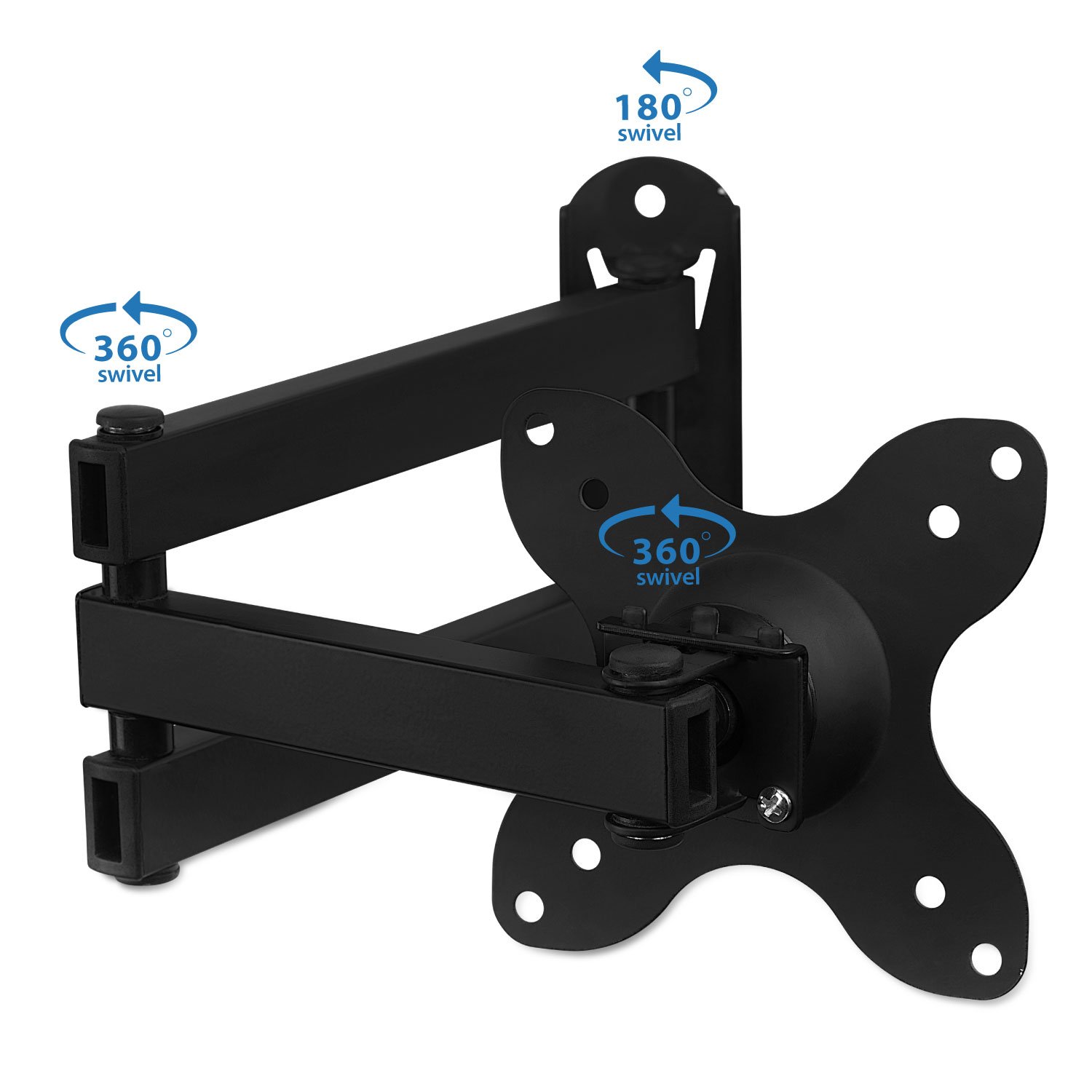
Figure 4: Attaching the display to the wall mount.
Instrucións de funcionamento (axustes)
The Mount-It! MI-2042 offers versatile adjustments for optimal viewing.
- Extensión: The articulating arm allows the display to extend from 1.75 inches (minimum) to 15 inches (maximum) from the wall. Gently pull or push the display to achieve the desired distance.
- Inclinación: The mount allows for a tilt range of up to 15 degrees up or down. Loosen the tilt knob, adjust the screen to your preferred vertical angle, and then re-tighten the knob.
- Xiratorio: The mount provides 180 degrees of swivel at each joint, allowing you to angle the screen left or right. Gently push the display to the desired horizontal viewposición de ing.
- Rotación: The VESA plate can rotate 360 degrees, enabling you to switch between landscape and portrait orientation for your display.

Figure 5: Display extension from the wall.

Figure 6: Tilt and rotation capabilities.
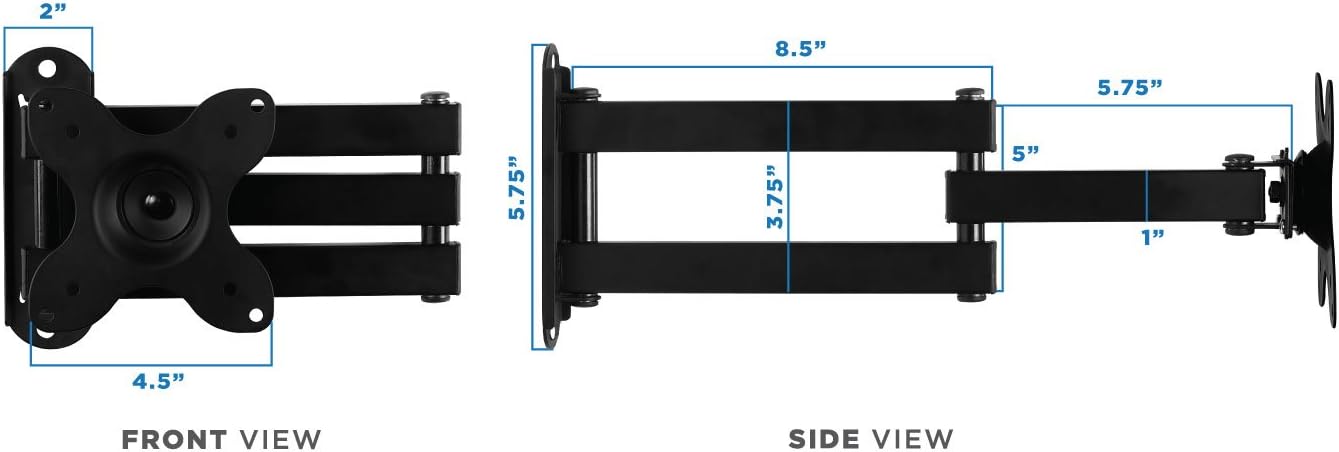
Figure 7: Swivel and rotation points on the mount.
Mantemento
Un mantemento regular garante a lonxevidade e o funcionamento seguro do seu soporte de parede.
- Limpeza: Limpa a montura cun pano suave eamp un pano para eliminar o po e a sucidade. Evite produtos químicos agresivos ou produtos de limpeza abrasivos.
- Inspección: Comprobe periodicamente todos os parafusos e conexións para asegurarse de que estean ben axustados e seguros. Volva a apertalos se é necesario.
- Lubricación: If joints become stiff, apply a small amount of silicone-based lubricant to the moving parts.
Resolución de problemas
Se tes algún problema, consulta os seguintes problemas e solucións comúns.
| Problema | Causa posible | Solución |
|---|---|---|
| TV/Monitor is wobbly or not secure. | Parafusos de montaxe soltos ou instalación incorrecta. | Ensure all wall plate and VESA plate screws are tightened. Verify the wall mount is properly secured to a stud or solid wall. |
| Display tilts forward or does not hold position. | Tilt adjustment knob is loose. | Tighten the tilt adjustment knob located on the VESA plate connection point. |
| Dificultade para mover o brazo articulado. | As articulacións están ríxidas ou precisan lubricación. | Apply a small amount of silicone-based lubricant to the arm joints. |
| Missing parts from package. | Packaging error or parts lost during transit. | Contact Mount-It! customer support for replacement parts. |
Especificacións
- Número de modelo: MI-2042
- Compatible TV/Monitor Sizes: 19 a 40 polgadas
- Compatibilidade VESA: 75x75mm, 100x100mm
- Capacidade de peso: 33 libras (15 kg)
- Extensión do muro: 1.75 inches (min) to 15 inches (max)
- Ángulo de inclinación: Up to 15 degrees (up/down)
- Xiratorio: 180 degrees at each joint
- Rotación: 360 degrees (landscape to portrait)
- Material: Ferro
- Cor: Negro
- Peso do artigo: 2.52 libras
- Dimensións do paquete: 12.6 x 9.17 x 1.65 polgadas

Figure 8: Dimensional specifications of the wall mount.
Información da garantía
For detailed warranty information regarding your Mount-It! MI-2042 Full Motion TV Wall Mount, please refer to the official Mount-It! websitio web ou póñase en contacto directamente co servizo de atención ao cliente. Garde o recibo da compra como proba de compra.
Atención ao cliente
If you require further assistance, have questions about installation, or need to report a missing/defective part, please visit the official Mount-It! website for contact information or their support portal.
Ask a question about this manual
Ask about setup, troubleshooting, compatibility, parts, safety, or missing instructions. Manuals+ will review the question and use this page’s manual context to help answer it.