
PeakTech 4095
Manual do usuario do multímetro gráfico de mesa con verdadeiro valor RMS PeakTech 4095
Modelo: 4095
1. Introdución
The PeakTech 4095 is a high-precision graphical True RMS bench multimeter designed for accurate electrical measurements in professional and hobbyist settings. This device features a 4-inch TFT color display, offering clear visualization of measurement data, including graphical trends. It supports a wide range of functions, including voltage, current, resistance, capacitance, frequency, and temperature measurements up to 1000 °C. With LAN, USB, and RS-232 interfaces, the PeakTech 4095 facilitates data logging and remote control, making it a versatile tool for various applications.
2. Información de seguridade
Please read all safety instructions carefully before operating the device.
- Always adhere to local and national safety regulations.
- This device is rated for CAT III 300V. Do not exceed the specified voltage and current limits for any input terminal.
- Ensure the multimeter is properly grounded before use, especially when connecting to mains power.
- Non poñas en funcionamento o dispositivo se parece estar danado ou se o illamento está comprometido.
- Use only the test leads and accessories supplied or recommended by PeakTech.
- Before changing functions or ranges, disconnect the test leads from the circuit under test.
- Teña extrema precaución ao traballar co voltagpor riba de 30 V CA RMS, 42 V pico ou 60 V CC, xa que supoñen un perigo de descarga eléctrica.
- Fuses must be replaced only with the specified type and rating (ceramic fuse).
3. Contido do paquete
Verifique que todos os elementos estean presentes e sen danos ao desembalar:
- PeakTech 4095 Bench Multimeter
- Cabos de proba
- Type K Thermocouple Wire Sensor
- Cable de alimentación
- Cable USB
- Manual de usuario (este documento)
- Software CD (for DMM Tool and drivers)
4. Produto rematadoview
4.1 Panel frontal
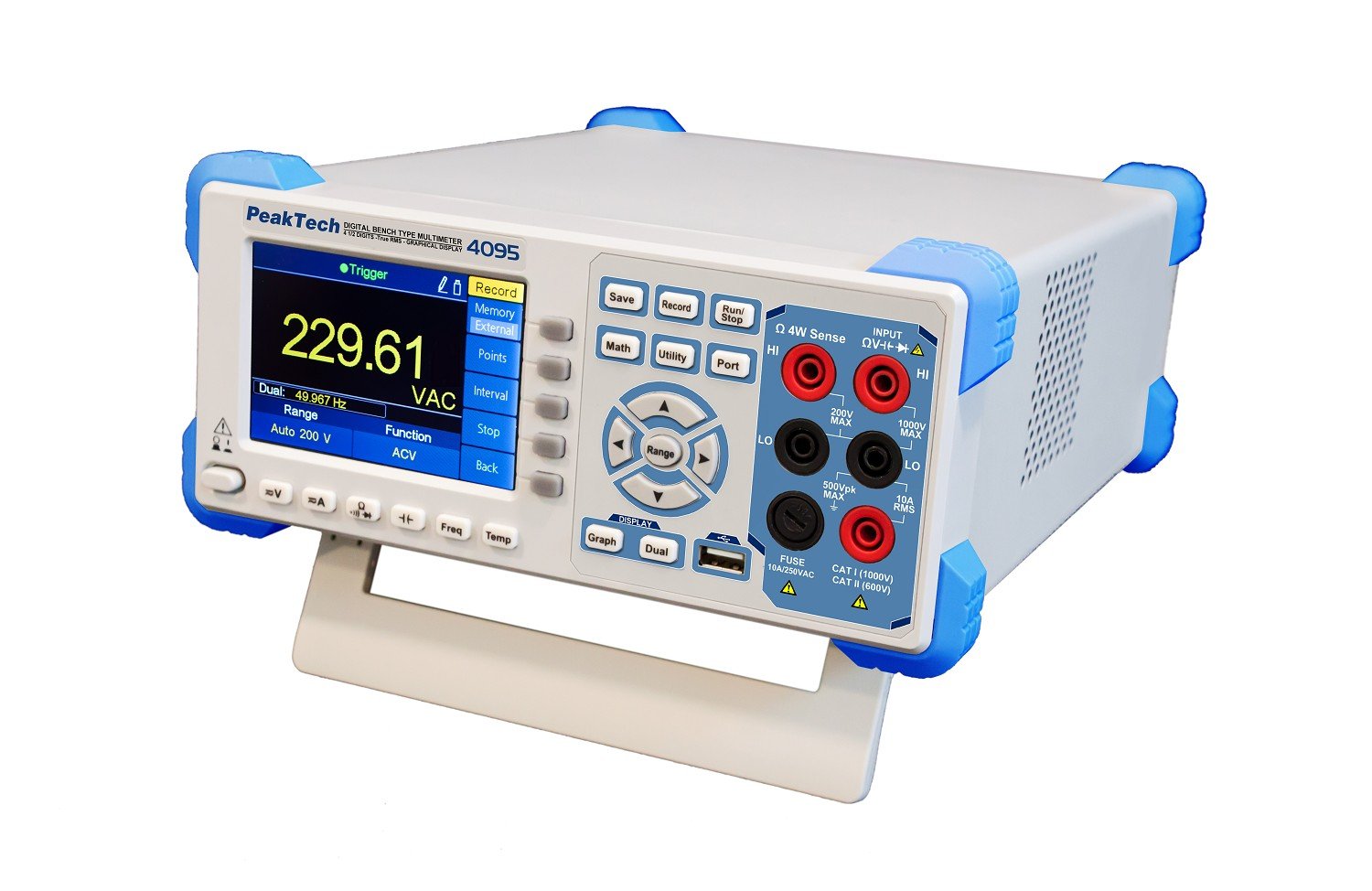
Figura 1: Fronte view of the PeakTech 4095 Bench Multimeter, showing the 4-inch TFT display, function buttons, navigation controls, and input terminals.
The front panel features the 4-inch TFT color display, which shows measurement values, graphs, and menu options. To the right of the display are the primary function buttons (Save, Record, Math, Utility, Port, Run/Stop) and navigation controls (Range, up/down/left/right arrows, Enter). Below the display are additional function buttons (Graph, Dual, V=, A=, Ω, Freq, Temp). On the far right are the input terminals for various measurements: HI/LO for voltage and resistance, 10A RMS for high current, and mA/µA for low current measurements. A USB host port is also located on the front for data storage.
4.2 Panel posterior

Figura 2: Traseira view of the PeakTech 4095 Bench Multimeter, showing power input, LAN, USB, RS-232, and external trigger ports.
The rear panel includes the main power input socket, a line selector switch (110V/220V), LAN port for network connectivity, USB device port for PC connection, RS-232 serial port, and external trigger/AUX output ports. Ensure the line selector is set correctly for your region's mains voltage before connecting power.
5. Configuración
5.1 Conexión de alimentación
- Before connecting the power cord, verify that the voltage selector switch on the rear panel is set to the correct mains voltage para a súa rexión (110 V ou 220 V).
- Connect the supplied power cord to the power input socket on the rear panel of the multimeter.
- Conecte o outro extremo do cable de alimentación a unha toma de corrente alterna con conexión a terra.
- Press the power button on the front panel to turn on the device. The TFT display will illuminate, and the device will perform a self-test.
5.2 Configuración inicial
Upon first power-on or after a factory reset, you may need to configure basic settings such as language, date, and time. Navigate through the 'Utility' menu using the front panel buttons to adjust these settings.
6. Instrucións de funcionamento
The PeakTech 4095 offers various measurement functions accessible via the front panel buttons. Always ensure test leads are connected to the correct input terminals for the desired measurement type.
6.1 Medicións básicas
- Voltage (V= / V~): Connect test leads to the HI and LO input terminals. Press the 'V=' button for DC voltage or 'V~' (often combined with V= or selected via a sub-menu) for AC voltage. The device supports True RMS measurements up to 100 kHz.
- Current (A= / A~): For current measurements, connect the test leads in series with the circuit. Use the 10A RMS input for high currents or mA/µA for lower currents. Select 'A=' for DC current or 'A~' for AC current.
- Resistencia (Ω): Connect test leads to the HI and LO input terminals. Press the 'Ω' button. The device features a fast response time for resistance and continuity tests.
- Proba de continuidade: Select the resistance function and look for the continuity symbol. An audible tone indicates continuity.
- Proba de diodo: Select the diode test function (often combined with resistance). Connect the test leads to the diode to measure its forward voltagcae.
- Frequency (Freq): Connect the signal source to the HI and LO terminals. Press the 'Freq' button to measure the frequency of an AC signal.
- Temperatura (Temp): Connect the Type K thermocouple wire sensor to the dedicated temperature input terminals (if available, or via adapter to HI/LO). Press the 'Temp' button. The device can measure temperatures up to 1000 °C (1372 °C maximum specified).
6.2 Graphical Display and Data Logging
The 4-inch TFT display allows for graphical representation of measurements, such as voltage trends over time. Use the 'Graph' button to switch to graphical mode. The 'Record' button initiates data logging, storing measurement points to internal memory or an external USB drive connected to the front panel port. The device can store up to 1 million measurement points.

Figure 3: Graphical display showing a trend of voltage measurements over time.
6.3 Funcións avanzadas
- Funcións matemáticas: The 'Math' button provides access to various mathematical operations on measurement data, such as MIN/MAX, AVG, dB, dBm.
- Utility Menu: The 'Utility' button allows access to system settings, calibration, display options, and interface configurations.
- Pantalla dual: The 'Dual' button enables simultaneous display of two different measurement parameters or a primary measurement with a secondary parameter (e.g., AC voltage and frequency).
7. Conectividade
The PeakTech 4095 offers multiple interfaces for data transfer and remote control.
- Interface USB: Connect the multimeter to a PC using the USB device port on the rear panel. This allows for data transfer and remote control via software. The front panel USB host port is for connecting USB storage devices for data logging.
- Interface LAN: Connect the multimeter to a network using an Ethernet cable. This enables remote control and data access over a local area network.
- Interface RS-232: The serial RS-232 port on the rear panel provides another option for connecting the multimeter to a PC or other control systems.
For PC connectivity, install the 'DMM Tool' software and drivers from the supplied CD or PeakTech's website. While the software is designed for data acquisition and control, users have reported that specific versions may not be fully updated for the 4095 model's advanced features, particularly for direct PC control and processing of .csv recordings. For detailed instructions on using the software, refer to the software's documentation.
8. Mantemento
8.1 Limpeza
Para limpar o dispositivo, use un suave, damp cloth with a mild detergent. Do not use abrasive cleaners or solvents. Ensure the device is powered off and disconnected from all power sources and circuits before cleaning.
8.2 Substitución de fusibles
If the current measurement function fails, the fuse may need replacement. Refer to the specifications for the correct ceramic fuse type and rating. Fuse replacement should only be performed by qualified personnel. Disconnect the device from all power sources and test leads before attempting to open the casing.
8.3 Calibración
The PeakTech 4095 is factory calibrated. For continued accuracy, periodic calibration by an authorized service center is recommended. Refer to the 'Utility' menu for calibration information.
9 Solución de problemas
- O dispositivo non se acende: Check the power cord connection and ensure the power outlet is functional. Verify the rear panel voltage selector switch is set correctly (110V/220V).
- Sen lectura nin se mostra "OL": Ensure test leads are correctly connected to the appropriate input terminals and the circuit under test. Check if the measurement range is appropriate for the expected value; try a higher range if 'OL' (Overload) is displayed.
- Incorrect current reading: Check the fuse. Ensure the test leads are connected to the correct current input (10A or mA/µA) and in series with the circuit.
- Connectivity issues (LAN/USB/RS-232): Verify cable connections. Ensure correct drivers are installed on the PC. Check network settings for LAN connectivity.
- Problemas de visualización: If the display is dim or flickering, check power supply. If specific segments are missing, contact support.
10. Especificacións
| Parámetro | Valor |
|---|---|
| Número de modelo | 4095 |
| Mostrar | 4-inch TFT Color Display, 60,000 Counts |
| Tipo de medida | Multímetro True RMS |
| Ancho de banda AC | Ata 100 kHz |
| Rexistro de datos | 1 Million Measurement Points |
| Interfaces | LAN, USB (Device & Host), RS-232 |
| Valoración de seguridade | CAT III 300V, TÜV/GS, EN-61010-1 |
| Tipo de fusible | Ceramic Fuse |
| Medición de temperatura | Up to 1372 °C (Type K Thermocouple) |
| Fonte de enerxía | Mains Powered (110V/220V selectable) |
| Dimensións do produto (L x W x H) | 30 x 24 x 11 cm |
| Peso do elemento | 3 kg |
| Fabricante | PeakTech |
| País de Orixe | China |
11. Garantía e soporte
PeakTech products are manufactured with quality and reliability in mind. For warranty information, please refer to the warranty card included with your product or visit the official PeakTech website. In case of technical issues, questions, or service requests, please contact PeakTech customer support or your local distributor. Ensure you have your product model number (4095) and purchase details available when seeking support.
Ask a question about this manual
Ask about setup, troubleshooting, compatibility, parts, safety, or missing instructions. Manuals+ will review the question and use this page’s manual context to help answer it.