
Introdución
This manual provides detailed instructions for the installation, operation, and maintenance of your Minolta MNCD53-S Car Dashboard Camera. Please read this manual thoroughly before using the device to ensure proper functionality and safety.
The Minolta MNCD53-S is designed to record your road trips in full 1080P HD resolution, featuring a 140-degree wide-angle lens, Wide Dynamic Range (WDR), G-Sensor for emergency recording, and loop recording capabilities. Review footage on the integrated 3.0-inch LCD screen.
O que hai na caixa
- Minolta MNCD53-S Car Dashboard Camera
- Tarxeta SD (8 GB incluída)
- Bolsa
- Cable USB
- Manual de instrucións (este documento)
- Tarxeta de garantía
Información de seguridade
- Do not operate the camera or adjust settings while driving. Always pull over to a safe location before making any adjustments.
- Ensure the camera is securely mounted and does not obstruct your view of the road or interfere with airbag deployment.
- Evite expoñer a cámara a temperaturas extremas, á luz solar directa durante períodos prolongados ou a humidade excesiva.
- Use only the provided power cable and accessories to prevent damage to the device or vehicle.
- Manteña a lente limpa para garantir gravacións nítidas.
- The internal battery is primarily for saving emergency files and maintaining settings. The camera requires continuous power from the vehicle's lighter socket for daily operation.
Produto rematadoview
The Minolta MNCD53-S dash camera is designed for reliable in-car video recording. Below are its key features and a visual representation.
- Full HD 1080P Video Recording: Captura vídeo nítidotage.
- Lente gran angular de 140°: Ofrece unha ampla view da estrada.
- Pantalla LCD de 3.0 polgadas: Para en directo view, reprodución e navegación por menús.
- Sensor G: Automatically detects sudden impacts or movements and locks the current video file para evitar a sobreescritura.
- Gravación en bucle: Continuously records, overwriting the oldest unlocked files cando a tarxeta de memoria estea chea.
- Detección de movemento: Starts recording automatically when motion is detected in front of the camera (useful when parked).
- Amplio rango dinámico (WDR): Improves video quality in varying light conditions, such as bright sunlight and shadows.
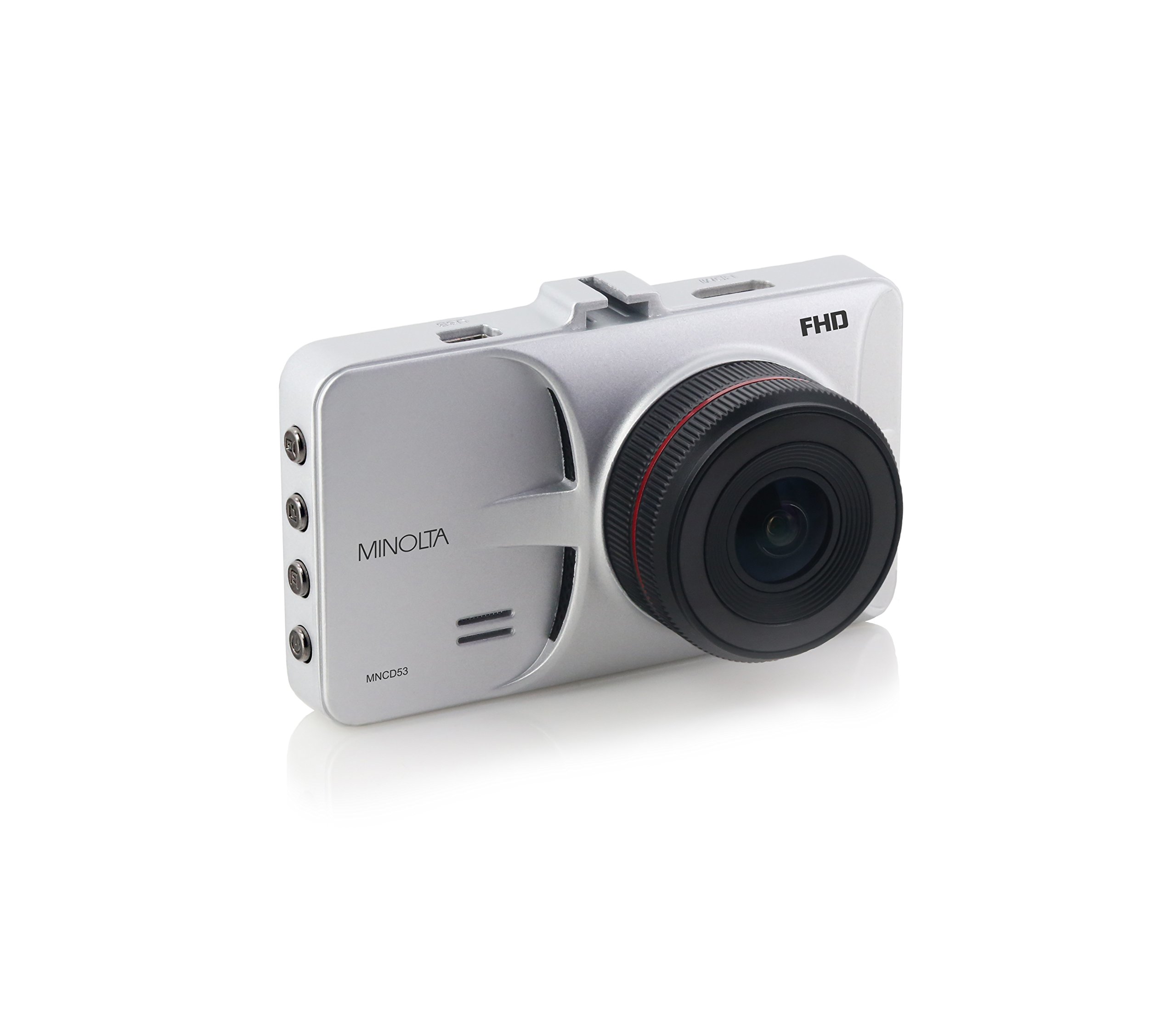
Figura 1: Fronte view of the Minolta MNCD53-S Car Dashboard Camera, showing the 3.0-inch LCD screen displaying a city night scene.
Configuración
- Insira a tarxeta SD: Locate the SD card slot on the camera. Gently insert the provided 8GB SD card (or another compatible Class 10 or higher microSD card, up to 32GB) until it clicks into place. Ensure the camera is off before inserting or removing the SD card.
- Montaxe da cámara:
- Attach the suction cup mount to the camera.
- Clean the desired area on your windshield. Ensure it does not obstruct your view or interfere with safety features.
- Press the suction cup firmly against the windshield and engage the locking mechanism to secure it.
- Adjust the camera angle to capture the road ahead.

Figure 2: The Minolta MNCD53-S Car Dashboard Camera mounted on a car windshield, showing the driver's perspective of the road.
- Conexión de alimentación:
- Connect the provided USB power cable to the camera's power input port.
- Plug the other end of the power cable into your vehicle's 12V lighter socket.
- The camera will typically power on automatically when the vehicle starts and power off when the vehicle is turned off.
- Encendido inicial: The camera should power on automatically when connected to power. If not, press and hold the power button.
- Establecer data e hora: Access the camera's menu settings to set the correct date and time. This is crucial for accurate timestamps on your recordings. Refer to the "Operating Instructions" section for general menu navigation.
Instrucións de funcionamento
Familiarize yourself with the camera's buttons and menu system for optimal use.
Gravación básica
- When the camera is powered on, it typically begins recording automatically. A red indicator or icon on the screen usually signifies active recording.
- Recordings are saved in segments (e.g., 3 or 5 minutes) due to loop recording.
- To manually start/stop recording, press the designated record button (refer to your camera's physical buttons).
Navegación de menús
The camera features a menu system accessible via physical buttons. Common buttons include:
- Botón de menú: Entra no menú de configuración.
- Botóns arriba / abaixo: Navega polas opcións do menú.
- Botón Aceptar/Confirmar: Selecciona unha opción ou confirma un axuste.
- Botón de modo: Switches between video recording, photo mode, and playback mode.
Key Settings to Adjust:
- Data/Hora: Set the current date and time for accurate timestamps.
- Gravación en bucle: Adjust the duration of video segments (e.g., 1, 3, 5 minutes).
- Sensibilidade do sensor G: Adjust sensitivity for emergency recording. Higher sensitivity means it will trigger more easily.
- Detección de movemento: Enable or disable this feature. Use with caution when parked as it can drain the battery or fill the SD card quickly.
- WDR: Enable or disable Wide Dynamic Range for improved image quality in varied lighting.
Reprodución
- Switch to playback mode using the Mode button.
- Use the navigation buttons to browse through recorded video files.
- Press the OK/Confirm button to play a selected video.
- Para view files on a computer, remove the SD card and insert it into a card reader, or connect the camera directly to a computer via USB.
Modo foto
- Switch to photo mode using the Mode button.
- Press the record/shutter button to capture still images.
Mantemento
- Limpeza da lente: Use a soft, lint-free cloth to gently wipe the camera lens. Avoid abrasive materials or harsh chemicals.
- Limpeza da pantalla: Use a microfiber cloth to clean the LCD screen.
- Xestión da tarxeta SD:
- Regularly format the SD card (e.g., once a month) within the camera's settings to ensure optimal performance and prevent data corruption.
- Fai unha copia de seguranza importantetage a un ordenador antes de formatar.
- Replace the SD card if you notice frequent errors or degraded performance.
- Almacenamento: If storing the camera for an extended period, remove it from the windshield and store it in its pouch in a cool, dry place.
Resolución de problemas
| Problema | Causa posible | Solución |
|---|---|---|
| A cámara non se acende. | No power from vehicle; faulty power cable; internal battery depleted. | Check vehicle's lighter socket and fuse. Ensure power cable is securely connected. Try a different power source or cable if available. The internal battery is for emergency files, not sustained operation. |
| Camera stops recording or does not record continuously. | SD card full; SD card error; G-Sensor triggered too often; motion detection enabled. | Format the SD card. Use a Class 10 or higher SD card. Adjust G-Sensor sensitivity. Disable motion detection if not needed while driving. |
| Vídeo footage está borrosa ou pouco clara. | Protective film on lens; dirty lens; incorrect focus (unlikely for fixed focus); poor lighting. | Remove any protective film. Clean the lens with a soft cloth. Ensure WDR is enabled in challenging light conditions. |
| Date and time settings reset. | Batería interna esgotada. | Ensure the camera is consistently powered by the vehicle to allow the internal battery to maintain charge for settings. Re-enter date and time. |
| Suction mount does not hold. | Dirty windshield; cold temperatures; worn suction cup. | Clean the windshield and suction cup thoroughly. Warm the windshield slightly in cold weather. Replace the mount if it is damaged. |
Especificacións
| Característica | Detalle |
|---|---|
| Nome do modelo | MNCD53-S |
| Resolución de captura de vídeo | Full HD 1080p |
| Ángulo real de View | 140 graos |
| Tamaño da pantalla | LCD de 3 polgadas |
| Características especiais | Loop Recording, Motion Sensing, G-Sensor, Wide Dynamic Range (WDR) |
| Tecnoloxía de conectividade | Cable USB |
| Sistemas operativos compatibles | Windows 7 / 8 / 10, Mac OS 10.8 / 10.9 / 10.10 |
| Tipo de montaxe | Montaxe de succión |
| Tipo de memoria flash | SD (supports up to 32GB, Class 10 recommended) |
| Tipo de batería | Lithium Ion (internal, for emergency files and settings) |
| Peso do elemento | 0.3 libras |
| Fabricante | Minolta |
| UPC | 084438960143 |
Garantía e Soporte
Información da garantía
The Minolta MNCD53-S Car Dashboard Camera comes with a Garantía limitada de 1 anos desde a data de compra. Esta garantía cobre defectos de fabricación e man de obra en condicións de uso normal. Non cobre danos causados por mal uso, accidentes, modificacións non autorizadas ou desastres naturais.
Conserve o comprobante de compra para reclamacións de garantía.
Atención ao cliente
For technical assistance, troubleshooting not covered in this manual, or warranty inquiries, please contact Minolta customer support. Refer to the warranty card or the official Minolta websitio para obter a información de contacto máis actualizada.
When contacting support, please have your product model number (MNCD53-S) and proof of purchase readily available.