
1. Introdución
Thank you for choosing the Andoer Mini 49-LED Camera Video Light. This compact and versatile lighting solution is designed to enhance your photography and videography with bright, dimmable illumination. Featuring 49 high-quality LED beads, a 6000K color temperature, and a CRI of ≥90, it provides natural and soft white light. Its design includes multiple hot shoe bases for interlocking with other lights and a standard hot shoe mount with a 1/4-inch thread for broad compatibility with cameras and light stands.

Figura 1.1: Fronte view of the Andoer Mini 49-LED Camera Video Light.
2. Información de seguridade
Please read and understand all safety precautions before using this product to prevent damage or injury.
- Non expoñas o dispositivo á auga nin a humidade excesiva.
- Avoid direct eye exposure to the LED light, as it can be very bright.
- Non intente desmontar nin modificar a luz. As reparacións só deben ser realizadas por persoal cualificado.
- Use only specified AA batteries. Ensure correct polarity when inserting batteries.
- Retire as pilas se non vai usar a luz durante un período prolongado.
- Manter fóra do alcance dos nenos.
3. Configuración
3.1 Instalación da batería
- Locate the battery compartment cover on the back of the light.
- Deslice a tapa para abrir.
- Insira dúas (2) pilas AA, asegurándose de manter a polaridade correcta (+/-) como se indica no interior do compartimento.
- Pecha a tapa do compartimento da batería de forma segura.

Figure 3.1: Open battery compartment for AA battery installation.
3.2 Montaxe da luz
The Andoer Mini 49-LED Camera Video Light offers versatile mounting options:
- Zapata para cámara: The light features a standard hot shoe mount at its base. Slide this mount into your camera's hot shoe slot and tighten the locking ring for a secure fit.
- 1/4-inch Thread: The hot shoe mount also includes a 1/4-inch thread, allowing it to be attached to light stands, tripods, or other accessories with a compatible screw.

Figure 3.2: The video light mounted on a DSLR camera's hot shoe.
3.3 Interlocking Multiple Lights
For enhanced lighting effects, multiple Andoer Mini 49-LED lights can be interlocked. The light is equipped with hot shoe bases on three sides (top, left, right).
- Mount the first light onto your camera or stand.
- Take a second light and slide its hot shoe mount into one of the hot shoe bases on the first light.
- Repeat for additional lights as needed.

Figure 3.3: Multiple lights interlocked for broader illumination.
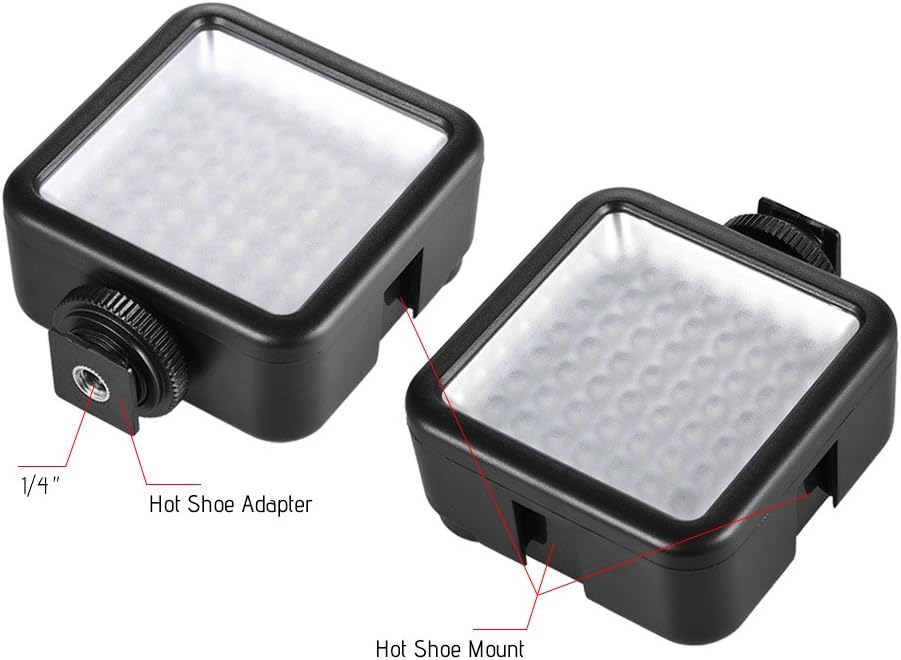
Figure 3.4: Detail of the hot shoe adapter and mount for interlocking.
4. Instrucións de funcionamento
4.1 Acendido/apagado e axuste do brillo
The light features a single rotary knob for both power control and brightness adjustment.
- Encendido: Rotate the knob clockwise from the 'OFF' position. The light will turn on at its lowest brightness setting.
- Axustar o brillo: Continue rotating the knob clockwise to increase brightness from 0% to 100%. Rotate counter-clockwise to decrease brightness.
- Apagado: Rotate the knob counter-clockwise until it clicks into the 'OFF' position.

Figure 4.1: The ON/Dimmer rotary knob on the back of the light.

Figure 4.2: Visual representation of 0-100% dimmable brightness.
5. Mantemento
- Limpeza: Use a soft, dry cloth to clean the exterior of the light. Do not use abrasive cleaners or solvents.
- Almacenamento: Store the light in a cool, dry place away from direct sunlight and extreme temperatures. Remove batteries if storing for extended periods.
- Coidado da batería: Replace batteries when the light output becomes dim or inconsistent. Dispose of used batteries responsibly according to local regulations.
6 Solución de problemas
| Problema | Causa posible | Solución |
|---|---|---|
| A luz non acende. | As pilas están gastadas ou inseridas incorrectamente. | Comprobe a polaridade das pilas. Substitúaas por pilas AA novas. |
| Light dims quickly or is inconsistent. | Batería baixa. | Substitúeo por pilas AA novas. |
| Light is not securely mounted. | Mounting knob/ring is loose. | Ensure the hot shoe locking ring is tightened. |
7. Especificacións
| Característica | Especificación |
|---|---|
| Modelo | W49 |
| Cantidade de LED | 49 pezas |
| Potencia de saída | 5.5 W |
| Temperatura da cor | 6000 mil |
| CRI (Índice de renderización de cor) | ≥90 |
| Rango de atenuación | 0% - 100% |
| Fonte de enerxía | 2 pilas AA (non incluídas) |
| De por vida | Ata 50,000 horas |
| Montaxe | Hot Shoe Mount, 1/4-inch Thread |
| Dimensións do produto | 3.15 x 1.22 x 2.56 polgadas (8 x 3.1 x 6.5 cm) |
| Peso do elemento | 3.36 onzas (95.25 gramos) |

Figura 7.1: Dimensións do produto.
8. Información da garantía
Specific warranty details for the Andoer Mini 49-LED Camera Video Light are typically provided at the point of purchase or within the product packaging. Please retain your proof of purchase for any warranty claims. For detailed warranty terms and conditions, please refer to the documentation included with your product or contact the seller/manufacturer directly.
9. Apoio
If you encounter any issues or have questions regarding your Andoer Mini 49-LED Camera Video Light that are not covered in this manual, please contact the retailer from whom you purchased the product. Alternatively, you may visit the official Andoer website for further support and contact information.