
Introdución
Grazas pola compraasing the Max Power MPD125L Karaoke DJ Speaker System. This portable 12-inch speaker system is designed to deliver powerful sound and vibrant LED lighting for your entertainment needs. It features a built-in rechargeable battery, multiple connectivity options including USB, SD, AM/FM radio, and Bluetooth, along with a strong amplifier para unha experiencia de audio inmersiva.
Please read this manual thoroughly before operating the device to ensure proper use, optimal performance, and to prevent damage.
Información de seguridade
- Non expoña a unidade á choiva nin á humidade para evitar incendios ou descargas eléctricas.
- Non abras a c.asing. Non hai pezas que o usuario poida reparar no interior. Encomende calquera mantemento a persoal cualificado.
- Coloque a unidade sobre unha superficie estable e plana para evitar que caia.
- Manteña a unidade lonxe da luz solar directa, de fontes de calor e do exceso de po.
- Asegúrese de que haxa unha ventilación axeitada. Non bloquee as aberturas de ventilación.
- Use só o adaptador de alimentación que se proporciona coa unidade.
- Desenchufe a unidade durante as tormentas eléctricas ou cando non se use durante longos períodos.
- Evite colocar obxectos pesados no cable de alimentación.
- Do not insert any objects into the unit's openings.
Contido do paquete
Comprobe que todos os elementos estean presentes e en bo estado:
- Max Power MPD125L Karaoke DJ Speaker System
- Micrófono sen fíos
- Control remoto sen fíos
- Adaptador de corrente/cable de carga
- Manual de usuario (este documento)
Características do produto
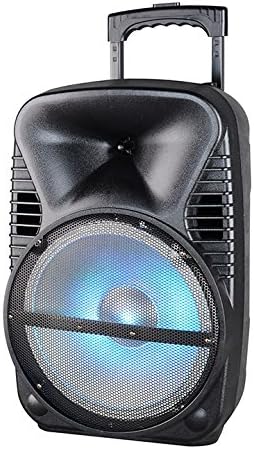
Imaxe: Fronte view of the Max Power MPD125L Karaoke DJ Speaker System. It is a black, portable speaker with a retractable handle on top and wheels at the bottom. The front features a large speaker grille with blue LED lights illuminating the woofer, indicating its active state.
- Deseño portátil: 12-inch speaker with built-in retractable handle and wheels for easy transport.
- Audio potente: 4000W peak power output for loud and clear sound with good bass.
- Batería recargable incorporada: Provides up to 4 hours of continuous playback. (Battery size: 12V/2.6A)
- LED Dance Lights: Integrated LED lights that flash, transforming any room into a disco club.
- Múltiples opcións de conectividade:
- Bluetooth: Wireless streaming from compatible devices (laptops, smartphones).
- Ranura USB: Para reproducir audio files desde unidades USB.
- Ranura SD: Para reproducir audio files from SD cards.
- Radio AM/FM: Built-in tuner for radio broadcasts.
- Función Karaoke: Includes a wireless microphone for karaoke sessions.
- Full-Function Wireless Remote Control: Para unha operación cómoda a distancia.
- Impedancia: 4 ohmios.
- Resposta en frecuencia: 40 Hz - 20 kHz.
Configuración
1. Cargando o altofalante
- Locate the DC input port on the speaker (usually on the rear panel).
- Connect the supplied power adapter to the DC input port.
- Enchufe o adaptador de corrente a unha toma eléctrica estándar.
- The charging indicator light (if present) will illuminate, typically red, during charging and turn green when fully charged.
- Allow approximately 4-6 hours for a full charge before first use. The speaker can be used while charging.
2. Configuración do micrófono sen fíos
- Insert appropriate batteries (not included, usually AA) into the wireless microphone.
- Turn on the microphone. It should automatically pair with the speaker.
- Adjust the microphone volume knob on the speaker's control panel to your desired level.
3. Configuración do control remoto
- Insert appropriate batteries (not included, usually AAA) into the wireless remote control.
- Point the remote control towards the speaker's IR receiver (usually on the front panel or near the controls) to operate.
Instrucións de funcionamento
1. Acendido/apagado
Locate the Power switch (usually a rocker switch) on the speaker's control panel. Flip it to the "ON" position to power on the speaker. Flip it to "OFF" to power off.
2. Selección de modo
Press the "MODE" button on the control panel or remote control to cycle through available input modes: Bluetooth, USB, SD, FM Radio, AM Radio, AUX (if available).
3. Emparellamento Bluetooth
- Turn on the speaker and select Bluetooth mode. The speaker will typically announce "Bluetooth Mode" or display "BT" and enter pairing mode (indicated by a flashing Bluetooth indicator).
- On your smartphone, tablet, or laptop, enable Bluetooth and search for new devices.
- Select "MPD125L" (or similar name) from the list of available devices.
- Once paired, the speaker will confirm with an audible tone or a solid Bluetooth indicator light. You can now play audio wirelessly.
4. Reprodución por USB/SD
- Insert a USB flash drive or SD card (pre-loaded with MP3 or compatible audio files) na ranura correspondente.
- The speaker should automatically switch to USB/SD mode and begin playing the first track. If not, press the "MODE" button to select USB or SD mode.
- Use the Play/Pause, Next Track, and Previous Track buttons on the control panel or remote to navigate.
5. Funcionamento da radio AM/FM
- Select FM or AM radio mode using the "MODE" button.
- Press and hold the Play/Pause button (often labeled "SCAN") to automatically scan and save available radio stations.
- Use the Next Track and Previous Track buttons to switch between saved stations.
- Extend the telescopic antenna (if present) for better reception.
6. Función de karaoke
Ensure the wireless microphone is powered on and paired. Play your desired music through any input mode (Bluetooth, USB, etc.). Speak or sing into the microphone. Adjust the microphone volume and echo effects (if available) using the dedicated knobs on the control panel.
7. LED Dance Lights
The LED lights typically activate automatically when the speaker is powered on. There may be a dedicated button (e.g., "LIGHT" or "LED") on the control panel or remote to toggle them on/off or change patterns.
8. Control de volume
Adjust the master volume using the main volume knob on the speaker's control panel or the volume buttons on the remote control.
Mantemento
- Limpeza: Use a soft, dry cloth to wipe the exterior of the speaker. Do not use liquid cleaners or abrasive chemicals.
- Almacenamento: Cando non o use durante períodos prolongados, garde o altofalante nun lugar fresco e seco, lonxe da luz solar directa e de temperaturas extremas.
- Coidado da batería: To prolong battery life, avoid fully discharging the battery frequently. Recharge the battery at least once every 3 months if not in regular use.
- Ventilación: Ensure the speaker's ventilation openings are clear of dust and debris to prevent overheating.
Resolución de problemas
| Problema | Causa posible | Solución |
|---|---|---|
| O altofalante non se acende. | A batería está esgotada. Cable de alimentación non conectado correctamente. | Connect the speaker to a power outlet and allow it to charge. Ensure the power cable is securely plugged into both the speaker and the outlet. |
| Non se escoita son do altofalante. | O volume é demasiado baixo. Seleccionouse o modo de entrada incorrecto. Device not properly connected (Bluetooth/USB/SD). | Aumenta o volume mestre. Press the "MODE" button to select the correct input. Re-pair Bluetooth device, re-insert USB/SD, or check AUX cable connection. |
| O dispositivo Bluetooth non se emparella. | O altofalante non está en modo de emparellamento. Dispositivo demasiado lonxe do altofalante. O Bluetooth do dispositivo está desactivado. | Ensure speaker is in Bluetooth mode and indicator is flashing. Achega o dispositivo ao altofalante (a menos de 10 metros). Activa o Bluetooth no teu dispositivo. |
| O micrófono non funciona. | Microphone is off or batteries are dead. O volume do micrófono é demasiado baixo. | Turn on the microphone and replace batteries if necessary. Increase the microphone volume knob on the speaker. |
| A recepción da radio é mala. | Debil sinal. Antena non estendida. | Reubica o altofalante nunha zona con mellor sinal. Estenda completamente a antena telescópica. |
Especificacións
| Número de modelo | MPD125L |
| Marca | POTENCIA MÁXIMA |
| Potencia máxima de saída | 4000 vatios |
| Impedancia | 4 ohmios |
| Resposta en frecuencia | 40 Hz - 20 kHz |
| Tamaño da batería | 12V/2.6A |
| Duración da batería | Ata 4 horas |
| Dimensións do produto (L x W x H) | 33.02 x 38.1 x 58.42 cm (13 x 15 x 23 polgadas) |
| Peso do produto | 15.88 kg (35 lb) |
| Dispositivos compatibles | Portátil, Smartphone |
| Tipo de conector | USB |
| UPC | 703510623201 |
Garantía e Soporte
Para obter información sobre a garantía e asistencia técnica, consulte a documentación proporcionada no momento da compra ou póñase en contacto co seu vendedor. Garde o comprobante de compra para calquera reclamación de garantía.
For further assistance or inquiries, please visit the official MAX POWER websitio ou póñase en contacto co seu departamento de atención ao cliente.