
D-Link DCS-8000LH/E
D-Link DCS-8000LH mydlink Mini HD Wi-Fi Camera User Manual
Model: DCS-8000LH/E
1. Introdución
Thank you for choosing the D-Link DCS-8000LH mydlink Mini HD Wi-Fi Camera. This compact and powerful camera is designed to provide high-definition surveillance for your home or office, offering features like motion detection, night vision, and smart home integration. This manual will guide you through the setup, operation, and maintenance of your new camera.
Contido do paquete
- D-Link Mini HD Camera (1 unit)
- Power Adapter (Electric Cable)
- Kit de montaxe (para montaxe na parede)
- Guía de instalación rápida
2. Produto rematadoview
Familiarize yourself with the key components of your D-Link DCS-8000LH camera.
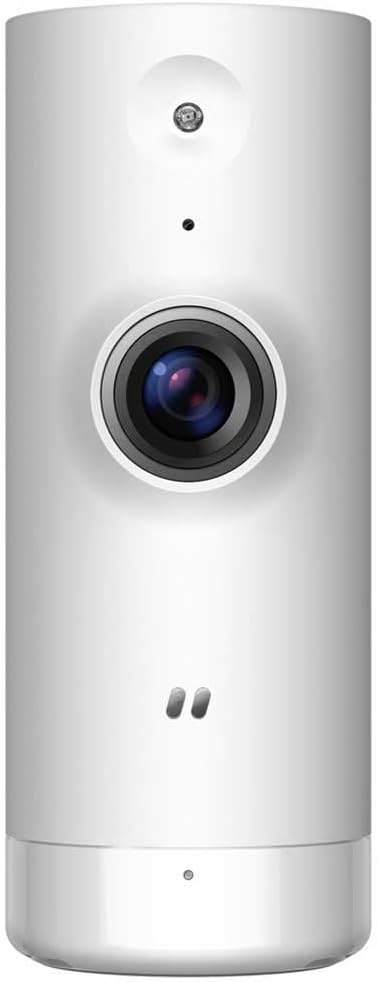
Figura 2.1: Fronte view of the D-Link DCS-8000LH camera, showing the lens, microphone, and status LED.

Figura 2.2: De volta view of the D-Link DCS-8000LH camera, highlighting the power input port.
3. Guía de configuración
Follow these steps to set up your D-Link DCS-8000LH camera.
- Descarga a aplicación mydlink: Busca "mydlink" on the App Store (iOS) or Google Play Store (Android) and install the application on your smartphone.
- Create a mydlink Account: Open the mydlink app and follow the on-screen instructions to create a new account or log in if you already have one.
- Encender a cámara: Connect the provided power adapter to the camera's power port and plug it into a wall outlet. Wait for the camera's status LED to indicate it's ready for setup (usually blinking orange or green).
- Add Camera to mydlink App: In the mydlink app, tap the "Add Device" or "+" icon. Scan the QR code located on the camera or its packaging. Follow the app's prompts to connect the camera to your Wi-Fi network. Ensure your Wi-Fi network is 2.4 GHz.
- Colocación: Position the camera in your desired location. It supports desk or wall mounting. Ensure it has a clear line of sight to the area you wish to monitor and is within range of your Wi-Fi signal.
Note: For optimal performance, place the camera away from direct sunlight or strong light sources that could affect image quality.
4. Uso da cámara
Once set up, you can access and control your camera through the mydlink app.
Características principais:
- Transmisión de vídeo en alta definición: View live video in 720p HD resolution directly from your smartphone.
- Detección de movemento: The camera can detect movement and send instant notifications to your phone. You can customize detection zones and sensitivity within the app.
- AI-based Person Detection: Distinguish between people and other moving objects to reduce false alarms.
- Visión nocturna: Equipped with infrared LEDs, the camera provides clear video up to 5 meters in low-light or complete darkness.
- Micrófono integrado: Listen to audio from the camera's surroundings.
- Almacenamento na nube: Securely store recorded video clips in the mydlink cloud (subscription may be required).
- Integración do fogar intelixente: Compatible with Google Assistant, Amazon Alexa, and IFTTT for voice control and automation.
Using the mydlink App:
The mydlink app provides a comprehensive interface for managing your camera. From the app, you can:
- View live feed and playback recorded videos.
- Adjust video quality and settings.
- Configure motion detection alerts and schedules.
- Manage cloud recording settings.
- Access camera settings and firmware updates.
5. Mantemento
Un mantemento axeitado garante a lonxevidade e o rendemento óptimo da túa cámara.
- Limpeza: Use a soft, dry cloth to clean the camera lens and body. Do not use liquid cleaners or abrasive materials, as they may damage the camera.
- Actualizacións de firmware: Regularly check for and install firmware updates through the mydlink app. Updates often include performance improvements and security enhancements.
- Condicións ambientais: Ensure the camera is used within its specified operating temperature and humidity ranges. Avoid exposing it to extreme temperatures, direct water, or high humidity.
6 Solución de problemas
If you encounter issues with your D-Link DCS-8000LH camera, refer to the following common solutions.
- Cámara sen conexión:
- Comprobe se a cámara está acendida correctamente e se o adaptador de corrente está conectado de forma segura.
- Asegúrate de que o teu enrutador Wi-Fi funciona e de que a cámara está dentro do alcance do Wi-Fi.
- Reinicie a cámara desconectando e volvendo conectar o adaptador de corrente.
- Reinicia o teu enrutador Wi-Fi.
- Baixa calidade do vídeo:
- Asegúrate de que a lente da cámara estea limpa e libre de po ou manchas.
- Comproba a velocidade da túa conexión a internet. Unha conexión lenta pode afectar á calidade da transmisión.
- Adjust video resolution settings in the mydlink app.
- A detección de movemento non funciona:
- Verify that motion detection is enabled in the mydlink app.
- Axusta a sensibilidade da detección de movemento e as zonas de detección.
- Asegúrate de que non haxa obstáculos que bloqueen a cámara view.
- Non se pode conectar á wifi:
- Ensure you are connecting to a 2.4 GHz Wi-Fi network. The camera does not support 5 GHz networks.
- Comproba dúas veces o contrasinal da túa wifi.
- Move the camera closer to your Wi-Fi router during setup.
- Perform a factory reset on the camera (refer to the Quick Installation Guide for instructions) and try setup again.
For more detailed troubleshooting or persistent issues, please refer to the D-Link support websitio ou póñase en contacto co servizo de atención ao cliente.
7. Especificacións
| Característica | Detalle |
|---|---|
| Número de modelo | DCS-8000LH/E |
| Marca | D-Link |
| Cor | Branco |
| Tecnoloxía de conectividade | Sen fíos (Wi-Fi) |
| Resolución de gravación de vídeo | 720p HD |
| Resolución efectiva de vídeo | 720 píxeles |
| Velocidade de cadros | 30 fotogramas por segundo |
| Viewángulo ing | 112 graos |
| Range de visión nocturna | 5 metros |
| Características especiais | Motion Detector, HD Resolution |
| Uso interior/exterior | Interior |
| Dispositivos compatibles | Teléfono intelixente |
| Fonte de enerxía | Cable eléctrico |
| Dimensións do artigo (L x W x H) | 35 x 38 x 92 milímetros (3.5 x 3.8 x 9.2 cm) |
| Peso do elemento | 57.7 gramos (2.04 onzas) |
| Tipo de montaxe | Wall Mount, Desk |
| Compoñentes incluídos | D-Link Mini HD Camera (1) |
| Requírese batería | Non |
| Fabricante | D-LINK |
8. Garantía e soporte
Para obter información sobre a garantía, consulte a tarxeta de garantía incluída co produto ou visite o sitio web oficial de D-Link. website. D-Link provides technical support and resources to assist you with any questions or issues you may have.
- Soporte en liña: Visit the D-Link support portal for FAQs, troubleshooting guides, and firmware downloads.
- Contacte con Soporte: Contact D-Link customer service for direct assistance. Contact details can be found on the D-Link websitio.
Disclaimer: The product originates from the European Economic Area (EEE). The product is genuinely sourced from manufacturer-authorized distributors.