
1. Introdución
The Keliiyo HDMI Splitter 1x4 is designed to duplicate a single HDMI input signal to four identical HDMI output signals. This device allows for simultaneous transmission of video and audio without any loss in quality. It supports a wide range of resolutions, including Full HD 1080P, 3D, and up to 4K@30Hz, making it suitable for various display setups.
2. Información de seguridade
- Asegúrese de colocar o dispositivo nunha zona ben ventilada para evitar o sobreenriquecido.
- Avoid exposing the splitter to moisture, water, or extreme temperatures.
- Use only the provided AC power adapter to prevent damage to the unit.
- Non intente desmontar nin reparar o dispositivo vostede mesmo. Póñase en contacto con persoal cualificado para o servizo técnico.
- Manter fóra do alcance dos nenos.
3. Contido do paquete
Verifique que todos os elementos que se indican a continuación estean incluídos no seu paquete:
- 1x Keliiyo HDMI Splitter 1x4
- 1x adaptador de alimentación de CA.
- 1 x Manual de usuario

Figure 3.1: Contents of the Keliiyo HDMI Splitter package, including the splitter unit, user manual, and power adapter.
4. Produto rematadoview
The Keliiyo HDMI Splitter 1x4 features a robust metal casing for durability and efficient heat dissipation. Below is a description of its ports and indicators:
- ENTRADA: HDMI input port for connecting your source device (e.g., computer, PS4, TV Box).
- SAÍDA 1-4: Four HDMI output ports for connecting display devices (e.g., monitors, TVs, projectors).
- EN LED: Indicates when an input signal is detected.
- 1-4 LEDs: Indicate active output connections.
- LED de potencia: Luz indicadora de alimentación.
- DC 5 V: Porto de entrada de alimentación para o adaptador de CA.
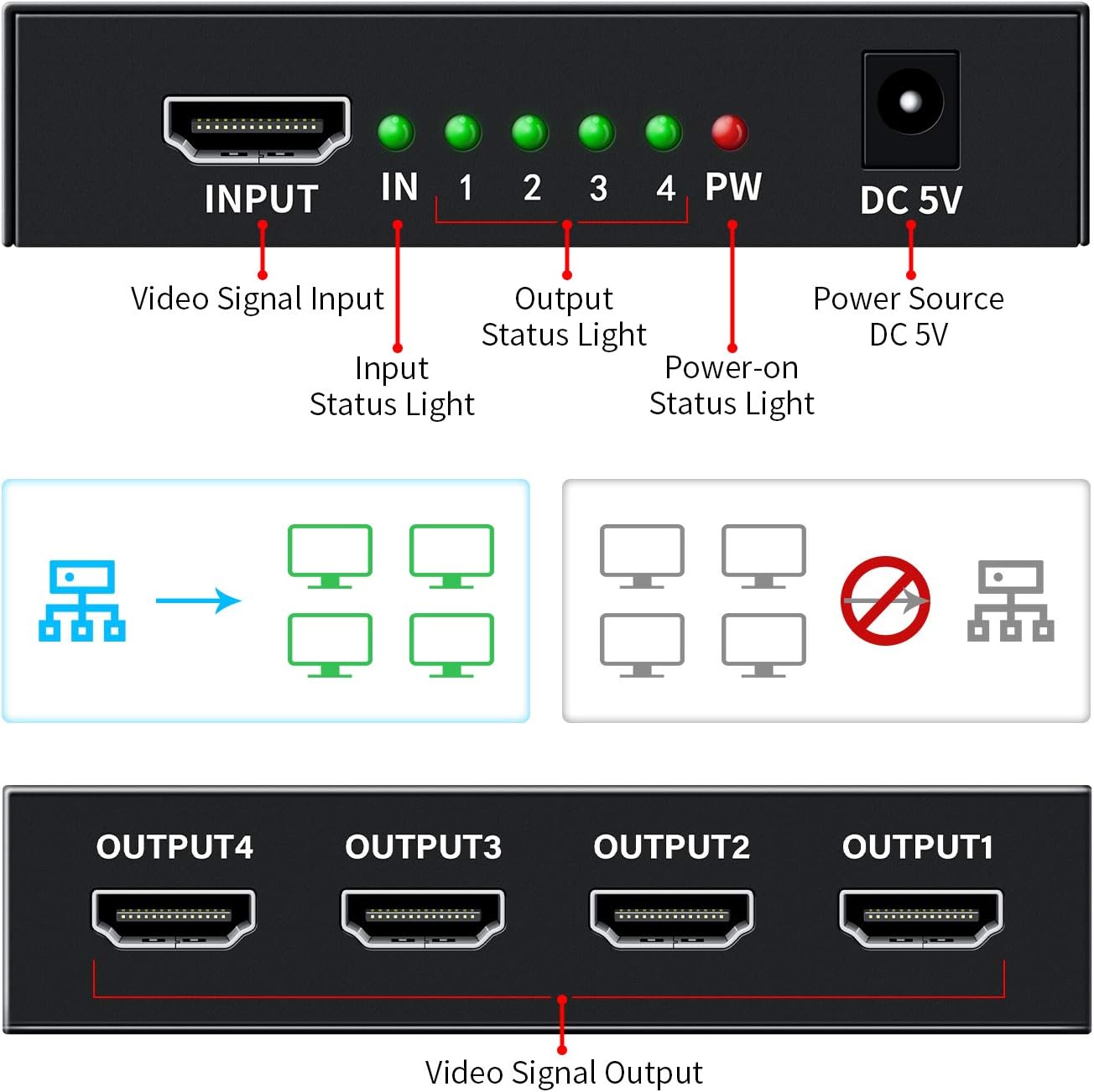
Figura 4.1: Parte dianteira e traseira view of the HDMI Splitter with labeled ports and indicator lights.

Figura 4.2: Examples of compatible input and output devices for the HDMI Splitter.

Figure 4.3: Physical dimensions of the Keliiyo HDMI Splitter.
5. Instrucións de configuración
Follow these steps to set up your Keliiyo HDMI Splitter:
- Conectar dispositivo de entrada: Connect your HDMI source device (e.g., DVD player, gaming console, laptop) to the 'INPUT' port on the HDMI splitter using a high-quality HDMI cable (not included).
- Conectar dispositivos de saída: Connect up to four HDMI display devices (e.g., TVs, monitors, projectors) to the 'OUTPUT 1', 'OUTPUT 2', 'OUTPUT 3', and 'OUTPUT 4' ports on the splitter using HDMI cables.
- Conectar enerxía: Plug the provided 5V AC power adapter into the 'DC 5V' port on the splitter, then plug the adapter into a power outlet. The 'PW' LED will illuminate.
- Encendido: Power on your HDMI source device and all connected display devices. The corresponding 'IN' and '1-4' LEDs on the splitter will light up, indicating active connections.
Nota importante: For optimal performance and to ensure normal operation, please ensure that all connected output devices are set to the same resolution. If different resolutions are detected, the splitter will output the lowest common resolution to all displays.

Figure 5.1: Illustrates mirroring one screen to four identical screens simultaneously.
Video 5.1: An official Keliiyo video demonstrating the setup process and functionality of the HDMI Splitter, showing how to connect input and output devices and power supply.
6. Instrucións de funcionamento
Once the setup is complete and all devices are powered on, the Keliiyo HDMI Splitter will automatically duplicate the input signal to all connected output displays. No additional configuration is typically required.
- The green 'IN' LED indicates that an HDMI source is connected and providing a signal.
- The green '1', '2', '3', '4' LEDs indicate which output ports have active display devices connected and receiving a signal.
- The red 'PW' LED confirms that the device is receiving power.
The splitter is designed for simple plug-and-play operation, allowing you to share your video and audio content across multiple screens effortlessly.
7. Mantemento
To ensure the longevity and optimal performance of your HDMI Splitter, please follow these maintenance guidelines:
- Limpeza: Usa un pano suave e seco para limpar o exterior do dispositivo. Non empregues produtos de limpeza líquidos nin aerosois.
- Almacenamento: Cando non o use durante períodos prolongados, garde o dispositivo nun lugar fresco e seco, lonxe da luz solar directa e de temperaturas extremas.
- Manexo: Avoid dropping or subjecting the device to strong impacts. Handle cables carefully to prevent damage to the ports.
- Ventilación: Ensure that the ventilation holes on the device are not blocked to allow for proper airflow and prevent overheating.
8 Solución de problemas
If you encounter issues with your Keliiyo HDMI Splitter, refer to the following common problems and solutions:
| Problema | Causa posible | Solución |
|---|---|---|
| No picture or sound on display(s). | Loose connections, no power, incompatible resolution, faulty cables. |
|
| Imaxe parpadeante ou distorsionada. | Poor quality HDMI cables, long cable runs, resolution mismatch. |
|
| Image briefly disappears when a new display is turned on. | Splitter adjusting to new display connection. | This is normal behavior as the splitter may need to re-establish the signal handshake. The image should return shortly. |
9. Especificacións
| Característica | Detalle |
|---|---|
| Número de modelo | 104 |
| Dimensións do produto | 2.44 x 3.77 x 0.86 polgadas |
| Peso do elemento | 7.8 onzas |
| Cor | Negro |
| Tipo de conector | HDMI |
| Tipo de cable | HDMI |
| Resolucións admitidas | 408i/576i/576p/720p/1080i/1080P, up to 4K@30Hz |
| Soporte 3D | Si |
| Versión HDCP | V1.4 |
| Distancia máxima de transmisión | Up to 100ft (Input 40ft, Output 60ft with AWG26 HDMI cable) |
| Fonte de alimentación | DC 5V (AC Adapter included) |
10. Garantía e soporte
For any questions, technical support, or warranty inquiries regarding your Keliiyo HDMI Splitter, please contact Keliiyo customer service. Refer to the contact information provided with your product packaging or visit the official Keliiyo websitio de asistencia.
Conserve o comprobante de compra para reclamacións de garantía.