
1. Introdución
The Garmin ECHOMAP Plus 44cv is a compact, easy-to-use fishfinder and chartplotter combo designed for marine navigation and fishing. This device features a bright, sunlight-readable 4.3-inch display and includes a CV20-TM transducer for comprehensive sonar capabilities. It comes preloaded with BlueChart g2 charts for coastal U.S. waters and offers Quickdraw Contours mapping software for creating personalized fishing maps.
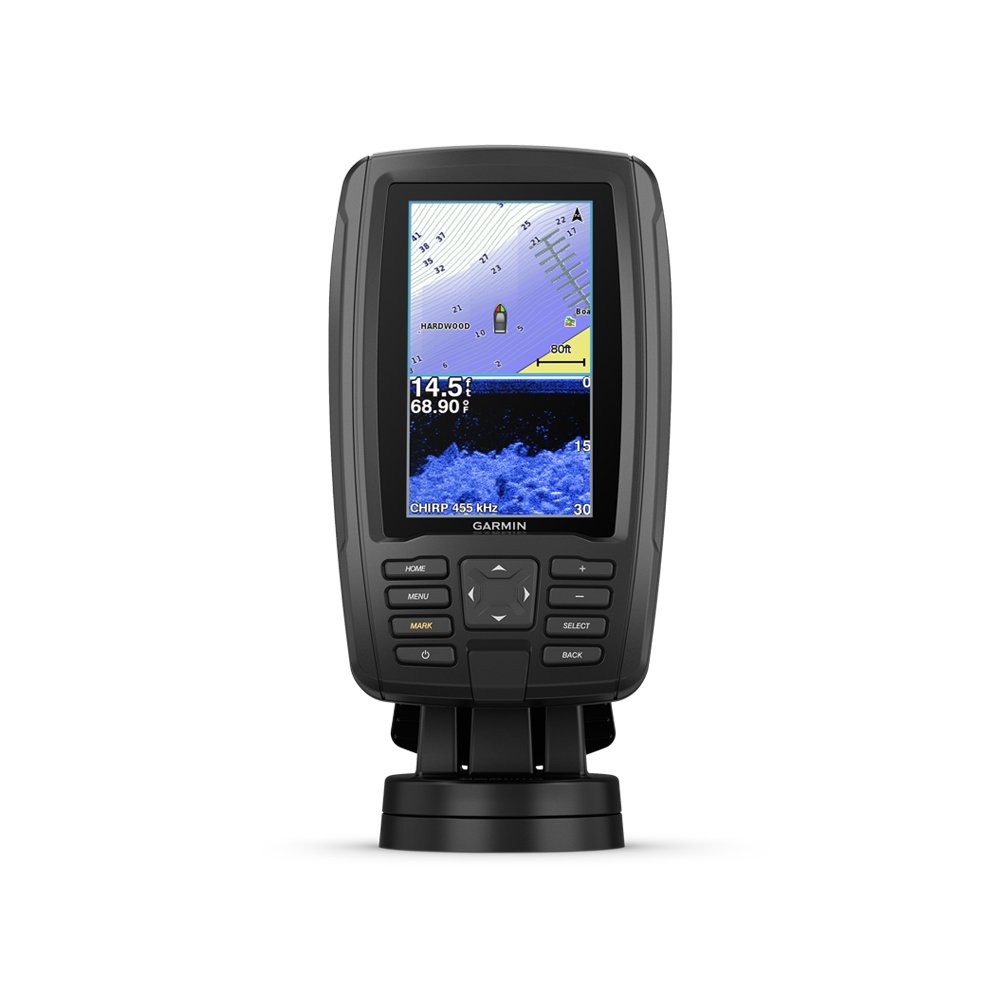
Figure 1.1: Garmin ECHOMAP Plus 44cv Device Overview
2. Que hai na caixa
Desembale coidadosamente todos os compoñentes e verifique que estean incluídos os seguintes elementos:
- ECHOMAP Plus 44cv unit with U.S. BlueChart® g2
- Cable de alimentación/datos
- Tilt/swivel mount with quick release cradle
- CV20-TM transducer
- Kit de montaxe empotrado
- Funda protectora
- Hardware para instalación
- Documentación (este manual e outras guías)
3. Configuración
3.1 Montaxe do dispositivo
The ECHOMAP Plus 44cv can be mounted using the included tilt/swivel mount or flush mount kit. The quick-release cradle allows for easy removal of the device from its power and mount.
- Soporte inclinable/xiratorio: Secure the base to a flat surface using the provided hardware. Attach the quick-release cradle to the base, then slide the ECHOMAP unit into the cradle until it clicks into place.
- Montaxe empotrado: Use the flush mount template to cut an opening in the mounting surface. Secure the unit from behind using the provided hardware.
3.2 Instalación do transductor
The CV20-TM transducer supports both Garmin CHIRP traditional sonar and CHIRP ClearVü scanning sonar. It includes mounts for transom and trolling motor installations.
- Soporte do espello de popa: Attach the transducer to the boat's transom, ensuring it is submerged and free from obstructions for optimal sonar performance.
- Soporte para motor de pesca de arrastre: Secure the transducer to the shaft of your trolling motor.
Refer to the separate transducer installation instructions for detailed guidance on placement and wiring.
3.3 Conexión de alimentación e datos
Connect the power/data cable to the corresponding port on the back of the ECHOMAP unit. Connect the power wires to a 12V DC power source on your boat. Ensure all connections are secure and waterproof.
4. Funcionamento do dispositivo
4.1 Acendido/Apagado
Manteña premido o POTENCIA button to turn the device on or off. A short press of the POTENCIA button will bring up the backlight and brightness settings.
4.2 Características de visualización
The 4.3-inch WQVGA display is designed for clear visibility even in direct sunlight.

Figure 4.1: Bright, Sunlight-Readable 4.3" Display
4.3 Funcións do sónar
The included CV20-TM transducer provides two primary sonar technologies:
- Sonda tradicional Garmin CHIRP: Delivers clear target separation and definition.
- Sonar de exploración CHIRP ClearVü: Provides a nearly photographic view of what is below your boat, showing structure and fish in clear detail.
Acceder ao sonar views from the Home screen. Adjust gain, range, and frequency settings as needed for optimal performance in different water conditions.

Figure 4.2: Transducer for CHIRP Traditional and ClearVü Sonar
4.4 Chartplotter and Mapping
The device comes preloaded with BlueChart g2 charts for coastal U.S. waters, offering detailed navigation data.

Figure 4.3: Preloaded BlueChart g2 Charts
Utilize the built-in Quickdraw Contours mapping software to create personalized fishing maps with 1-foot contours in real-time as you fish. These maps are stored on your device and can be kept private or shared with the Quickdraw Community via Garmin Connect.

Figure 4.4: Quickdraw Contours Mapping Software in Action
4.5 Waypoints and Routes
You can mark waypoints for specific locations and create routes for navigation. The ECHOMAP Plus 44cv allows sharing of waypoints and routes with other compatible ECHOMAP or STRIKER units.
5. Mantemento
5.1 Limpeza do dispositivo
Limpar o dispositivo casing and screen with a soft, clean, lint-free cloth. If necessary, use a mild soap solution and rinse thoroughly with fresh water. Avoid chemical cleaners and solvents that can damage plastic components and finishes.
5.2 Coidado do transdutor
Regularly inspect the transducer for marine growth or damage. Clean the transducer face with a soft cloth and mild soap. Avoid scratching the transducer surface, as this can affect performance.
5.3 Actualizacións de software
Periodically check the Garmin website for software updates. Keeping your device's software up to date ensures optimal performance and access to new features.
6 Solución de problemas
6.1 O dispositivo non se acende
- Asegúrate de que o cable de alimentación estea conectado correctamente tanto ao dispositivo como á fonte de alimentación.
- Check the boat's fuse panel for a blown fuse.
- Verify that the boat's battery has sufficient charge.
6.2 No Sonar Data or Incorrect Depth Readings
- Check that the transducer cable is securely connected to the ECHOMAP unit.
- Inspect the transducer for marine growth or damage. Clean if necessary.
- Ensure the transducer is properly mounted and submerged in the water, free from air bubbles or obstructions.
- Adjust sonar gain and range settings.
6.3 Perda de sinal GPS
- Asegúrate de que o dispositivo teña unha imaxe clara view do ceo.
- Move away from tall structures or other electronic devices that may interfere with the GPS signal.
7. Especificacións
| Característica | Especificación |
|---|---|
| Marca | Garmin |
| Nome do modelo | ECHOMAP Plus 44cv |
| Número de modelo | 010-01886-01 |
| Tamaño da pantalla | 4.3 polgadas |
| Tipo de visualización | WQVGA |
| Fonte de enerxía | Eléctrico con cable (12 V CC) |
| Included Transducer | CV20-TM (CHIRP Traditional, CHIRP ClearVü) |
| Cartografía | Preloaded U.S. BlueChart® g2, Quickdraw Contours |
| Tipo de montaxe | Transom, Trolling Motor, Flush Mount |
| Peso do elemento | 12.8 onzas |
| UPC | 753759185398 |
8. Garantía e soporte
8.1 Garantía do fabricante
This Garmin ECHOMAP Plus 44cv device is covered by a manufacturer's warranty. Please refer to the warranty documentation included with your product for specific terms and conditions, including warranty period and coverage details.
8.2 Atención ao cliente
For technical assistance, troubleshooting beyond this manual, or warranty claims, please contact Garmin Customer Support. Visit the official Garmin websitio web para obter información de contacto, preguntas frecuentes e recursos adicionais.
Garmin Websitio: www.garmin.com