
Brother HL-L2375DW
Brother HL-L2375DW Mono Laser Printer User Manual
Model: HL-L2375DW | Brand: Brother
1. Introdución e finalview
The Brother HL-L2375DW is a compact and efficient mono laser printer designed for home and small office environments. It offers fast print speeds of up to 34 pages per minute (ppm) and features automatic 2-sided (duplex) printing to help reduce paper consumption. With versatile connectivity options including wireless, wired (Ethernet), and USB 2.0, it integrates seamlessly into various setups.

Figura 1.1: Fronte view of the Brother HL-L2375DW Mono Laser Printer.
The printer is equipped with a 250-sheet paper capacity, minimizing the need for frequent paper refills. It also includes an in-box toner cartridge designed to yield approximately 1,200 pages, providing excellent value from the start.

Figure 1.2: Key features of the HL-L2375DW, including the 16-character LCD, 34ppm print speed, 250-sheet paper capacity, wireless/mobile/wired/USB connectivity, automatic 2-sided printing, and an in-box toner for up to 1,200 pages.
2. Configuración
2.1 Desembalaxe da impresora
Carefully remove the printer from its packaging. Ensure all protective tapes and packing materials are removed from the exterior and interior of the printer. Retain the packaging for future transportation if needed.
2.2 Instalación do cartucho de tóner e da unidade de tambor
The toner cartridge is typically pre-installed in the drum unit. Open the front cover of the printer and gently slide the drum unit assembly into the printer until it locks into place. Close the front cover.
2.3 Carga de papel
Open the paper tray located at the front of the printer. Adjust the paper guides to fit the size of the paper you are loading. Insert up to 250 sheets of A4 or Letter-sized plain paper. Ensure the paper is flat and not curled.

Figure 2.1: Loading paper into the 250-sheet capacity paper tray.
2.4 Conexión do cable de alimentación
Connect the power cord to the AC inlet on the back of the printer and then to a standard electrical outlet.
2.5 Connecting to a Computer or Network
The HL-L2375DW offers multiple connectivity options:
- Conexión USB: Conecta un cable USB 2.0 da impresora ao teu ordenador.
- Wireless (Wi-Fi) Connection: Follow the on-screen instructions on the printer's LCD panel or use the Brother iPrint&Scan app to connect to your wireless network.
- Wired (Ethernet) Connection: Conecta un cable Ethernet da impresora ao enrutador ou conmutador de rede.

Figure 2.2: The control panel indicating wireless connectivity status.
2.6 Instalación do controlador
Insert the installation CD-ROM (if included) into your computer's CD/DVD drive and follow the on-screen instructions. Alternatively, download the latest drivers and software from the official Brother support website for your operating system (Windows, Mac, Linux).
3. Instrucións de funcionamento
3.1 Impresión básica
To print a document, open the document on your computer or mobile device. Select "Print" from the application's menu. Choose the Brother HL-L2375DW from the list of available printers. Adjust print settings such as paper size, orientation, and number of copies as needed, then click "Print".
3.2 Automatic 2-Sided (Duplex) Printing
For automatic duplex printing, ensure the duplex option is enabled in your printer's settings or the print dialogue box on your computer. The printer will automatically flip the paper to print on both sides.
3.3 Usando o panel de control
The printer features a 16-character x 1-line LCD display and navigation buttons for simple operation.
- Usa o Frechas arriba/abaixo para desprazarse polas opcións do menú.
- Preme OK para seleccionar unha opción ou confirmar un axuste.
- Preme De volta para volver ao menú anterior.
- O Go button can be used to print a test page or clear certain errors.

Figure 3.1: The printer's control panel for simple navigation and settings adjustment.
4. Mantemento
4.1 Substitución do cartucho de tóner
When the "Toner Low" or "Replace Toner" message appears on the LCD, it's time to replace the toner cartridge. Open the front cover, remove the drum unit assembly, and then detach the old toner cartridge from the drum unit. Unpack a new Brother genuine toner cartridge and slide it into the drum unit until it clicks. Reinstall the assembly into the printer.
4.2 Substitución da unidade de tambor
The drum unit is a consumable item that needs to be replaced periodically, typically after printing tens of thousands of pages. The printer's LCD will indicate when the drum unit needs replacement. Follow the same steps as replacing the toner cartridge, but replace the entire drum unit assembly.
4.3 Limpeza da impresora
Regularly clean the exterior of the printer with a soft, lint-free cloth. For internal cleaning, refer to the printer's menu for options like "Drum Cleaning" or "Fuser Cleaning" if available, or consult the full online manual. Avoid using abrasive cleaners or solvents.
5 Solución de problemas
5.1 Problemas comúns e solucións
| Problema | Posible causa/solución |
|---|---|
| A impresora non responde | Check power connection, USB/network cable, and ensure printer is online. Restart printer and computer. |
| Atasco de papel | Open covers and carefully remove jammed paper. Ensure paper is loaded correctly and not creased. |
| Mala calidade de impresión | Check toner level. Clean the drum unit. Ensure correct paper type is used. |
| Problemas de conectividade wifi | Verify Wi-Fi settings on printer and router. Ensure printer is within range. Restart router and printer. |
| "Toner Low" / "Replace Toner" | Replace the toner cartridge as described in Section 4.1. |
5.2 Mensaxes de erro
The LCD display will show various error messages. Consult the full online user guide or Brother's support website for a comprehensive list of error codes and their specific solutions. Common messages include "Paper Jam", "Toner Low", "Drum End Soon", and "Offline".
6. Especificacións
| Característica | Detalle |
|---|---|
| Número de modelo | HL-L2375DW (HLL2375DWG1) |
| Tipo de impresora | Impresora láser mono |
| Velocidade de impresión (monocromo) | Ata 34 ppm |
| Resolución de impresión (máx.) | 600 x 600 dpi (up to 1200 x 1200 dpi with Resolution Control) |
| Impresión dúplex | Impresión automática a dúas caras |
| Capacidade de papel | 250 sheets (standard tray) |
| Tamaños de papel admitidos | A4, Letter, Legal, Folio, A5, A5(Long Edge), A6, Executive |
| Conectividade | Wi-Fi (802.11b/g/n), Ethernet, Hi-Speed USB 2.0, Wi-Fi Direct, AirPrint, Cortado Cloud Print, Google Cloud Print 2.0, iPrint&Scan |
| Sistemas operativos compatibles | Windows, Mac, Linux |
| Memoria | 64 MB |
| Mostrar | LCD de 16 caracteres x 1 liñas |
| Consumo de enerxía | Printing: Approx. 500W, Ready: Approx. 51W, Sleep: Approx. 6.6W, Deep Sleep: Approx. 1.2W |
| Dimensións do produto (ancho x fondo x alto) | 356 x 360 x 183 mm (14.02 x 14.17 x 7.2 polgadas) |
| Peso do elemento | 7.2 kg (15.87 lb) |
| Compoñentes incluídos | 1 x Printer, Toner Cartridge (approx. 1,200 pages), Drum Unit, Power Supply Cord, Quick Setup Guide |
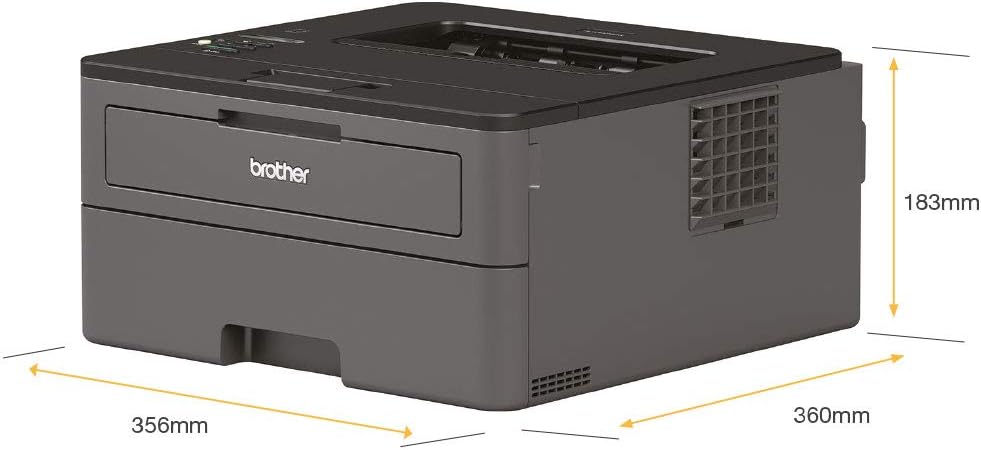
Figure 6.1: Dimensions of the Brother HL-L2375DW printer.
7. Garantía e soporte
7.1 Garantía do produto
This Brother HL-L2375DW printer comes with a Limited Warranty. Please refer to the warranty documentation included with your product for specific terms and conditions. The EU Spare Part Availability Duration is 2 Years.
7.2 Atención ao cliente
For further assistance, driver downloads, FAQs, or detailed troubleshooting guides, please visit the official Brother support website. You can also find contact information for technical support in your region on their websitio.
Documentos relacionados - HL-L2375DW
 |
Brother Printer Reference Guide: HL-L2312D, HL-L2357DW, HL-L2352DW, HL-L2372DN, HL-L2375DW A concise reference guide for Brother printer models HL-L2312D, HL-L2357DW, HL-L2352DW, HL-L2372DN, and HL-L2375DW, covering general information, loading paper, troubleshooting, and supplies. |
 |
Guía de referencia da serie Brother HL-L2310D: operacións, solución de problemas e consumibles Unha guía de referencia completa para as impresoras láser Brother HL-L2310D, HL-L2350DW, HL-L2357DW, HL-L2370DN e HL-L2375DW, que abrangue as operacións rutineiras, as explicacións do panel de control, a carga de papel, a resolución de problemas e os consumibles. |
 |
Guía de configuración rápida da serie Brother HL-L23xx Instrucións paso a paso para desembalar, configurar e conectar a impresora láser Brother HL-L23xx, incluíndo a configuración do ordenador, o dispositivo móbil e a rede sen fíos. |
 |
Brother HL-L3210CW, HL-L3230CDN, HL-L3230CDW, HL-L3270CDW Quick Setup Guide Quick setup guide for Brother HL-L3210CW, HL-L3230CDN, HL-L3230CDW, and HL-L3270CDW printers. Includes instructions on unpacking, installation, wireless setup, and mobile printing. |
 |
Guía de configuración rápida da impresora Brother: MFCL2710DW, DCP-L2550DW, HL-L2390DW Unha guía concisa para configurar a súa impresora Brother, incluíndo o desembalado, a instalación do tambor e o tóner, a carga do papel, a conexión da alimentación, a selección do idioma, a configuración do fax (modelos MFC), a conexión a ordenadores e dispositivos móbiles a través de USB ou redes sen fíos e a impresión/escaneado desde dispositivos móbiles. |
 |
Brother HL-L2400DW serijos spausdintuvų internetinis naudotojo vadovas Išsamus internetinis naudotojo vadovas, skirtas Brother HL-L2400DW serijos spausdintuvams. Apima sąranką, naudojimą, trikčių šalinimą ir priežiūrą. |
Ask a question about this manual
Ask about setup, troubleshooting, compatibility, parts, safety, or missing instructions. Manuals+ will review the question and use this page’s manual context to help answer it.