
1. Introdución
The Moxa ioLogik E2210 is a smart Ethernet remote I/O device designed for industrial automation applications. It features 12 digital inputs (DIs) and 8 digital outputs (DOs), enabling efficient data acquisition and control over an Ethernet network. This device incorporates front-end intelligence with patented Click&Go control logic, supporting up to 24 rules for flexible automation tasks. It facilitates active communication with MX-AOPC UA Server and supports SNMPv1/v2c/v3 protocols.
As características principais inclúen:
- Front-end intelligence with patented Click&Go control logic, supporting up to 24 rules.
- Active communication with MX-AOPC UA Server and support for SNMPv1/v2c/v3.
- Peer-to-peer communication for reduced wiring costs and simplified setup.
- User-friendly configuration via a web interface do navegador.
- Simplified I/O management with the MXIO library for Windows or Linux platforms.
- Wide operating temperature range of -40 to 75°C (-40 to 167°F) for harsh environments.
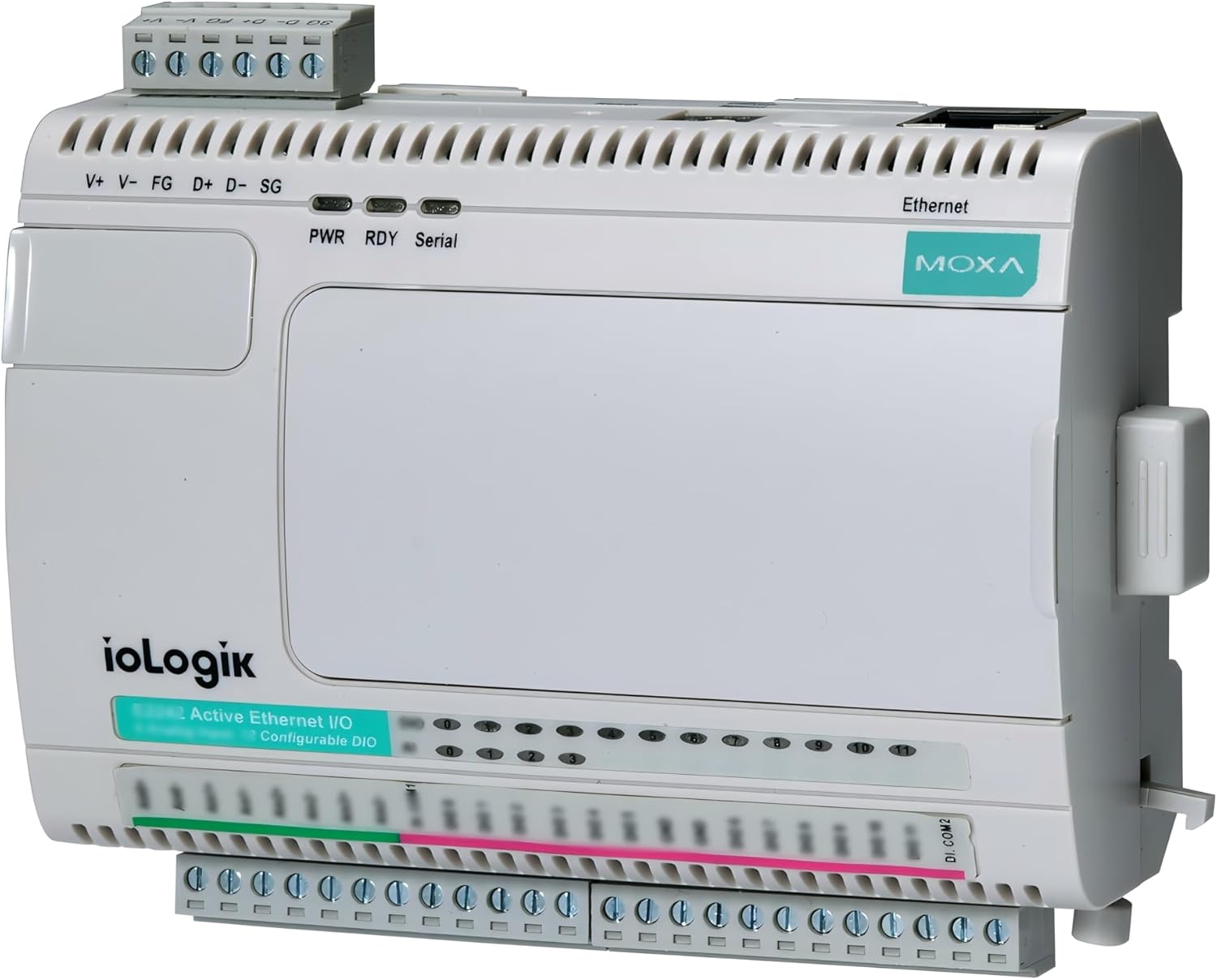
Figura 1: Fronte view of the Moxa ioLogik E2210 device, showing the digital input/output terminals and Ethernet port.
2. Configuración e instalación
2.1 Montaxe
The ioLogik E2210 is designed for DIN-rail mounting. Ensure the mounting surface is stable and provides adequate ventilation. Snap the device onto a standard 35mm DIN rail until it clicks securely into place.
2.2 Conexión de alimentación
Connect a 12-48 VDC power supply to the V+ and V- terminals on the device. Ensure proper polarity. The FG (Frame Ground) terminal should be connected to a protective earth ground for safety and noise reduction. The PWR LED on the front panel will illuminate when power is successfully applied.
2.3 Conexión Ethernet
Connect a standard Ethernet cable from your network switch or router to the Ethernet port on the ioLogik E2210. The device supports 10/100 Mbps auto-negotiation. Verify network connectivity through the Ethernet status LEDs.
2.4 Digital Input (DI) Wiring
The ioLogik E2210 provides 12 digital input channels. Connect your digital sensors or switches to the DI terminals. Refer to the device's technical specifications for input voltage ranges and current requirements. Ensure all wiring is secure and correctly terminated.
2.5 Digital Output (DO) Wiring
The device includes 8 digital output channels. Connect your actuators, relays, or indicators to the DO terminals. Observe the maximum switching voltage and current ratings for the digital outputs to prevent damage to the device or connected equipment.

Figura 2: En ángulo view of the Moxa ioLogik E2210, highlighting the various connection points for power, Ethernet, and I/O.
3. Instrucións de funcionamento
3.1 Configuración inicial
Accede ao dispositivo web-based configuration interface by entering its IP address into a web browser. The default IP address can typically be found in the quick installation guide or by using Moxa's utility software. Log in using the default credentials (refer to the product documentation for default username and password).
3.2 Configuración de rede
Dentro do web interface, configure the network settings, including the IP address, subnet mask, and gateway, to match your network infrastructure. It is recommended to assign a static IP address for reliable communication.
3.3 Configuración de E/S
Configure the digital input and output channels according to your application requirements. This includes setting input types (e.g., dry contact, wet contact) and output behaviors. Utilize the Click&Go control logic to define rules for automated responses based on input states.
3.4 Protocolos de comunicación
The ioLogik E2210 supports various communication protocols. Configure settings for MX-AOPC UA Server communication or SNMP (Simple Network Management Protocol) as needed for integration with your SCADA system or network management tools.
3.5 MXIO Library
For advanced programming and integration, use the MXIO library. This library provides APIs for Windows and Linux platforms, allowing developers to create custom applications to interact with the ioLogik E2210's I/O channels.
4. Mantemento
Regular maintenance ensures the longevity and reliable operation of your ioLogik E2210 device.
- Comprobacións ambientais: Ensure the operating environment remains within the specified temperature and humidity ranges (-40 to 75°C).
- Limpeza: Periodically clean the device exterior with a soft, dry cloth. Avoid using liquid cleaners or solvents.
- Integridade da conexión: Routinely inspect all power, Ethernet, and I/O connections to ensure they are secure and free from corrosion or damage.
- Actualizacións de firmware: Consulta a Moxa website for available firmware updates. Applying updates can improve performance, add features, or address security vulnerabilities.
5 Solución de problemas
This section provides solutions to common issues you might encounter with the ioLogik E2210.
- O dispositivo non se acende:
- Verify the power supply is connected correctly to V+ and V- terminals.
- Asegúrese de que a fonte de alimentación voltage is within the 12-48 VDC range.
- Comprobe a funcionalidade da fonte de alimentación.
- Sen conectividade de rede:
- Confirm the Ethernet cable is securely connected to both the device and the network switch.
- Check the Ethernet status LEDs on the device.
- Verify the device's IP address, subnet mask, and gateway settings are correct and match your network configuration.
- Fai ping ao enderezo IP do dispositivo desde un ordenador conectado.
- I/O Not Responding:
- Check the wiring for the specific DI or DO channel.
- Verify the sensor or actuator connected to the I/O channel is functioning correctly.
- Review the I/O configuration in the web interface to ensure settings are appropriate for the connected device.
- If using Click&Go logic, ensure the rules are correctly defined and enabled.
- Web Interface Inaccessible:
- Ensure your computer is on the same network segment as the ioLogik E2210.
- Verify the device's IP address.
- Tenta limpar a caché do teu navegador ou usar un navegador diferente.
6. Especificacións
| Característica | Descrición |
|---|---|
| Número de modelo | ioLogik E2210 |
| Digital Inputs (DIs) | 12 |
| Saídas dixitais (DO) | 8 |
| Lóxica de control | Patented Click&Go, up to 24 rules |
| Protocolos de comunicación | MX-AOPC UA Server, SNMPv1/v2c/v3 |
| Configuración | Web navegador |
| I/O Management Library | MXIO library for Windows/Linux |
| Temperatura de funcionamento | -40 a 75 °C (-40 a 167 °F) |
| Dimensións do paquete | 8.27 x 6.02 x 3.03 polgadas |
| Peso do elemento | 13.4 onzas |
| Fabricante | Moxa Inc. |
| Data de primeira dispoñibilidade | 14 de decembro de 2017 |
7. Información da garantía
Moxa products are typically covered by a manufacturer's warranty. For detailed information regarding the warranty period and terms for your ioLogik E2210, please refer to the official Moxa websitio web ou a tarxeta de garantía incluída co produto. Garde o comprobante de compra para reclamacións de garantía.
8. Apoio
For technical assistance, additional documentation, or software downloads related to your Moxa ioLogik E2210, please visit the official Moxa support websitio:
You can also contact Moxa customer service directly through the contact information provided on their websitio.