
GoHawk AS5-X Chrome
GoHawk AS5-X Gen.3 Motorcycle Stereo Speakers User Manual
Model: AS5-X Chrome
Brand: GoHawk
1. Introdución
This user manual provides comprehensive instructions for the installation, operation, and maintenance of your GoHawk AS5-X Gen.3 All-in-One Motorcycle Stereo Speaker System. Designed for motorcycle, ATV, and UTV use, this waterproof system features a built-in amplifier, Bluetooth connectivity, and multiple input options for an enhanced audio experience on the go. Please read this manual thoroughly before use to ensure proper setup and optimal performance.
2. Características do produto
- 600W Full Range Speakers: Powerful audio output for clear sound.
- Integrado Ampmáis vivo: All-in-one design for simplified installation.
- Deseño impermeable (IP56): Engineered for outdoor use and resistance to water splashes.
- Bluetooth 5.0 Wireless: Seamless audio streaming from compatible devices up to 15 meters.
- Múltiples opcións de entrada: Includes 3.5mm AUX input and USB input (supports USB drive only for music playback).
- Control con cable: Full-function wired control for easy operation.
- Ajuste universal: Designed for 1" to 1-1/4" handlebars, suitable for various motorcycles, ATVs, and UTVs.
- Construción duradeira: Chrome housing with heavy-duty clamps and aluminum alloy for zero rattling.
- Montaxe axustable: 360° adjustable mounting brackets for flexible positioning.

Figure 2.1: Key features of the GoHawk AS5-X Gen.3 system.
3. Que hai na caixa
Comprobe que todos os compoñentes estean presentes antes de comezar a instalación:
- 1 x altofalante mestre
- 1 x altofalante escravo
- 1 x Control con cable
- 1 x cable de alimentación SAE
- 1 x Handlebar Clamp for (1 to 1-1/4 in.)
- 1 x Manual de usuario

Figure 3.1: Included components and wiring diagram.
4. Configuración e instalación
Before installation, ensure you have sufficient free space for the speakers (approximately 5" x 6.5").
4.1 Montaxe dos altofalantes
- Identify suitable mounting locations on your 1" to 1-1/4" handlebar or crash bar.
- Coloque o manillar clamps to the desired positions.
- Securely mount the Master and Slave speakers to the clamps. Ensure they are firmly tightened to prevent movement during operation. The mounting brackets are 360° adjustable for optimal positioning.

Figure 4.1: Speakers mounted on a motorcycle handlebar.
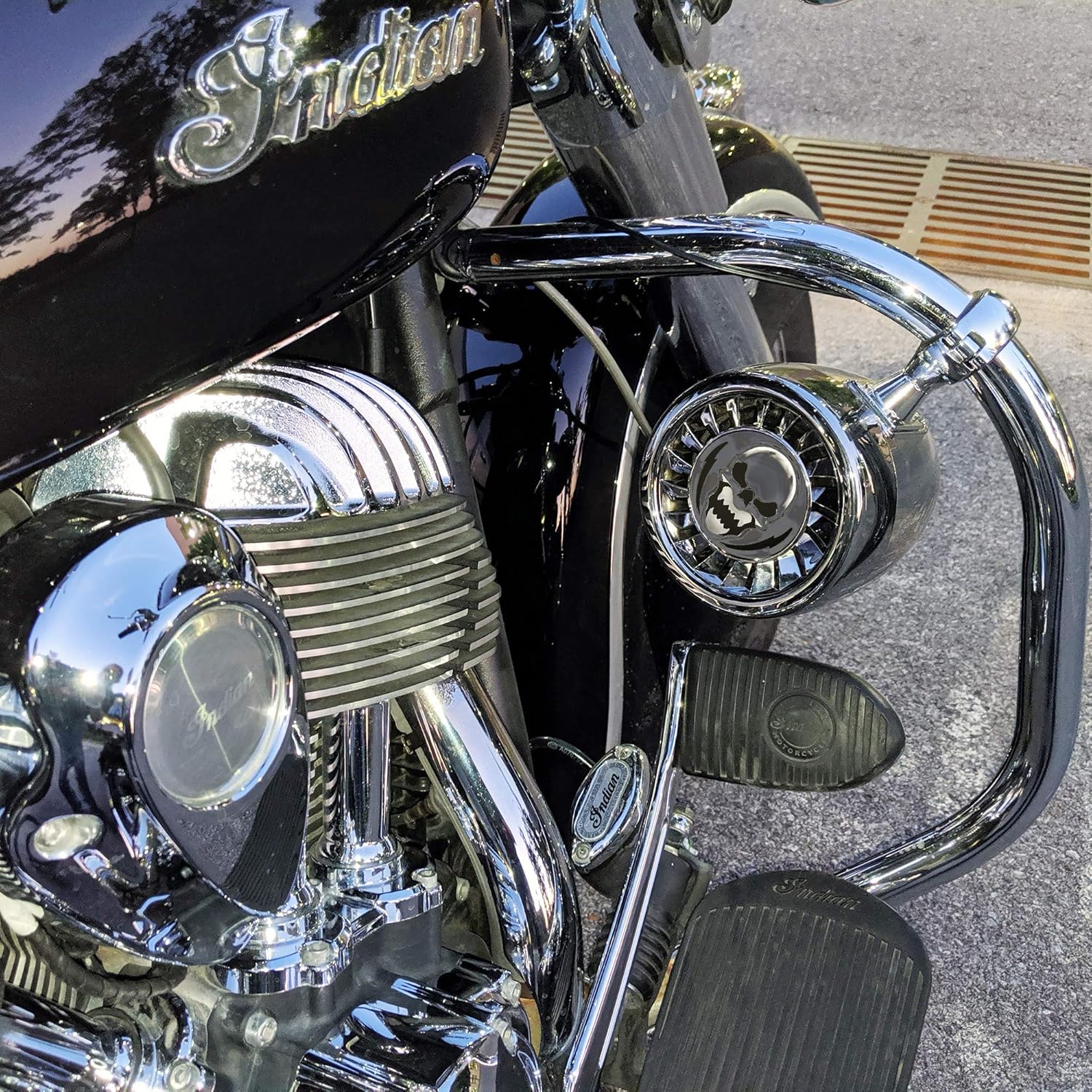
Figure 4.2: Speakers mounted on a motorcycle crash bar.
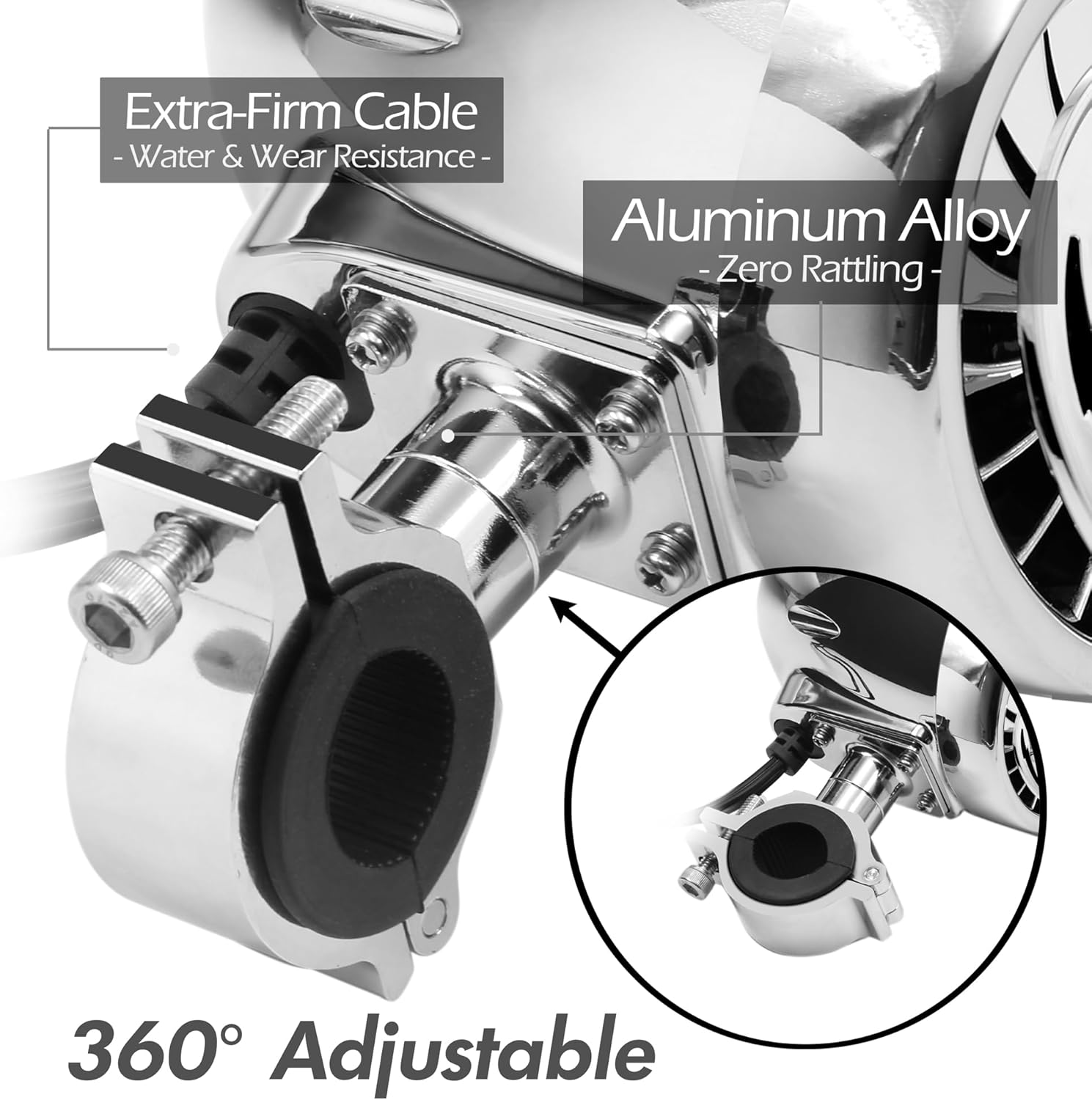
Figure 4.3: Detail of the 360° adjustable mounting bracket.
4.2 Conexións de cableado
The system uses a standard 12V power connection. All necessary hardware and wiring are included for a plug-and-play installation.
- Connect the SAE Power Cord to your motorcycle's 12V power source. Ensure proper polarity (red to positive, black to negative). The power cord includes a 7.5A inline fuse for protection.
- Connect the Master Speaker to the Slave Speaker using the provided RCA cable.
- Connect the Wired Control to the designated port on the Master Speaker.
- Route all cables neatly and securely, away from hot or moving parts, using zip ties if necessary.

Figure 4.4: Detailed wiring diagram.
5. Instrucións de funcionamento
5.1 Encendido/apagado
Use the wired control unit to power the system on or off. Press and hold the power button until the unit activates/deactivates.

Figure 5.1: Wired control unit.
5.2 Conexión Bluetooth
- Ensure the GoHawk system is powered on.
- No teu teléfono intelixente ou dispositivo con Bluetooth, busca os dispositivos Bluetooth dispoñibles.
- Select "GOHAWK" from the list to pair. A confirmation tone will sound upon successful connection.
- Agora podes transmitir audio sen fíos desde o teu dispositivo.

Figure 5.2: Bluetooth pairing.
5.3 Entrada AUX
For devices without Bluetooth, use the 3.5mm AUX input:
- Connect your audio device (e.g., MP3 player) to the 3.5mm AUX port on the system using a standard audio cable.
- The system will automatically switch to AUX mode.

Figure 5.3: AUX input connection.
5.4 Entrada USB
The USB port supports music playback from a USB drive (flash drive) only. It does not support USB to phone connections for music or charging.
- Inserir unha unidade USB que conteña son files no porto USB.
- The system will automatically detect and begin playing music from the drive.

Figure 5.4: USB input for music playback.
5.5 Control de volume e pista
Use the buttons on the wired control unit to adjust volume and navigate tracks:
- Subir volume (+): Aumenta o volume de audio.
- Baixar o volume (-): Baixar o volume do son.
- Seguinte pista (>|): Ir á seguinte canción.
- Pista anterior (|<): Volta á canción anterior.
- Play/Pause (||): Play or pause the current audio.
6. Mantemento
- Limpeza: Wipe the speakers and control unit with a soft, damp pano. Evite o uso de produtos químicos agresivos ou produtos de limpeza abrasivos.
- Exposición á auga: While waterproof (IP56), avoid submerging the unit. Ensure all port covers are securely closed when not in use, especially in wet conditions.
- Inspección de cables: Periodically check all cables and connections for wear, fraying, or loose contacts. Replace any damaged cables immediately.
- Almacenamento: When not in use for extended periods, store the system in a cool, dry place.
7 Solución de problemas
| Problema | Causa posible | Solución |
|---|---|---|
| Sen poder | Loose power connection; Blown fuse; Incorrect wiring. | Check SAE power cord connection; Inspect and replace fuse if blown; Verify wiring polarity. |
| Sen son | Volume too low; Incorrect input mode; Loose speaker connection; Device not paired (Bluetooth). | Increase volume; Switch to correct input (Bluetooth/AUX/USB); Check RCA cable connection between speakers; Re-pair Bluetooth device. |
| Bluetooth non se conecta | Device too far; Interference; System not in pairing mode. | Move device closer (within 15m); Reduce interference; Power cycle the GoHawk system and try pairing again. |
| Son distorsionado | Volume too high; Poor audio source quality; Loose connections. | Lower volume; Try a different audio source; Check all cable connections. |
| Unidade USB non recoñecida | Non é compatible file format; USB drive not formatted correctly; USB drive not compatible. | Garantir o audio files are standard formats (e.g., MP3); Format USB drive to FAT32; Try a different USB drive. |
8. Especificacións
| Característica | Detalle |
|---|---|
| Nome do modelo | AS5-X Chrome |
| Vol. De entradatage | 12 voltios |
| Tipo de altofalante | Sistemas de altofalantes |
| Tamaño do altofalante | 5 polgadas |
| Potencia de saída máxima do altofalante | 600 vatios |
| Impedancia | 4 ohmios |
| Resposta en frecuencia | 20 kHz |
| Relación sinal-ruído | 80 dB |
| Tecnoloxía de comunicación sen fíos | Bluetooth 5.0 |
| Alcance Bluetooth | 15 metros |
| Protocolo de conectividade | Bluetooth, Auxiliar, USB |
| Nivel de resistencia á auga | IP56 (Impermeable) |
| Tipo de montaxe | Handlebar Mount (1" to 1-1/4") |
| Material | Aluminum, Plastic, Metal |
| Dimensións do produto | 6.5" D x 5" W x 8" H |
| Peso do elemento | 7.92 libras (3.6 quilogramos) |
| UPC | 733074172921 |

Figura 8.1: Dimensións do produto.
9. Garantía e soporte
GoHawk products come with a limited warranty. For specific warranty details, please refer to the warranty card included in your product packaging or visit the official GoHawk websitio.
For technical support, troubleshooting assistance, or replacement parts, please contact GoHawk customer service through their official channels. You can often find support information on the GoHawk store page on Amazon or their dedicated support websitio.
GoHawk Store Link: Visit the GoHawk Store on Amazon
Ask a question about this manual
Ask about setup, troubleshooting, compatibility, parts, safety, or missing instructions. Manuals+ will review the question and use this page’s manual context to help answer it.