
1. Introdución
The AC Infinity AIRTAP T4 is a register booster fan designed to enhance and improve existing airflow from HVAC register holes in your home. It features smart programming with 10-level speeds, heating and cooling triggers, timers, and cycles. This manual provides essential information for the safe and efficient operation of your AIRTAP T4.
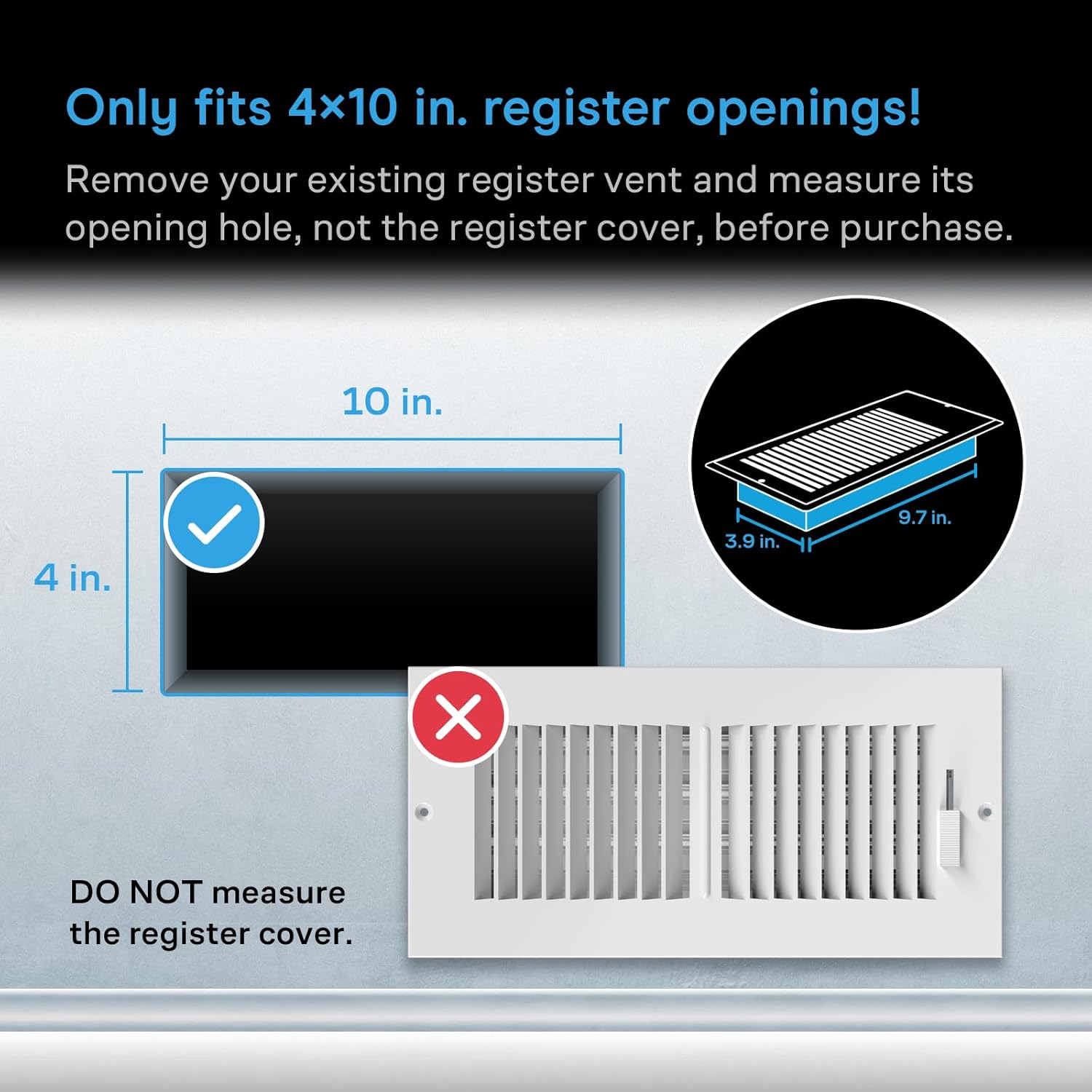
Figure 1: AC Infinity AIRTAP T4 Register Booster Fan (Bronze)
2. Información de seguridade
Please read this manual thoroughly before installation and operation. Failure to follow these instructions may result in electric shock, fire, or serious injury.
- Asegúrese de que a fonte de alimentación voltage cumpre cos requisitos do fan.
- Non faga funcionar o ventilador cun cable ou enchufe danados.
- Manteña os dedos e obxectos estraños lonxe das aspas do ventilador durante o funcionamento.
- Do not immerse the fan in water or expose it to excessive moisture.
- Desconecte o ventilador da toma de corrente antes de limpalo ou realizar calquera mantemento.
- Este produto está pensado só para uso en interiores.
3. Configuración
3.1 Measure Before Purchase
It is crucial to measure your existing duct opening before purchasing and installing the AIRTAP T4. This model is designed to fit 4 x 10 inch duct openings only. Remove your existing register vent and measure its opening hole, not the register cover.

Figure 2: Ensure your duct opening measures 4 x 10 inches.
3.2 Instalación
- Remove your existing floor or wall register.
- Carefully place the AC Infinity AIRTAP T4 into the duct opening. Ensure it sits flush with the floor or wall surface.
- Connect the power adapter to the fan and then plug it into a standard electrical outlet.

Figure 3: AIRTAP T4 installed in a floor vent, ready for operation.
4. Funcionamento
The AIRTAP T4 offers versatile control options including an on-device display, a remote controller, and a Bluetooth app.
4.1 Intelligent Programming
Utilize the smart programming features to optimize your home's heating and cooling. The system includes 10-level speeds, heating and cooling triggers, timers, and cycles.
- Temperature Controlled Airflow: Set desired temperature thresholds for automatic fan activation.
- 10-Level Speeds: Adjust fan speed from 1 to 10 to control airflow intensity.
- Timers and Cycles: Program the fan to operate during specific periods or in repeating cycles.

Figure 4: On-device display and remote controller for intelligent programming.
4.2 Control da aplicación Bluetooth
Download the AC Infinity app to unlock advanced programs, monitor climate data, set alarms, receive notifications, and remotely control your register fan via Bluetooth.
- Advanced Programs: Access additional customization options for fan operation.
- Climate Data: View real-time and historical temperature data.
- Notificacións: Receive alerts for temperature changes or operational status.

Figure 5: Control your AIRTAP T4 and monitor data using the AC Infinity mobile app.
4.3 Funcionamento silencioso
The AIRTAP T4 features dual-ball bearing fans with a PWM motor, engineered to minimize noise while delivering high airflow. This ensures quiet operation even at higher speeds.

Figure 6: Dual-ball bearing fans designed for ultra-quiet performance.
5. Mantemento
Regular maintenance ensures optimal performance and longevity of your AIRTAP T4.
- Limpeza: Periodically wipe the surface of the fan with a soft, dry cloth. For deeper cleaning, unplug the unit and gently clean the fan blades with a soft brush or compressed air.
- Inspección: Regularly check the power cord and plug for any signs of damage. Do not use the unit if any damage is found.
6 Solución de problemas
| Problema | Causa posible | Solución |
|---|---|---|
| O ventilador non se acende | No power; Incorrect settings | Check power connection; Verify temperature triggers and fan speed settings. |
| Baixo fluxo de aire | Fan speed too low; Obstruction | Increase fan speed; Clear any obstructions from the vent or fan blades. |
| O ventilador é ruidoso | Obstruction; Loose installation | Check for and remove any obstructions; Ensure the fan is securely seated in the vent. |
| A aplicación non se conecta | Bluetooth off; App issue | Ensure Bluetooth is enabled on your device; Restart the app or reinstall if necessary. |
7. Especificacións
| Característica | Detalle |
|---|---|
| Nome do modelo | AC-RBF4-B |
| Marca | AC Infinity |
| Cor | Bronce |
| Duct Opening Size | 4 x 10 polgadas |
| Traseira CasinDimensións en g | 3.93 x 9.76 polgadas |
| Dimensións do produto (P x A x A) | 1.96" D x 11.54" W x 5.51" H |
| Motor | Dual 92 mm Fans |
| Fluxo de aire | 130 CFM |
| Nivel de ruído | 17 dBA (as per feature bullets) / 18 Decibels (as per specifications) |
| Número de velocidades | 10 |
| Fonte de enerxía | Eléctrico con cable |
| Wattage | 6 vatios |
| Voltage | 12 voltios |
| Método de control | App, Button Control, Remote Control |
| Material | Aluminio, Plástico |
| Peso do elemento | 0.01 onzas |
| UPC | 819137020238 |
8. Garantía e soporte
AC Infinity products are designed with quality and durability in mind. For specific warranty details and to register your product, please visit the official AC Infinity website. For technical support, troubleshooting assistance, or any inquiries, please contact AC Infinity customer service through their websitio web ou a información de contacto que se inclúe na embalaxe do produto.
You can visit the AC Infinity Store for more information: Tenda AC Infinity