
1. Introdución e finalview
The GoHawk RD8 Gen.2 is a robust and versatile audio system designed for motorcycles, scooters, ATVs, and electric bikes. It features a waterproof aluminum housing, high-performance built-in amplifier, and superb crystal sound quality, making it ideal for outdoor use. This second-generation model includes updated mounting clamps supporting 7/8” to 1 1/4” handlebars, optional stainless steel extension mounting brackets for custom installation, and an 80” battery cable harness with ring terminal connectors for easy setup.
Enjoy your favorite music and radio channels via Bluetooth wireless streaming, 3.5mm AUX input, or USB drive playback. The system also includes an FM radio and a digital clock display.

GoHawk RD8 Gen.2 Motorcycle Stereo Speakers
2. Que hai na caixa
Upon opening your GoHawk RD8 Gen.2 package, you will find the following components:
- 1 x Speaker Stereo Main Unit (Soundbar)
- 2 x Montaxe Clamps (supports 7/8” to 1 1/4” handlebars)
- 2 x Stainless Steel Extension Brackets
- 1 x Power Harness (80” long SAE power cord with ring terminal connector)
- 1 x Manual de usuario
- 1 x 3.5mm Audio Jack AUX Cable
- Bridas de cremalleira para a xestión de cables
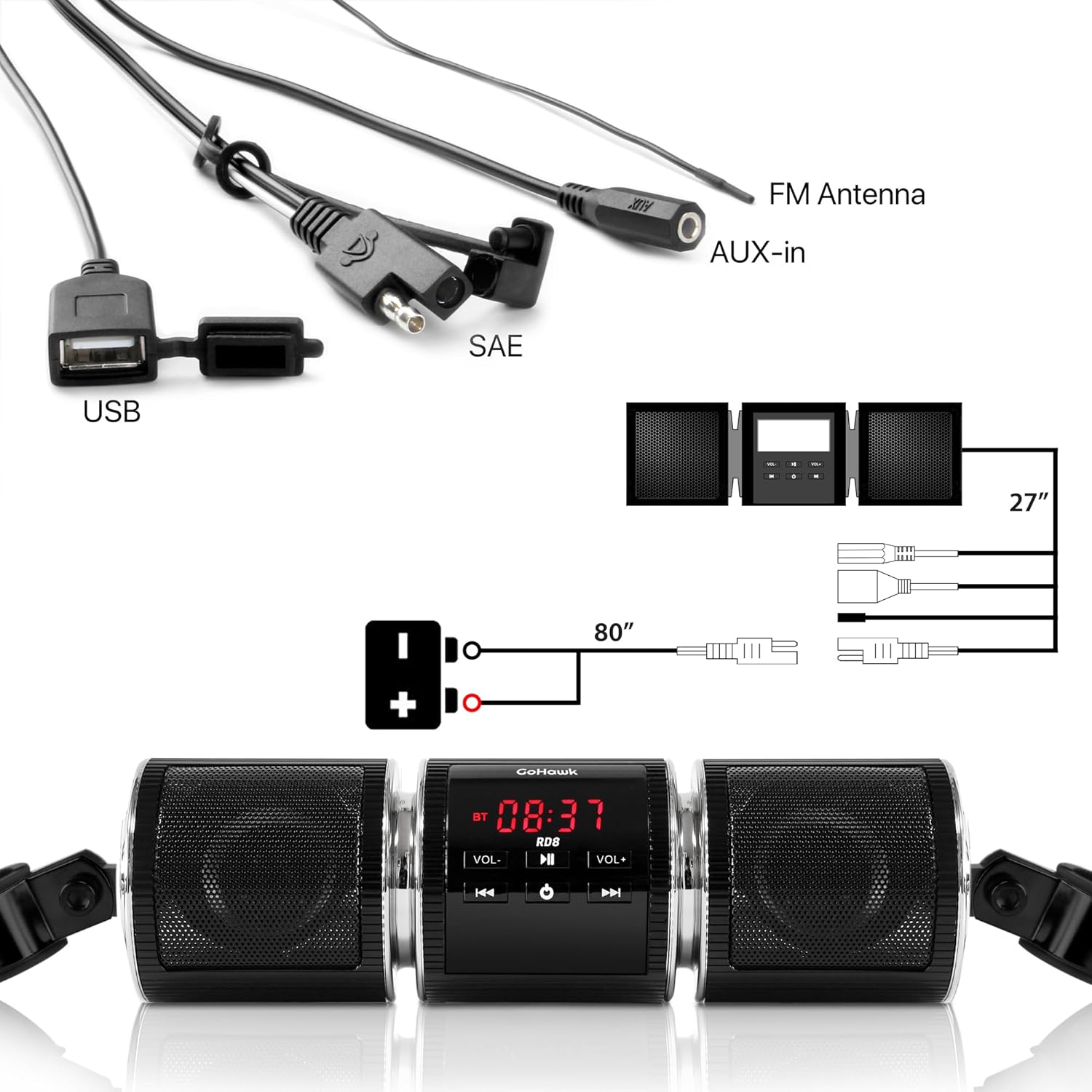
Included components of the GoHawk RD8 Gen.2 system.
3. Características
The GoHawk RD8 Gen.2 offers a range of features for an enhanced audio experience on your ride:
- Bluetooth sen fíos: Seamlessly stream music and radio from your smartphone (compatible with various iPhone and Android models). Supports connection up to 15 meters.
- 3.5mm Audio Jack AUX IN: Connect external audio devices directly.
- Porto USB 2.0: Reproducir MP3 files directly from a USB drive. (Note: USB charging is NOT supported).
- Radio FM: Goza das túas emisoras de radio favoritas esteas onde esteas.
- Visualización do reloxo dixital: Convenient time display.
- Deseño impermeable: Advanced waterproof construction for durability in various weather conditions.
- Carcasa de aluminio: Construción duradeira e robusta.
- Alto Rendemento Ampmáis vivo: Integrado amplifier for superb crystal sound quality.
- Montaxe versátil: New mounting clamps support 7/8” to 1 1/4” handlebars, with optional stainless steel extension brackets for custom installation.
- Fácil instalación: Comes with all necessary hardware and wiring for a plug-and-play setup.
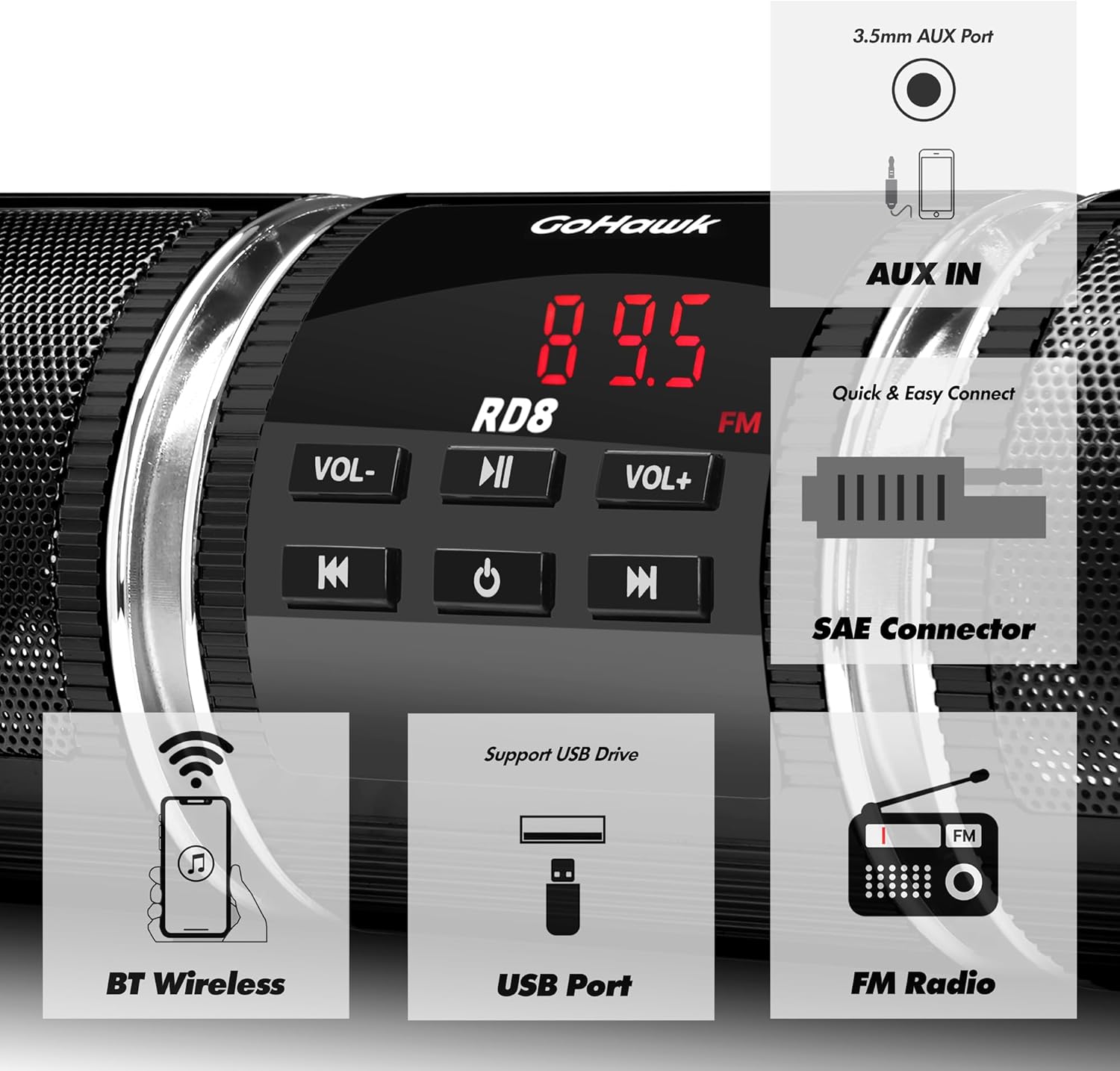
Key features of the GoHawk RD8 Gen.2 system.
4. Especificacións
| Especificación | Valor |
|---|---|
| Nome do modelo | RD8 Gen. 2 |
| Cor | RD8 Black |
| Voltage | 12V DC |
| Potencia máxima de entrada | 7W x 2 |
| Impedancia nominal | 4 - 8Ω |
| Versión Bluetooth | 2.1+EDR |
| Rango de transmisión sen fíos | > 15 m |
| Rango de frecuencias | 20Hz - 20KHz |
| FM Cover | 87.5 - 108 MHz |
| Sensibilidade FM | ≤ 37 dB |
| Distorsión FM | ≤0.5 % |
| SNR FM | ≥40 dB |
| Dimensións do altofalante | 8.25 x 2.5 polgadas. |
| Manillar Clamp Tamaño | 7/8 to 1 1/4 in. |
| Material | Aluminio |
| Peso do elemento | 1.5 libras |
| É Impermeable | VERDADEIRO |
5. Configuración e instalación
The GoHawk RD8 Gen.2 is designed for easy installation. Follow these steps to set up your system:
5.1. Mounting the Soundbar
- Coloque o montaxe clamps to your motorcycle's handlebar. The clamps support handlebar sizes from 7/8” to 1 1/4”.
- If needed, use the included stainless steel extension brackets for more custom installation or to extend the mounting reach.
- Securely fasten the soundbar to the mounting clamps using the provided hardware. Ensure the soundbar is positioned for optimal sound projection and visibility of the display.

Gen.2 mounting clamp and optional extension bracket.
5.2. Instrucións de cableado
The system uses a standard 12V power connection. The 80” long SAE power cord with ring terminal connectors simplifies wiring.
- Connect the RED wire to the positive (+) terminal of your motorcycle's 12V battery.
- Connect the BLACK wire to the negative (-) terminal of your motorcycle's 12V battery.
- Use the provided zip ties to secure any loose wiring, ensuring it is clear of moving parts and heat sources.

Wiring diagram for the GoHawk RD8 Gen.2 system.
5.3. Guía de vídeo de instalación
For a visual guide on unboxing and installation, please refer to the official GoHawk video below:
Official GoHawk RD8 Gen.2 Motorcycle Speakers Soundbar Open Box and Installation Video. This video demonstrates the unboxing process, how to set up the extension brackets, and the wiring connections for the soundbar.
6. Instrucións de funcionamento
Once installed and powered, operate your GoHawk RD8 Gen.2 using the control panel on the main unit:
6.1. Acendido/apagado
- Manteña premido o PWR botón para encender ou apagar a unidade.
6.2. Selección de modo
- Preme o MODO button to cycle through available modes: FM Radio, Bluetooth, and AUX.
6.3. Control de volume
- Preme VOL+ para aumentar o volume.
- Preme VOL- para diminuír o volume.
6.4. Funcionamento da radio FM
- In FM Radio mode, use the |< e >> | buttons to change radio stations.
6.5. Emparellamento Bluetooth
- Switch the soundbar to Bluetooth mode. The display will indicate it's ready for pairing.
- On your smartphone or Bluetooth device, search for available devices and select “GoHawk” to pair.
- Unha vez emparellado, podes transmitir audio sen fíos desde o teu dispositivo.
6.6. Reprodución USB
- Insira unha unidade USB que conteña MP3 files into the USB port. The unit will automatically switch to USB mode and begin playback.
- Usa o |< e >> | botóns para saltar pistas.
6.7. Entrada AUX
- Connect your external audio device (e.g., MP3 player) to the 3.5mm AUX IN jack using the provided AUX cable.
- Switch the soundbar to AUX mode. Audio will play from your connected device.
7. Mantemento
To ensure the longevity and optimal performance of your GoHawk RD8 Gen.2 system, follow these maintenance guidelines:
- Limpeza: Limpe a unidade regularmente cun pano suave eamp pano para eliminar o po e a sucidade. Evite o uso de produtos químicos agresivos ou produtos de limpeza abrasivos.
- Exposición á auga: While the unit is waterproof, avoid prolonged submersion. Ensure all port covers are securely closed when not in use, especially during rain or washing.
- Conexións: Comprobe periodicamente todas as conexións do cableado para asegurarse de que estean seguras e libres de corrosión.
- Almacenamento: If storing the motorcycle for an extended period, consider disconnecting the power to the unit to prevent battery drain.
8 Solución de problemas
If you encounter any issues with your GoHawk RD8 Gen.2, refer to the following common troubleshooting tips:
- Sen enerxía:
- Check all power connections (RED to positive, BLACK to negative) to ensure they are secure.
- Verify your motorcycle's battery has sufficient charge.
- Inspect the power harness for any visible damage or frayed wires.
- Sen son:
- Ensure the volume is turned up on both the soundbar and your connected device (if using Bluetooth or AUX).
- Confirm the correct mode (FM, Bluetooth, AUX, USB) is selected.
- Se usa AUX, asegúrese de que o cable estea completamente inserido e non estea danado.
- If using USB, ensure the USB drive is formatted correctly and contains compatible MP3 files.
- Problemas de sincronización Bluetooth:
- Asegúrate de que a barra de son estea no modo de emparellamento Bluetooth.
- Desactiva e activa o Bluetooth do teu dispositivo e, a seguir, tenta emparellalo de novo.
- Ensure your device is within the 15-meter wireless transmission range.
- Borra as conexións Bluetooth anteriores no teu dispositivo se tes demasiadas gardadas.
- Mala recepción de radio FM:
- Ensure the FM antenna wire is properly extended and positioned for best reception.
- Avoid routing the antenna wire near other electrical wires that may cause interference.
If these steps do not resolve your issue, please contact GoHawk customer support for further assistance.
9. Garantía e soporte
The GoHawk RD8 Gen.2 comes with a Limited Warranty. Please refer to the warranty card included in your package for specific terms and conditions.
For any questions, technical support, or warranty claims, please contact GoHawk customer service:
- Websitio: GoldenHawkUSA.com
- Refer to your user manual for additional contact information.